
Do you want to learn how to perform keyword research for your website and grow your online visibility in search results pages of Google, Bing, Yandex, and other search engines?
Keywords connect what people are searching for with the content you publish. That’s why they play such an important role in attracting visitors who are genuinely interested in what you offer.
Several studies have shown that most online experiences begin with a search engine. This alone highlights how important keyword selection is. When your content matches the words people are already using, your chances of being discovered increase significantly.
Now, I know what you might be thinking: “Isn’t keyword research complicated? Don’t I need expensive software or some technical background?” Not really.
In this guide, I break the entire process down step by step. You’ll learn why keywords matter, the different types to focus on, and practical ways to find and assess them. You’ll also see how to use keywords on your site and the common mistakes to avoid.
Table of Contents
Understanding What Keywords Really Are
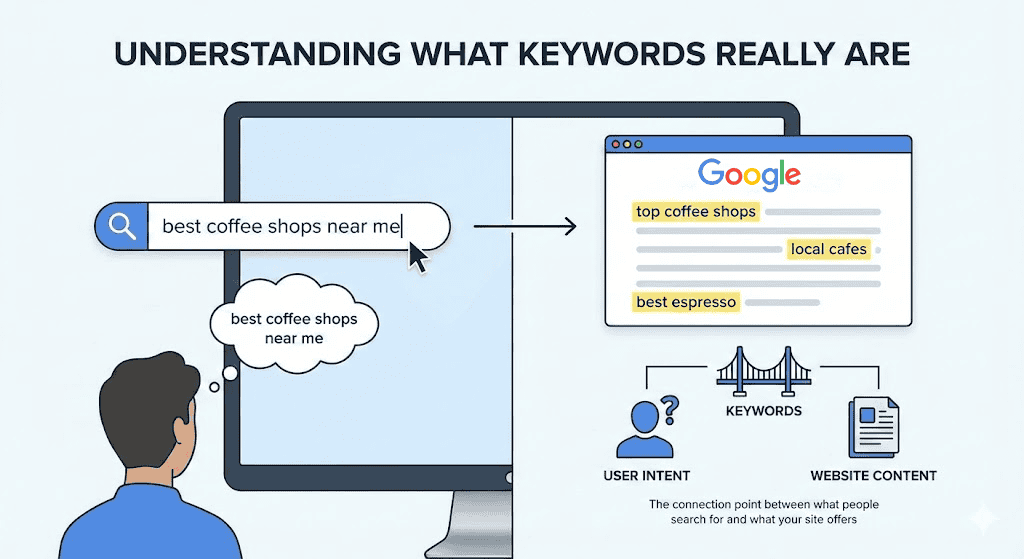
Keywords are the words and phrases people type into search engines when they are looking for information, products, or services. Every search begins with a thought or a need, and keywords are how users express that need online.
From a website perspective, keywords help search engines understand what your content is about. They give context to your pages and signal when your content should appear in search results.
When your website uses the same words and phrases your audience is searching for, it becomes easier for search engines to match your pages with the right queries.
Keywords also reveal intent. A person searching for “how to find keywords for your website” is likely looking for guidance or education. Someone searching for “SEO services for small businesses” may be closer to making a decision.
Understanding this difference helps you create content that fits what the searcher actually wants at that moment.
Types of Keywords to Consider
Now that you understand what keywords are, this section will discuss the different types of keywords you should consider when planning your content strategy.
Each type attracts a different audience and fits into a different stage of the buyer’s journey.
Below are the main types of keywords to consider:
1. Short-Tail Keywords
Short-tail keywords are broad, general phrases that usually consist of one or two words. They are the most basic form of keyword and often represent a website’s main topic or category.
Examples include terms like “SEO,” “digital marketing,” “website design,” or “keyword research.”
These keywords tend to have very high search volume, meaning many people search for them every day. That may sound like a great opportunity, but there’s a catch. Because they are broad, they attract a wide audience and are extremely competitive. Established websites with high domain authority often dominate the top search results for short-tail keywords, making it difficult for smaller sites to rank.
That being said, short-tail keywords are useful for building overall visibility and brand awareness, but they may not always bring the right kind of traffic. Many people searching with short-tail terms are still in the early stage of research and may not be ready to take action or make a purchase. For this reason, short-tail keywords are best used alongside more specific keywords that better match user intent.
When planning your content strategy, think of short-tail keywords as the foundation of your topic. They help you define what your website is about, but they should not be your only focus. To attract more targeted visitors, it is best to combine short-tail keywords with long-tail phrases that reflect specific questions or needs.
2. Long-Tail Keywords
Long-tail keywords are longer and more specific phrases that usually contain four or more words. Unlike short-tail keywords, long-tail phrases reflect more precise search intent, and they often describe a particular problem, need, or question.
Examples include “how to research keywords for your website” or “best SEO strategy for small businesses.”
Long-tail keywords are easier to rank for, especially if your website is new or has limited authority. Since fewer sites compete for these phrases, you have a better chance of appearing in the top results. This makes long-tail keywords an excellent starting point for many websites, especially those just beginning their SEO journey.
Another benefit of long-tail keywords is that they help you create content that directly answers real user questions. When you target long-tail phrases, your content becomes more useful and relevant, which improves user experience and increases the chances of conversion.
3. Informational Keywords
Informational keywords are phrases people use when they want answers, explanations, or guidance. These searches usually begin with words like “how,” “what,” “why,” or “guide.”
For example, phrases such as “how to research keywords for your website,” “what is keyword research,” or “why SEO matters for businesses” all fall into this category.
These keywords are commonly used at the early stage of the search journey. At this point, the searcher is not trying to buy anything yet. Instead, they are looking to understand a topic, solve a problem, or learn something new. Because of this, informational keywords are ideal for blog posts, tutorials, guides, and educational pages.
When using informational keywords, focus on clarity and usefulness. Write content that genuinely helps the reader, avoids unnecessary jargon, and stays focused on the question being asked. When used well, informational keywords drive steady traffic and provide a solid foundation for the rest of your website content.
4. Navigational Keywords
Navigational keywords are search terms people use when they already know where they want to go and are trying to reach a specific website, page, or brand. Instead of typing a full web address, users often rely on search engines to guide them.
Examples include searches like “Facebook login,” “WordPress dashboard,” or “MailOptin pricing page.”
These keywords usually include brand names, product names, or service names. Because the intent is clear, navigational searches tend to have a high click-through rate. The searcher is not comparing options or looking for general information. They are trying to find a particular destination as quickly as possible.
For your website, navigational keywords matter because they help users reach the correct pages without confusion. If someone searches for your brand name or a specific page on your site, your content should appear clearly in the results. This improves user experience and prevents traffic from going to unofficial or unrelated pages.
5. Commercial Keywords
Commercial keywords are used by people who are considering a product or service and are comparing their options before making a decision.
These searches often include words like “best,” “top,” “review,” “comparison,” or “pricing.” Examples include phrases such as “best website hosting providers,” “SEO services reviews,” or “email marketing platforms comparison.”
At this stage of the search journey, users are no longer just learning. They have a clear interest and want to evaluate what is available. This makes commercial keywords especially valuable because they attract visitors who are closer to taking action. While they may not be ready to buy immediately, they are actively weighing their choices.
Content created around commercial keywords should focus on helping readers make informed decisions. This can include comparison articles, detailed reviews, feature breakdowns, and use case examples. The goal is to present clear, honest information that highlights differences, benefits, and limitations, so readers can decide what works best for them.
6. Transactional Keywords
Transactional keywords are used by people who are ready to take action. These searches often signal a clear intent to buy, subscribe, book, or sign up.
Examples include phrases like “buy SEO services,” “order website design,” “subscribe to email marketing plan,” or “book a consultation.” At this stage, the searcher knows what they want and is looking for the easiest way to complete the action.
These keywords are especially valuable for businesses because they often lead directly to conversions. Visitors who arrive through transactional searches are not browsing or comparing. They are ready to move forward, making these keywords ideal for product, service, and pricing pages, as well as sign-up forms.
Content targeting transactional keywords should be clear and focused. The page should explain what is being offered, why it is useful, and how the user can take the next step. Important details such as pricing, features, timelines, and contact options should be easy to find. Any confusion at this stage can cause visitors to leave and look elsewhere.
7. Local Keywords
Local keywords are search terms people use to find products or services in a specific area. These searches usually include location-based words such as city names, neighborhoods, or phrases like “near me.”
Examples include “web designer in California,” “SEO services in Toronto,” or “coffee shop near me.”
These keywords are especially important for businesses that serve a specific region. Local keywords help connect your website with people actively searching for nearby options. When someone uses a local search, they are often ready to visit a store, make a call, or book a service, which makes these keywords highly valuable for attracting real-world customers.
Using local keywords also helps your website appear in local search results and map listings. This improves visibility for users searching on mobile devices, where location-based searches are very common.
8. Seasonal Keywords
Seasonal keywords are search terms that become popular during specific times of the year. These keywords are often tied to holidays, events, trends, or recurring seasons.
Examples include phrases such as “Black Friday deals,” “Christmas gift ideas,” “summer fitness programs,” and “tax filing deadlines.” Interest in these keywords rises and falls depending on timing.
These keywords are useful because they reflect changes in user behavior throughout the year. People search differently during certain months, and seasonal keywords help you align your content with those patterns. When planned well, they can drive a surge of traffic during peak periods, especially for promotions, special offers, or time-sensitive content.
Seasonal keywords require early preparation. Content should be published before the peak season begins so search engines have time to index and rank it. This allows your pages to gain visibility when search demand increases. Updating seasonal content each year also helps keep it relevant and competitive.
Methods for Doing Keyword Research
Now that you understand the different types of keywords and the role each one plays, the next step is to learn how to find them for your website.
In this section, we will explore practical methods for discovering keyword ideas. These include brainstorming and studying competitors, using keyword research platforms, reviewing Google search suggestions and related searches, and understanding search intent.
Together, these approaches will help you build a powerful keyword list that supports your content goals.
Brainstorming and Competitor Analysis
A good keyword list often starts with a simple idea: what would you type into Google if you were looking for what your website offers?
Brainstorming is about capturing those real, natural phrases. Think about the questions people ask you, the problems they want solved, and the exact words they use. Look at your customer messages, comments, or even support tickets. You’ll start noticing common phrases, repeated questions, and topics that keep coming up. These are often the best starting points for keyword research because they reflect real search behavior.
Once you have a list of ideas, the next step is competitor analysis. This is not about copying someone else’s content. No, it’s about learning from what already ranks well.
Visit websites in your niche and see what topics they cover, how they structure their pages, and what words they use in titles and headings.
Using Keyword Research Platforms
After brainstorming ideas and conducting competitor analysis, the next step is to turn to keyword research platforms.
These platforms help you move beyond assumptions and work with actual search data. Instead of guessing what people might be typing into search engines, you can see what they are already searching for.
There are several reliable keyword research platforms available today. Some popular options include Google Keyword Planner, Ubersuggest, Ahrefs, AnswerThePublic, and SEMrush. Each of these platforms offers insights into search behavior, making it easier to spot keyword opportunities that align with your content goals.
To use any of these keyword research platforms, enter a broad phrase related to your niche, often called a seed keyword. Once entered, the platform will generate a list of related search terms.
From there, you can review how often each keyword is searched and how competitive it is. This step helps you avoid phrases that are too difficult to rank for while highlighting those with real potential.
As you review the results, focus on keywords that are relevant to your website and realistic for your current stage. The goal is to choose terms that attract the right audience and increase your content’s chances of appearing in search results.
Google Search Suggestions and Related Searches
Another effective way to find keywords for your website is to use Google Search Suggestions and Related Searches.
When you start typing a word or phrase into the Google search bar, you will notice suggestions appear before you even finish typing.

These suggestions are not random. They reflect common searches that are already happening. For example, typing “acne treatment” may instantly show variations like “acne treatment at home,” “acne treatment cream,” or “acne treatment products.” Each suggestion is a clear signal of what users are actively looking for.
Related Searches appear at the bottom of the search results page after you run a search. These phrases often expand on the original query and introduce additional angles you may not have considered.
The real value of Google Search Suggestions and Related Searches lies in their simplicity. You do not need an account, paid access, or technical knowledge to use them. By paying attention to the language Google surfaces, you gain a clearer picture of how people phrase their questions and what information they expect.
Understanding Search Intent
After exploring keyword ideas through research platforms and Google’s suggestions, the next step is understanding why people are searching for those phrases in the first place. This is where search intent comes in.
Search intent refers to the purpose behind a user’s search. In other words, it answers the question: what is this person really trying to achieve?
Two people can type very similar phrases into a search engine and expect completely different results. For example, someone searching for “acne treatment” might be looking for basic information, while another person using the same phrase could be ready to buy a product. If your content does not match what the searcher expects, it will struggle to perform well, even if the keyword itself looks promising.
Understanding search intent helps you create content that fits naturally with user expectations. When someone is looking for information, they expect guides, explanations, or answers to common questions.
When they are comparing options, they want reviews, comparisons, or recommendations. And when they are ready to take action, they expect product pages, service pages, or clear next steps. Aligning your content with the right intent makes it more useful and more likely to be trusted by both users and search engines.
A simple way to identify intent is to look at the current search results for a keyword. If most of the top pages are blog posts and guides, the intent is likely informational. If the results show product listings or service pages, the intent is more action-focused.
Paying attention to this pattern helps you decide what type of content to create and prevents you from targeting phrases that do not fit your goals.
Evaluating Keyword Metrics
After gathering keyword ideas and understanding search intent, the next step is evaluating keyword metrics. This stage helps you decide which keywords are worth targeting and which ones may not deliver results.
Not every keyword that looks appealing on the surface will help your website grow. Some attract traffic but bring the wrong audience, while others are so competitive that ranking for them would take years.
Evaluating keyword metrics allows you to make informed choices instead of relying on guesswork. By reviewing search volume, competition, difficulty, and relevance together, you can narrow your list to keywords that match both your content goals and your website’s current reach.
Here’s how to assess these metrics:
Search Volume and Competition
Start by looking at search volume. This shows how often a keyword is searched over a given period, usually per month. Higher search volume means more interest, but it often comes with increased competition.
Next, review the level of competition. This shows how many websites are targeting the same keyword and how crowded the search results are. Keywords with extremely high competition are usually dominated by established sites, making them harder to rank for.
Rather than focusing only on the highest numbers, aim for balance. Keywords with moderate search volume and manageable competition often provide the best opportunities, especially for websites that are still growing.
Difficulty and Relevance
After reviewing volume and competition, check keyword difficulty. This metric estimates how difficult it would be to rank for a keyword based on the strength of the pages already ranking for it. Lower difficulty keywords usually offer a better chance of ranking within a reasonable timeframe.
Finally, assess relevance. Ask yourself whether the keyword truly fits your content and answers what the searcher is looking for. Even a low-competition keyword will not perform well if it does not align with your topic or audience needs.
By evaluating these metrics together, you move from collecting keywords to choosing the ones that can realistically bring the right visitors to your website and support steady growth.
Implementing Keywords on Your Website
Once you have selected the right keywords, the next step is putting them to work on your website. Keyword research only delivers results when those phrases are used correctly and naturally within your content.
Implementing keywords is not about forcing phrases into every sentence. It is about placing them where they make sense, supporting clarity, and improving the overall experience for the reader. When done properly, keywords help search engines understand your content while still keeping your writing clear and engaging for real people.
Below, we’ll look at practical ways to use keywords effectively:
Using Keywords Within Your Content
Start by placing your primary keyword naturally within your content. This includes the page title, the opening paragraph, and a few relevant sections throughout the page. The focus should always be on readability. If a sentence feels awkward after adding a keyword, it is better to rewrite the sentence than to force the phrase in.
Use related phrases and variations to support your main topic. This helps your content feel natural and allows search engines to understand the topic more clearly.
For example, instead of repeating the same phrase over and over, you can use similar wording that fits the context of the discussion.
Keywords should also be placed where users expect them. Headings, subheadings, image descriptions, and internal links are all natural locations. The goal is to guide readers through your content while clearly and honestly reinforcing what the page is about.
Optimizing On-Page SEO
On-page SEO goes beyond placing keywords in the text. It includes optimizing page titles, descriptions, headings, URLs, and images so everything works together. Your page title should clearly describe what the page offers and include the main keyword naturally.
Headings should be structured logically to make the content easy to scan. This improves the user experience and helps search engines understand your page’s structure.
Image file names and descriptions should also reflect the topic of the page, especially when they add context to the content.
Internal linking is another important practice. Linking to related pages on your website helps users find more useful information and helps search engines better discover and understand your content. Each link should be relevant and helpful, not forced.
Monitoring and Adjusting Your Keyword Plan
Keyword research is not a one-time task. Search behavior changes, competition shifts, and your website grows over time. Because of this, monitoring and adjusting your keyword plan is necessary if you want lasting results.
Pay attention to which keywords are bringing in traffic, which pages are gaining visibility, and which ones may need improvement. Some keywords may lose interest over time, while new opportunities can appear as search trends change.
If your website is on WordPress, the CrawlWP plugin can be very helpful. It is a WordPress SEO plugin designed to help you improve and monitor your site’s visibility across search engines, including Google, Bing, and Yandex.
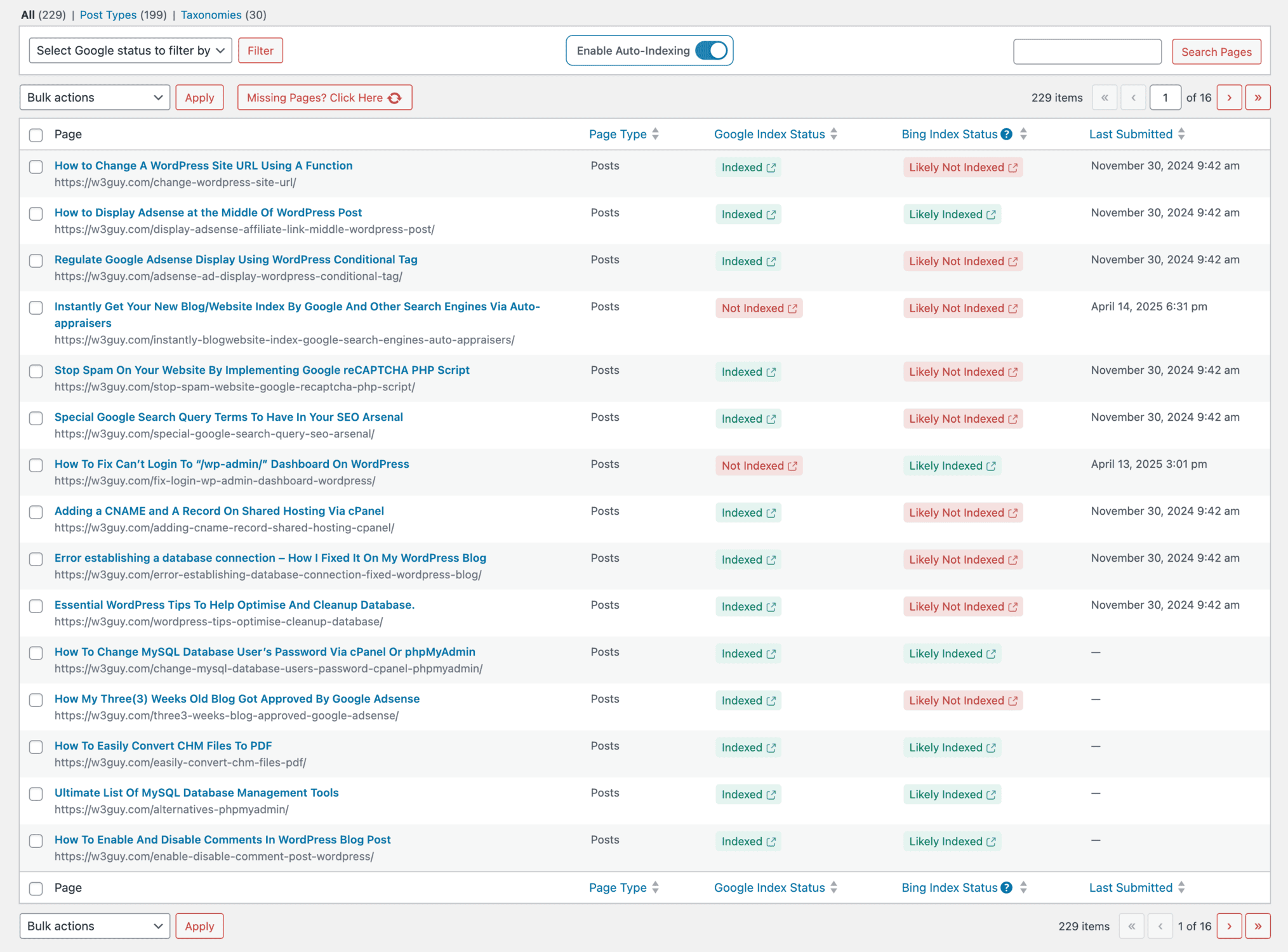
It gives you clear SEO performance insights so you can understand how your WordPress site appears in search results.
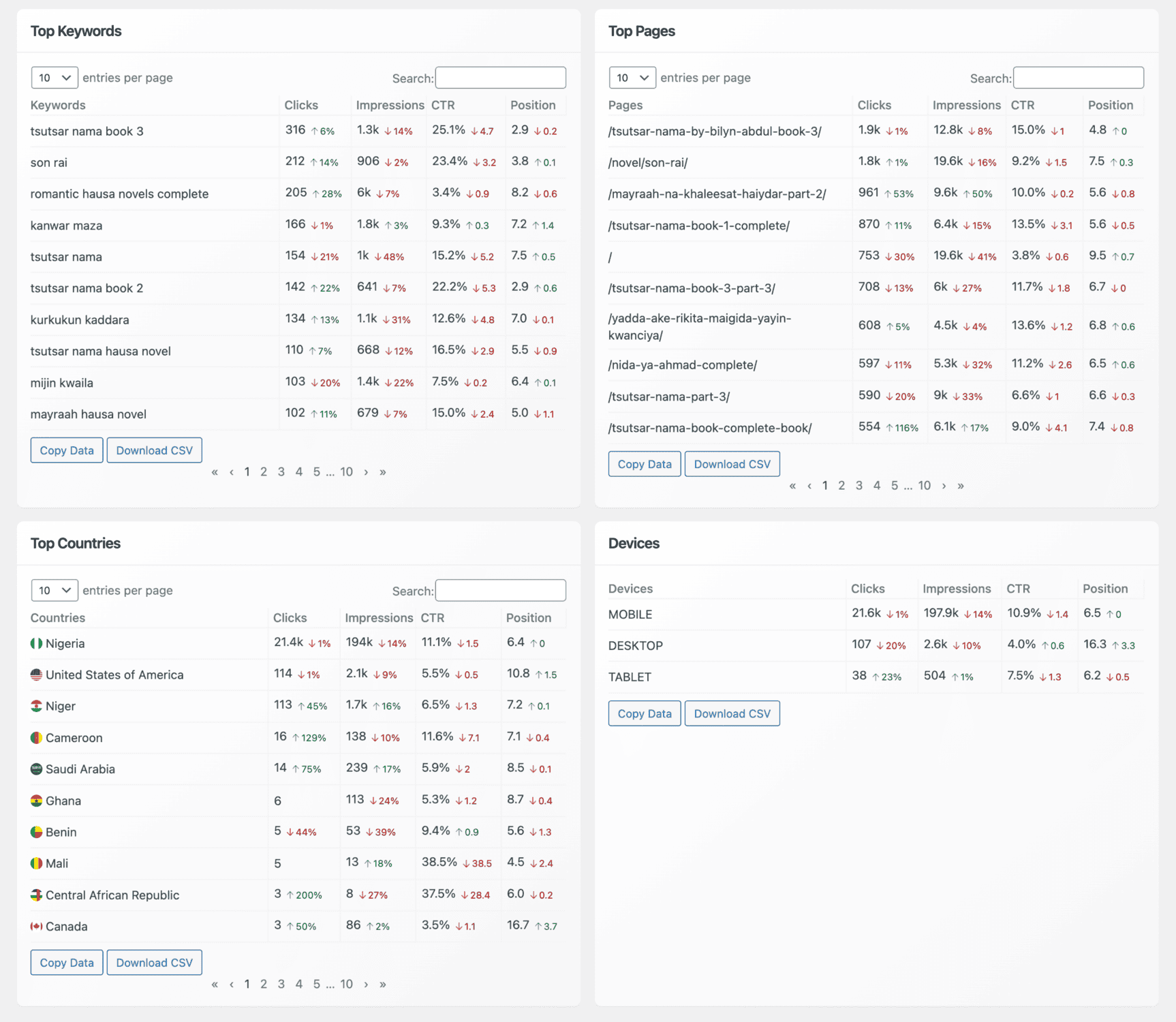
With CrawlWP, you can view your top keywords, top pages, top countries, and devices. Each section includes useful data such as clicks, impressions, click-through rate, and average position, all displayed in a clean, easy-to-read table. This makes it easier to spot what’s working and where adjustments are needed.
By using these insights to update your content with better wording, fresh details, or additional supporting sections, you can keep your pages relevant and visible.
Common Keyword Research Mistakes to Avoid

In this section, we will highlight common mistakes in keyword research and explain how to prevent them.
This helps you stay focused on keywords that match your goals and improves your chances of ranking well over time.
1. Choosing Keywords Based Only on Search Volume: One of the biggest mistakes is focusing solely on search volume. While high search volume sounds attractive, it often comes with high competition. That means your website may struggle to rank, especially if it is new or has limited authority.
Instead, look for keywords with a balance of volume and competition. Keywords with moderate volume can still drive meaningful traffic, and they are often easier to rank for. The goal is to find terms that match your audience and are realistic for your current website stage.
2. Ignoring Search Intent: A keyword may look perfect on paper, but if it doesn’t match the user’s intent, your content won’t perform well. For example, targeting a keyword like “best SEO tools” with a blog post that only explains SEO basics will likely disappoint visitors and increase bounce rate.
Always consider what the searcher is trying to accomplish. If they want to buy, provide a product page or a comparison guide. If they want information, offer a clear, helpful guide. Matching intent helps you attract visitors who stay longer and take action.
3. Overlooking Long-Tail Keywords: Many website owners focus only on short-tail keywords, hoping to rank for broad terms. This approach often leads to frustration because those keywords are highly competitive.
Long-tail keywords, however, are more specific and usually have clearer intent. They may bring fewer searches, but the visitors they attract are more likely to engage with your content and convert. Including long-tail keywords in your strategy can quickly improve results, especially for newer sites.
4. Not Checking Competitor Keywords: Competitor research is not about copying, but it is a valuable way to discover what works in your niche. Ignoring competitor keywords means you may miss opportunities or waste time targeting phrases that other websites have already dominated.
By reviewing competitors’ content, you can identify gaps and create better, more targeted content to fill them. This can help you gain traffic faster than starting from scratch.
Keyword Research SEO FAQ
Question 1: How can I find the best keywords for my website?
Answer: To find the best keywords, start by brainstorming ideas and checking what your competitors are ranking for. Then use keyword research tools and Google search suggestions to expand your list. Finally, choose keywords relevant to your content and strike a good balance between search volume and competition.
Question 2: How many keywords should I target per page?
Answer: It’s best to focus on one primary keyword per page and support it with a few related phrases. Targeting too many keywords can make your content feel scattered and reduce its relevance. A focused approach helps search engines understand your page’s main topic and improves your chances of ranking.
Question 3: How often should I do keyword research?
Answer: Keyword research is not a one-time task. Search trends change, new topics emerge, and competitors. It’s a good idea to review your keyword strategy every few months. This keeps your site aligned with what users are searching for.
Question 4: How do I know if a keyword is worth targeting?
Answer: To decide if a keyword is worth targeting, look at its search volume, competition level, and difficulty. Aim for keywords that match your niche and audience, and offer a good balance of decent search volume with manageable competition.
Question 5: Do I need paid tools to research keywords?
No. While paid tools like SEMrush and Ahrefs offer advanced features, you can still find great keyword ideas using free options. Google Keyword Planner, Google Search Suggestions, and AnswerThePublic are excellent starting points.
That’s how to research keywords for your site!
Researching the right keywords to improve your website SEO doesn’t have to be confusing or overwhelming. Once you understand how keywords work, which types to focus on, and how to discover them, the process becomes much more manageable.
The most important thing to remember is that keyword research is ongoing. Search trends change, competition shifts, and your website will grow over time. By regularly reviewing your performance, updating your content, and adjusting your keyword choices, you give your site a better chance to stay visible and relevant.
Now you’re ready to take action. Start with what you’ve learned, apply it to your keyword strategy, and keep improving as you go.