
The WordPress SEO plugin that also gets you indexed
CrawlWP is a complete WordPress SEO plugin that writes your meta tags and schema, gives you the technical controls other plugins bury, submits every page to search engines for indexing, and reports back how they performed on search result pages.
Over 40,000 website owners use CrawlWP for their WordPress SEO.
What CrawlWP does
Three jobs most WordPress sites need three plugins for
Traditional WordPress SEO plugins write your meta tags and stop there. Indexing is left to a second plugin and performance data to a browser tab. CrawlWP covers all three, so you get one settings screen, one set of updates, and one place to check when something changes.
Optimize
Meta tags, the schema graph, breadcrumbs, robots.txt, sitemaps, and social cards for every WordPress post, page & CPT.
Index
Submission to six search engines through their APIs and IndexNow, with live index status for every URL.
Measure
Clicks, impressions, CTR, and position from Google Search Console, Bing Webmaster Tools, and Yandex Webmaster.
On-page WordPress SEO
Every on-page SEO control, in the editor where you write
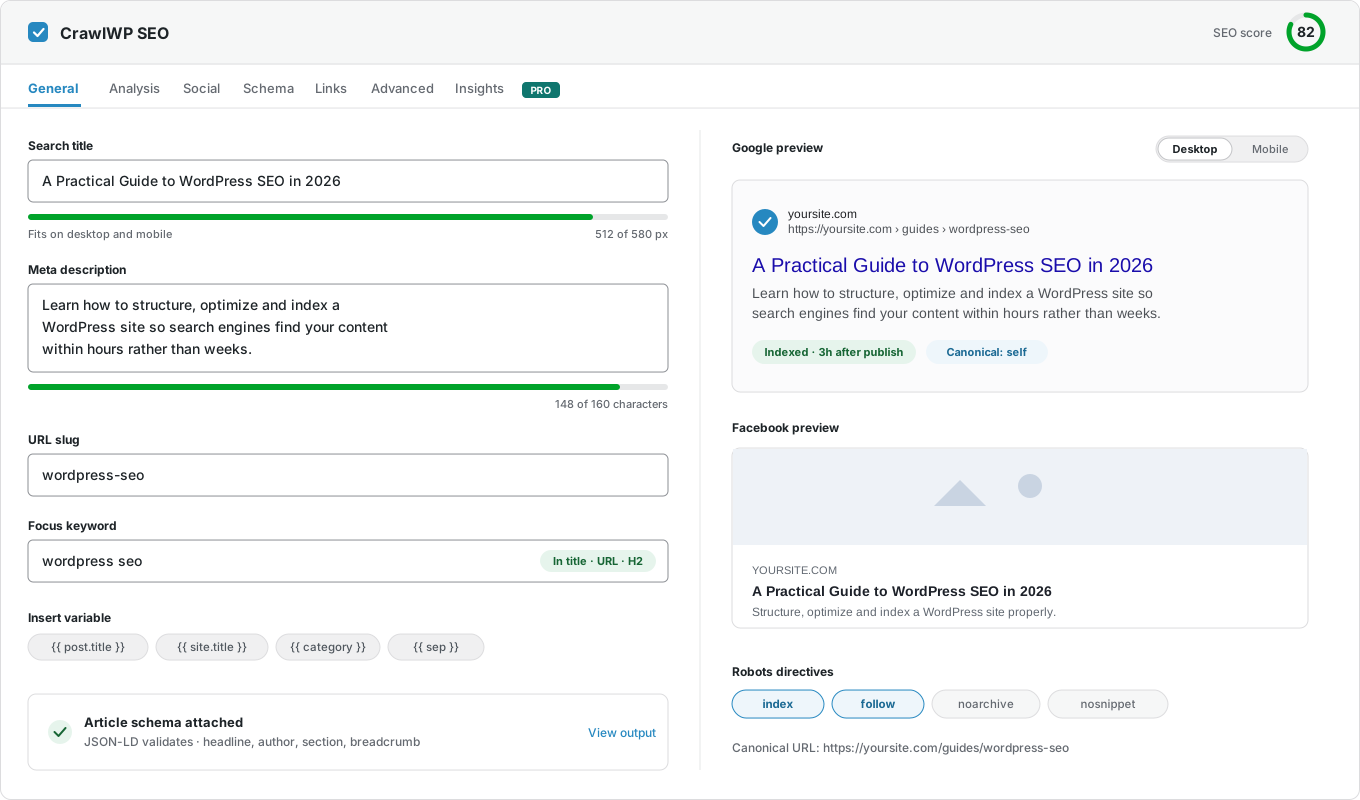
One metabox under the post editor holds the search title and meta description with a live Google preview, the schema, the robots directives, the canonical URL, and the social cards. Sensible defaults ship on activation, so you only open it when a page needs something different.
Titles and meta descriptions
Templates built from {{ site.title }}, {{ sep }} and post variables, with the rendered output previewed underneath and pixel-width meters so nothing is truncated.
AI Features
Integrates with active AI connectors in WordPress to generate SEO titles and meta descriptions.
The schema graph
Declare the WordPress site as an organization or a person, set the identity and logo, and switch on the sitelinks search box.
Breadcrumbs
A shortcode with your own labels and separator, plus a BreadcrumbList node on every page.
Robots rules and robots.txt
A virtual robots.txt editor pre-filled with your live output, plus noindex, nofollow, and canonical URLs per post or post type.
Redirects and a 404 monitor
301, 302, and regex rules, an automatic 301 whenever you change a permalink, and every logged 404 one click from becoming a redirect.
Sitemaps, llms.txt and more
Works with the WordPress sitemap index, adds Google News, video, HTML and multilingual sitemaps, and publishes an llms.txt for AI crawlers.
Bulk editing
Fix the SEO title and meta description of a hundred posts from one table, with live character counters.
Open Graph and X cards
Share previews in the editor, a fallback image for pages without one, and per-page overrides where the artwork matters.
Link suggestions
Get internal link suggestions to improve your WordPress content on-page SEO.
Instant indexing
Submission to Google, Bing, Yandex, Naver, Yep, and Seznam.cz.
Content analysis
Focus keyword checks across the title, URL, content, meta description, headings, etc.
Templates
Set it once per post type, override where it counts
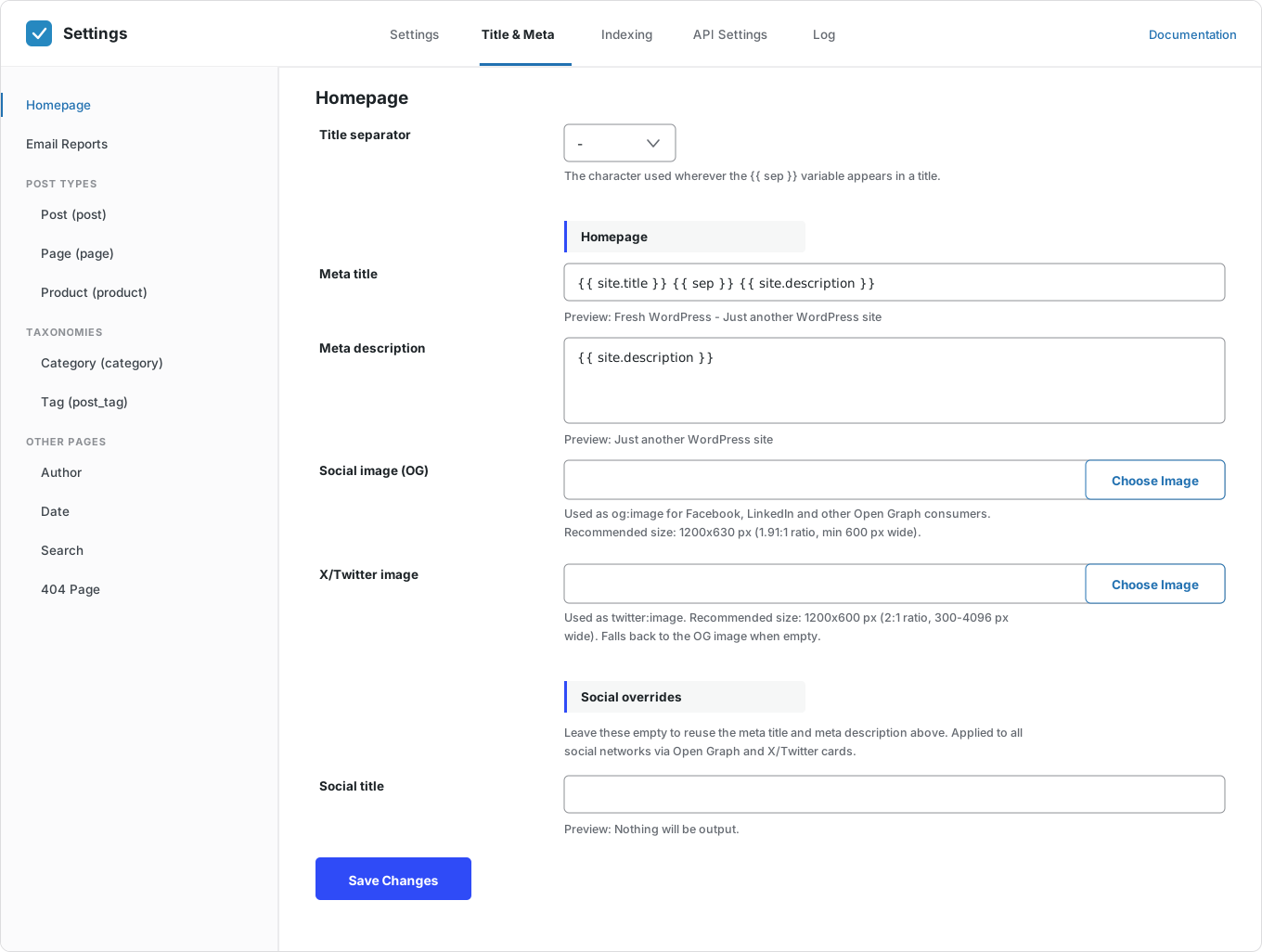
The Title & Meta screen holds a template for the homepage, each post type, each taxonomy, and the author, date, search, and 404 archives. Every field renders a preview of the real output as you build it from variables.
Templates with variables
Build titles from {{ site.title }}, {{ sep }}, {{ site.description }} and post variables, with the separator set once.
Every template in one place
Homepage, each post type, each taxonomy, and the author, date, search, and 404 archives.
Live output preview
Each field shows the rendered result underneath, so you see the real title before saving.
Per-post overrides
The SEO metabox overrides any template on the posts that deserve individual attention.
Pixel-width meters
Title and description measured in rendered pixels, not characters, so truncation is visible before you publish.
Social overrides
Leave the social title and description empty to reuse the SEO ones, or set them separately per page.
Technical SEO
The controls other SEO plugins for WordPress make you go looking for
A robots.txt editor pre-filled with what your site actually serves. News, video, HTML and multilingual sitemaps alongside the WordPress index rather than replacing it. Breadcrumbs with a shortcode and BreadcrumbList markup. RSS attribution so scraped copies point home.
robots.txt editor
Edit the virtual robots.txt in wp-admin, pre-filled with your current output rather than an empty box.
Robots directives
noindex, nofollow, and related rules per post, per post type, and canonical URLs where you need them.
Redirects
301, 302, and 410 rules with exact, starts-with, ends-with, and regex matching, hit counts, and an enable switch per rule.
Automatic permalink redirects
Change a post’s slug, and CrawlWP writes the 301 for you, so no old link ever breaks.
404 monitor
Every URL that returned a 404, with hit counts and referrers, and a one-click button to turn it into a redirect.
WordPress sitemap index
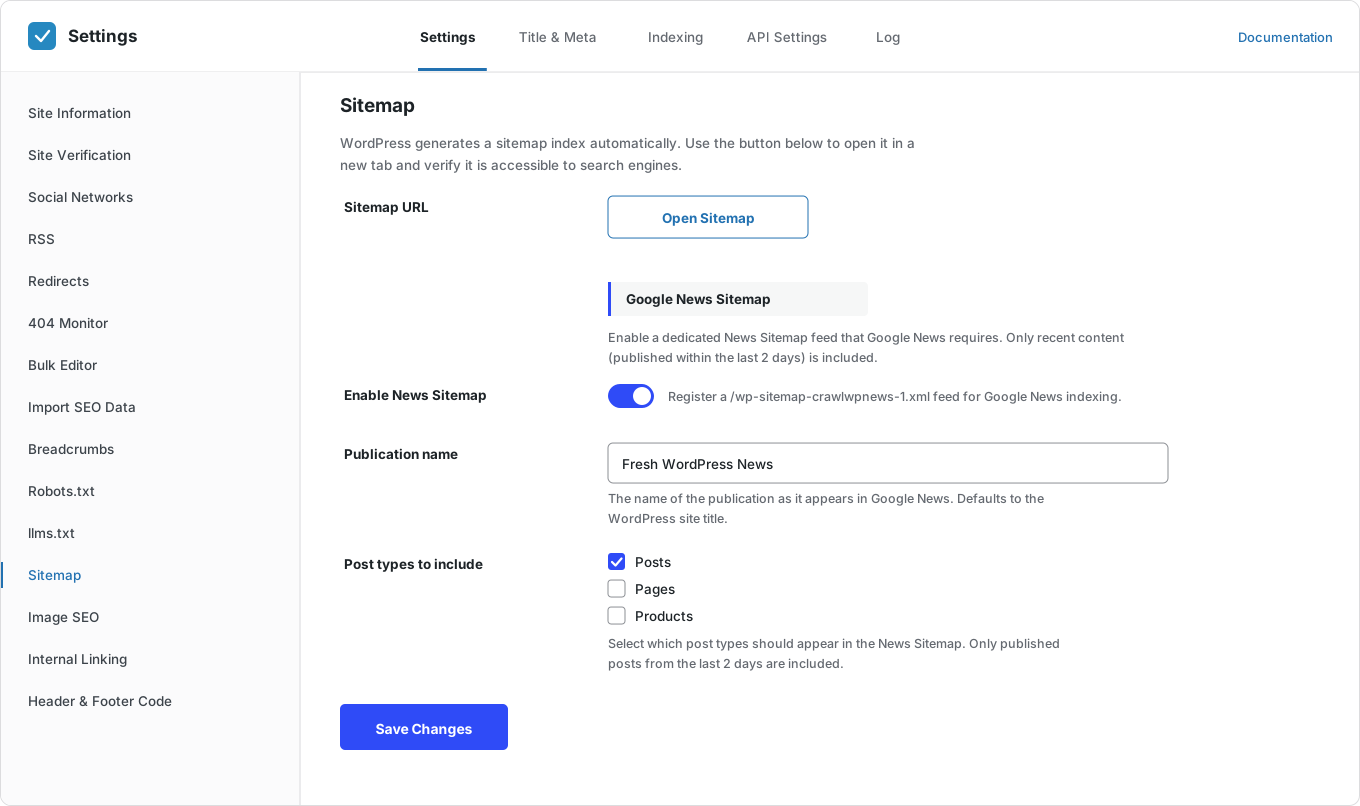
CrawlWP works with the core sitemap rather than replacing it, and gives you a one-click check to confirm it’s reachable.
Advanced sitemaps
Google News, video, HTML and multilingual sitemaps, with WPML, Polylang and TranslatePress support.
llms.txt
A plain-text file describing your WordPress website, its sitemap, and its key pages for AI crawlers that now read it.
Breadcrumb shortcode
A breadcrumb feature with your own labels, separator, and primary taxonomy, or disabled if your theme has its own.
RSS attribution
Append a line linking back to the original post on every feed item.
Local SEO
LocalBusiness structured data with full NAP details and opening hours.
Indexing
The part most WordPress SEO plugins leave to chance
A well-optimized page earns nothing until a search engine knows it exists. CrawlWP submits each URL through the Google, Bing, and Yandex APIs and the IndexNow protocol as soon as content changes, then checks whether the page entered the index.
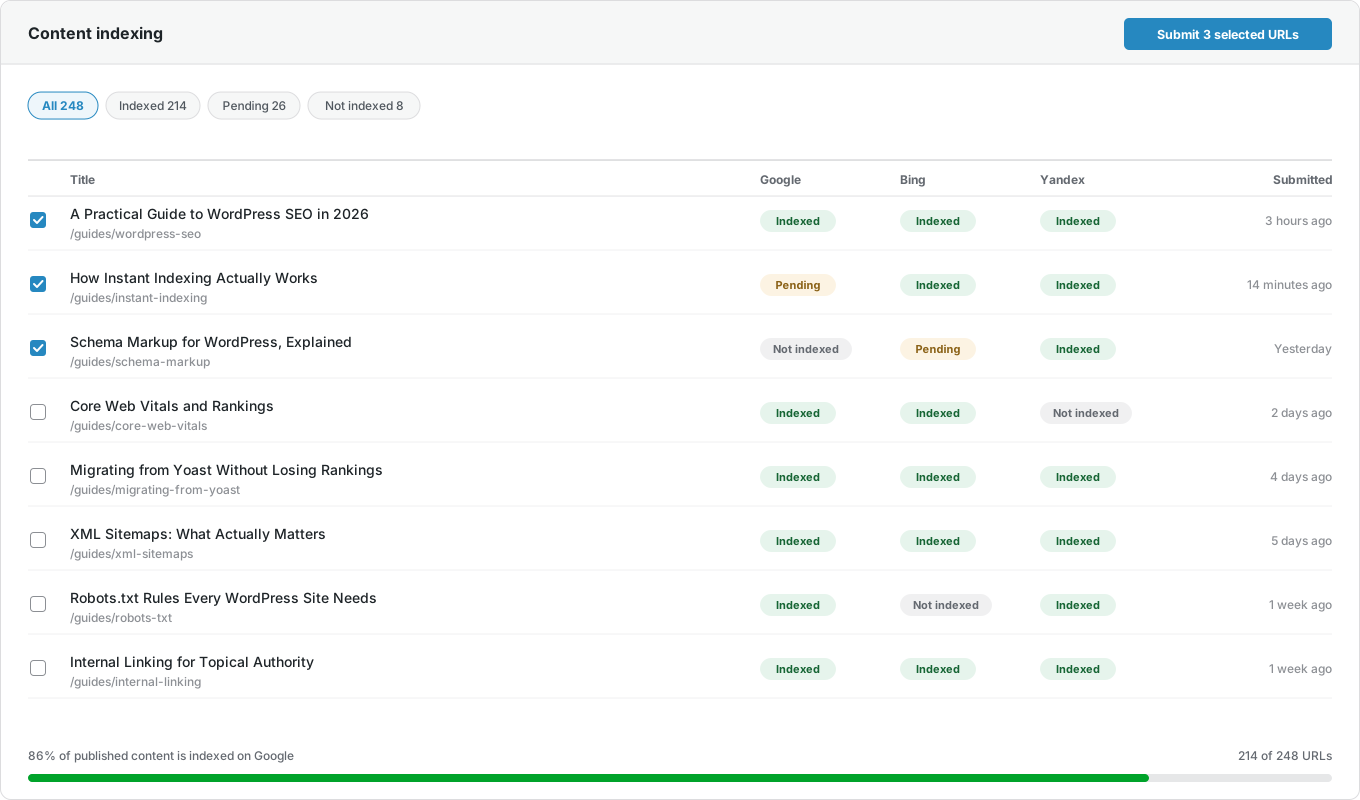
Indexing on content change
New and updated posts, pages, and custom post types are submitted to search engines for indexing.
Auto indexing
A scheduled scan finds content that search engines never indexed and submits it for indexing.
Bulk index in one click
Select any set of posts and pages from the content list and send them together.
Live index status
View the index status of your posts and pages on Google, Bing, and Yandex.
Indexing Submission log
Every request is recorded with its date, search engine, and result, on its own Log screen.
URL inspection shortcut
One-click navigation to Google’s inspection tool when you would rather request indexing manually and safely.
Reporting
WordPress SEO reporting from Google, Bing and Yandex
Connect the three search webmaster tools to get a dedicated page to view your website SEO performance across Google, Bing, and Yandex, with search data appearing beside the posts that earned them—plus daily, weekly, or monthly email summaries so you don’t have to log in at all.
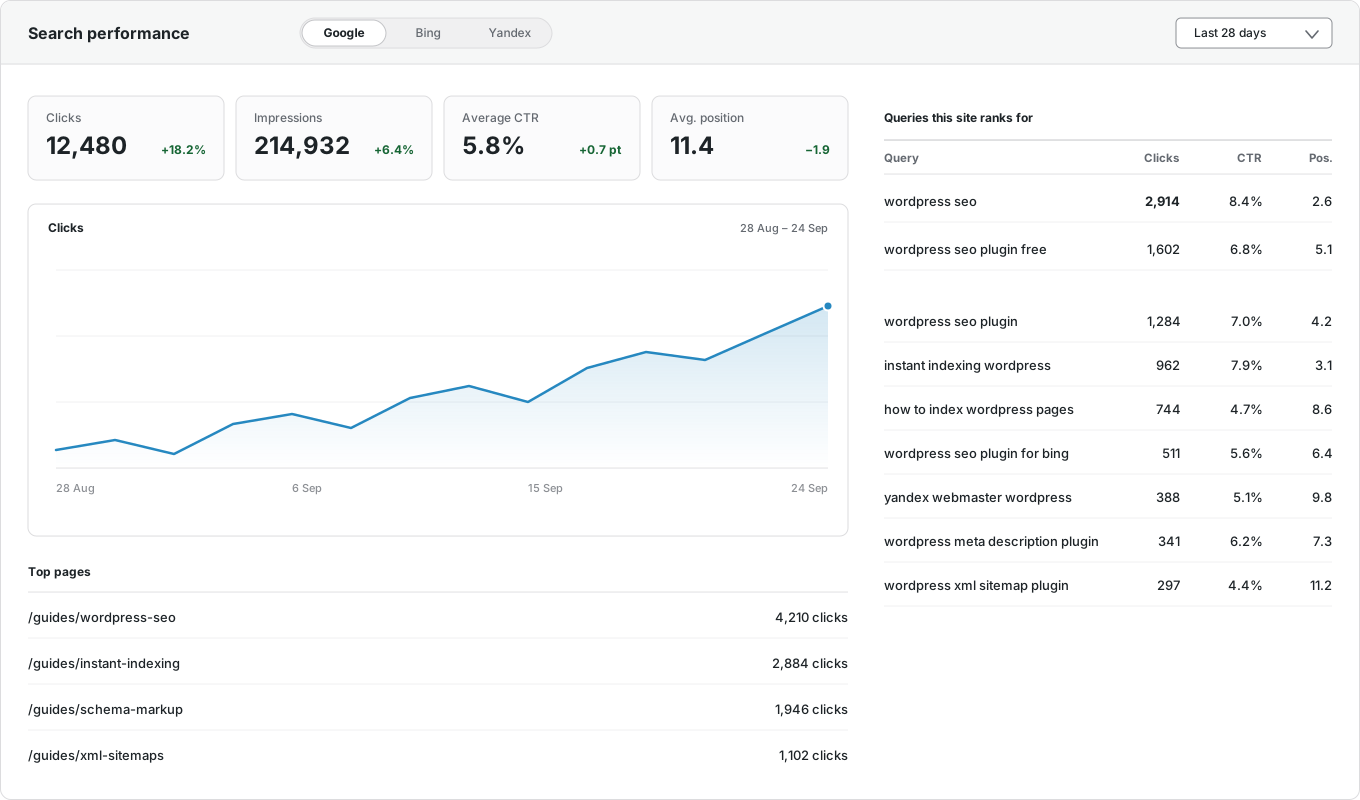
Google Search Console
Clicks, impressions, CTR, and average position, inside WordPress.
Bing Webmaster Tools
The same SEO metrics from Microsoft Bing, on the same WordPress dashboard.
Yandex Webmaster
Clicks, impressions, ranking keywords, and positions from Yandex.
Per-post performance
View each post’s own SEO stats and the keywords it ranks for, in the editor.
Top pages and queries
Your best-performing URLs and search terms, by country and device.
Email reports
Daily, weekly, or monthly SEO performance summaries to multiple recipients, in your brand color.
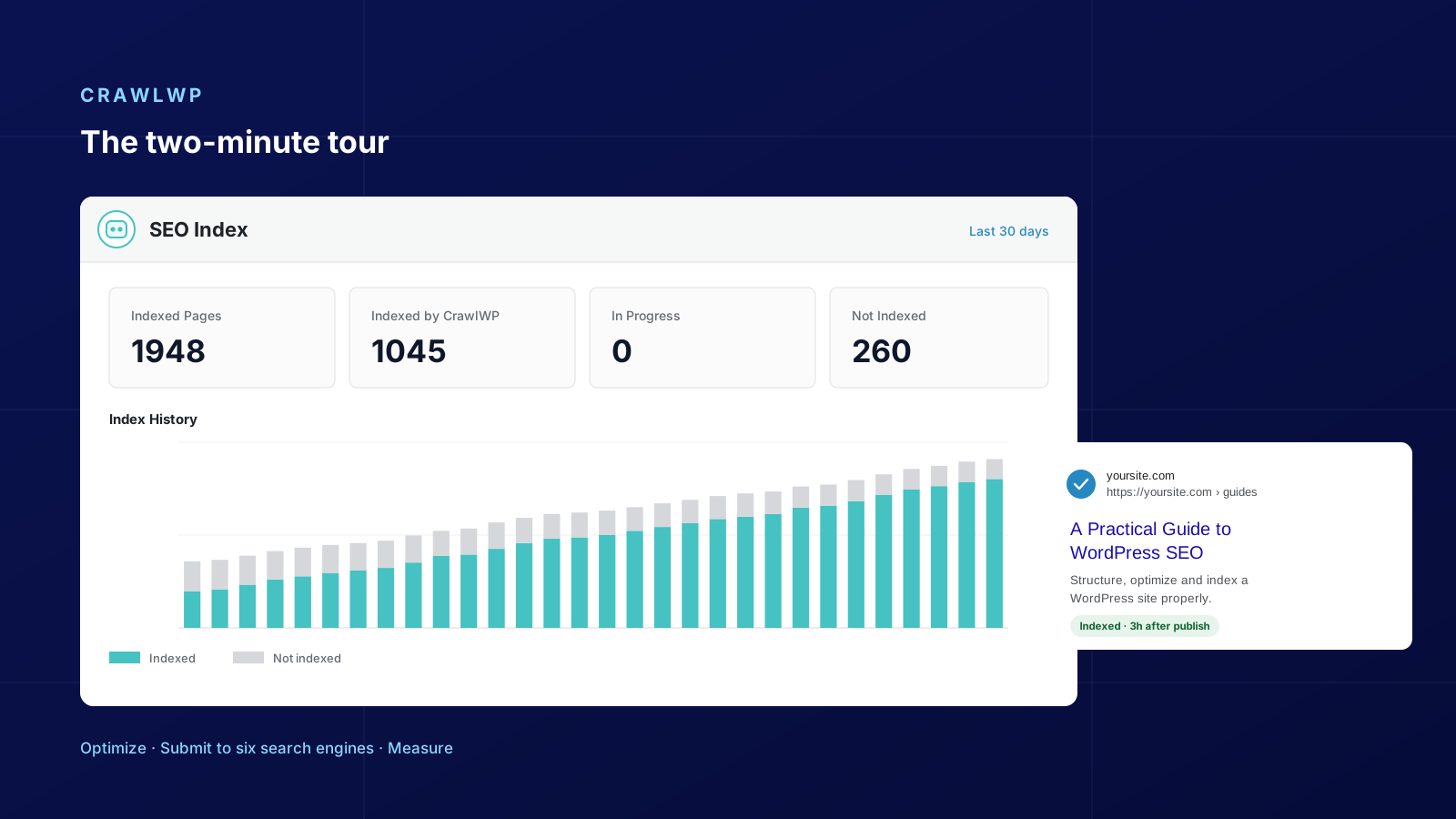
The index screen
Publishing a post is not the same as being found.
How many of your pages are actually indexed? Most sites cannot answer that question. CrawlWP checks your pages against Google Search and creates a 30-day chart, separating what was already indexed from what has been indexed.
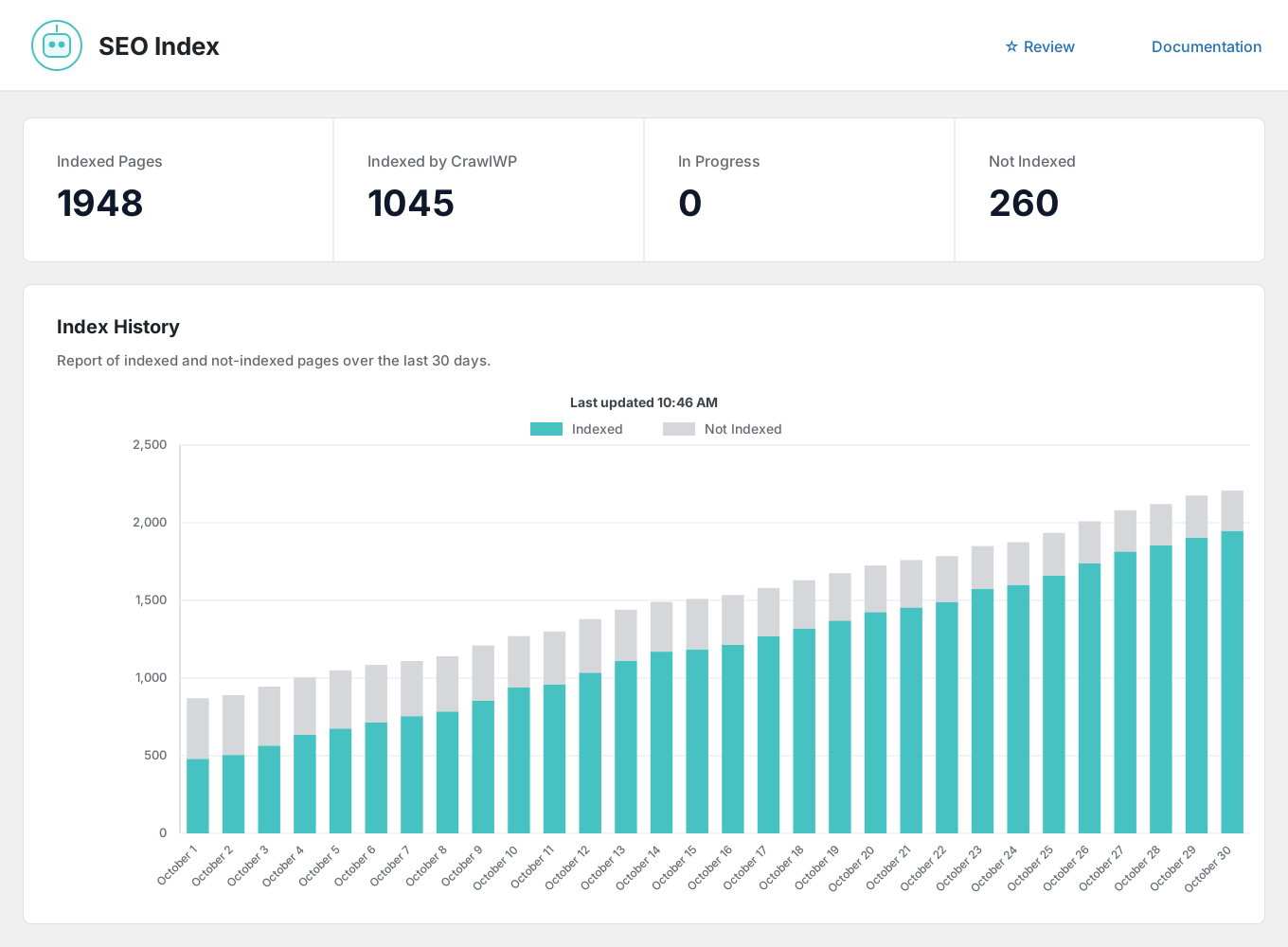
Indexed Pages
How many of your URLs and WordPress pages Google, Bing, and Yandex actually index, rather than assuming.
Indexed by CrawlWP
The number of pages CrawlWP helped get indexed by search engines, so you know whether the plugin is earning its place.
In Progress
URLs submitted and awaiting indexing, so you know the difference between pending and rejected.
Not Indexed
What is still missing, ready to be resubmitted for indexing in bulk from the content list.
Index History
Thirty days of indexed vs. not-indexed, so the trend is visible rather than anecdotal.
Dashboard widget
The same numbers on the WordPress dashboard and beside every row of the post list.
Migration
Switching WordPress SEO plugins takes minutes
Import the titles, meta descriptions, canonicals, and robots settings your current WordPress SEO plugin already saved, check a few posts, then deactivate it. Nothing is deleted and no URL moves.
| CrawlWP | Typical WordPress SEO plugin | |
|---|---|---|
| Meta title and description templates | Yes | Yes |
| Bulk editor for titles and descriptions | Yes | Premium or add-on |
| Schema graph, breadcrumbs, Open Graph | Yes | Yes |
| LocalBusiness schema with NAP and hours | Yes | Usually a paid add-on |
| robots.txt editor and robots directives | Yes | Yes |
| Redirect manager with 301, 302 and regex | Yes | Premium or separate plugin |
| 404 monitor | Yes | Premium or separate plugin |
| Automatic redirect on permalink change | Yes | Premium |
| Internal link automation | Yes | Premium or separate plugin |
| Google News sitemap | Yes | Premium or add-on |
| Video sitemap | Yes | Premium or add-on |
| HTML sitemap | Yes | Sometimes |
| Multilingual sitemaps (WPML, Polylang, TranslatePress) | Yes | Varies |
| llms.txt for AI crawlers | Yes | Rarely |
| GA4 and Tag Manager fields | Yes | Separate plugin |
| Instant indexing to Google | Yes | Add-on or manual |
| Indexing to Bing, Yandex, Naver, Yep, Seznam.cz | Yes | Rarely |
| Search Console data inside WordPress | Yes | Sometimes |
| Bing and Yandex data inside WordPress | Yes | No |
| Live index status per post | Yes | No |
| Indexing and performance email reports | Yes | No |
Pricing
One license, every feature
No feature is held back for a higher tier — the only difference between plans is how many sites you can run it on, with a 14-day money-back guarantee.
Questions
WordPress SEO questions, answered
Things people ask before switching WordPress SEO plugins.
Can I import my SEO data from another plugin?
Yes. The Import SEO Data screen detects Yoast SEO, Rank Math, All in One SEO, SEOPress, The SEO Framework, and Slim SEO and shows how many posts, terms, and redirects each one holds before you start.
It includes titles, descriptions, robots rules, canonicals, social images, and redirects. Existing CrawlWP values are kept unless you tick overwrite, and nothing is deleted from the old plugin.
Does CrawlWP handle redirects?
Yes. You can add 301, 302, and 410 rules with exact, starts-with, ends-with, or regex matching, see how many times each has been hit, and switch individual rules off without deleting them. CrawlWP also writes a 301 automatically whenever you change a post’s permalink, and the 404 monitor turns any logged 404 into a redirect in one click.
Does CrawlWP replace the WordPress sitemap?
No, and that is deliberate. WordPress generates its own sitemap index, so CrawlWP works with it rather than adding a competing one, and paid plans add Google News, video, HTML and multilingual sitemaps when you need them.
Is using the Google Indexing API recommended?
Google recommends the Indexing API for job-posting and live-streaming websites; however, you can use it on any website. If you’re concerned or want to proceed cautiously, we offer a one-click option to view your WordPress content in Google Search Console. This allows you to request indexing manually, which is a safe approach.
Please note that submitting content via IndexNow or using the Bing and Yandex API is completely safe and recommended.
Why do I need an indexing tool?
Getting search engines like Google, Bing, Yandex, Naver, Seznam.cz, and Yep to recognize your website content can be challenging. CrawlWP is a valuable tool that improves your website’s SEO by identifying WordPress posts and pages that aren’t indexed and, optionally, submitting them to search engines on your behalf via the Google, Bing, Yandex, and IndexNow APIs.
.
Can I edit titles and descriptions in bulk?
Yes. The Bulk Editor lists your posts and pages with editable SEO title and meta description fields and live character counters, so you can fix a hundred posts from one table instead of opening each one.
What is the IndexNow API?
The IndexNow protocol is an easy way for website owners to instantly notify supported search engines (Microsoft Bing, Naver, Seznam.cz, Yandex, Yep) of the latest content changes on their websites. It is a simple ping that lets search engines know when a URL and its content have been added, updated, or deleted so that they can reflect the change in their search results quickly.
Without IndexNow, it can take days to weeks for search engines to notice content changes, as they don’t frequently crawl every URL. With IndexNow, search engines are immediately notified of changed URLs, which prioritizes their crawling and reduces the time to discover new content.
How long does it take for pages to get indexed?
In our experience, pages are usually indexed within 24 hours of submission and often within a few hours. However, search engines control the exact timing and still assess each page’s quality and relevance.
There is no guarantee, but submission improves the odds and reduces the wait. CrawlWP checks the live index status so you are not guessing.
Do you have access to my Google Search data?
No. All of your information is stored on your WordPress server, and your site connects to Google Search Console directly without our involvement. Your data stays under your control, and we cannot access it.
What people say
What our customers think
Over 40,000 website owners use CrawlWP for their WordPress SEO. Here is what some of them say.

I had eleven hundred posts and no idea four hundred of them had never been indexed. That’s why I bought it; everything else was a bonus.
Andre Lung
★★★★★

I run SEO for nineteen client sites. Emailing a client a report they actually understand, without giving them a login, has saved me an afternoon a month.
Gaurav Tiwari
★★★★★

Great indexing plugin for multiple search engines (Google, Bing & Yandex). Working great without any issues.
Ayyaz Ahmad
★★★★★

We publish twenty stories a day. Being able to see which ones landed in the index within the hour changed how we plan the schedule.
Godstime Oseghale
★★★★★

I’ve been using CrawlWP SEO for months, and it’s become an essential part of my SEO toolkit. The instant search engine indexing feature works exactly as advertised. The SEO performance monitoring dashboard gives actionable insights.
Peter Krieg
★★★★★

Great Plugin and Support
Really well thought out and developed. I had a small issue, but customer support solved it promptly.
Joe (@joeler)
★★★★★
View more reviews on wordpress.org →
Start ranking on more than one search engine
Join over 40,000 website owners using the CrawlWP plugin for their WordPress SEO. Connect Google, Bing, and Yandex in a few minutes and run the whole workflow from one dashboard.
yoursite.com
https://yoursite.com › guides › wordpress-seo
A Practical Guide to WordPress SEO in 2026
Learn how to structure, optimize, and index a WordPress site so search engines find your content within hours rather than weeks.
Google · indexed
Bing · indexed
Yandex · indexed