
Search Console
Google Search Console Integration for WordPress
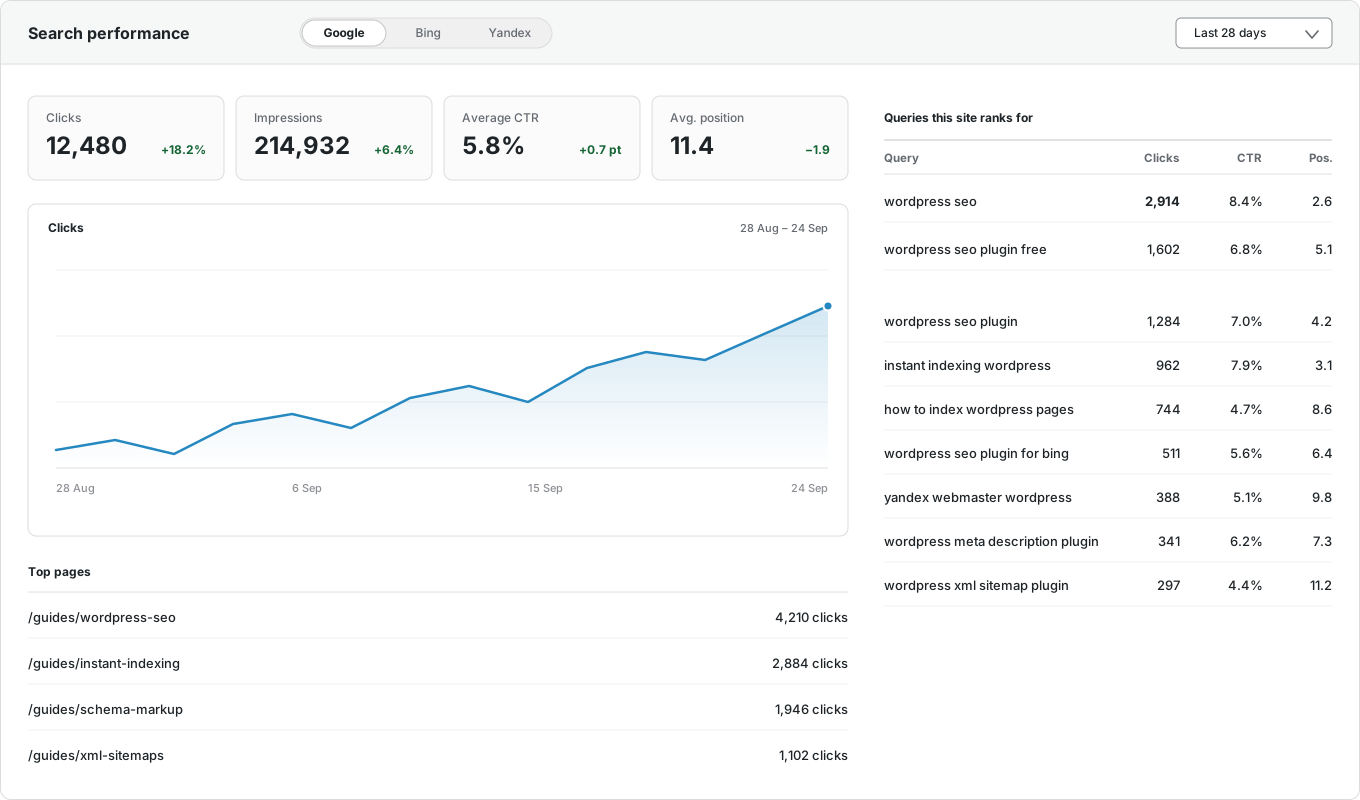
See your Google Search Console data inside WordPress. CrawlWP shows the clicks, impressions, click-through rate, and average position of every post right next to the post itself. It also brings in Bing and Yandex, so you see all three search engines in one place. Part of CrawlWP Premium.
Why connect it
Why use a WordPress Google Search Console integration?
Search Console is free and full of useful data. But it lives on a separate website, so most people rarely check it. Bringing it into WordPress changes that.
See what works
Find out which posts bring visitors from Google, without opening another website.
Catch drops early
Spot a post that is losing clicks while you can still fix it.
Find what to write next
See the searches you already rank for, and turn the close ones into new or better posts.
On this page
Google Search Console
Clicks, impressions, click-through rate, and average position, without leaving WordPress.
Bing Webmaster Tools
The same numbers from Microsoft Bing, on the same screen.
Yandex Webmaster
Clicks, impressions, keywords, and positions from Yandex.
Numbers for each post
See how each post performs, and the searches it ranks for, right in the editor.
Top pages and keywords
Your best pages and the searches that bring visitors, with their countries and devices.
Email reports
Daily, weekly, or monthly summaries, sent to as many people as you like, in your brand color.
The data
What Search Console data you get in WordPress
The same numbers Google shows in Search Console, in plain words.
| What you see | What it tells you |
|---|---|
| Clicks | How many times people clicked your page in search results. |
| Impressions | How many times your page appeared in search results. |
| Click-through rate (CTR) | How often people clicked when they saw your page. |
| Average position | Where your page usually appears in the results. Lower is better. |
| Top keywords | The searches that bring people to your site. |
| Top pages | The pages that earn the most clicks. |
| Countries and devices | Where your visitors are, and whether they use a phone or a computer. |
How it works
Set it up once, then it runs on its own
Step 1
Verify your site
Paste the verification code from Search Console into CrawlWP. It adds the right tag to your WordPress site, so you don’t need to edit any code.
Step 2
Connect your accounts
On the API Settings tab, add your Google service account key and give it access to your Search Console property. Add Bing Webmaster Tools and Yandex Webmaster too, if you use them.
Step 3
Read your numbers in WordPress
See site-wide numbers on the dashboard and each post’s numbers in the editor. Get an email summary daily, weekly, or monthly.
Where you see it
Search Console numbers where you already work
A report you have to remember to open is a report you rarely read. So CrawlWP puts your search numbers in your WordPress posts list, your editor, and your dashboard.

For each post: the Insights tab
In the SEO metabox below the editor, the Insights tab shows how the WordPress post performs on Google, Bing, or Yandex.

A quick summary in the editor sidebar
The CrawlWP Stats panel shows the post’s index status on Google, Bing, and Yandex, plus 28 days of Google clicks, impressions, CTR, and position, with a link to the detailed analytics.

In WordPress
Four places you will see your numbers
No new screen to remember. The numbers come to you.
Dashboard widget
The last 28 days of clicks, impressions, CTR, and position, the moment you log in.
Posts list
Clicks, impressions and position for every post, in a column next to its title.
Post editor
Each post’s numbers and top keywords in the Insights tab, plus a 28-day summary in the sidebar.
SEO Stats screen
Google, Bing, and Yandex together, with your top pages and keywords.
Compare
How CrawlWP compares
Most WordPress SEO plugins stop at Google. CrawlWP shows all three search engines together.
| CrawlWP | Search Console website | Other WordPress SEO plugins | |
|---|---|---|---|
| Google search data | Yes | Yes | Yes |
| Bing and Yandex data | Yes | No | No |
| Numbers next to each post in WordPress | Yes | No | Sometimes |
| Numbers inside the post editor | Yes | No | Sometimes |
| Email reports for people without a login | Yes | No | Sometimes |
| Check if each page is indexed | Yes | One page at a time | Rarely |
| Your data stays on your own server | Yes | — | Varies |
Questions
Search Console integration questions
Can you see my Search Console data?
No. Your site connects to Google directly and saves the data in your own WordPress database. It never passes through our servers, so we cannot see it.
How is this different from the Search Console website?
It is the same data from Google. The difference is where you see it: next to each post in WordPress, and side by side with Bing and Yandex. You no longer need three browser tabs to check how one page is doing.
Can I see the data for a single post?
Yes. Open the post: the Insights tab in the SEO metabox shows its clicks, impressions, position, CTR, and top keywords, and the editor sidebar shows a 28-day summary with its index status.
Can other people see the numbers without logging in?
Yes. Email reports go out daily, weekly, or monthly to as many people as you like — clients, writers, or your boss. They do not need a WordPress account.
What is Google Search Console?
A free tool from Google that shows how your site appears in Google search: how often it is seen, how often it is clicked, and the searches that find it. CrawlWP brings that data into WordPress.
Is the Search Console integration free?
It is part of CrawlWP Premium. Every Premium plan includes the Search Console, Bing, and Yandex integrations.
Do I need a Search Console account?
Yes. Search Console is free — sign up with your Google account and verify your site. CrawlWP makes the verification step easy: paste the code, and it adds the tag for you.
Why are the last few days missing?
Google usually needs two or three days to finish its numbers. The newest days fill in once Google has them, in CrawlWP and in Search Console alike.
Will it slow down my site?
No. CrawlWP collects the data in the background and saves it in your database. Nothing is fetched while visitors load your pages, and the numbers only show in your WordPress admin.
Can I see Bing and Yandex data too?
Yes. Connect Bing Webmaster Tools and Yandex Webmaster as well, and see all three search engines side by side — something most WordPress SEO plugins do not offer.
Pricing
Straightforward pricing, every feature included
Standard
For 1 Site
$59
/ year
Pro
For 5 Sites
$159
/ year
Agency
For Unlimited Sites
$259
/ year
Standard
For 1 Site
$359
once
Pro
For 5 Sites
$559
once
Agency
For Unlimited Sites
$759
once
See how your WordPress site really performs in search
Join thousands of website owners who use CrawlWP. Connect Search Console, Bing, and Yandex in a few minutes, and see every post’s search numbers without leaving WordPress.
yoursite.com
https://yoursite.com › guides › wordpress-seo
A Practical Guide to WordPress SEO in 2026
Learn how to structure, optimize, and index a WordPress site so search engines find your content within hours rather than weeks.
Google · indexed
Bing · indexed
Yandex · indexed