
Features
SEO Email Reports for WordPress
CrawlWP sends SEO email reports straight to your inbox. Each report shows your website’s search performance, indexing numbers, top keywords and pages, and pages recently indexed or deindexed. Send them daily, weekly, or monthly, to as many people as you like.
What it does
What CrawlWP SEO email reports do
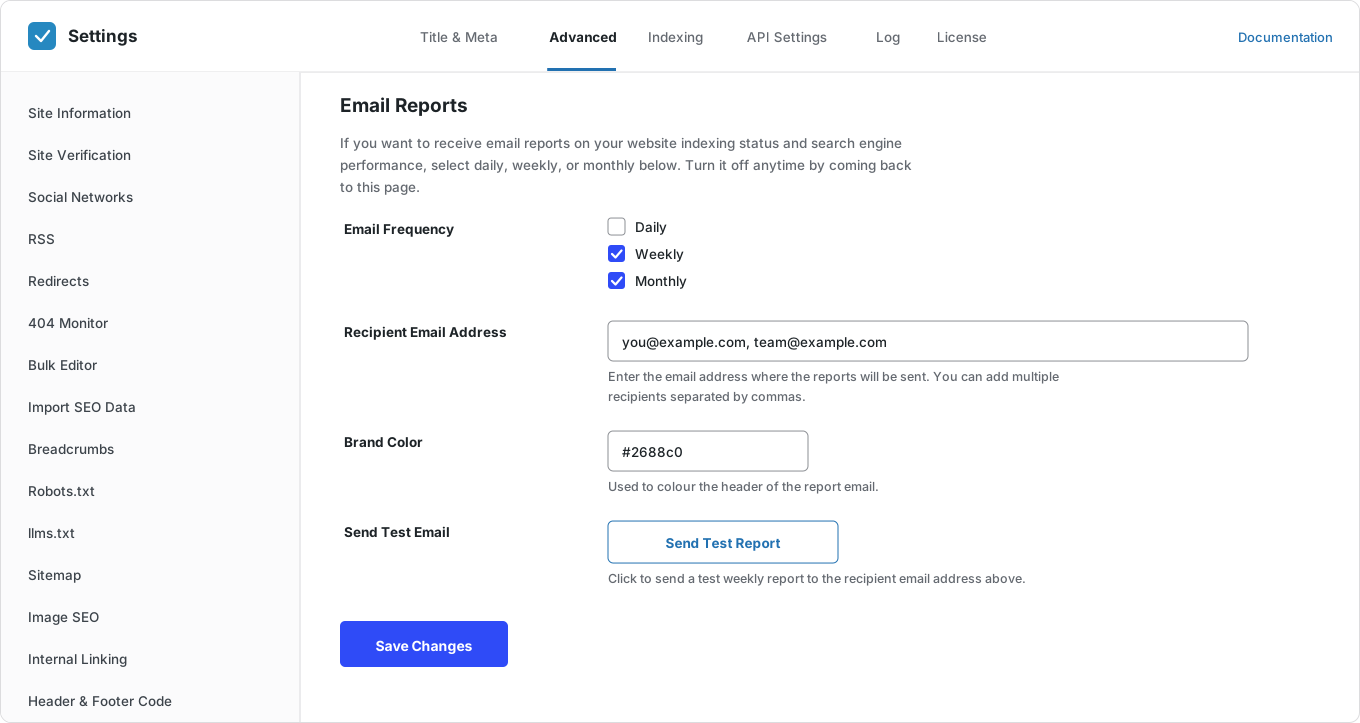
Set up your SEO email reports once on the Email Reports screen. After that, CrawlWP sends them on your schedule. Here is what you get.
Daily, weekly or monthly
Pick how often the report arrives. Daily suits news sites; weekly suits most sites.
As many recipients as you need
Add email addresses separated by commas. Clients, colleagues, and your boss can all get it.
No login needed
Recipients do not need a WordPress account. The report comes to their inbox.
Search performance
Impressions, clicks, click-through rate (CTR), and average position for the period.
Change since last time
Each number shows how much it went up or down compared with the previous period.
Indexing insights
Pages indexed on Google, pages likely indexed on Bing, and pages not indexed.
Top keywords
The searches that brought you the most clicks.
Top pages
The pages that brought you the most clicks.
Newly indexed and dropped pages
Which pages Google indexed in the period, and which ones it removed.
Your brand color
The SEO email report header uses the color you choose.
Test report
Send a test SEO email report now instead of waiting for the first one.
Turn off at any time
Come back to the Email Reports screen, untick the frequencies, and save.
Why it matters
Why use SEO email reports
Most people do not log in to check their SEO every week. Clients almost never do. So problems go unseen, and good results go unnoticed.
An SEO email report brings the numbers to you. At a glance, you can see whether traffic is up or down and whether pages are dropping out of Google.
How it works
Set up SEO email reports in three steps
It takes a few minutes. After that, the reports arrive on their own.
Step 1
Choose how often
Daily for a news site, weekly for most sites, monthly for a client retainer.
Step 2
Add the recipients
Type the email addresses into one field, separated by commas. You do not need to create WordPress users.
Step 3
Send a test
The test report goes to every address in the list. To check it privately first, add only your own address, send the test, then add the others.
What lands in the inbox
What is in each SEO email report
A clear summary you can forward to a client as it is. It covers the period since the last report.

Questions
SEO email report questions
Answers to the questions people ask most about SEO email reports in CrawlWP.
What is an SEO email report?
It is a summary of how your WordPress site is doing in search, sent to your inbox on a schedule. CrawlWP SEO email reports cover search performance, indexing, top keywords, and top pages.
Can clients receive the report without a WordPress login?
Yes. Recipients are email addresses, so you can send reports to people who don’t have access to the site.
How many people can receive the report?
As many as you like. Add their email addresses in one field, separated by commas.
How often are reports sent?
Daily, weekly, or monthly. You choose on the Email Reports screen.
Where does the data come from?
From the search engines you connect on the API Settings tab. Connect them first, or the report will have no data.
Can I brand the report?
You can set a brand color, and the report header uses it.
Can I see a report before the first one is sent?
Yes. Click Send Test Report. The test goes to every address in the recipient list, so add only your own address first if you want to check it privately.
Are SEO email reports free?
No. They are part of CrawlWP Premium.
How do I stop the reports?
Go back to the Email Reports screen, untick the frequencies and save.
Pricing
Straightforward pricing, every feature included
Standard
For 1 Site
$59
/ year
Pro
For 5 Sites
$159
/ year
Agency
For Unlimited Sites
$259
/ year
Standard
For 1 Site
$359
once
Pro
For 5 Sites
$559
once
Agency
For Unlimited Sites
$759
once
Get your SEO results in your inbox
Join thousands of website owners using CrawlWP for their WordPress SEO. Set up your first SEO email report in a few minutes.
yoursite.com
https://yoursite.com › guides › wordpress-seo
A Practical Guide to WordPress SEO in 2026
Learn how to structure, optimize, and index a WordPress site so search engines find your content within hours rather than weeks.
Google · indexed
Bing · indexed
Yandex · indexed