
Features
WordPress Meta Title and Description Templates
Writing a meta title and description for every page by hand is slow, so many pages end up with none. CrawlWP builds them from templates for your homepage, every post type, every category and tag, and the author, date, search, and 404 pages. You see the result as you type.
What it does
What CrawlWP title and meta templates do
Set a template once for each type of page. CrawlWP fills it in for every page of that type, and you only step in where a page needs something special.
On this page
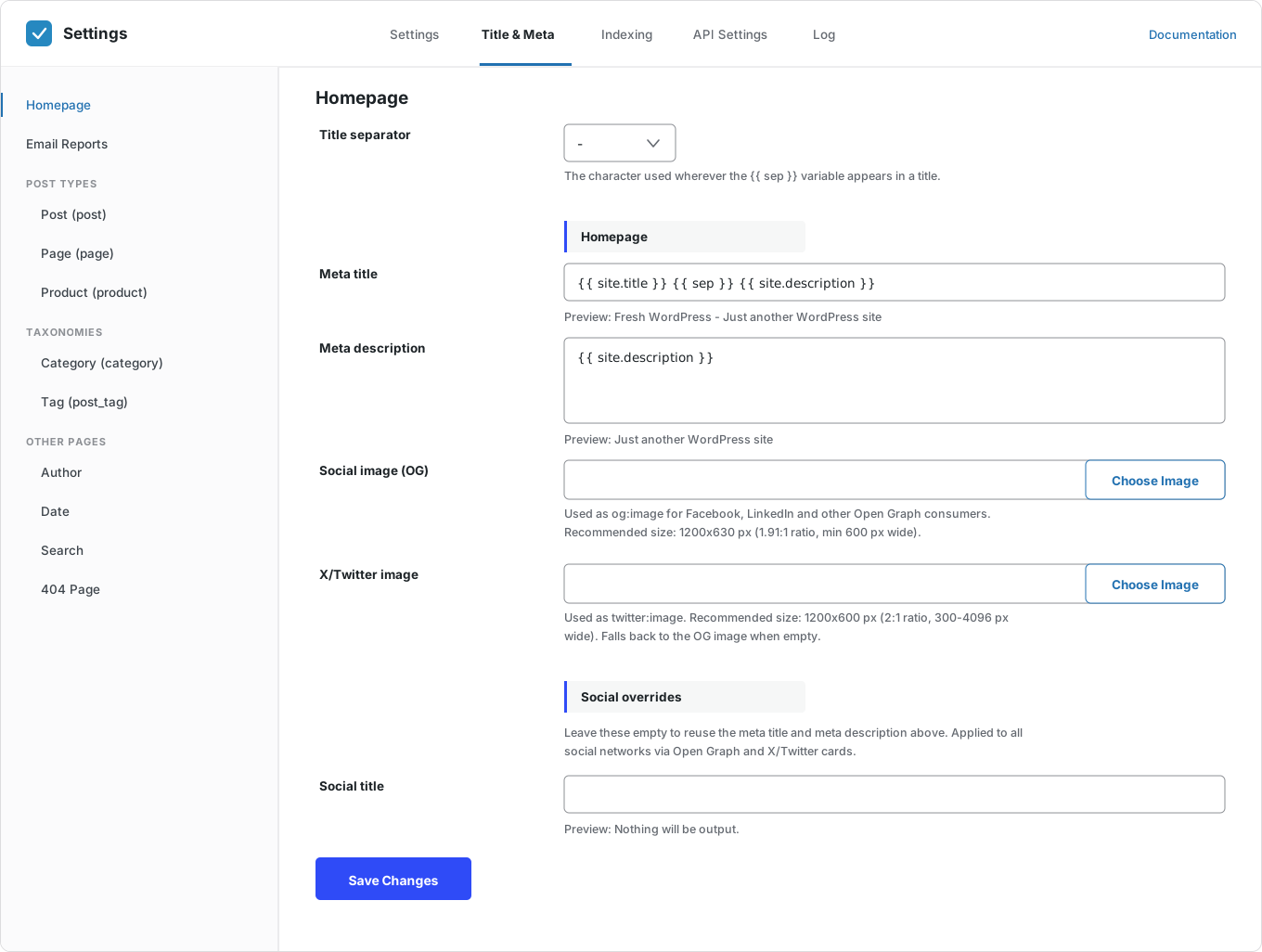
Templates with variables
Build titles from variables like {{ post.title }}, {{ sep }} and {{ site.title }}. CrawlWP fills them in for each page.
Every page type covered
The homepage, posts, pages, categories, tags, and the author, date, search, and 404 pages.
Live preview
Each field shows the finished title or description under it as you type.
One separator for the whole site
Pick what the character {{ sep }} stands for, such as a dash or a bar. It changes everywhere at once.
Linked to your site settings
{{ site.title }} and {{ site.description }} come from WordPress, so a new site name updates every title.
Custom post types and taxonomies
Products, custom post types and custom taxonomies get their own templates automatically.
Override any post
Write a custom title and description in the SEO metabox for the posts that need one.
Google preview
The metabox shows how the post will look in Google, on desktop and on mobile.
Pixel meter
Titles are measured in pixels, the way Google cuts them, so you can see when one is too long.
Bulk editor
Fix the titles and descriptions of many posts from one table, with length counters.
Social title and images
Set social images and a social title for each template, or reuse the SEO ones.
Keep pages out of search
Set noindex for a whole post type or archive, such as date archives.
Why it matters
Why use meta title and description templates
Your meta title is the blue link people see in Google. Your meta description is the short text under it. Together they help people decide whether to click.
Writing both by hand for every page takes too long. Templates give every page a sensible title and description from the start, so you can spend your time on the pages that matter most.
How it works
Set up your title templates in three steps
Set them up once. After that, every new post gets its own meta title and description.
Step 1
Choose your separator
In Title & Meta, pick the character that {{ sep }} stands for. It applies to every template.
Step 2
Build a template for each page type
Open each page type and combine variables. The preview under each field shows the result.
Step 3
Override where it matters
In the SEO metabox or the bulk editor, write a custom title for the posts that need one. Leave a field empty to use the template.
Per post
Custom meta titles with a real Google preview
For the posts that matter, write the title and description by hand. The SEO metabox shows the Google result as you type.
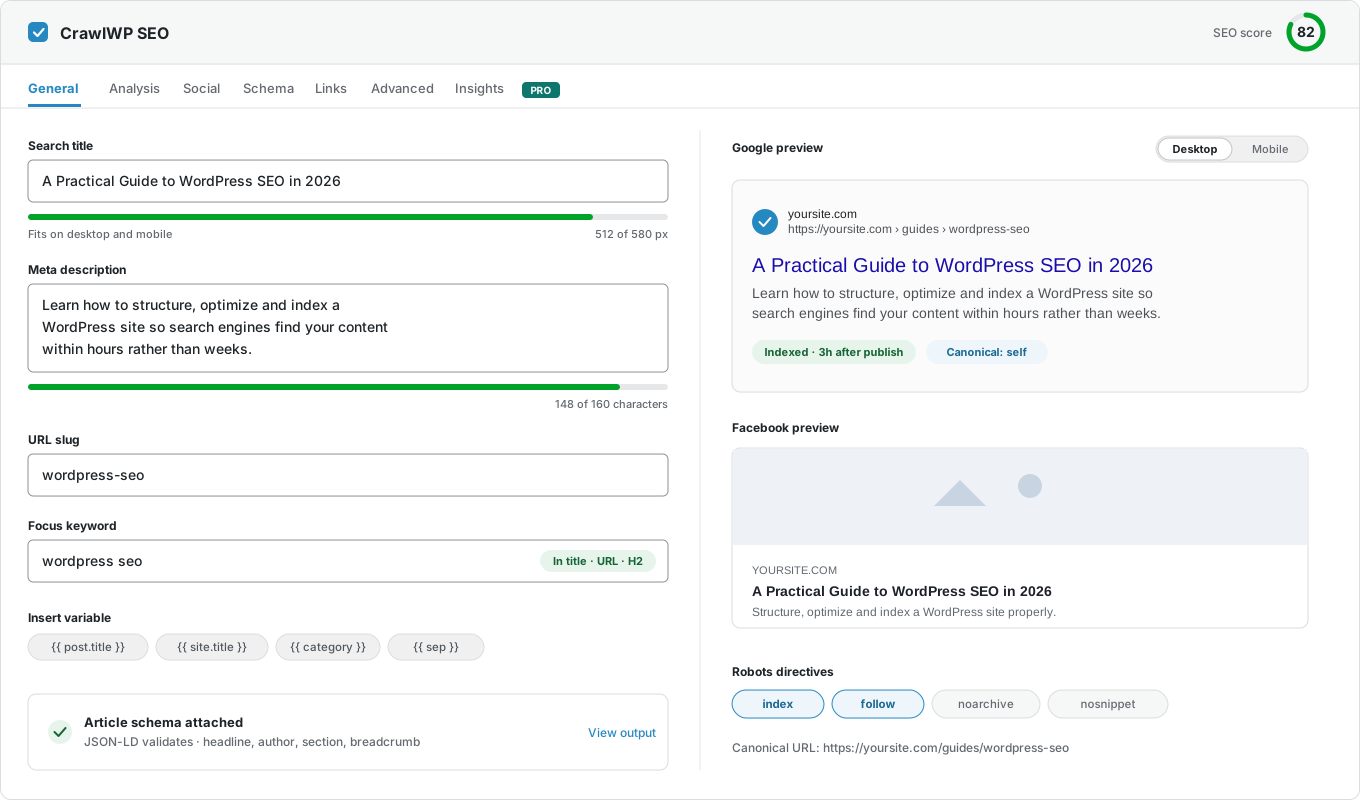
Common template variables
There are also variables for the author, date, and the names and descriptions of categories and tags. Click Insert variable to see them all.
Questions
Meta title and description questions
Answers to the questions people ask most about meta titles, meta descriptions, and templates in WordPress.
What is a meta title?
It is the title of a page as search engines see it. Google usually shows it as the blue link in search results. It can be different from the heading on the page.
What is a meta description?
It is a summary of the page. Google often shows it under the title in search results.
What is a title template?
It is a pattern for building titles, such as {{ post.title }} {{ sep }} {{ site.title }}. CrawlWP fills in the variables for each page, so every page gets a title without you writing one.
What variables can I use?
Your site title, tagline, and separator; the post title, category, author, and date; and the name and description of categories and tags. Click Insert variable in the metabox to see the full list.
How long should a meta title be?
Google cuts titles by width, at about 580 pixels on desktop. That is roughly 50 to 60 characters. The pixel meter shows you when a title is too long.
Why pixels rather than characters?
Google cuts titles by width, not by the number of characters. A title full of wide letters like W and M is cut sooner than one with narrow letters.
Will Google always use my SEO title?
Not always. Google sometimes rewrites titles and descriptions. Clear, accurate titles that match the page are less likely to be changed.
Can I override a template for one post?
Yes. Write a custom title or description in the SEO metabox or the bulk editor. Leave the field empty to go back to the template.
Are SEO title and meta templates free?
Yes. They are part of CrawlWP Lite, the free version.
Pricing
Straightforward pricing, every feature included
Standard
For 1 Site
$59
/ year
Pro
For 5 Sites
$159
/ year
Agency
For Unlimited Sites
$259
/ year
Standard
For 1 Site
$359
once
Pro
For 5 Sites
$559
once
Agency
For Unlimited Sites
$759
once
Give every page a better title in Google
Join thousands of website owners using CrawlWP for their WordPress SEO. Moving from another SEO plugin? Import your titles and descriptions in a few minutes.
yoursite.com
https://yoursite.com › guides › wordpress-seo
A Practical Guide to WordPress SEO in 2026
Learn how to structure, optimize, and index a WordPress site so search engines find your content within hours rather than weeks.
Google · indexed
Bing · indexed
Yandex · indexed