
Features
Index Status Checker for WordPress
Publishing a page doesn’t mean Google and other search engines know about it. The CrawlWP index status checker shows which of your pages are indexed, pending, or not indexed on Google, Bing, and Yandex. You can see it all inside WordPress, and you can send missing pages to search engines in bulk.
What it does
What the index status checker shows you
The SEO Index report gives you the numbers for your whole site. Every post also gets its own status for Google, Bing, and Yandex. Here is what you can see and do.
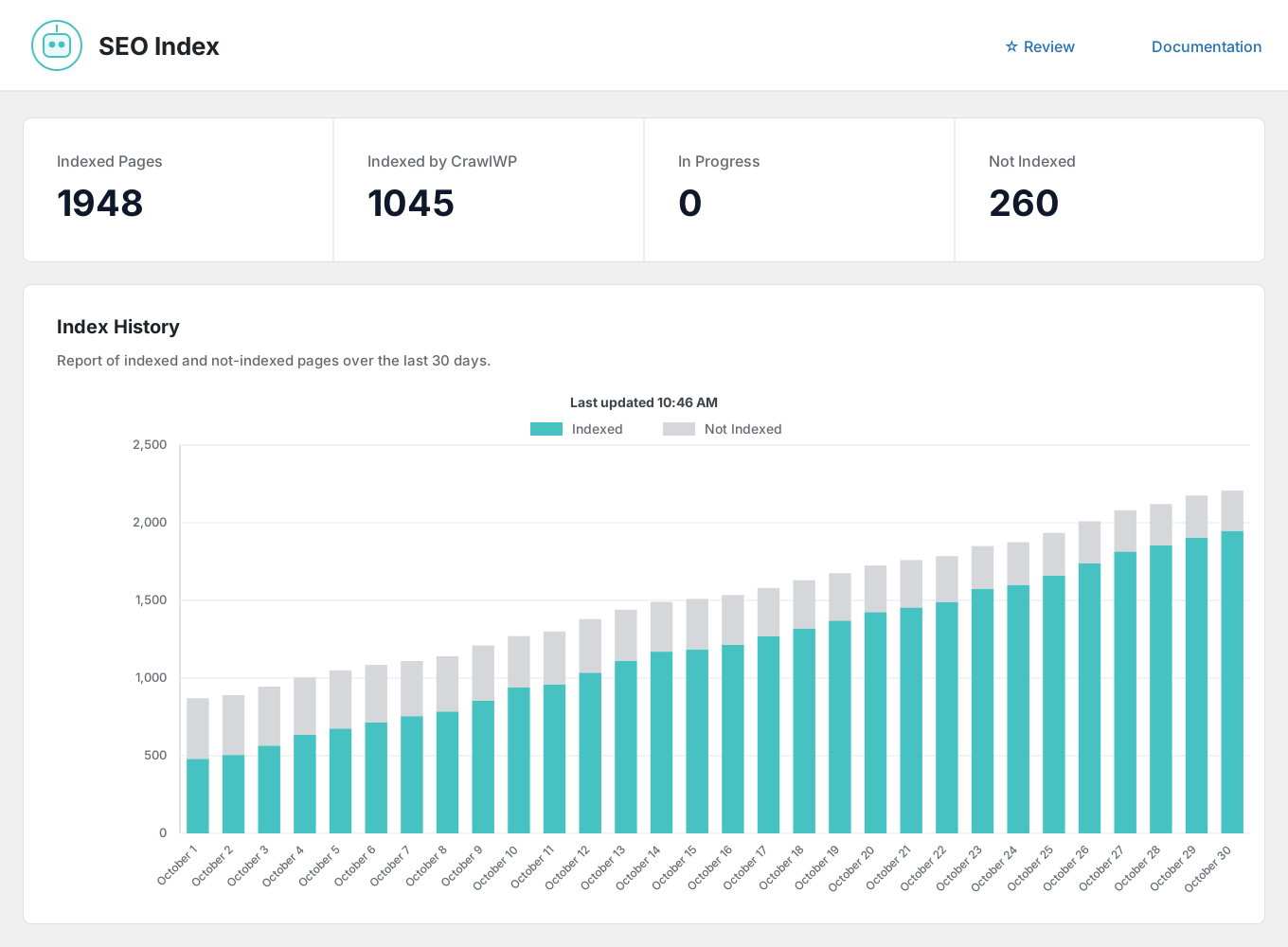
Indexed pages
How many of your pages are in Google’s index right now.
Indexed by CrawlWP
How many of your indexed pages CrawlWP submitted for you.
In progress
Pages that were submitted and are waiting for a result. Waiting is not the same as rejected.
Not indexed
Pages that are missing from the Google index. Select them and send them again in bulk.
30-day index history
A chart of indexed and not-indexed pages over the last 30 days so that you can see the trend.
Status on each search engine
Every post shows its own status on Google, Bing, and Yandex, on the posts list and in the editor.
Last submitted
See when each page was last sent to search engines for indexing.
Filter by status
Show all pages, or only the indexed, pending, or not-indexed ones.
Bulk submission
Tick the pages you want and submit them all for indexing with one click.
Automatic indexing
CrawlWP finds older pages that were never indexed and submits them for indexing.
Dashboard widget
Your Google indexing numbers on the WordPress dashboard, next to your search performance.
Email reports
Indexing numbers in your SEO email reports, including pages that were recently indexed or dropped.
Why it matters
Why you need an index status checker
A page that is not indexed cannot appear in search results. It gets no search traffic, no matter how good it is.
Many sites have pages that never made it into the index, and owners don’t know. Google Search Console has the data, but it lives outside WordPress, and checking pages one by one takes time.
An index status checker does the checking for you. You see the status of every page in one place so that you can fix problems early.
How it works
Check index status in three steps
Set it up once. After that, CrawlWP keeps the status up to date in the background.
Step 1
Connect your search engines
Add your Google service account key, connect Bing, and authorize Yandex on the API Settings tab. CrawlWP reads index status from these search engines, so the numbers are theirs, not a guess.
Step 2
See the status of every page
Each post shows whether Google, Bing, or Yandex has indexed it, is pending, or hasn’t indexed it. The SEO Index report shows the totals for your whole site.
Step 3
Fix what is missing
Select the pages that are not indexed and submit them together. If a page should not be in search results, mark it excluded instead.
In detail
Check the index status of every page at once
You do not need another tool. The status sits in WordPress, next to your content, and you can act on it from the same screen.
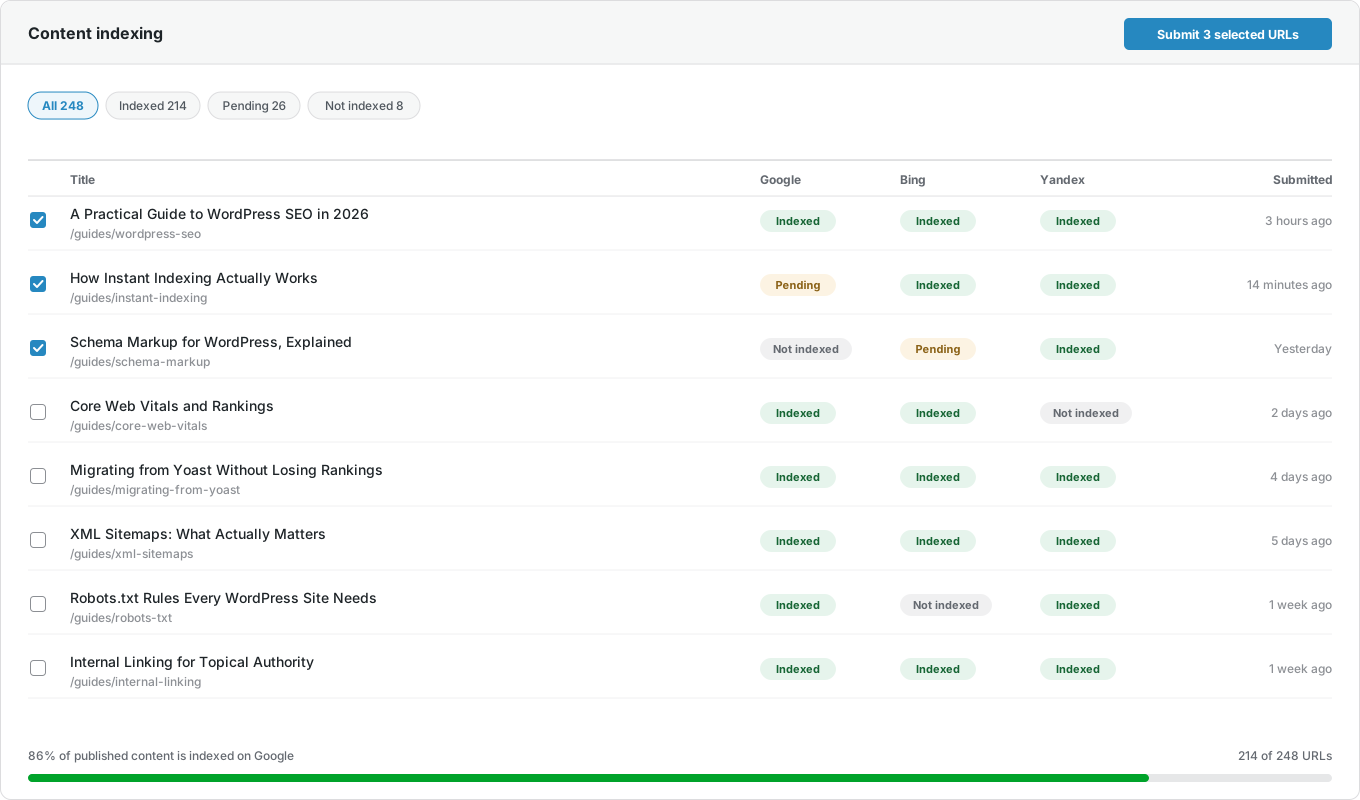
On your posts list too
Your WordPress posts list gets a CrawlWP column. It shows each post’s index status on Google, Bing, and Yandex, along with clicks, impressions, and average position.

And in the post editor
Open any post in WordPress, and the CrawlWP Stats panel in the editor sidebar shows its index status on Google, Bing, and Yandex, next to 28 days of Google search data. The Insights tab of the SEO metabox adds the dates of the last index check and the last submission.

Questions
Index status checker questions
Answers to the questions people ask most about checking index status in WordPress.
What is an index status checker?
A tool that tells you whether search engines have added your pages to their index. The CrawlWP index status checker does this for Google, Bing, and Yandex, inside WordPress.
How does CrawlWP check if a page is indexed?
It gets the status from the search engines you connect. It does not guess from your sitemap.
Which search engines does it check?
Google, Bing, and Yandex. CrawlWP also submits pages to Naver, Yep and Seznam.cz through IndexNow, but IndexNow only sends pages. It does not report whether they were indexed.
Is the index status checker free?
No. It is part of CrawlWP Premium. The free version still submits your pages to all six search engines and logs every submission.
Why are some of my pages not indexed?
Search engines decide what to index. Thin pages, archive pages, paginated pages, and duplicate content are the usual reasons. Often the right fix is to mark these pages noindex, not to keep submitting them.
Should every page on my site be indexed?
No. Only pages that are useful to searchers need to be. Tag archives and thank-you pages are often better left out. You can set any post, or a whole post type, to noindex in CrawlWP.
How long until a submitted page shows as indexed?
Each search engine decides when to index a page. In our experience, it usually takes less than 24 hours, and often only a few hours.
Can I check the index status of one post?
Yes. You can see it on your posts list, in the CrawlWP Stats panel of the editor sidebar, and in the Insights tab of the SEO metabox, which also shows when the post was last checked and last submitted.
Can I check one page in Google Search Console?
Yes. CrawlWP gives you one-click access to Google’s URL Inspection tool, where you can check a page and request indexing by hand.
Will checking index status slow down my site?
No. CrawlWP checks index status in the background on a schedule, not when visitors load a page. The results are saved in your own database.
Pricing
Straightforward pricing, every feature included
Standard
For 1 Site
$59
/ year
Pro
For 5 Sites
$159
/ year
Agency
For Unlimited Sites
$259
/ year
Standard
For 1 Site
$359
once
Pro
For 5 Sites
$559
once
Agency
For Unlimited Sites
$759
once
Know which of your pages are indexed
Join thousands of website owners using CrawlWP for their WordPress SEO. Connect Google, Bing, and Yandex in a few minutes and see the index status of every page.
yoursite.com
https://yoursite.com › guides › wordpress-seo
A Practical Guide to WordPress SEO in 2026
Learn how to structure, optimize, and index a WordPress site so search engines find your content within hours rather than weeks.
Google · indexed
Bing · indexed
Yandex · indexed