
Instant indexing
WordPress Instant Indexing Plugin
CrawlWP is an instant indexing plugin for WordPress. It sends your new and updated posts to Google, Bing, Yandex, Naver, Yep, and Seznam.cz the moment you publish, then checks whether each page was indexed. No more waiting for search engines to find your sitemap.
Why it matters
Why use an instant indexing plugin for WordPress?
Search engines find new pages by crawling, and a crawler may not visit your site for days or weeks. Until it does, your page cannot rank at all.
Rank sooner
Your new post can appear in search results within hours instead of weeks, while the topic is still fresh.
Be first, even when copied
When other sites copy your post, search engines should already know yours is the original.
Keep results up to date
Updated pages show their new content sooner, and deleted pages drop out of search results faster.
On this page
Sent on publish, update and delete
New and updated posts, pages and custom post types are sent straight away for indexing. Deleted pages are reported too, so they leave search results sooner.
Automatic indexing (Premium)
A scheduled check finds published pages that were never indexed and resends them for indexing.
Bulk indexing (Premium)
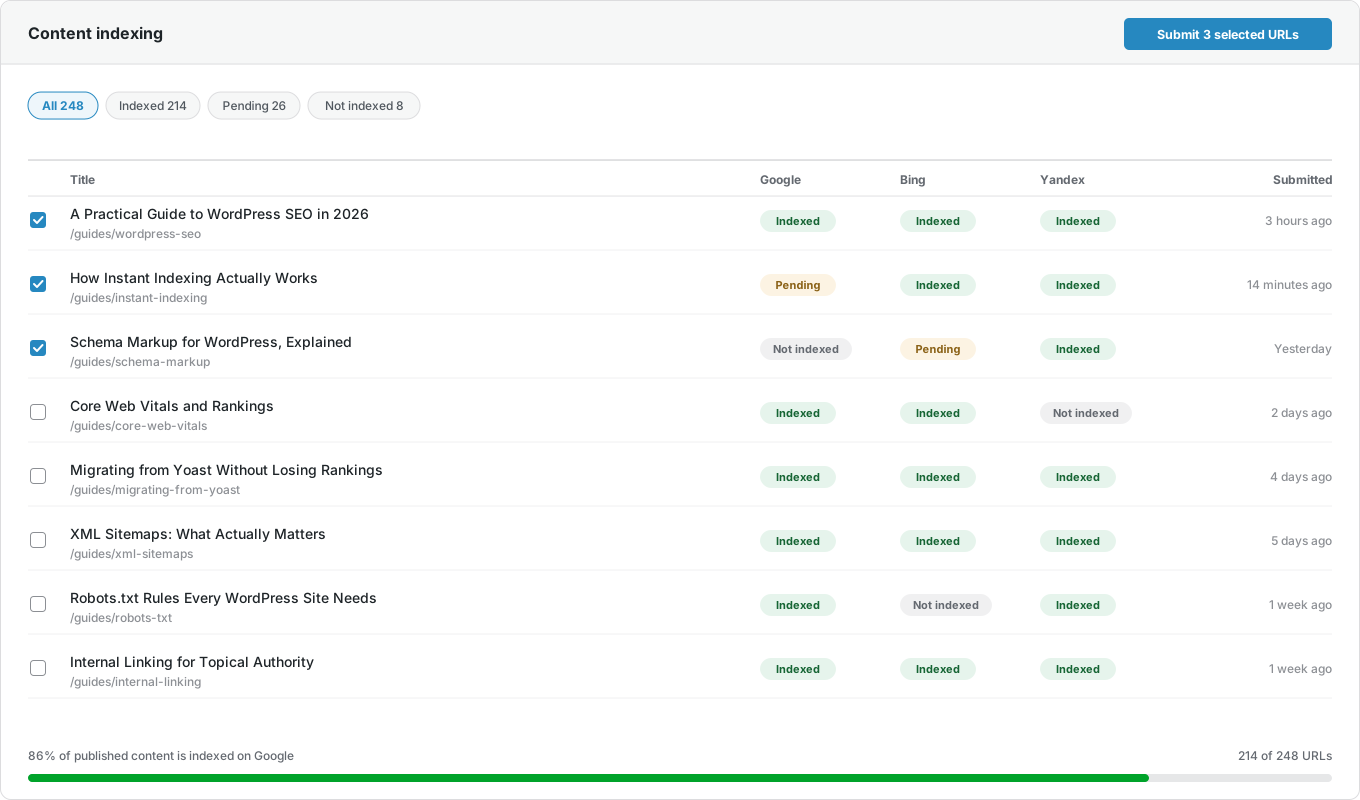
Select many posts in your content list and send them all in one click.
Index status
See whether each page is indexed, waiting, or missing on Google, Bing, and Yandex—right in your WordPress posts list.
Submission log
Every request is saved with the search engine, its answer, and the time. You always know what was sent.
Google URL Inspection shortcut
Open Google’s URL Inspection tool for any page in one click, if you prefer to request indexing yourself.
How it works
Set it up once, then forget about it
Setting up the CrawlWP instant indexing plugin takes a few minutes. After that, it works automatically every time you publish.
Step 1
Connect your search engines
Add your Google, Bing, and Yandex details under API Settings. Naver, Yep, and Seznam.cz use IndexNow, so they need no setup.
Step 2
Publish as usual
Write and publish as usual. Every new or updated post, page, and custom post type is sent automatically. There is nothing to remember.
Step 3
See the result
Check each page’s index status in your posts list, and follow the 30-day chart on the SEO Index screen.
Search engines
Six search engines, one plugin
Most instant indexing plugins for WordPress talk only to Google, or only to Bing and Yandex. CrawlWP sends your pages to all six.
| Search engine | How CrawlWP sends pages | What you need |
|---|---|---|
| Google Indexing API | A Google Cloud service account key | |
| Microsoft Bing | Bing Webmaster API and IndexNow | A Bing Webmaster Tools API key |
| Yandex | Yandex Webmaster API and IndexNow | Sign in with your Yandex account |
| Naver | IndexNow | Nothing — it works automatically |
| Yep | IndexNow | Nothing — it works automatically |
| Seznam.cz | IndexNow | Nothing — it works automatically |
Index history
See your indexed pages grow
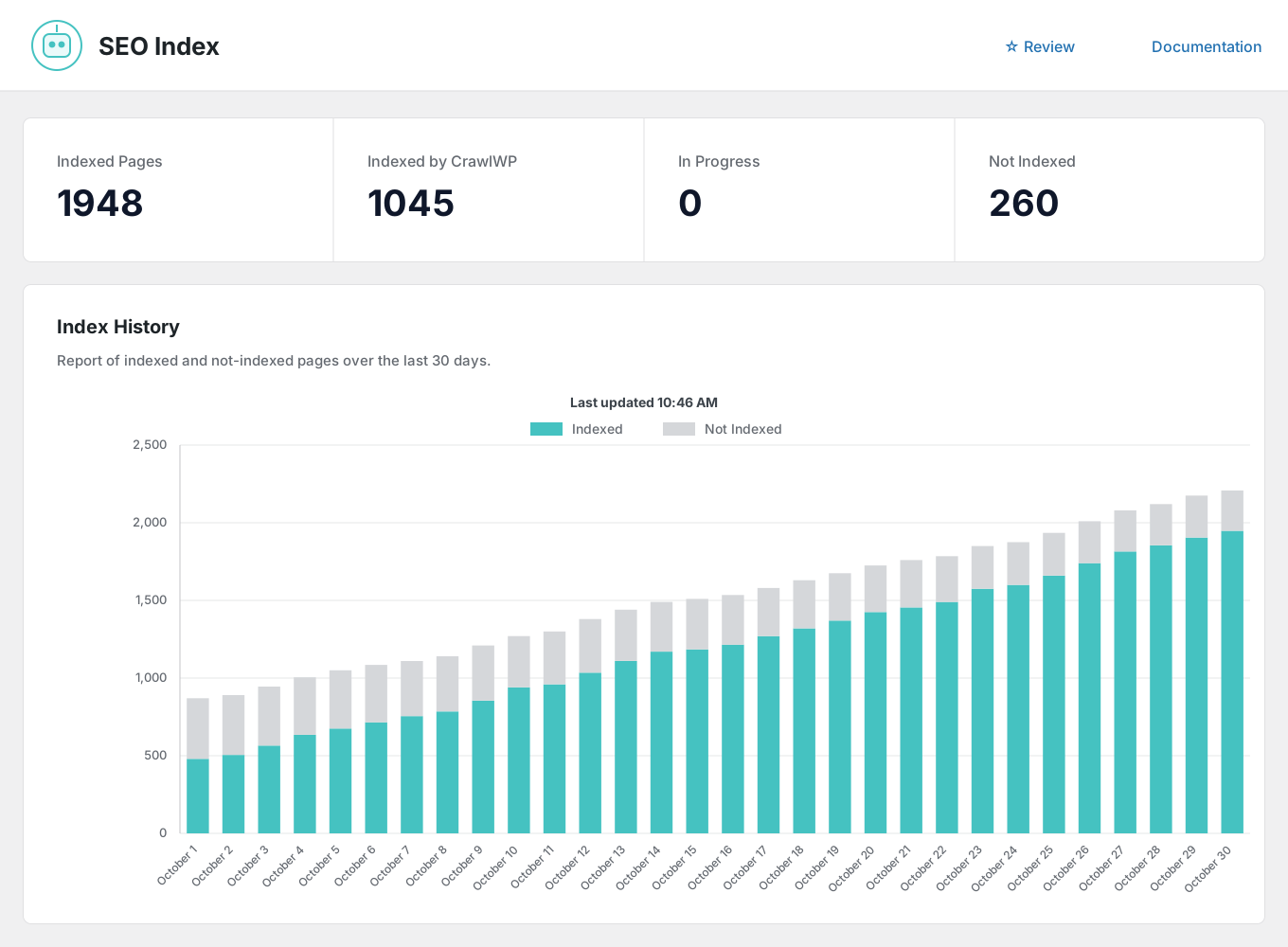
Sending a page only matters if it gets indexed. The SEO Index screen shows how many of your pages are indexed, how many CrawlWP helped get there, and how that changed over the last 30 days.
Compare
How CrawlWP compares with other instant indexing plugins
Sending a page to Google is where most indexing plugins stop. CrawlWP goes further.
| CrawlWP | Typical instant indexing plugin | |
|---|---|---|
| Search engines | Google, Bing, Yandex, Naver, Yep and Seznam.cz | Usually Google only, or Bing and Yandex only |
| Sends updated and deleted pages | Yes | Sometimes |
| Checks if each page was indexed | Yes (Premium) | Rarely |
| 30-day index history | Yes (Premium) | No |
| Finds and resends pages that were never indexed | Yes (Premium) | No |
| Log of every request | Yes | Sometimes |
| Also a complete SEO plugin | Yes | No |
Questions
Instant indexing questions
How long does indexing take after submission?
Usually within 24 hours, and often within a few hours. But each search engine decides when to index a page, and it still checks the page’s quality first. Instant indexing cuts out the wait for a crawler to find your page — it cannot promise a result.
Is the Google Indexing API safe to use?
Google says the Indexing API is meant for job posting and live streaming pages, but it works on any site, and many sites use it. If you prefer to be careful, CrawlWP gives you a one-click link to Google’s URL Inspection tool so you can request indexing manually. Sending pages through IndexNow and the Bing and Yandex APIs is completely safe.
What is IndexNow?
IndexNow is a free system that lets your site tell search engines the moment a page is added, updated, or deleted. Microsoft Bing, Naver, Seznam.cz, Yandex, and Yep support it, and they share the pages they receive with each other. Google does not use IndexNow, which is why CrawlWP also connects to the Google Indexing API.
What is an instant indexing plugin for WordPress?
It is a WordPress SEO plugin that tells search engines about a new or changed page as soon as you publish it, instead of waiting for them to find it by crawling your site. CrawlWP does this for Google, Bing, Yandex, Naver, Yep and Seznam.cz.
Is CrawlWP’s instant indexing free?
Yes. CrawlWP Lite sends your pages to all six search engines for free. CrawlWP Premium adds index status for each post, a 30-day history, automatic indexing of missing pages, and bulk indexing.
Will instant indexing make my pages rank higher?
Not on its own. It helps search engines find your pages sooner, giving them a chance to rank sooner. Where they rank still depends on page quality.
Do I still need a sitemap?
Yes. A sitemap is a complete list of your pages that search engines can crawl. Instant indexing tells them about changes straight away. They do different jobs, and the best-indexed sites use both.
Does it work with custom post types?
Yes. Posts, pages and every public custom post type — like products or docs — are sent automatically. Pages you set to noindex are never sent.
How do I connect Google?
Create a project in Google Cloud, turn on the Indexing API, and create a service account. Add that service account as an owner of your site in Google Search Console, then paste its key into CrawlWP under API Settings. Our documentation walks you through each step.
Can I send the same page many times a day?
Please do not. Send a page again only when its content has actually changed. Sending the same page too often can slow down your requests.
Pricing
Straightforward pricing, every feature included
Standard
For 1 Site
$59
/ year
Pro
For 5 Sites
$159
/ year
Agency
For Unlimited Sites
$259
/ year
Standard
For 1 Site
$359
once
Pro
For 5 Sites
$559
once
Agency
For Unlimited Sites
$759
once
Get indexed on every search engine that matters
Join thousands of website owners who use CrawlWP. Install it, connect your search engines in a few minutes, and let every new post reach the index faster.
yoursite.com
https://yoursite.com › guides › wordpress-seo
A Practical Guide to WordPress SEO in 2026
Learn how to structure, optimize, and index a WordPress site so search engines find your content within hours rather than weeks.
Google · indexed
Bing · indexed
Yandex · indexed