
Features
Google News Sitemap for WordPress
A Google News sitemap lists your newest articles so Google can find them quickly. CrawlWP adds one to your WordPress site with a single switch. It only includes articles from the last two days, as Google asks, and it works alongside the normal WordPress sitemap.
What it does
What the CrawlWP Google News sitemap does
Turn it on once, and CrawlWP keeps your Google News sitemap up to date. Here is what you get.
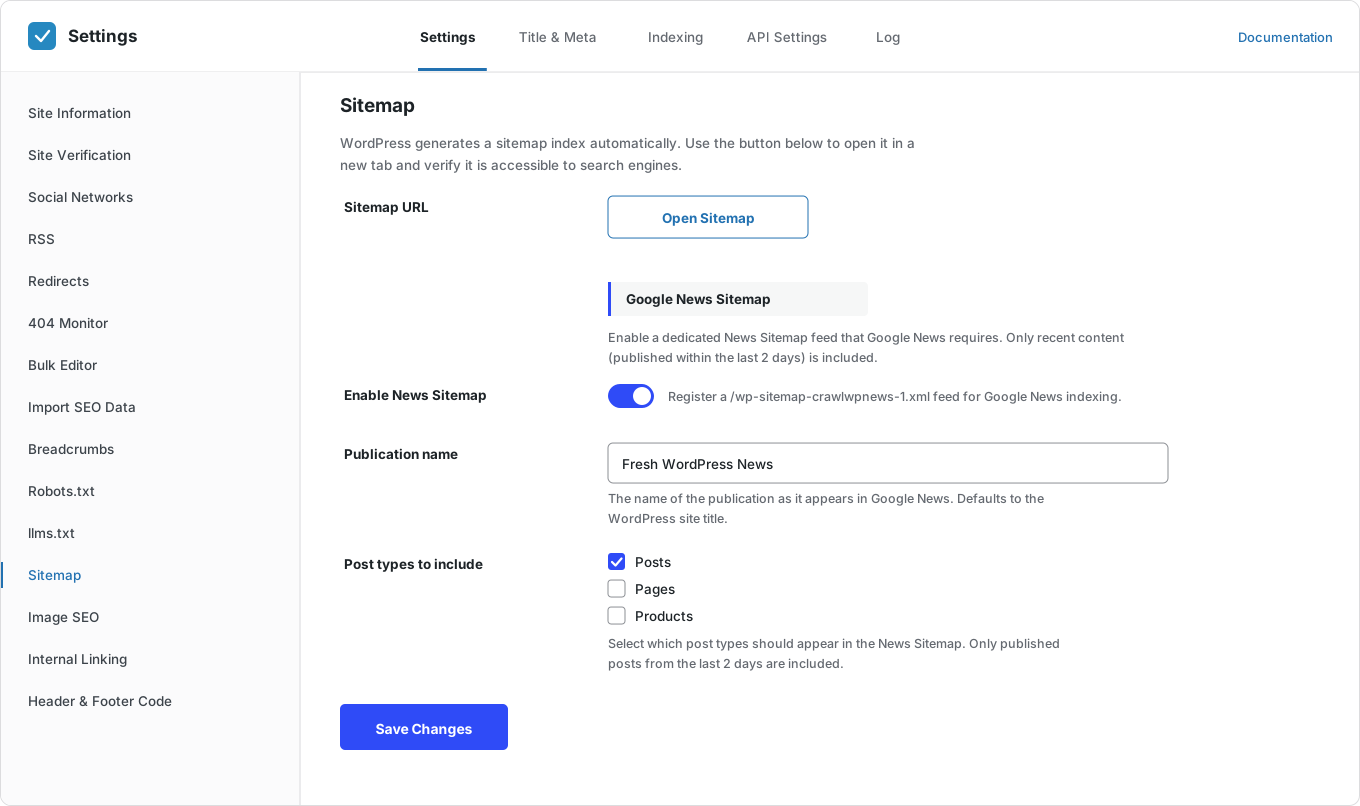
Its own news sitemap
Your Google News sitemap lives at /wp-sitemap-crawlwpnews-1.xml, separate from your main sitemap.
Last two days only
Only articles published in the last two days are included, as Google’s rules require.
Always up to date
New articles appear when you publish them. Older ones drop off after two days.
Publication name
Set the name Google News should show. Leave it empty, and CrawlWP uses your site title.
Choose post types
Pick which post types go in the news sitemap, such as posts.
Works with the WordPress sitemap
Your normal WordPress sitemap stays as it is. The two do not clash.
One switch
Turn it on with a single toggle on the Sitemap screen. No code needed.
Open your sitemap in one click
Open your sitemap in a new tab to check that it loads.
Instant indexing for each story
CrawlWP also sends each new story to search engines the moment you publish it.
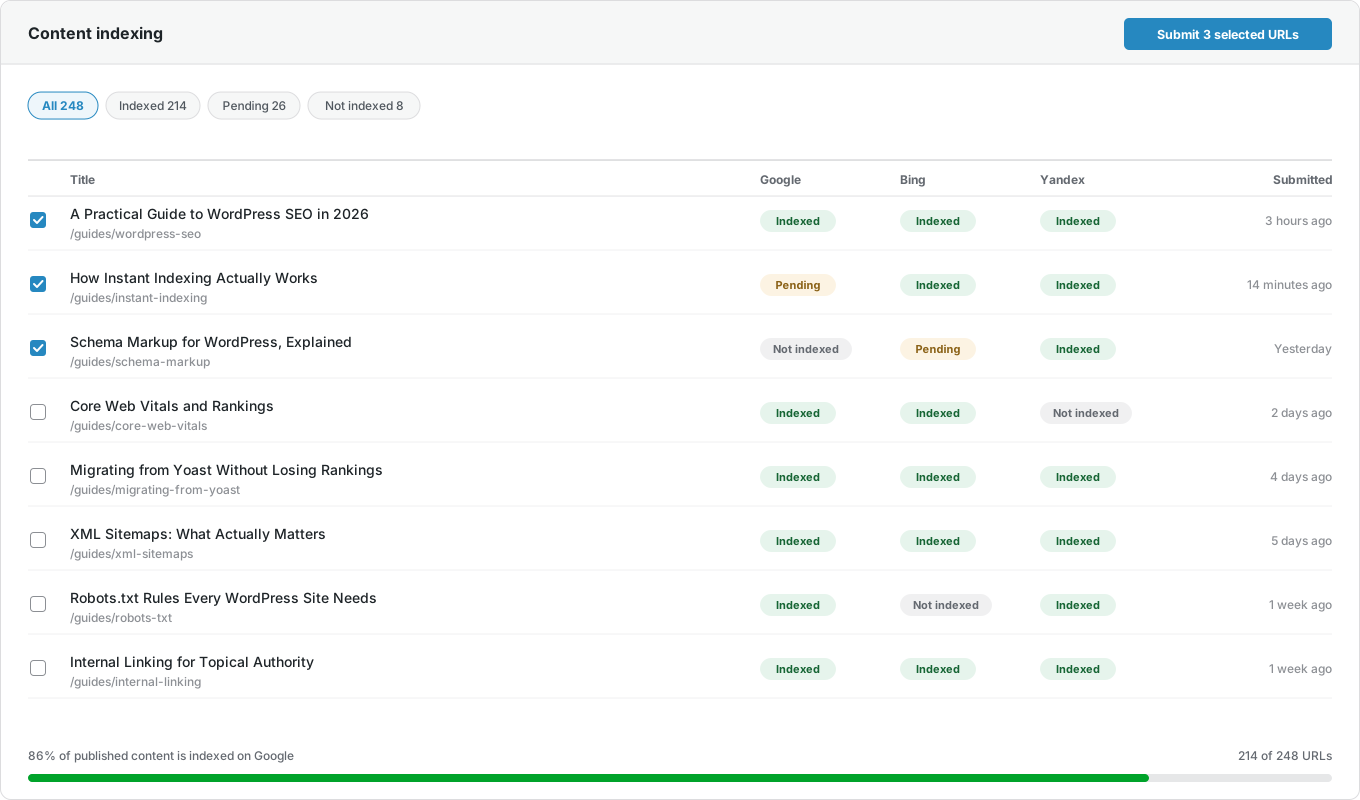
Index status for each story
See whether each story is indexed on Google, Bing, and Yandex.
Search data for each story
Clicks and impressions from Google Search Console for every post.
More sitemaps
Premium also adds video, HTML, and multilingual sitemaps.
Why it matters
Why use a Google News sitemap
News is time-sensitive. A story that Google finds days later has already missed most of its readers.
Your normal sitemap lists every page on your site, old and new. A Google News sitemap lists only your newest articles, so Google can spot fresh stories without looking through everything else.
How it works
Set up your Google News sitemap in three steps
It takes a few minutes. After that, CrawlWP keeps the sitemap updated automatically.
Step 1
Turn on the news sitemap
Go to the Sitemap screen in CrawlWP and switch on Enable News Sitemap.
Step 2
Add your publication name
Enter the name as it should appear in Google News, and pick the post types to include. Most sites only need Posts.
Step 3
Submit it in Search Console
Add /wp-sitemap-crawlwpnews-1.xml under Sitemaps in Google Search Console. Instant indexing then sends each new story as you publish it.
For publishers
Built for news publishers
A Google News sitemap is only one part of getting stories found fast. CrawlWP also sends each story to search engines the moment you publish, and then shows you whether it was indexed.
Questions
Google News sitemap questions
Answers to the questions people ask most about Google News sitemaps in WordPress.
What is a Google News sitemap?
It is a special XML sitemap that lists only your newest news articles, with extra details such as your publication name. It helps Google find fresh stories quickly.
Do I need a Google News sitemap to appear in Google News?
No, it is not required. Google can find articles by crawling your site. A news sitemap helps it find new stories faster, which is why most news sites use one.
Will a news sitemap get me into Google News?
Not on its own. There is no application to fill in. Google decides which sites appear, based on its content policies. The news sitemap helps Google find your stories once you qualify.
Why does it only include the last two days?
That is Google’s rule for news sitemaps. Older articles stay in your normal WordPress sitemap.
My news sitemap is empty. Is something wrong?
No. If you have not published anything in the last two days, there is nothing to list. It fills up again when you publish.
Where is my Google News sitemap?
At /wp-sitemap-crawlwpnews-1.xml on your site, once you switch it on.
How do I submit it to Google?
In Google Search Console, open Sitemaps, enter the news sitemap URL, and click Submit.
Does CrawlWP replace the WordPress sitemap?
No, and that is on purpose. WordPress already creates a sitemap, so CrawlWP works with it and adds the news sitemap WordPress doesn’t provide.
Is the Google News sitemap free?
No. It is part of CrawlWP Premium. The free version includes the normal XML sitemap.
Pricing
Straightforward pricing, every feature included
Standard
For 1 Site
$59
/ year
Pro
For 5 Sites
$159
/ year
Agency
For Unlimited Sites
$259
/ year
Standard
For 1 Site
$359
once
Pro
For 5 Sites
$559
once
Agency
For Unlimited Sites
$759
once
Get your news found faster
Join thousands of website owners using CrawlWP for their WordPress SEO. Switch on your Google News sitemap in a few minutes.
yoursite.com
https://yoursite.com › guides › wordpress-seo
A Practical Guide to WordPress SEO in 2026
Learn how to structure, optimize, and index a WordPress site so search engines find your content within hours rather than weeks.
Google · indexed
Bing · indexed
Yandex · indexed