
AIOSEO alternative
CrawlWP: the AIOSEO alternative without the tier ladder
All in One SEO is one of the oldest plugins in this category and covers a great deal, much of it spread across four paid tiers. If you are looking for an AIOSEO alternative, it is usually because of where those tier lines fall, or because everything it reports stops at Google.
The short answer
Why people look for an AIOSEO alternative
AIOSEO is a capable plugin. These are the three reasons people come to us from it.
The features you need are two tiers up
Redirects, the 404 monitor, and the Link Assistant all start at the Pro plan. The entry Basic plan is mostly the free plugin with support attached.
The renewal price
AIOSEO’s listed prices are first-year introductory rates. Renewals go to the full rate, which catches people out. Our renewal is the price you first paid, and the lifetime license stops renewals entirely.
Everything reports Google
AIOSEO brings Search Console into WordPress on Pro and above. If Bing or Yandex matter to your traffic, you won’t see anything.
On this page
Side by side
CrawlWP vs All in One SEO, feature by feature
Most of the difference here is not whether a feature exists, but which of AIOSEO’s four tiers it sits on.
| CrawlWP | All in One SEO | |
|---|---|---|
| Meta title and description templates | Free | Free |
| Content analysis | Focus keyword checks | TruSEO, free |
| Bulk editor for titles and descriptions | Free | Paid |
| Schema types | Core types, free | 20+ types with a visual builder |
| LocalBusiness schema | Free | Plus and above |
| Image alt text automation | Free | Higher tiers |
| robots.txt editing | Free, pre-filled with live output | Free |
| llms.txt | Free | Free |
| Redirect manager | Free: 301, 302, 410, regex | Pro and above |
| 404 monitor | Free | Pro and above |
| Internal link automation | Keyword rules | Link Assistant, Pro and above |
| XML sitemap | Uses the WordPress core index | Its own sitemap |
| Google News and video sitemaps | Premium | Pro and above |
| Multilingual sitemaps | Premium: WPML, Polylang, TranslatePress | WPML and Polylang |
| Import from other SEO plugins | Free | Free |
| Instant indexing to Google | Free, Google Indexing API | Not included |
| Indexing to Bing and Yandex | Free, APIs plus IndexNow | IndexNow |
| Indexing to Naver, Yep, Seznam.cz | Free, IndexNow | Not included |
| Index status per post | Premium: Google, Bing, Yandex | Not included |
| 30-day index history and bulk resubmission | Premium | Not included |
| Google Search Console data in WordPress | Premium | Pro and above |
| Bing and Yandex data in WordPress | Premium | Not included |
| Keyword rank tracking | Not included | Elite |
| WooCommerce SEO | Basic support | Deeper, on paid tiers |
| Renewal price | Same as the price you first paid | Renews at full rate |
| Lifetime licence | Yes | Not offered |
| Paid entry price | Starts at $59 a year | Starts at $99 a year |
Being fair about it
Where All in One SEO is the better choice
No AIOSEO alternative wins on every point, and several are clearly ahead.
Internal linking at scale
The Link Assistant audits your whole site, reports orphaned pages and link distribution, and suggests links as you write. Our keyword rules do not come close to that.
Schema depth
More than twenty schema types with a visual builder, against the core types we generate automatically.
Content analysis
TruSEO scores your draft as you write, and it is free. Ours checks a focus keyword and the basics, which in most cases is all you need.
Agency licensing
Pro covers 10 sites, and Elite covers 100. If you manage many client sites, the per-site cost is hard to beat.
WooCommerce and rank tracking
CrawlWP provides product schema but lacks advanced keyword rank tracking like the All-In-One SEO plugin.
A long track record
More than a decade of installs and a large support operation behind it.
Where CrawlWP is ahead
Getting indexed, and knowing that you were
AIOSEO supports IndexNow, which covers Bing and Yandex. It doesn’t use the Google Indexing API, and it doesn’t tell you whether it worked.
Google included
CrawlWP submits to Google through the Indexing API as well as to Bing and Yandex. AIOSEO’s IndexNow support does not reach Google.
Index status per post
Indexed, pending, or missing on Google, Bing, and Yandex, on the posts list you already use.
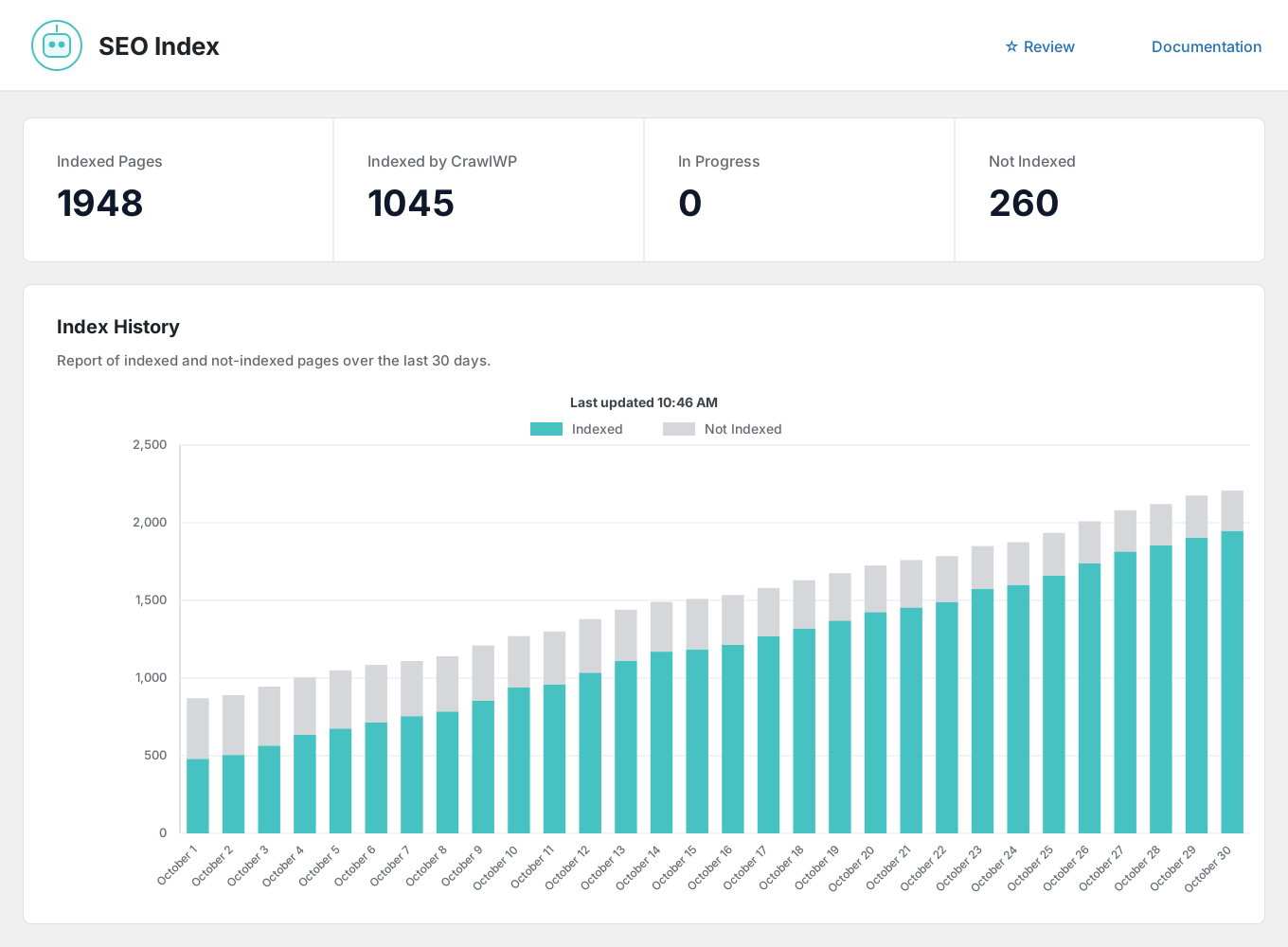
30-day index history
A chart of indexed and not-indexed pages over time so that you can see the trend rather than a snapshot.
Automatic indexing
A scheduled scan finds older content that never made it into the index and submits it.
Submission log
Every request is recorded with its date, engine, and result, on its own Log screen.
Three more engines
Naver, Yep, and Seznam.cz through IndexNow, alongside Google, Bing, and Yandex.
The gap nobody else fills
Bing and Yandex, not just Google
AIOSEO’s Search Statistics brings Google Search Console into WordPress from the Pro tier up, and it is good. Bing and Yandex are not covered at any tier. CrawlWP reads all three and reports them together.
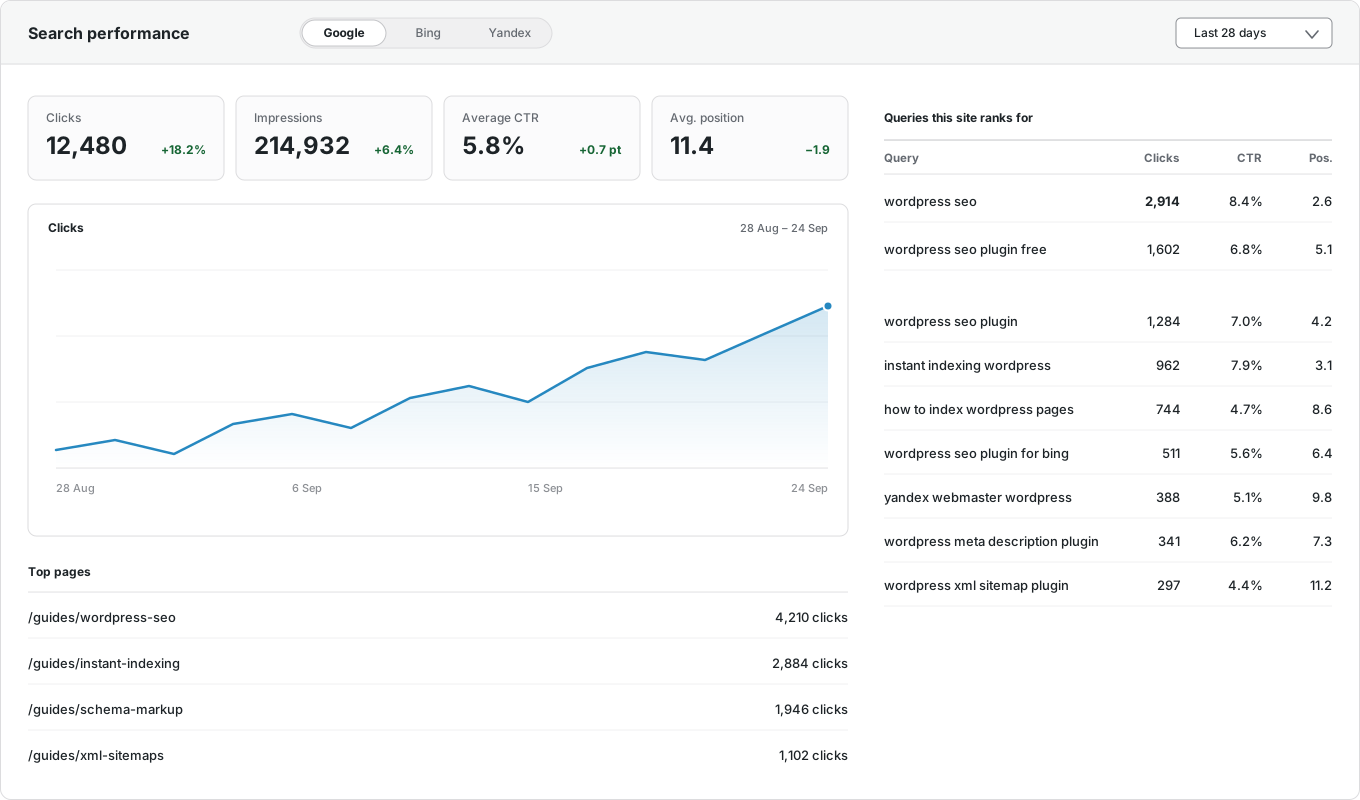
Google Search Console
Clicks, impressions, CTR, and average position, inside WordPress.
Bing Webmaster Tools
The same numbers from Microsoft Bing, on the same screen.
Yandex Webmaster
Clicks, impressions, ranking keywords, and positions from Yandex.
Per-post performance
Each post’s own numbers and top keywords, in the editor sidebar and the Insights tab.
Top pages and queries
Your best-performing URLs and the searches that bring visitors, with top countries and devices.
One screen for all three
Switch between engines without opening three separate tools.
And it comes to you
The SEO report your client will actually read
Daily, weekly, or monthly, to as many recipients as you like, in your own brand color. What is in ours and not in anyone else’s is the indexing half: how many pages are in the index, and which ones moved.

Your schedule
Daily, weekly on a day you choose, or monthly.
Multiple recipients
Comma-separated addresses, so clients and colleagues get it without a WordPress login.
Search performance
Impressions, clicks, CTR, and average position, with the change from the previous period.
Indexing insights
Pages indexed on Google, pages likely indexed on Bing, and pages still not indexed.
Keywords and pages
The searches driving traffic and the URLs earning the clicks.
Recent movements
What was newly indexed and what was dropped since the last report.
Switching
Moving from All in One SEO takes minutes
Install CrawlWP alongside All in One SEO, import the titles, descriptions, canonicals, robots settings, and redirects it already saved, spot-check a few posts, then deactivate it. The importer copies rather than moves, so that you can roll back. The full migration guide walks through it step by step.
Questions
CrawlWP and All in One SEO questions
Answers to the questions people ask most when comparing the two.
Is CrawlWP a good AIOSEO alternative?
It depends on your tier. If you are on Basic and finding that redirects and the 404 monitor need Pro, CrawlWP includes both for free. If you want index tracking or Bing and Yandex data, nothing in AIOSEO’s range covers that. If you bought Pro for the Link Assistant, stay where you are.
What does CrawlWP include that AIOSEO charges for?
Redirects, the 404 monitor, internal link automation, the bulk editor, LocalBusiness schema, image alt text, and instant indexing are all in our free version. In AIOSEO, they sit across the Plus, Pro, and Elite tiers.
Is CrawlWP cheaper than AIOSEO?
On one site, AIOSEO Basic is cheaper in year one at $49.50 against our $59, but it renews at full rate while ours does not. Across ten sites, AIOSEO Pro is better value than our Agency plan. Check both current price lists, including renewal rates.
Does AIOSEO do instant indexing?
It supports IndexNow, which covers Bing and Yandex. It doesn’t use the Google Indexing API, so Google isn’t included. CrawlWP submits to Google, Bing, Yandex, Naver, Yep, and Seznam.cz in the free version.
Can I import my AIOSEO data?
Yes. The importer detects All in One SEO and copies titles, descriptions, robots rules, canonicals, social images, and redirects. Your AIOSEO data stays where it is.
What does AIOSEO do that CrawlWP does not?
The Link Assistant, a deeper schema builder, TruSEO content analysis, keyword rank tracking, and more WooCommerce features.
Which should I choose?
If internal linking across a large content library is your main problem, AIOSEO Pro is the stronger pick. If you want to know whether your pages got indexed and how they perform beyond Google, CrawlWP is built for that.
Pricing
One tier, every feature included
Every plan includes every feature. The difference is how many sites you can run it on, and your renewal is the price you first paid.
Standard
For 1 Site
$59
/ year
Pro
For 5 Sites
$159
/ year
Agency
For Unlimited Sites
$259
/ year
Standard
For 1 Site
$359
once
Pro
For 5 Sites
$559
once
Agency
For Unlimited Sites
$759
once
Try the AIOSEO alternative alongside what you have
Install CrawlWP, import your AIOSEO data, and compare the two for a week before you deactivate anything. There is a 14-day money-back guarantee either way.
yoursite.com
https://yoursite.com › guides › wordpress-seo
A Practical Guide to WordPress SEO in 2026
Learn how to structure, optimize, and index a WordPress site so search engines find your content within hours rather than weeks.
Google · indexed
Bing · indexed
Yandex · indexed