
Comparison
CrawlWP vs Yoast SEO: WordPress SEO Plugin Comparison
Yoast is a popular WordPress SEO plugin, and it does its job well. This page covers where the two overlap, where Yoast is the better choice, and the one area where CrawlWP does something Yoast does not do at all.
On this page
Side by side
Feature by feature
Both plugins cover on-page SEO well. The differences are in redirects, indexing, and what happens after you publish.
| CrawlWP | Yoast SEO | |
|---|---|---|
| Meta title and description templates | Yes | Yes |
| Bulk editor for titles and descriptions | Free | Yes |
| Schema, breadcrumbs, Open Graph | Yes | Yes |
| Content analysis | Yes | Yes |
| Focus keywords per post | Multiple | One free, up to five in Premium |
| robots.txt editing | Free, pre-filled with live output | Free |
| llms.txt | Free | Free |
| Redirect manager | Free: 301, 302, 410, regex | Premium |
| 404 monitor | Free | Not included |
| Automatic redirect on permalink change | Free | Premium |
| Internal link automation | Keyword rules | Premium suggestions |
| XML sitemap | Uses the WordPress core index | Its own sitemap |
| Google News and video sitemaps | Premium | Premium |
| LocalBusiness schema | Free | Premium |
| HTML sitemap | Premium | Not included |
| Multilingual sitemaps | Premium: WPML, Polylang, TranslatePress | Via WPML and Polylang compatibility |
| GA4 and Tag Manager fields | Free | Separate plugin |
| Import from other SEO plugins | Yes | Yes |
| Instant indexing to Google | Free | Not included |
| Indexing to Bing, Yandex, Naver, Yep, Seznam.cz | Free, APIs plus IndexNow | IndexNow in Premium |
| Index status per post | Premium | Not included |
| Search Console data inside WordPress | Premium | Not included |
| Bing and Yandex data inside WordPress | Premium | Not included |
| SEO email reports | Premium | Not included |
| Price for one site | Starts at $59 a year | See their pricing page |
Being fair about it
Where Yoast SEO is the better choice
Yoast is a mature product with a much larger team. These are the reasons to stay with it.
Content and readability analysis
Yoast has spent over a decade on its content analysis, and it is more developed. If you open an SEO plugin mainly to score a draft, that is a fair reason to stay.
Multiple focus keyphrases
Yoast Premium scores a post against up to five keyphrases. CrawlWP works with as many focus keywords per post.
Bundled niche products
Yoast Premium includes Local, News, and Video SEO products. CrawlWP includes LocalBusiness schema and News and video sitemaps, but not everything those carry.
Its own sitemap system
If you need more control over your sitemap than WordPress offers, consider using Yoast’s sitemap feature.
Ecosystem and familiarity
Yoast is installed on millions of sites, so every developer you hire has already seen it.
A larger team
More third-party integrations, a longer track record, and a support operation sized to match.
Where CrawlWP is ahead
Indexing, and three engines instead of one
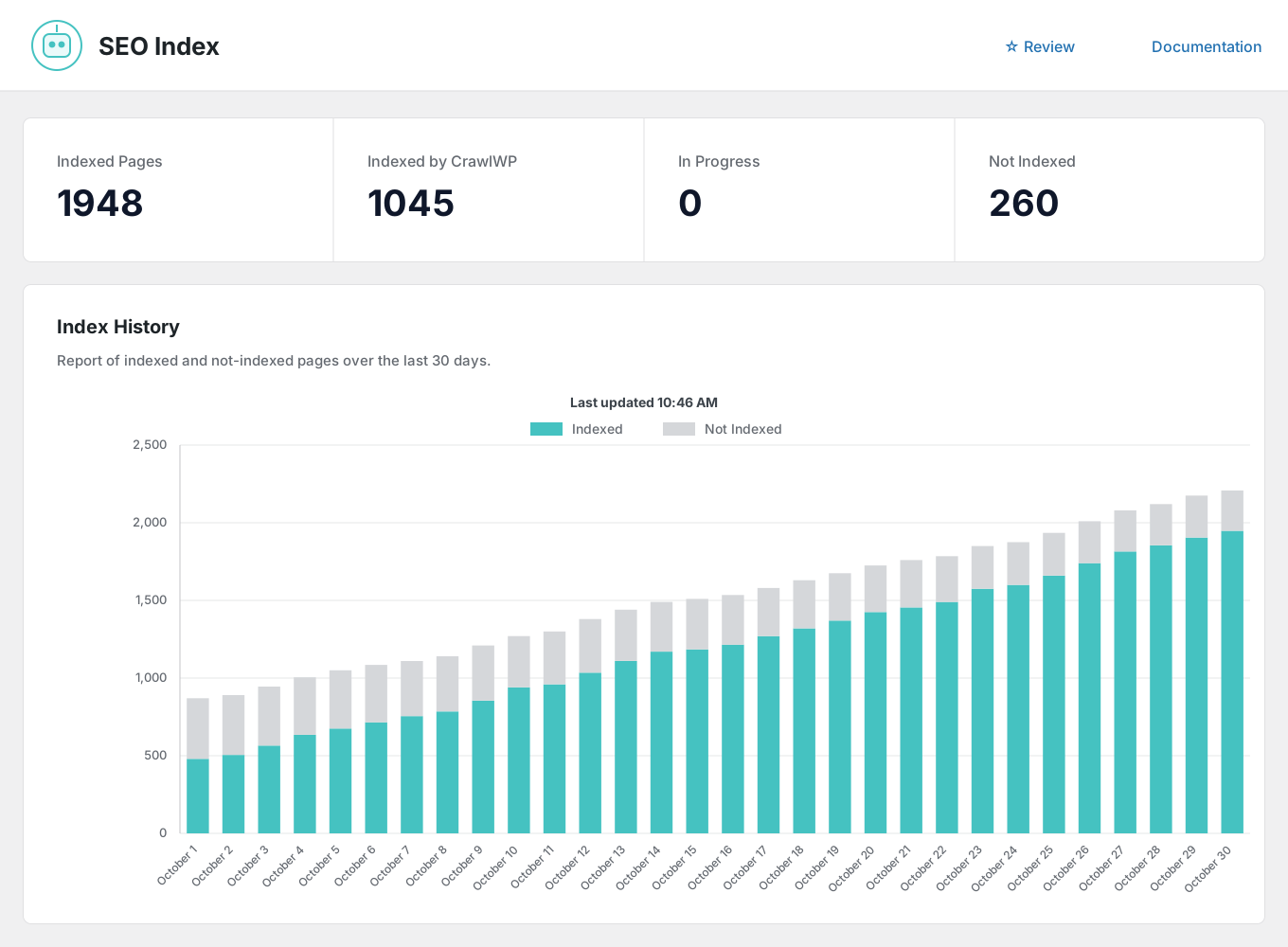
The on-page work is comparable. The difference is what happens after you publish: CrawlWP submits the page to several search engines, tells you whether it reached the index, and reports on Bing and Yandex as well as Google.
Indexing on content change
New and updated posts, pages, and custom post types are submitted as soon as they change.
Automatic indexing
A scheduled scan finds content that never made it into the index and submits it.
Bulk indexing
Select any set of posts from the content list and send them together.
Index status per post
Indexed, pending, or missing, per engine, on the posts list you already use.
Submission log
Every request recorded with its date, engine, and result, on its own Log screen.
URL inspection shortcut
One click through to Google’s inspection tool when you would rather request indexing by hand.
The gap nobody else fills
Search data from three engines, in WordPress
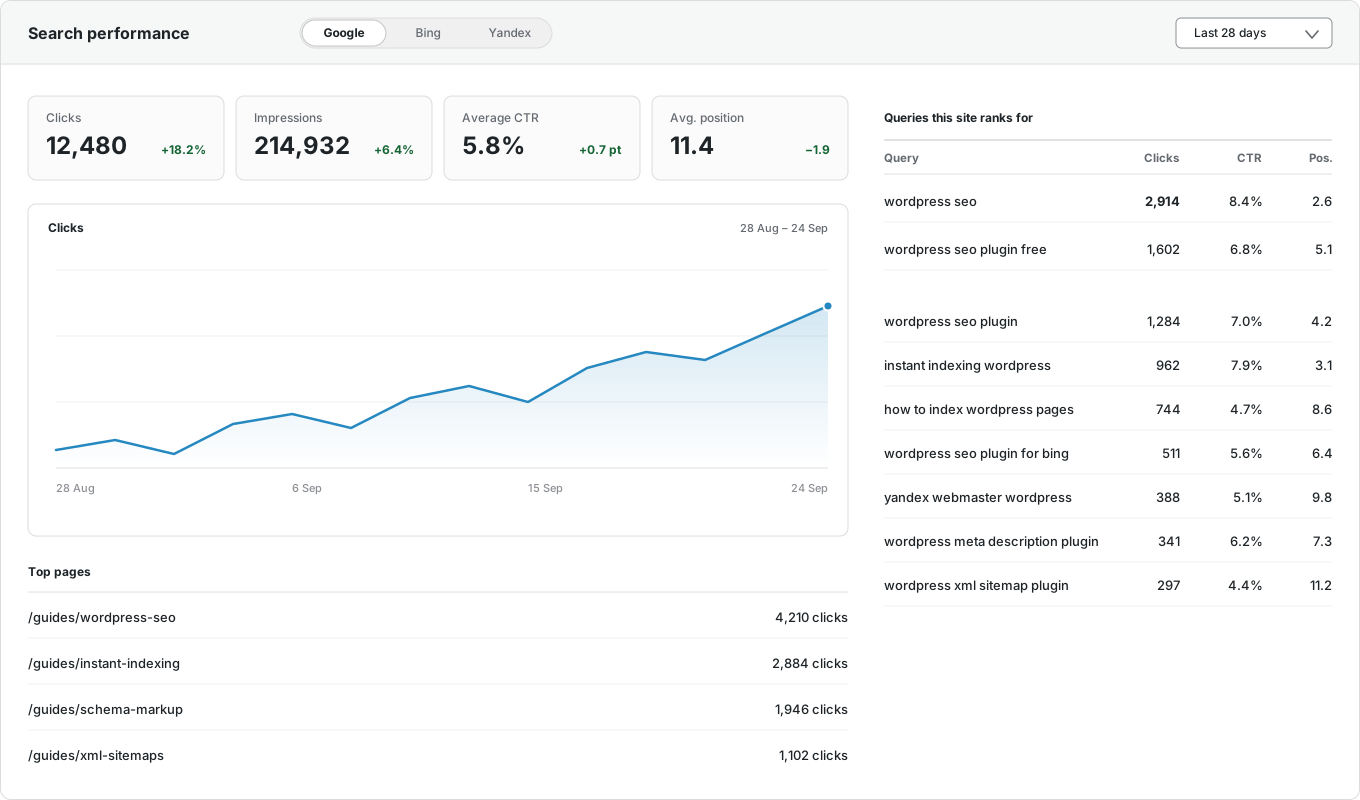
Yoast doesn’t access Search Console, Bing, or Yandex, so WordPress has no search performance data and no email report is generated. In contrast, CrawlWP accesses all three platforms, combines their data, and displays the numbers next to the posts that earned them.
Google Search Console
Clicks, impressions, CTR, and average position, inside WordPress.
Bing Webmaster Tools
The same numbers from Microsoft Bing, on the same screen.
Yandex Webmaster
Clicks, impressions, ranking keywords, and positions from Yandex.
Per-post performance
Each post’s own numbers and top keywords, in the editor sidebar and the Insights tab.
Top pages and queries
Your best-performing URLs and the searches that bring visitors, with top countries and devices.
Email reports
Daily, weekly, or monthly summaries to as many people as you like.
And it comes to you
The SEO report your client will actually read
Daily, weekly, or monthly, to as many recipients as you like, in your own brand color. Yoast does not send anything like it.

Your schedule
Daily, weekly on a day you choose, or monthly.
Multiple recipients
Comma-separated addresses, so clients and colleagues get it without a WordPress login.
Search performance
Impressions, clicks, CTR, and average position, with changes from the previous period.
Indexing insights
Pages indexed on Google, pages likely indexed on Bing, and pages still not indexed.
Keywords and pages
The searches driving traffic and the URLs earning the clicks.
Recent movements
What was newly indexed and what was dropped since the last report.
Switching
Moving from Yoast SEO takes minutes
Install CrawlWP alongside Yoast SEO, import the titles, descriptions, canonicals, and robots settings it already saved, spot-check a few posts, then deactivate it. The importer copies rather than moves so that you can roll back. The full migration guide walks through it step by step.
Questions
CrawlWP and Yoast SEO questions
Answers to the questions people ask most when comparing the two.
Can I run both at once?
Briefly, while you import, but not permanently. Two SEO plugins produce duplicate meta tags and competing sitemaps.
Will switching hurt my rankings?
Not if the output is equivalent, which is what the importer is for. Search engines read your meta tags, not your plugin list.
Is CrawlWP cheaper than Yoast?
CrawlWP Premium is $59 a year for one site, with every feature included. Yoast prices Premium per site and sells WooCommerce support as a separate product. Check both current price lists, since they change.
Does CrawlWP have a redirect manager?
Yes, and it is free: 301, 302, and 410 rules with exact, starts-with, ends-with, and regex matching, hit counts, and a 404 monitor. In Yoast, redirects are a Premium feature.
Does Yoast do instant indexing?
Yoast Premium includes IndexNow, which covers Bing and Yandex. It doesn’t use the Google Indexing API, so Google isn’t included. CrawlWP submits to Google, Bing, Yandex, Naver, Yep, and Seznam.cz in the free version.
Is CrawlWP’s content analysis as good as Yoast’s?
Yes. Yoast is more developed and includes readability scoring, which we also offer, though in a more basic form. Ours checks your focus keyword, title, description, headings, links, and images.
Which should I choose?
If you mainly want help writing and scoring drafts, Yoast is the safer pick. If you want to know whether your pages got indexed and how they perform on Google, Bing, and Yandex, that is what CrawlWP is built for.
Pricing
Straightforward pricing, every feature included
Standard
For 1 Site
$59
/ year
Pro
For 5 Sites
$159
/ year
Agency
For Unlimited Sites
$259
/ year
Standard
For 1 Site
$359
once
Pro
For 5 Sites
$559
once
Agency
For Unlimited Sites
$759
once
Try it alongside what you have
Install CrawlWP, import your Yoast data, and compare the two for a week before you deactivate anything. There is a 14-day money-back guarantee either way.
yoursite.com
https://yoursite.com › guides › wordpress-seo
A Practical Guide to WordPress SEO in 2026
Learn how to structure, optimize, and index a WordPress site so search engines find your content within hours rather than weeks.
Google · indexed
Bing · indexed
Yandex · indexed