
Do you want to learn how to use keywords for SEO to rank higher and attract the right audience to your website?
Keywords aren’t some magical SEO spell. They’re just the connection between what people are typing into search engines and the content you publish. When you use them the right way, search engines understand your pages better, and that’s how you give your content a fighting chance to rank.
Back in the early days of the web, you could literally repeat the same word fifty times and call it a day. Those times are long gone. Today, search engines are way smarter. They look for relevance, context, and whether your keywords fit naturally into the conversation. It’s no longer about tricking an algorithm. It’s about building a clear map that leads both search bots and real people straight to your door.
In this guide, you’ll learn how keywords work in SEO, how to find the right keywords, the different types you can use, and where to place them in your content. You’ll also see how to track performance and avoid common mistakes.
Table of Contents
Understanding Keywords and SEO
Keywords are the words and phrases people type into search engines when they are looking for information, products, or solutions. For example, someone might search for “best WordPress SEO plugins,” “how to start a blog,” or “cheap web hosting in London.” Each of these phrases gives a clear signal of what the person wants.
SEO (Search Engine Optimization) is the process of improving your content so it can appear in search results when people search for those terms. In simple terms, SEO helps search engines understand your content, while keywords tell search engines what your content is about.
Think of keywords as the language your audience uses, and SEO as the system that connects that language to your content. When both work together, your pages become easier for the right people to discover.
What Keywords Mean in Search Engines
At the most basic level, keywords are signals. They tell search engines what a page is about. When someone enters a search term, Google scans its index to find pages that contain relevant keywords and closely match the meaning behind that search.
But keywords are not just random words placed on a page. They reflect user intent. This means every keyword serves a purpose. For example, a person searching “how to use keywords” is likely trying to learn something, while someone searching “best SEO keywords for ranking” may be looking for strategies or lists they can apply immediately.
Search engines have become more advanced over time. They no longer look for exact word matches. Instead, they analyze context, related terms, and how well your content answers the user’s question. This is why understanding the intent behind keywords is just as important as the keywords themselves.
Keyword Research: How to Know What Keywords to Use for SEO
Once you understand what keywords are and how they relate to SEO, the next step is to figure out which ones you should actually use. This process is called keyword research, and it is where most of your SEO success begins.
Keyword research is the act of discovering what your audience is searching for and how they phrase it. Instead of guessing what people might type into search engines, you rely on real data to guide your content. This helps you create pages that match actual demand, not assumptions.
A good place to start is by thinking like your audience. Ask yourself: what would someone type if they were looking for the solution I’m providing? If you’re writing about SEO, for example, people might search for phrases like “how to improve Google ranking,” “SEO tips for beginners,” or “how to use keywords for SEO.”
From there, you can expand your ideas using keyword tools. These tools show you how often people search for a term, how competitive it is, and what related keywords exist.
Some popular options include Google Keyword Planner, Ubersuggest, Ahrefs, and SEMrush. Even Google itself can help: start typing a query and check the autocomplete suggestions or the “People also ask” section.
As you gather keyword ideas, focus on three important factors:
- Search intent: What does the user actually want? Are they trying to learn, compare, or buy something?
- Search volume: How many people are searching for that keyword each month?
- Competition level: How difficult will it be to rank for that keyword based on existing content?
Balancing these three helps you avoid wasting time on keywords that are either too competitive or too irrelevant. In many cases, long-tail keywords (more specific phrases) are easier to rank for and attract more targeted traffic because they match exactly what users are looking for.
It also helps to group your keywords into themes. Instead of targeting one keyword per page, you can build content around a main topic and include related terms naturally within it. This gives search engines a clearer understanding of your content and improves your chances of ranking for multiple searches.
Keyword Types: What Types of Keywords Can You Use
Now that you understand keyword research for SEO and how to find keywords for SEO, the next step is knowing the different types of keywords you can use in your content.
Not all keywords work the same way. Some bring in large amounts of traffic, while others attract a smaller but more targeted audience.
Using a mix of keyword types helps you reach people at different stages of their search journey. It also makes your content more natural and easier for search engines to understand.
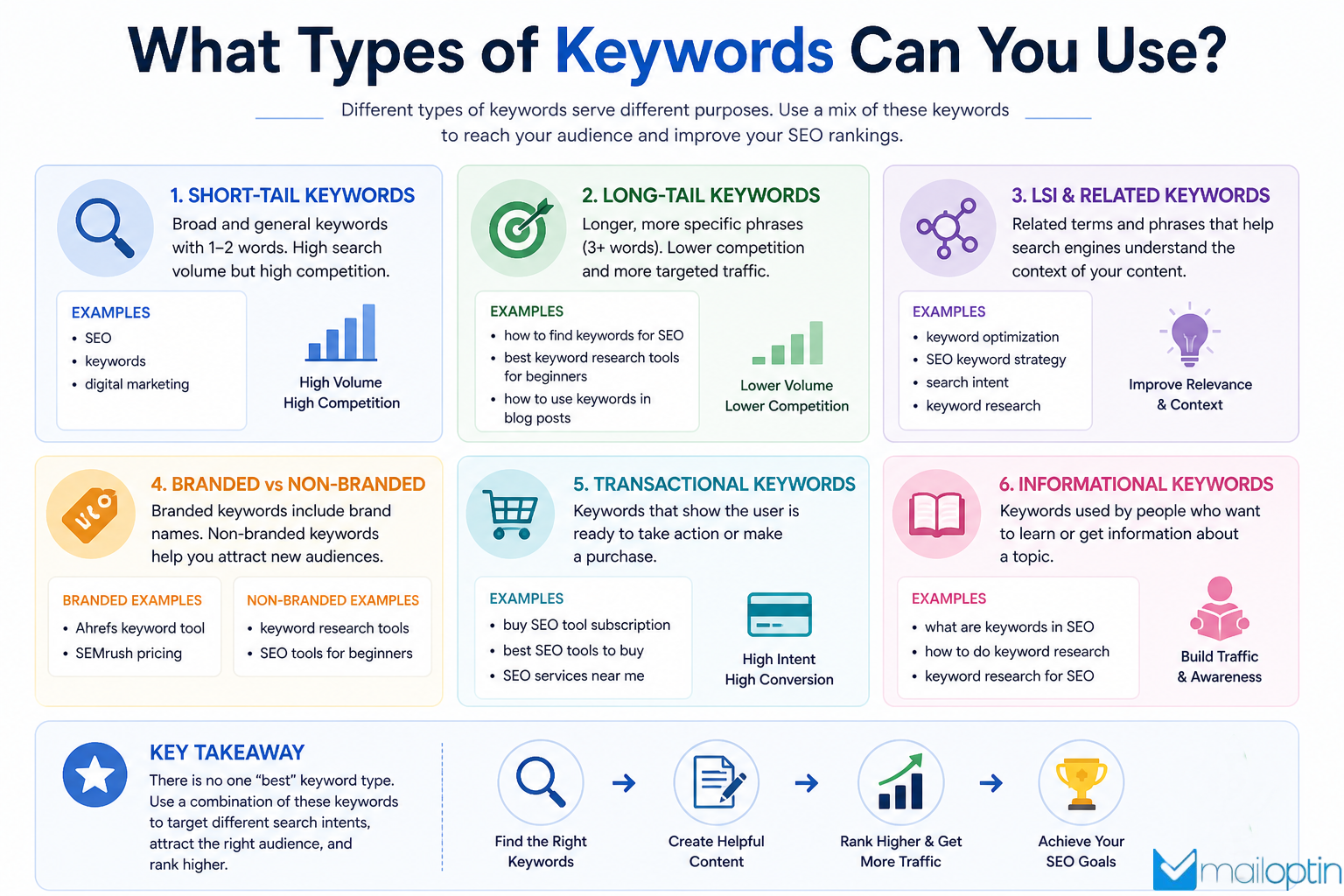
Below are the different types of keywords;
1. Short-Tail Keywords: Short-tail keywords are broad search terms, usually made up of one or two words.
Examples:
- SEO
- keywords
- digital marketing
These keywords have high search volume, meaning many people are searching for them. However, they are also very competitive and often vague. Someone searching for “SEO” could be looking for anything from a definition to advanced strategies.
Because of this, short-tail keywords are useful for general visibility, but they are harder to rank for, especially if your site is new.
2. Long-Tail Keywords: Long-tail keywords are longer and more specific phrases, usually containing three or more words.
Examples:
- How to find keywords for SEO
- Best keyword research platform for beginners
- How to use keywords in blog posts
These keywords typically have lower search volume, but they are much easier to rank for and often bring more relevant traffic. This is because they clearly reflect what the user is looking for.
Long-tail keywords are especially important if you want to attract users who are closer to taking action or who have a specific question in mind.
3. LSI and Related Keywords: LSI (Latent Semantic Indexing) keywords, often called related keywords, are terms that are closely connected to your main keyword.
For example, if your main keyword is “keywords in SEO,” related terms might include:
- SEO keyword strategy
- keyword optimization
- search intent
Search engines use these related terms to understand the context of your content better. Instead of repeating the same keyword over and over, including variations and related phrases makes your content more natural and improves its relevance.
4. Branded vs Non-Branded Keywords: Branded keywords include the name of a specific company, product, or service, while non-branded keywords do not.
Examples:
- Branded: “Ahrefs keyword research,” “SEMrush pricing.”
- Non-branded: “keyword research for SEO,” “SEO for beginners.”
Branded keywords are useful when people are already aware of a product or service and search for it directly. Non-branded keywords, on the other hand, help you attract new users who are still exploring their options.
5. Transactional and Informational Keywords: These keywords are based on search intent and align with what users want to achieve.
Informational keywords focus on learning. Example: “What are keywords in SEO?”
Transactional keywords focus on taking action. Example: “buy SEO tool subscription”
Including both types in your content strategy ensures you can guide users from learning about a topic to eventually making a decision.
When you combine these keyword types effectively, your content becomes more flexible and powerful. Instead of relying on a single keyword, you create a structure that captures different search patterns, matches user intent, and improves your chances of ranking across multiple queries.
Keyword Placement: Where to Integrate Keywords in Your Content
After finding the right keywords and understanding the different types you can use, the next step is knowing exactly where to place them.
Using keywords in the right spots sends clear signals about what your page is about. But it is not about forcing them into every sentence. The goal is to integrate them in a way that feels natural and supports the overall flow of your content.
In this section, you will learn where to place keywords in your content so both search engines and readers can easily understand your page
1. Title Tags
Your title is one of the most important places to include your main keyword. It tells both readers and search engines what the page is about.
Make sure your primary keyword appears naturally in the title, preferably close to the beginning. At the same time, keep it engaging so people actually want to click.

Best Practices for Title Tags
1. Include your main keyword: Place your main keyword in the title in a way that feels natural. This helps search engines understand what the page is about and improves its relevance for related searches.
2. Keep the title within a reasonable length: A title that is too long may get cut off in search results. Aim for a length that allows the full message to display clearly so users can understand it at a glance.
3. Match search intent: Your title should reflect what the user is trying to find. If someone is looking for guidance, the title should signal learning or explanation. If they want options, the title should reflect comparison or listing.
4. Use clear and specific wording: Avoid vague phrases that do not explain the topic. A good title should give a direct idea of what the page covers, so users know what to expect before clicking.
5. Keep each title unique: Every page should have its own distinct title. Repeating the same title across multiple pages can confuse search engines and reduce clarity about which page should rank for which topic.
2. Meta Descriptions
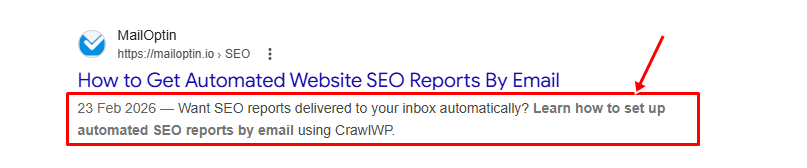
Meta descriptions are short text summaries that appear under your page title in search results. They give users a quick idea of what your page is about before they click.
You should place your main keyword naturally within the meta description and ensure it accurately reflects the content of the page. It should also align with the search intent so users know they are in the right place.
Best Practices for Meta Descriptions
1. Write a clear summary of the page: Explain what the content is about simply and directly so users immediately understand the value of the page.
2. Include your main keyword: Place your main keyword in a way that fits the sentence. This helps users confirm the page matches what they searched for.
3. Keep it concise: Avoid long descriptions that may get cut off in search results. Focus on delivering the main idea within a short space.
4. Match user intent: Make sure the description reflects what the user expects to find. If your content is educational, the description should reflect that.
5. Avoid duplicate descriptions: Each page should have its own unique meta description so search engines and users can clearly distinguish between different pages.
3. Headings and Subheadings
Headings (H1, H2, H3, and H4) are used to structure your content into clear sections. They make it easier for readers to scan and understand your content, while also helping search engines identify the main topics and how your ideas are organized.
Best Practices for Headings
1. Use the main keyword in the H1: The H1 tag should reflect the main topic of your page. Including your primary keyword in it helps search engines quickly understand the subject of your content.
2. Add related keywords in H2 and H3 headings: Use supporting keywords or related phrases in your H2 and H3 headings. This helps reinforce your topic and gives your content structure without repeating the same phrase too often.
3. Write clear and meaningful headings: Each heading should clearly describe the section that follows. This helps readers know what to expect and makes your content easier to follow.
4. Keep headings focused and specific: Avoid vague headings that do not explain the section properly. A focused heading improves clarity and helps both users and search engines better understand your content.
5. Maintain a logical heading structure: Follow a proper order starting from H1, then H2, followed by H3 where needed. This prevents confusion in how your content is organized.
4. Body Content
The body content is where most of your keyword usage happens. This is the main section of your page, where you fully explain your topic in detail.
However, keyword placement here should feel natural. The focus should be on writing helpful, readable content while weaving in relevant keywords in a way that supports the message. When keywords are forced into sentences, it can disrupt the flow and make the content harder to read.
Best Practices for Body Content
1. Maintain natural keyword usage: Instead of focusing too much on strict keyword density, aim for natural placement. Your primary keyword should appear where it fits logically within the sentence. Overusing it can make the content sound forced and reduce readability. The priority should always be smooth, helpful writing that flows well for the reader.
2. Use synonyms and related phrases: Avoid repeating the same keyword over and over. Instead, include variations and related terms that connect to your topic. This helps your content feel more natural and also gives search engines a better understanding of the context around your page. It allows your content to rank for multiple related searches rather than just one phrase.
3. Focus on readability and user experience: Your content should be written for people first. If readers find your content easy to understand and engaging, they are more likely to stay longer on your page. This sends positive signals to search engines. Break ideas into short paragraphs, use simple sentence structure, and keep the flow conversational without losing clarity.
4. Place the main keyword early: Try to include your primary keyword within the first 100 words of your content. This helps search engines quickly identify the topic of your page. However, it should still feel natural and not be forced into the opening paragraph. The goal is to set context early while maintaining a smooth introduction.
5. URLs
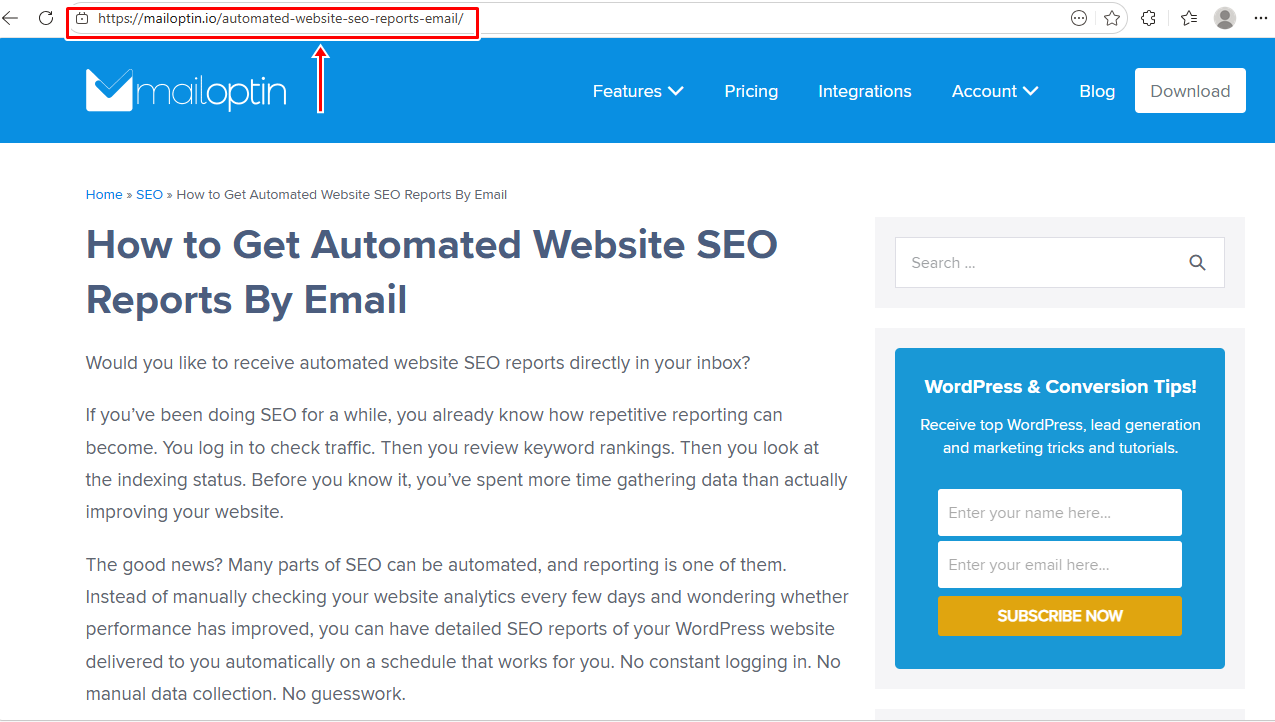
URLs are an important part of on-page SEO and should be optimized with relevant keywords. A clean, well-structured URL helps search engines understand what your page is about and makes it easier for users to read and trust the link.
Best Practices for URLs
1. Include your primary keyword: Add your main keyword to the URL slug so both users and search engines can quickly understand what the page is about.
2. Keep URLs short and clear: Short URLs are easier to read, share, and remember. Focus on including only the words that matter and remove anything unnecessary.
3. Use hyphens to separate words: Use hyphens (-) between words instead of underscores (_). This makes your URL easier to read and aligns with how search engines interpret word separation.
4. Avoid unnecessary words: Skip filler words like “and,” “the,” or “of” unless they are needed for clarity. This keeps your URL clean and focused.
5. Use lowercase letters: Always use lowercase letters in your URLs to avoid duplication issues and ensure consistency across browsers.
6. Images and Alt Text
Search engines cannot “see” images the way humans do, so they rely on alt text to understand them. Adding keywords to your image alt text helps improve your visibility in image search.
Just make sure the description matches the image and does not feel forced.
Best Practices for Images and Alt Text
1. Use clear and descriptive file names: Before uploading an image, rename the file so it reflects what the image shows. Instead of generic names like “IMG343.jpg,” use something meaningful like “seo-keyword-placement.jpg.”
2. Write helpful alt text: Alt text should describe the image in a way that makes sense if the image cannot be seen. Include relevant keywords where they fit naturally, but focus on clarity and accuracy first. This also improves accessibility for users who rely on screen readers.
3. Use image titles where relevant: Image titles are not as important as alt text, but they can still add context. Use them when needed, especially if they help explain the image further.
4. Compress images for faster loading: Large image files can slow down your page, which affects user experience. Compress images before uploading to keep your page loading quickly.
5. Place images near relevant text: Position images close to the content they relate to. This helps search engines understand the connection between the image and the surrounding text.
When you place keywords thoughtfully across your content, everything starts to work together. Your page becomes easier for both search engines and readers to understand. And instead of sounding repetitive, your writing feels natural while still being optimized for better rankings.
Tracking Keyword Performance and SEO Results
Once you’ve chosen your keywords and placed them correctly in your content, the next step is to track their performance. This helps you understand what is working, what needs improvement, and where new opportunities exist.
SEO is not a one-time task. Even well-optimized content needs to be monitored over time. Search rankings can change, user behavior can shift, and competitors can update their content. Tracking your keyword performance allows you to stay informed and make better decisions.
One of the first things to monitor is your keyword rankings. This shows where your content appears in search results for your target keywords. If your page starts moving higher, it is a good sign that your optimization is working. If it drops, it may mean your content needs to be updated or improved.
Another important factor is organic traffic. This shows how many visitors come to your site from search engines. An increase in traffic usually means your keywords are bringing in more visibility. However, traffic alone is not enough.
You should also look at user behavior. Metrics such as bounce rate, time on page, and pages per session provide insight into how visitors interact with your content. If users leave quickly, it may mean your content doesn’t match their expectations, even if your keywords are correct.
Click-through rate (CTR) is another useful metric. It shows how often people click your page after seeing it in search results. A low CTR could mean your title or meta description needs improvement, even if your ranking is good.
To track all of this, you can use platforms like Google Search Console and Google Analytics. They provide data on keyword rankings, traffic, and user behavior, helping you understand how your content is performing.
If your website is built with WordPress, you can also take advantage of our CrawlWP SEO plugin to monitor your website’s SEO performance and ensure your content is indexed. It also automatically notifies search engines whenever your content is published, updated, or removed, helping your pages be discovered faster.
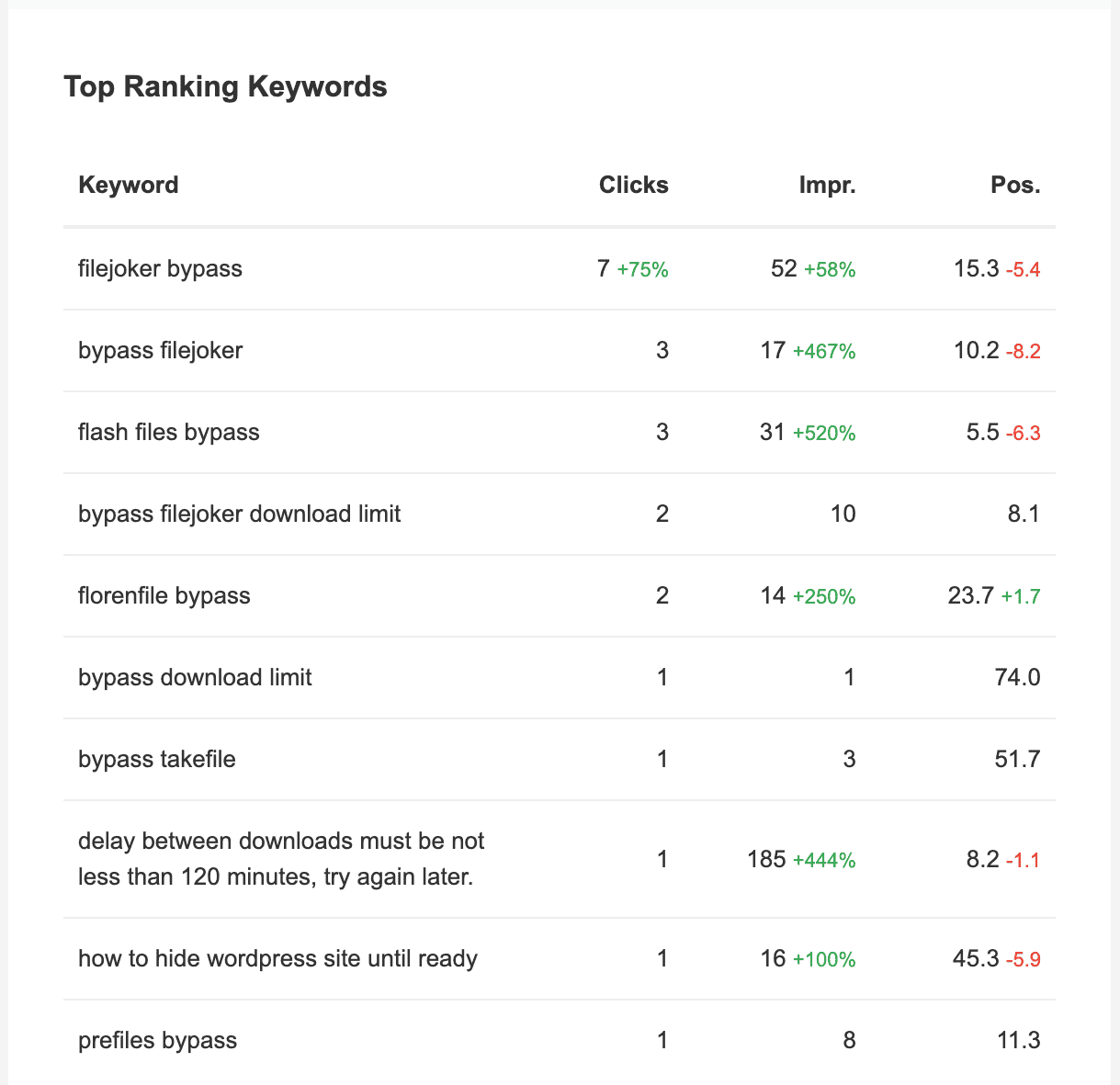
CrawlWP also gives you deeper insights into how your keywords are performing. You can track keyword rankings, monitor the index status of your pages, and view reports that show impressions, clicks, and ranking positions. This makes it easier to see which keywords are driving results and which ones need improvement.
Common Keyword SEO Mistakes to Avoid

By this point, you already understand how to find keywords and where to place them. The next step is knowing what not to do.
Even with the right keywords, a few common mistakes can hold your content back from ranking well.
Avoiding these issues will help you get better results from your efforts and keep your content aligned with how search engines work.
1. Keyword stuffing: One common mistake is overusing the same keyword in an attempt to rank higher. This often leads to awkward sentences and poor readability. Search engines are now advanced enough to recognize when keywords are forced into content. Instead of improving rankings, this can hurt your performance on Google, Bing, Yandex, Yep, and more. Focus on writing naturally and use keywords where they fit without repetition.
2. Ignoring search intent: Choosing a keyword without understanding the intent behind it can lead to mismatched content. For example, if someone searches for a guide but lands on a sales page, they will likely leave quickly. This signals to search engines that your content is not relevant. Always make sure your content matches what the user is actually looking for.
3. Targeting overly competitive keywords: It is tempting to go after high-volume keywords, but many of them are highly competitive. If your site is still growing, ranking for these terms can be difficult. A better approach is to focus on more specific phrases. These often have less competition and attract visitors who are more likely to engage with your content.
4. Using the same keyword across multiple pages: When multiple pages on your site target the same keyword, they compete against each other. This is known as keyword cannibalization. Instead of helping your rankings, it can confuse search engines about which page to show. Each page should focus on a distinct topic or keyword.
5. Neglecting keyword placement: Finding the right keywords is only part of the process. If they are not placed correctly in your content, search engines may not fully understand your page. Make sure your keywords appear naturally in important areas, such as the title, headings, introduction, and body content.
6. Relying only on exact match keywords: Repeating the same phrase throughout your content is no longer effective. Search engines now look at context and related terms. Using variations, synonyms, and related phrases helps your content feel more natural and allows it to rank for a wider range of searches.
7. Focusing on keywords instead of value: It is easy to get caught up in keyword placement and forget the main goal, which is helping the reader. If your content does not provide useful information, no amount of keyword optimization will keep visitors on your page. Always focus on delivering real value first, then support it with proper keyword usage.
Bonus Tip: Turn Your Traffic into Subscribers with MailOptin!
Getting your content to rank is only part of the process. What happens after visitors land on your page matters as much. If you are not capturing those visitors or staying in touch with them, you are missing out on valuable opportunities.
This is where MailOptin comes in.
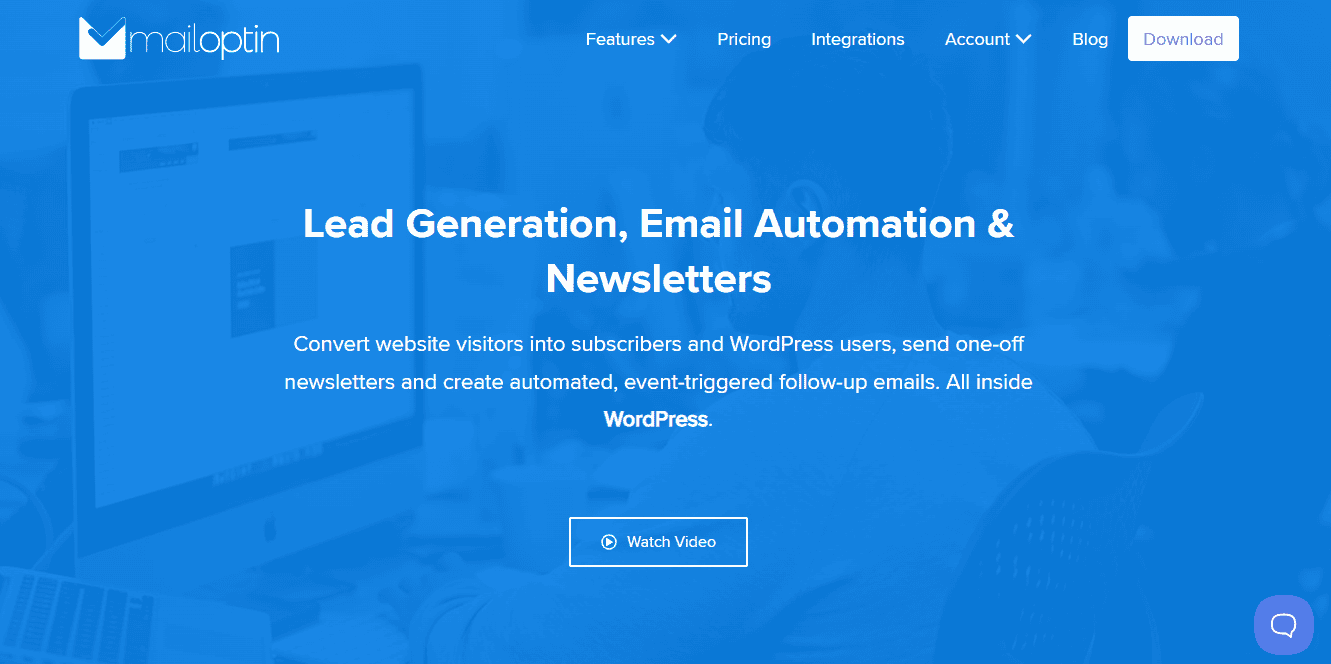
MailOptin helps you turn your website traffic into subscribers, leads, and returning visitors. While your keyword strategy brings people to your site, MailOptin helps you keep them engaged and connected to your content.
With MailOptin, you can create different types of optin campaigns, such as popups, in-post forms, sidebar forms, notification bars, and slide-ins. These allow you to capture email addresses at the right moment without disrupting the user experience. For example, you can display a signup form after a user scrolls through your article or when they are about to leave your page.
One useful feature is its ability to send automated email newsletters. MailOptin can email your content to your subscribers whenever you publish a new post in WordPress, and it can also send a digest or roundup of posts published on your website. This means your content does not rely solely on search traffic. You can bring readers back to your site whenever you publish something new.
In simple terms, your keywords help people find you, but MailOptin helps you build a relationship with them. When you combine both, you are not just getting traffic; you are building an audience that keeps coming back.
FAQs About Using Keywords for SEO
Q1. What are keywords in SEO, and why do they matter?
Keywords are the words and phrases people type into search engines when looking for information. Understanding SEO and keywords helps you connect your content to what users are searching for.
They matter because they guide search engines in understanding your page. Without the right keywords, your content may not appear in the search results you are targeting.
Q2. How do I know the best keywords for SEO?
Finding the best keywords for SEO depends on three things: relevance, search intent, and competition. You want keywords that match your content, reflect what users are searching for, and are realistic for your site to rank for.
In most cases, a mix of broad terms and specific phrases works best. This gives you both reach and targeted traffic.
Q3. How do I start setting keywords for SEO?
When setting SEO keywords, begin with your main topic. From there, identify one primary keyword that defines your page and then add supporting keywords that relate to it. Think about what your audience would type into a search engine, and build your content around those phrases.
Q4. What is a primary keyword in SEO?
Primary keywords in SEO are the main terms you want a page to rank for. Each page should focus on one main keyword to keep the content clear and focused.
Supporting keywords can then be added naturally to expand the topic and improve relevance.
Q5. Where should I add keywords for SEO?
A common question is where to add keywords for SEO. Your keywords should appear in important areas such as:
- Title tag
- Meta description
- Headings (H1, H2, H3)
- First paragraph
- Body content
- URL
- Image alt text
Note that the goal is to place them where they make sense, not to force them into every section.
Q6. How often should I use keywords in my content?
There is no fixed number, but when using keywords for SEO, they should appear naturally throughout your content.
Avoid repeating the same phrase too often. Instead, use variations and related terms to keep your writing smooth and readable.
Q7. What is SEO keyword optimization?
SEO keyword optimization is the process of placing and using keywords in a way that helps your content rank better in search results.
This includes choosing the right keywords, placing them correctly, and making sure your content matches what users are looking for.
Q8. Can I rank using only keywords?
No. While using SEO keywords is important, ranking depends on more than just keywords. Search engines also consider content quality, user experience, and how helpful your page is.
Keywords help search engines understand your content, but your content must still provide value.
Q9. How do I improve my SEO with keywords over time?
Improving SEO with keywords is an ongoing process. You should regularly review your content, improve keyword placement, and adjust it based on performance.
Tracking your results and refining your approach will help you get better outcomes over time.
These answers should give you more clarity on how to use keywords effectively. When applied correctly, keywords can help your content reach the right audience and perform better in search results.
Final Thoughts on Using Keywords for SEO to Rank Higher
Using keywords effectively remains an important part of improving your website search visibility. When you understand what your audience is searching for and place keywords in the right parts of your content, you give search engines a clearer signal about what your page offers.
However, real SEO success goes beyond keyword placement alone. It comes from combining good keyword usage with useful content, solid structure, and ongoing optimization. When your content fully answers user intent, it has a better chance of ranking higher and staying visible over time.
To take things further, CrawlWP can help you improve how quickly your content is discovered and indexed by search engines. It also helps you monitor keyword performance, track indexing status, and understand how your pages perform across search engines like Google and Bing.
Getting traffic is just one part; maintaining visitor engagement is key. MailOptin helps convert visitors into subscribers via popups, forms, and targeted messages, also sending automated email updates when new content is published to encourage return visits.