
A solid content refresh strategy using CrawlWP indexing data means targeting pages that are indexed but underperforming, fixing pages stuck in “not indexed” limbo, and re-indexing updated content immediately instead of waiting weeks.
Research shows content decay happens within 6-24 months, and pages lose 50% of their traffic if left untouched.
CrawlWP’s indexing reports tell you exactly which pages need attention based on real search engine data, not guesswork.
Let me break down how indexing data changes everything about content refreshes.
Table of Contents
The Problem With Random Content Updates

Most content refresh strategy approaches are backwards.
People pick content to update based on gut feeling.
“This post feels old, let’s refresh it.” Or they update everything chronologically. “These are from 2023; better update them.”
Wrong approach.
Here’s what happens: you spend hours updating a blog post that was already doing fine.
Meanwhile, high-potential content that’s stuck unindexed sits there collecting digital dust. Or you refresh a page Google hasn’t crawled in months, and it takes another 3 weeks before Google even notices your changes.
That’s time and effort wasted.
Content refresh strategy needs data. Specifically, indexing data that shows you what Google actually sees, how often pages get crawled, and which content is performing versus rotting.
What Content Decay Actually Looks Like (The Data)

Content decay isn’t a theory. It’s measurable and predictable.
Research from Siege Media analyzed thousands of top-ranking pages.
The finding?
Page-one-ranking content for popular keywords is updated on average within the last 2 years. Content older than that starts to slide down the rankings.
Another study tracked 500 blog posts over 18 months. 83% saw traffic decline starting around months 6-8 without updates. By month 12, average traffic loss was 47%. By month 18? Down 62%.
Why does this happen?
Information becomes outdated. Stats change, tools get updated, best practices evolve. Your 2023 guide to Instagram marketing is useless in 2026 because the platform has changed completely.
Competitors publish fresher content. Someone writes a better, more current version of your topic. Google gives them your ranking.
Search intent shifts. What people want from a search query changes over time. Your content no longer matches what they’re actually looking for.
Google prioritizes freshness. For query-deserving freshness (QDF) topics such as tech, news, tools, and trends, Google actively favors recently updated content.
The brutal truth? Your content has a shelf life. And that shelf life is shorter than you think.
Why Indexing Data is the Missing Piece
Traditional content audits look at traffic, rankings, and engagement metrics. Those are important, but they’re lagging indicators. By the time traffic drops significantly, you’ve already lost weeks or months of potential visitors.
Indexing data is a leading indicator.
CrawlWP indexing reports show you:
Which pages Google has actually indexed versus pages that are not indexed or in progress. In Google Search Console, “Discovered – currently not indexed” means Google found the page but has not added it to search results yet. This can indicate potential content quality or technical issues that may need attention.
How recently Google last crawled each page. If a high-priority page hasn’t been crawled in 30+ days, Google isn’t paying attention to it. Updates won’t matter until you force re-indexing.
Index status changes over time. Pages that were indexed but got de-indexed signal serious problems. Algorithm updates, manual actions, or quality issues caused Google to remove them from search.
Indexing success rate after updates. When you refresh content and resubmit, CrawlWP tracks whether Google actually re-indexed it. This validates whether your refresh strategy is working.
This data transforms your content refresh strategy from random updates to surgical interventions on pages that actually need it.
Content Refresh Priority Matrix
Not all content deserves equal attention. Prioritize based on impact and indexing status.
High Priority: Indexed but Declining
These pages are currently indexed and were getting traffic, but performance is dropping. Indexing data shows Google still crawls them regularly, meaning they have authority. These are your best refresh targets because small improvements can yield big results.
How to identify them: Cross-reference CrawlWP’s indexed pages list with Google Analytics traffic data. Look for pages with 30%+ traffic decline over 6 months that are still fully indexed.
Medium Priority: Discovered but Not Indexed
Google found these pages but won’t index them. This usually means thin content, duplicate content, or low perceived value. Indexing data from CrawlWP shows them stuck in this state for weeks or months.
Note: CrawlWP shows whether a page is “discovered but not indexed” when you hover over the index status column in the SEO Indexing page.
How to fix them: Refresh with substantial new content (add 300+ words), update outdated information, improve formatting, add internal links from high-authority pages, then re-submit via CrawlWP’s instant indexing.
Medium Priority: Indexed but Rarely Crawled
These pages are technically indexed, but Google rarely checks them. CrawlWP’s crawl frequency data shows crawls happen every 30-60+ days instead of weekly. This means updates take forever to register.
Refresh strategy: Update the content significantly, change the publish date, add fresh multimedia, build internal links to the page, then use CrawlWP to force immediate re-indexing so Google knows something changed.
Low Priority: Never Indexed and Low Value
Pages that have never been indexed despite being published months ago, and they target low-value keywords or outdated topics. Sometimes, content isn’t worth saving.
Decision point: Delete or 301 redirect to better content. Not every page deserves refreshing. CrawlWP’s bulk indexing status shows you which pages are lost causes so you can prune strategically.
How to Use CrawlWP Indexing Data for Refreshes
Let’s get practical. Here’s the workflow.
Step 1: Pull Your Indexing Report
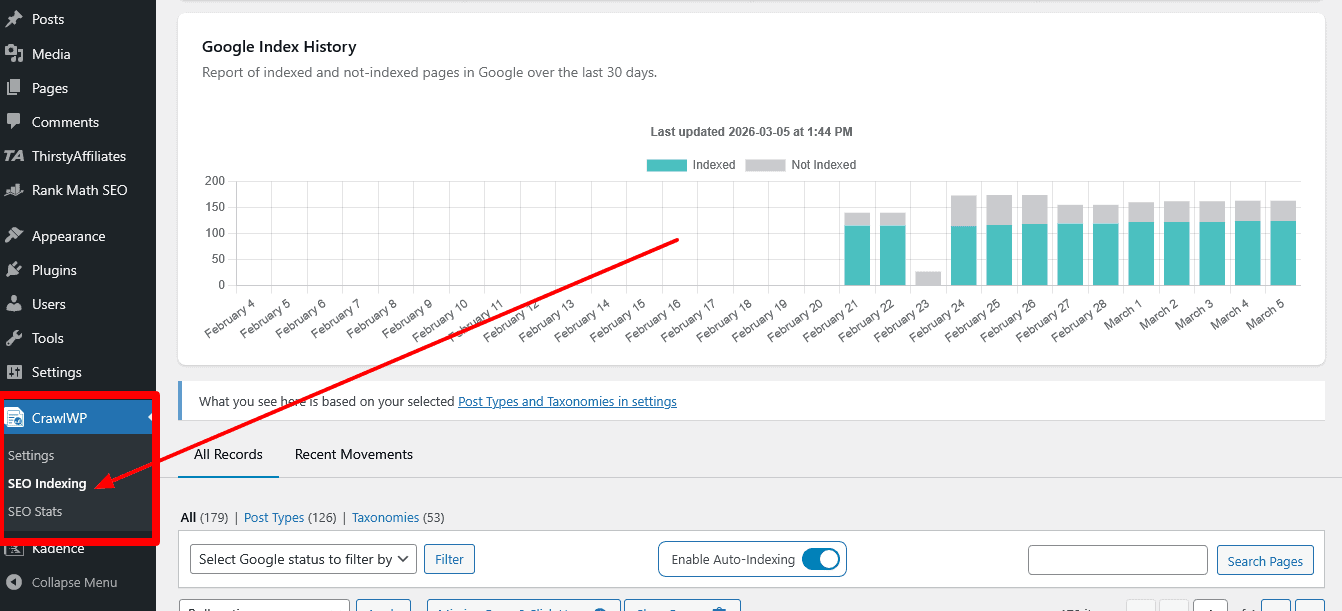
Log in to your WordPress dashboard. Navigate to the SEO Indexing section of CrawlWP. View all pages showing indexed, indexed by CrawlWP, in-progress, and not-indexed statuses.
This gives you the baseline. CrawlWP integrates directly with Google Search Console, so the data is accurate and real-time, not estimated.
Step 2: Cross-Reference with Performance Data
Open Google Analytics or Search Console performance reports. Identify pages with declining traffic, impressions, or CTR over the past 3-6 months.
Match these declining pages against your indexing report. Focus on pages that are indexed, still getting crawled, but losing performance. These are Refresh Gold.
Step 3: Audit Content Quality
For your priority pages, do a quality check. Read the content like you’re seeing it for the first time.
Ask yourself: Is the information current? Are there broken links? Do examples and screenshots reflect the current reality? Does this match what people actually search for now? Is the formatting scannable?
According to content refresh research, 67% of declining content suffers from outdated information, and 43% has formatting issues that hurt readability on mobile.
Step 4: Execute Strategic Refreshes
This isn’t minor tweaking. Real refreshes involve substantial updates.
Add 300-500+ new words of current information. Update all statistics, prices, and time-sensitive references. Replace outdated screenshots with current ones. Add new sections covering recent developments. Improve formatting with better headings, shorter paragraphs, and bullet points. Embed updated multimedia like videos or infographics. Add internal links to newer related content.
Research from Clearscope found that content refreshes that added meaningful value (not just date changes) saw an average 106% increase in traffic.
Step 5: Force Re-Indexing Immediately
Here’s where CrawlWP becomes critical.
After publishing your refreshed content, use CrawlWP’s instant indexing feature. It automatically pings Google’s Indexing API and IndexNow for Bing/Yandex.
This tells search engines immediately that the content has changed, rather than waiting days or weeks for natural re-crawling.
CrawlWP users report that re-indexing takes 24-48 hours, compared to 1-2 weeks with passive waiting.
Step 6: Monitor Indexing Success
Check CrawlWP’s indexing history 48-72 hours after submission. Confirm Google re-crawled and re-indexed the updated page.
If it’s still showing old crawl dates, there’s an issue. Either the changes weren’t substantial enough, or technical problems prevented re-indexing. CrawlWP’s status checker shows specific errors if Google rejected the page.
Step 7: Track Performance Changes
Give it 2-4 weeks, then measure results. Did traffic recover? Did rankings improve? Are impressions increasing?
Tag refreshed pages in Analytics so you can track them as a segment. This shows whether your content refresh strategy is actually working or just busy work.
The Quarterly Content Refresh System

One-off refreshes help, but consistent systems compound results.
Build a quarterly refresh schedule driven by indexing data.
Quarter 1: High-Traffic Declining Pages
Use CrawlWP indexing data to identify your top 20 traffic-driving pages from last year. Check which ones are losing position or traffic. Refresh the top 10 with substantial updates. Re-index immediately via CrawlWP.
Target outcome: Stabilize or recover rankings on your most valuable content.
Quarter 2: Stuck “Not Indexed” Pages
Pull CrawlWP’s report of all not-indexed pages. Audit the top 15-20 for refresh potential. Aggressively update with new content, better structure, and internal linking. Force indexing via CrawlWP’s bulk submission.
Target outcome: Get 60-70% of these pages actually indexed and ranking.
Quarter 3: Rarely Crawled But Important Content
Identify pages that haven’t been crawled in 30+ days according to CrawlWP data. If these pages target important keywords, refresh them and use CrawlWP to trigger immediate crawling.
Target outcome: Increase crawl frequency on strategically important pages.
Quarter 4: Seasonal and Timely Content
Update content related to upcoming events, seasons, or annual topics. Use CrawlWP’s bulk indexing to submit all updated seasonal pages together.
Target outcome: Capture seasonal traffic spikes with fresh, relevant content.
This system ensures continuous improvement without overwhelming your content team.
Using Indexing Speed as a Refresh Signal

Here’s an advanced tactic most people miss.
If a page that normally indexes in 24-48 hours suddenly takes 10+ days after an update, that’s a signal.
It means either: Google didn’t consider the update valuable enough to prioritize, the page has technical issues preventing fast indexing, or the content quality decreased rather than improved.
This feedback loop helps you refine your content refresh strategy. You learn which types of updates Google responds to and which it ignores.
Test different refresh approaches on similar pages. Compare indexing speed. The pages that get re-indexed fastest had the most effective updates. Replicate that approach across other refreshes.
Content Types That Benefit Most from Refresh Strategies

Not all content needs frequent refreshing. Focus energy where it matters.
List posts and roundups benefit massively.
“Best tools for X” or “Top strategies for Y” become outdated quickly.
Tools change, new options emerge, and pricing shifts. CrawlWP data typically shows these pages getting de-indexed or declining within 8-12 months without updates.
Refresh frequency: Every 6-12 months minimum.
How-to guides and tutorials need regular updates.
Software interfaces change, best practices evolve, and screenshots become outdated. Research shows tutorial content loses 40% of its value within 12 months for tech topics.
Refresh frequency: Annually, or whenever major platform changes occur.
Statistical and data-driven content requires constant updates.
Posts built around specific data or research need refreshing whenever new data becomes available. CrawlWP indexing often shows these pages stuck as “not indexed” if the data is clearly outdated.
Refresh frequency: Whenever new official data releases (often annually).
Pillar pages and cornerstone content demand attention.
These high-authority pages support your entire topic cluster. According to indexing research, pillar pages that get regular refreshes maintain 3x more internal authority than neglected pillars.
Refresh frequency: Quarterly reviews, major updates every 6 months.
Product reviews and comparisons need aggressive refreshing.
Features change, pricing shifts, and new competitors emerge. CrawlWP data shows product-related content has the shortest shelf life, often declining after just 4-6 months.
Refresh frequency: Every 3-6 months for active products.
The Re-Indexing Trigger Checklist
When should you manually trigger re-indexing via CrawlWP after a refresh?
Use this checklist:
✅ Added 300+ words of substantial new content
✅ Updated 5+ outdated statistics, facts, or examples
✅ Replaced multiple screenshots or images
✅ Changed or improved the title and meta description
✅ Added new sections addressing current search intent
✅ Fixed technical issues (broken links, formatting problems)
✅ Changed the publish date to reflect freshness
If you checked 4+ items, trigger immediate re-indexing via CrawlWP. If fewer than 4, the update might not be substantial enough to warrant forced re-indexing.
Google values meaningful updates. Surface-level changes (fixing a typo, tweaking one sentence) don’t need instant re-indexing and might even look manipulative if you constantly force re-crawls for minor edits.
Measuring Content Refresh ROI
Content refresh strategy only matters if it drives results. Track these metrics.
Re-indexing success rate: What percentage of refreshed pages successfully get re-indexed within 48 hours? CrawlWP’s indexing history shows this directly. Aim for 85%+ success rate.
Traffic recovery rate: For pages that were declining, what percentage recovered to previous traffic levels or higher within 30 days of refresh? Target 60-70% recovery rate.
Position improvements: Track ranking changes for target keywords. According to Siege Media research, properly refreshed content improves average position by 3-7 spots within 4-6 weeks.
Indexing to ranking timeline: How long from re-indexing to seeing ranking improvements? CrawlWP data helps you understand this lag, which averages 10-14 days for most content.
Refresh effort vs. new content ROI: Compare time invested in refreshing existing content versus creating new content. Research consistently shows refreshes deliver 2-3x better ROI per hour invested.
De-indexing prevention: Track how many refreshed pages stay indexed long-term versus getting de-indexed again. If refreshed pages get de-indexed within 90 days, your updates weren’t substantial enough.
Document these metrics in a simple spreadsheet. CrawlWP’s indexing reports provide the raw data you need for most calculations.
Common Content Refresh Mistakes (That Indexing Data Reveals)
Mistake 1: Refreshing content without checking the indexing status first.
You spend hours updating a page, but CrawlWP data shows it was never indexed in the first place. The problem wasn’t staleness; it was quality. Refreshing doesn’t fix a page Google rejected outright.
Mistake 2: Minor updates with forced re-indexing.
Changing one paragraph and immediately requesting re-indexing looks manipulative. CrawlWP tracks submission frequency. If you’re force-indexing the same page weekly with minimal changes, Google, Bing, and other search engines may ignore future submissions.
Mistake 3: Not monitoring re-indexing success.
You refresh content, but never check if Google actually re-crawls it. CrawlWP’s indexing history shows many refreshed pages sit for weeks before Google notices. Without manual submission, refreshes waste time.
Mistake 4: Batch refreshing without priority filtering.
Updating 50 old blog posts sounds productive, but if indexing data shows 30 of them are low-value pages that barely get crawled, you’re wasting effort. Focus on indexed, high-authority pages with declining performance.
Mistake 5: Ignoring mobile indexing signals.
Google uses mobile-first indexing. CrawlWP integrates with Search Console data that shows mobile usability issues. Refreshing content without fixing mobile problems means Google still deprioritizes the page.
Mistake 6: Forgetting to update internal links.
You refresh a cornerstone page but don’t update internal links pointing to it from other content. This limits the refresh impact. CrawlWP can’t fix this, but it’s a critical step in any content refresh strategy.
Advanced: Using Crawl Frequency to Predict Refresh Needs
CrawlWP displays the last time Google crawls specific pages. This data predicts when content will need refreshing.
Pages Google crawls weekly are high-priority. They have authority and traffic. When these pages start getting crawled less frequently (shifting to monthly crawls), it signals declining importance. This happens before traffic drops.
Catch this signal early. Refresh proactively when crawl frequency decreases, not reactively after traffic tanks.
Conversely, pages that never got crawled frequently won’t benefit much from refreshing unless you significantly improve the quality and build more internal links first. Indexing data shows you’re fighting an uphill battle on low-authority pages.
CrawlWP Premium Advantage for Content Refreshes
CrawlWP offers free and premium versions. For a serious content refresh strategy, premium features matter.
Free version includes: Basic instant indexing via Google Indexing API and IndexNow, index status checking, integration with Google Search Console, and Bing Webmaster Tools.
Premium version adds: Detailed indexing reports showing historical data, bulk submission for refreshing multiple pages simultaneously, keyword tracking to measure refresh impact on rankings, monitoring of indexing status changes, and SEO performance email reports.
For content teams managing 50+ pages or agencies handling client sites, the premium indexing reports alone justify the cost. You can see exactly which pages got re-indexed after refreshes, track indexing success rates over time, and identify patterns in what Google responds to.
The bulk submission feature is huge for quarterly refresh campaigns. Instead of manually submitting 20-30 refreshed pages individually, submit them all in one batch.
Building a Content Refresh Workflow
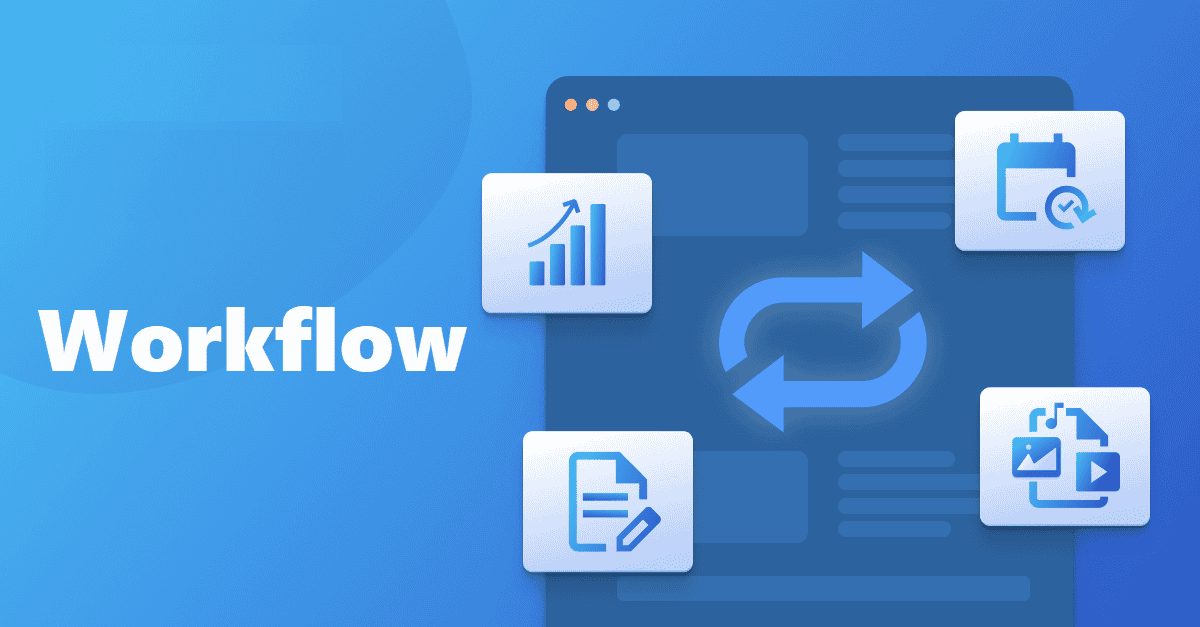
Here’s the complete system.
Weekly:
Check the CrawlWP dashboard for indexing status changes. Note any pages that got de-indexed. Flag these for investigation.
Monthly:
Pull the indexing report from CrawlWP. Export list of indexed pages with last crawl dates. Cross-reference against Google Analytics to identify declining pages. Select the top 3-5 pages for refresh based on traffic potential and indexing stability.
Quarterly:
Comprehensive content audit using CrawlWP data. Identify all pages in “not indexed” status. Review pages not crawled in 60+ days. Execute batch refreshes on 15-25 priority pages. Use CrawlWP bulk submission to re-index all refreshed content simultaneously. Measure results 30 days post-refresh.
Annually:
Complete site audit for content pruning. Use CrawlWP indexing data to identify pages that have never achieved indexing despite multiple refresh attempts. Delete or 301-redirect low-value, unindexed content. Consolidate thin content into comprehensive pages. This improves overall site quality and crawl efficiency.
Future of Content Refresh Strategies
Content refresh strategy is evolving alongside search technology.
AI-powered search engines – SearchGPT, Perplexity, Google Search Generative Experience (SGE), now AI Overviews – prioritize freshness even more aggressively than traditional search. Research shows AI answer engines cite content updated within the last 6 months 2.4x more often than older content.
This means refresh cycles are accelerating. Content that used to stay relevant for 18-24 months now needs updates every 8-12 months to maintain AI citation and traditional search visibility.
Indexing data becomes even more critical in this environment. Tools like CrawlWP that show exactly when content was last crawled and indexed help you stay ahead of freshness requirements.
The winners will be teams that build systematic refresh processes driven by real indexing data, not random update schedules.
Your Content Refresh Action Plan

Here’s what to do right now:
This week:
Install CrawlWP (free version works to start). Connect it to Google Search Console. Pull your first indexing status report. Identify your top 10 traffic pages and check their indexing status and last-crawl dates.
This month:
Select 3-5 high-value pages showing declining traffic.
Execute substantial content refreshes (300+ words added, updated stats, new sections). Use CrawlWP to force immediate re-indexing. Monitor indexing success in the CrawlWP dashboard after 48 hours. Measure traffic changes after 30 days.
This quarter:
Build your content refresh priority matrix.
Pull a list of all “uindexed” pages from CrawlWP. Refresh the top 15-20 pages with the highest potential. Use bulk indexing to submit all refreshes simultaneously. Track re-indexing success rate as your baseline metric.
This year:
Implement quarterly refresh cycles. Use CrawlWP indexing reports to drive prioritization each quarter. Measure refresh ROI against new content creation. Prune content that repeatedly fails to achieve indexing despite refreshes. Build this into your standard content operations workflow.
The difference between content that maintains rankings and content that slowly dies is simple: systematic refreshes driven by real data.
CrawlWP indexing data tells you exactly what needs attention and when. Stop guessing. Start using the data.
Wrapping This Up: Make Your Content Work Harder
Content refresh strategy isn’t optional anymore. Content decay is real, measurable, and expensive.
But random updates waste time. Data-driven refreshes using indexing insights from tools like CrawlWP target effort where it actually matters: indexed pages declining, content stuck in discovery limbo, and high-authority pages losing crawl frequency.
The system works: prioritize using indexing data, execute substantial refreshes, force immediate re-indexing, measure results, repeat quarterly.
Most creators publish content once and hope it performs forever. Smart creators refresh strategically and compound results over time.
Your existing content is an asset. Treat it like one. Use indexing data to know exactly which assets need maintenance.
Ready to stop guessing which content needs refreshing? Try CrawlWP and get real indexing data that shows you exactly what to update first.
FAQs
What is a content refresh strategy?
A content refresh strategy is the systematic process of updating existing content to improve relevance, quality, and search engine performance.
Rather than only creating new content, you identify underperforming or outdated pages, update them with current information, improved formatting, and fresh insights, then re-submit them to search engines for faster re-indexing.
Research shows properly executed content refreshes deliver 2-3x better ROI than creating equivalent new content from scratch.
How does CrawlWP help with content refresh strategies?
CrawlWP provides indexing data that shows exactly which pages are indexed, which are “in progress” and “not indexed” status, plus how recently Google crawled each page, and indexing status changes over time.
This data helps you prioritize which content to refresh first based on actual search engine behavior rather than guesswork. After refreshing content, CrawlWP’s instant indexing feature (via the Google Indexing API and IndexNow) forces immediate re-crawling, rather than waiting weeks for natural discovery.
How often should I refresh content?
Refresh frequency depends on content type and topic volatility. High-competition keywords benefit from updates every 6-12 months.
Tutorial and how-to content needs annual updates or whenever platforms change significantly.
Product reviews and tool comparisons require refreshing every 3-6 months. Statistical content needs to be updated when new data releases are made.
Pillar pages deserve quarterly reviews. Use CrawlWP’s crawl frequency data to identify when Google stops prioritizing specific pages as a signal that they need refreshing.
Does changing the publish date help with content refresh?
Changing the publish date only helps if you’ve made substantial content updates.
Google values genuine improvements, not superficial data changes. If you’ve added 300+ words, updated outdated information, improved formatting, and addressed current search intent, updating the publish date signals to both search engines and readers that the content is fresh.
However, minor tweaks to the date can look manipulative. Use CrawlWP to trigger re-indexing after meaningful updates rather than relying solely on date changes.
How long does it take for refreshed content to show results?
With CrawlWP’s instant indexing, refreshed content typically gets re-indexed within 24-48 hours compared to 1-2 weeks with passive waiting. However, ranking improvements take longer.
Most refreshed content shows measurable traffic changes within 2-4 weeks. Position improvements for target keywords average 10-14 days after re-indexing, according to content refresh studies.
The timeline depends on content quality improvements, the level of competition, and your site’s overall authority.
Can I refresh too much content at once?
Yes.
Refreshing hundreds of pages simultaneously can look unnatural to search engines and dilute your effort. Focus on 15-25 high-priority pages per quarter based on CrawlWP indexing data.
Use bulk indexing features for efficiency, but ensure each refresh involves substantial updates. Quality over quantity matters more. One deeply refreshed high-authority page delivers better results than 10 surface-level updates.
CrawlWP’s premium version enables bulk submissions and tracks success rates to ensure your refresh strategy works effectively.
What metrics should I track for content refresh success?
Track re-indexing success rate (aim for 85%+ of refreshed pages re-indexed within 48 hours), traffic recovery rate (60-70% of declining pages should recover to previous levels), ranking position improvements (average 3-7 spot gains within 4-6 weeks), indexing-to-ranking timeline (typically 10-14 days), and de-indexing prevention (refreshed pages should stay indexed 90+ days).
CrawlWP’s indexing reports, Search Console, and Bing Webmaster Tools integration provide most of this data directly, making it easy to measure refresh ROI compared to new content creation.