
Crawl budget is the amount of time and resources Googlebot is willing to spend exploring your website before it gets bored and leaves to crawl literally anything else on the internet.
Think of it like this: Googlebot is a very busy bee with ADHD. It has millions of websites to visit today, and yours gets maybe 30 minutes of attention (if you’re lucky). Will it spend that time on your important pages that actually make you money? Or will it waste 25 minutes crawling your “?sort=price-low-to-high” URLs that nobody cares about?
Here’s the deal:
- Sites under 10,000 pages: You probably don’t need to worry about this. Google handles small sites fine.
- Sites with 10,000+ pages: Crawl budget is now your life. Welcome to technical SEO hell.
- E-commerce sites with faceted navigation: Laughs in millions of parameter combinations. You’re screwed unless you optimize.
Let me tell you about the time I learned this lesson while surrounded by angry e-commerce stakeholders and a very expensive website that Google refused to fully index.
Table of Contents
The Day I Discovered My Client Was Wasting $47,000 Worth of Crawl Budget
May 2024. I’m working with a mid-sized ecommerce client selling outdoor gear. 50,000 product pages. Beautiful site. Solid content. One massive problem: Only 8,000 pages were indexed.
EIGHT. THOUSAND. Out of FIFTY thousand.
The client was understandably confused. “We built the site. It’s live. Why isn’t Google indexing it?”
I dove into Google Search Console like a digital archaeologist excavating ancient ruins. What I found made me want to throw my laptop out the window and become a goat farmer instead.
Google was crawling the site. A LOT. Around 200,000 requests per day. Sounds great, right?
WRONG.
142,000 of those daily crawl requests were hitting URLs like:
- /products?color=blue&size=medium&sort=price&page=27
- /products?filter=waterproof&brand=north-face&view=grid
- /search?q= (yes, empty search results)
Meanwhile, 42,000 actual product pages with real inventory, real content, and real revenue potential? Google visited them maybe once every three weeks.
That’s when I understood crawl budget for SEO isn’t an academic theory. It’s the difference between a successful website and a very expensive digital paperweight.
What the Hell Is Crawl Budget Anyway?
Crawl budget for SEO is the number of pages Googlebot will crawl on your website within a specific timeframe (usually a day). It’s determined by two factors that sound simple but get complicated fast:
1. Crawl Capacity Limit (How Much Can You Handle?)
This is Google being polite about not breaking your server.
Googlebot calculates the maximum number of simultaneous connections it can make to your site without causing your server to have a meltdown. It considers:
Crawl Health: If your site responds quickly, Google increases the limit. More connections, more crawling. If your site slows down or throws 500 errors like confetti, Google reduces the limit to avoid overwhelming you.
Google’s Crawling Limits: Google has machines, but not infinite machines (shocking, I know). They allocate resources based on how valuable they think your content is compared to the millions of other sites begging for attention.
Your Manual Limits: You can set a crawl rate limit in Google Search Console if you’re paranoid about server load. Most people should never touch this setting.
2. Crawl Demand (How Much Does Google Want to Crawl You?)
This is where it gets spicy. Crawl demand is Google’s enthusiasm level for your site.
According to Google’s official documentation, crawl demand is influenced by:
Perceived Inventory: Without guidance, Googlebot tries to crawl all URLs it knows about. If Google discovers millions of URLs on your site (looking at you, faceted navigation), it assumes they’re all important. Spoiler: They’re not.
Popularity: Pages with more backlinks, higher engagement, and consistent traffic get crawled more often. Google assumes popular URLs are more valuable and tries to keep them fresh in the index.
Freshness: If you regularly update content, Google revisits more often to catch changes. Static pages that never change? Google crawls them less frequently because why bother?
The Formula:
Crawl Budget = min(Crawl Capacity Limit, Crawl Demand)
Even if your server can handle 500 requests per second, Google won’t crawl more than it thinks is necessary. Conversely, if Google wants to crawl 10,000 pages but your server can only handle 2,000 without catching fire, you’re limited to 2,000.
Do You Need to Care About Crawl Budget? (Probably Not)
Here’s the truth that will save you hours of unnecessary optimization:
Most websites don’t need to worry about crawl budget for SEO.
Google’s own documentation says this explicitly: “If your site doesn’t have a large number of pages that change rapidly, or if your pages seem to be crawled the same day that they are published, you don’t need to read this guide.”
You DON’T Need to Worry If:
✅ Your site has under 10,000 pages
✅ New content gets indexed within a few days
✅ You’re not publishing hundreds of new pages daily
✅ Your site architecture is clean (no infinite parameter variations)
✅ You sleep fine at night without obsessing over technical SEO
For small to medium sites, Google is perfectly capable of crawling everything efficiently. Focus on content quality and basic technical SEO instead.
You ABSOLUTELY Need to Worry If:
🚨 Your site has 10,000+ pages (ecommerce, news sites, large blogs)
🚨 You have faceted navigation creating millions of URL variations
🚨 New pages take weeks to get indexed
🚨 You publish time-sensitive content (news, trending topics, seasonal products)
🚨 Search Console shows tons of pages “Discovered – currently not indexed.”
🚨 You’re running a massive content operation or marketplace
If you fall into the second category, congratulations! You now have a new hobby: optimizing crawl budget. It’s like Sudoku, but with more crying and server logs.
Crawl Budget Wasters: A Horror Story in Five Acts
Let me introduce you to the villains destroying your crawl budget for SEO. These are the pages eating up Googlebot’s time while your valuable content sits unindexed as the last kid picked for kickball.
Act I: The Infinite Pagination Nightmare
Every ecommerce site ever:
- /products?page=1
- /products?page=2
- /products?page=3
- … continues until page 847
Unless you have 900+ pages of genuinely unique products (you don’t), Google is wasting crawl budget on pagination pages that offer zero unique value.
The fix: Use rel=”canonical” to point paginated pages to the main category. Or implement “Load More” buttons that don’t create new URLs. Or use pagination parameters that Google can understand and ignore.
Act II: Faceted Navigation From Hell
Ecommerce sites with filters create exponentially more URLs:
- /products?color=blue
- /products?color=blue&size=large
- /products?color=blue&size=large&brand=nike
- /products?color=blue&size=large&brand=nike&sort=price
- /products?color=blue&size=large&brand=nike&sort=price&view=grid
One category with 5 filters and 3 values each creates 243 possible URL combinations. Add more filters? Congratulations, you just invented infinite URLs, and Google hates you now.
I once audited a furniture site with 2.7 MILLION crawlable URLs. They sold 5,000 products. Where did the other 2.695 million URLs come from? Filter combinations that literally nobody would ever use.
“Show me all red sofas under $500 sorted by newest that are also in stock and on sale and made of leather,” said exactly zero humans ever.
The fix: Use robots.txt to block filter parameters, or implement AJAX filtering that doesn’t change URLs, or use the URL parameters tool in Search Console to tell Google which parameters to ignore.
Act III: The Search Results Nobody Searched For
Internal search results pages are crawl budget black holes.
- /search?q=blue+shoes
- /search?q=
- /search?q=%20%20%20 (yes, people search for spaces)
These pages have zero value for Google’s index. They’re personalized, constantly changing, and often contain no unique content.
The fix: Block /search/ in robots.txt. Add noindex meta tags to search result pages. Stop letting Googlebot waste time on these disasters.
Act IV: Duplicate Content’s Greatest Hits Album
- http://example.com/page
- https://example.com/page
- www.example.com/page
- example.com/page
- example.com/page?utm_source=facebook
- example.com/page?sessionid=12345
That’s six URLs for one page. Google might crawl all six before realizing they’re duplicates.
That’s five wasted crawl requests that could’ve gone to actually valuable content.
The fix: Implement canonical tags religiously. Use HTTPS redirects properly; strip (don’t go to a club) session IDs and tracking parameters from URLs that get crawled.
Act V: The 404s That Won’t Die
Google doesn’t immediately forget URLs it knows about. Deleted pages return 404 errors, but Googlebot keeps trying to recrawl them “just in case.”
Hundreds of 404s waste crawl budget by repeatedly checking whether dead pages have magically resurrected.
The fix: Return proper 404 or 410 status codes for permanently deleted content. Clean up your sitemap to remove dead URLs. Use 301 redirects if the content has moved elsewhere.
How to Check Your Crawl Budget (Without Guessing)
Google doesn’t give you a number labeled “Your Crawl Budget: 5,000 pages per day.” That would be too helpful.
Instead, you have to do detective work.
Method 1: Google Search Console Crawl Stats
Navigate to: Settings > Crawl Stats
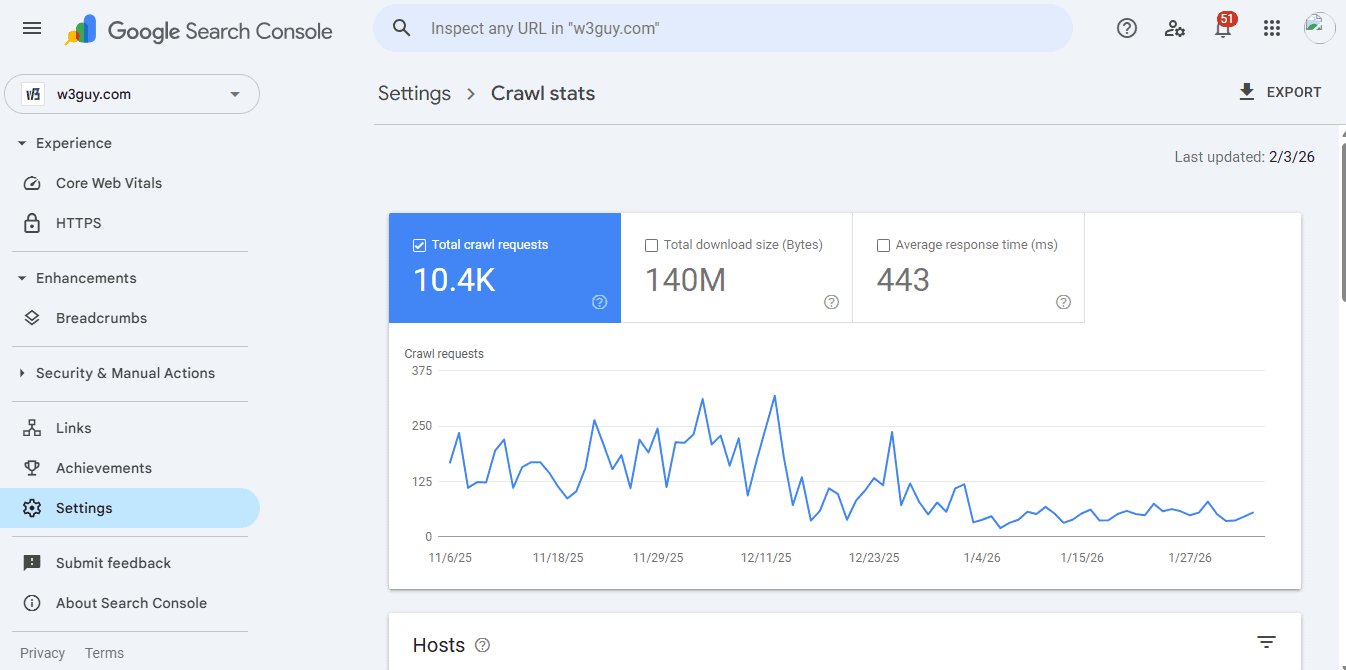
Look at:
- Total crawl requests: How many pages Google crawled per day (averaged over 90 days)
- Total download size: How much data Google downloaded
- Average response time: How fast your server responded
If you see 50,000 total pages but Google only crawls 5,000 per day, that’s a 10-day crawl cycle. New content won’t get indexed for over a week.
Method 2: Server Log Analysis
For the truly masochistic, analyze your server logs to see exactly what Googlebot is hitting.
Tools like Screaming Frog Log File Analyzer or Botify show:
- Which URLs does Googlebot crawl most frequently
- Which URLs never get crawled despite being valuable
- How much crawl budget is wasted on junk
I did this for that outdoor gear client. Discovered that Googlebot crawled the /sale/ category 847 times in one day (it had 12 products) while the /camping-tents/ category with 400 products got crawled twice.
Priorities, Googlebot. Priorities.
Method 3: The Math Approach
Here’s a rough calculation:
Average daily crawl requests ÷ Total indexable pages = Days to crawl entire site
Example:
- 40,000 indexable pages
- 4,000 crawl requests per day
- 40,000 ÷ 4,000 = 10 days to crawl everything
If you’re publishing daily content that needs immediate indexing, a 10-day crawl cycle is a problem.
Ultimate Crawl Budget Optimization Checklist
Alright, time to fix this mess.
WANT TO BE HONEST.
Here’s your step-by-step guide to optimizing crawl budget for SEO without losing your mind.
Step 1: Block Low-Value URLs in Robots.txt
User-agent: Googlebot

Disallow: /search/

Disallow: /*?sort=

Disallow: /*?filter=

Disallow: /*?page=

Disallow: /admin/

Disallow: /cart/

Disallow: /checkout/
Block anything users need, but Google doesn’t: admin pages, checkout flows, search results, excessive parameters.
Critical warning: Test this carefully. Accidentally blocking important content is how SEO careers end.
Step 2: Implement Canonical Tags Everywhere
Every page should have a self-referencing canonical tag at a minimum:
<link rel="canonical" href="https://example.com/blue-shoes" />For duplicate content variations, point to the primary version:
<link rel="canonical" href="https://example.com/products/shoes" />This tells Google: “Hey, I know you found 50 versions of this page. Here’s the one that actually matters.”
Step 3: Return Proper Status Codes
- 404 for temporarily deleted content
- 410 for permanently removed content (stronger signal than 404)
- 301 for moved content
- 200 only for actual, valuable pages
DO NOT: Return 200 status codes with “Page Not Found” content (soft 404s). Google will keep crawling these wastes of bandwidth.
Step 4: Fix Your Internal Linking
Orphan pages (pages with no internal links pointing to them) might never get crawled.
Run a crawl with Screaming Frog or similar tools. Find pages with zero internal links. Either:
- Link to them from relevant pages (if they’re valuable)
- Delete them (if they’re not)
- Noindex them (if users need them, but Google doesn’t)
Link depth matters. Pages should be no more than 3-4 clicks from the homepage. Bury important content seven layers deep, and Google might never find it.
Step 5: Improve Server Response Time
Faster server = more pages crawled per session.
Google’s documentation states: improving response time by 100 milliseconds allows Googlebot to crawl approximately 15% more pages per session.
Target: Under 500ms server response time for important pages.
How to improve:
- Upgrade your hosting (shared hosting is a crawl budget killer)
- Use a CDN for static resources
- Optimize database queries
- Enable caching aggressively
- Compress images and assets
That outdoor gear client? Their average response time was 3.2 seconds. After upgrading hosting and implementing caching, it dropped to 0.7 seconds. Google’s crawl rate increased by 280%. (Hey Gee)
Step 6: Clean Up Your Sitemap
Your XML sitemap should be a curated list of pages you WANT indexed. Not a dump of every URL that technically exists.
Remove from sitemap:
- Pages with noindex tags
- Duplicate content
- Parameter variations
- Pagination beyond page 2-3
- Broken or redirected URLs
Update frequency: Regenerate and resubmit your sitemap every time you publish important content.
Pro tip: Split sitemaps by content type (products, blog posts, categories) for better organization and targeted crawling.
Step 7: Use the URL Parameters Tool in Search Console
Tell Google how to handle URL parameters:
Navigate to: Legacy tools and reports > URL Parameters
For each parameter, specify:
- No URLs: If it doesn’t change content (tracking parameters)
- Representative URL: If it filters/sorts but doesn’t create unique content
- Every URL: Only if the parameter creates genuinely unique pages
This prevents Google from wasting time on meaningless parameter variations.
Step 8: Deploy CrawlWP for Instant Indexing
Here’s where I’m going to save you weeks of frustration.
Even with perfect crawl budget optimization, you’re still waiting for Googlebot to crawl your new content eventually. For sites with limited crawl budget, “eventually” might mean two weeks.
CrawlWP solves this by bypassing the traditional crawl queue entirely.
How CrawlWP helps with crawl budget:
🚀 Instant Indexing via Google Indexing API
Instead of waiting for Google to discover your new product page during its next crawl cycle, CrawlWP pings Google immediately. Your page jumps the queue.
🚀 IndexNow Protocol Integration
Notifies Bing, Yandex, Naver, and other search engines instantly. One publish, multiple search engines notified.
🚀 Auto-Index Feature
Continuously scans your site for new/updated content and automatically submits it—no manual intervention required.
🚀 Bulk Indexing for Large Updates
Launching 500 products? Submit them all at once instead of hoping Google’s crawl budget will eventually reach them.
🚀 Real-Time Index Status Dashboard
See exactly which pages are indexed in Google and Bing without manually checking Search Console.
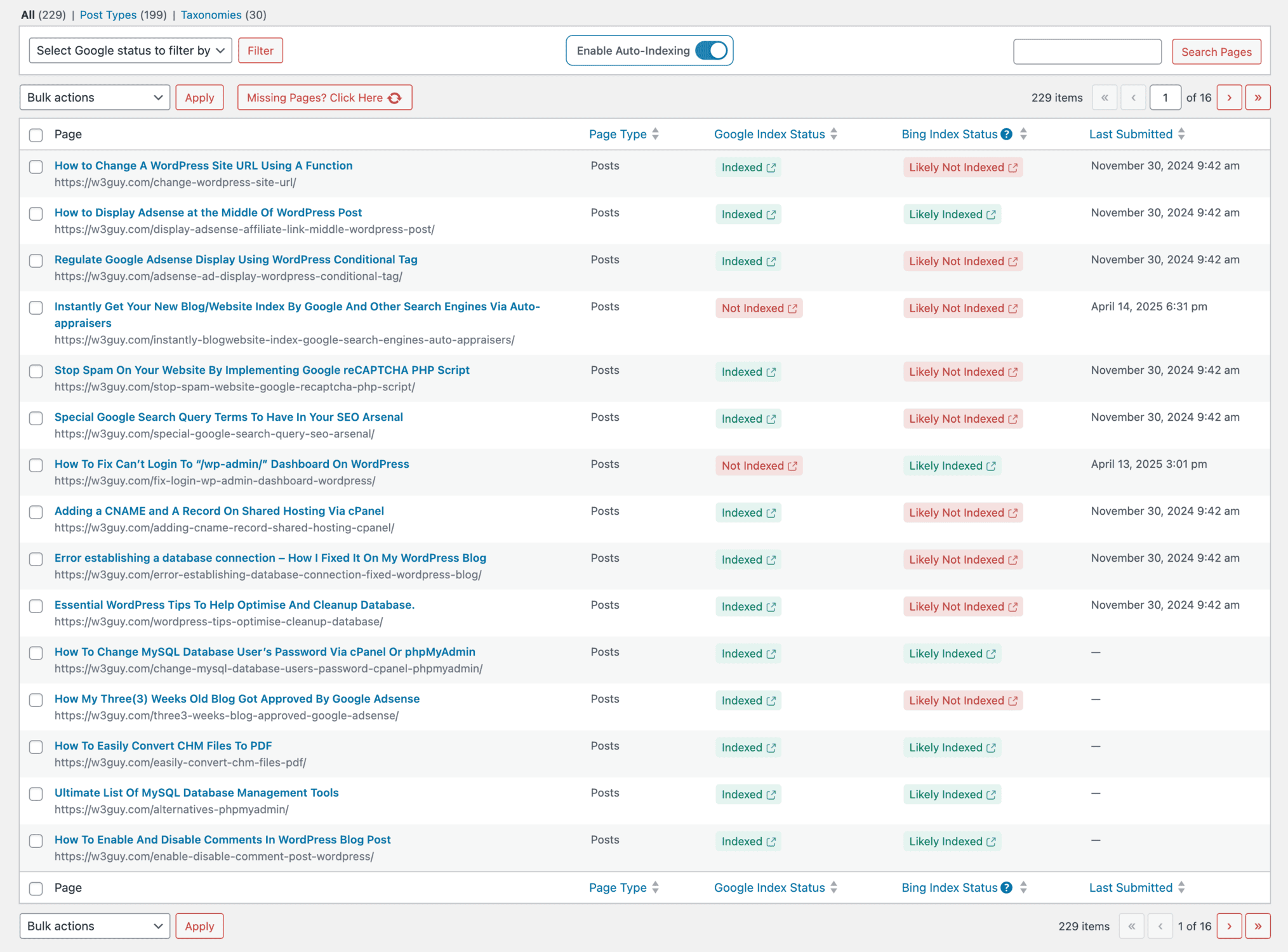
Real example: That outdoor gear client published 200 new winter products on a Monday. With their limited crawl budget, Google would’ve taken 12-14 days to crawl them all.
We used CrawlWP’s bulk indexing feature. Submitted all 200 URLs instantly. 187 were indexed within 48 hours instead of two weeks.
The 13 that didn’t index? They had thin content issues. We improved them, resubmitted via CrawlWP, and 11 more got indexed.
This is the difference between theory and practice. You can optimize crawl budget perfectly, but if you need content indexed NOW (product launches, time-sensitive content, breaking news), instant indexing is non-negotiable.
👉Stop waiting for Google’s crawl schedule. Get CrawlWP.
Step 9: Monitor Crawl Stats Weekly
Set a calendar reminder. Every Monday, check:
- Total crawl requests (trending up or down?)
- Server response time (getting slower?)
- Crawl errors (new issues?)
- Pages discovered vs. indexed (growing gap?)
Catching crawl budget problems early prevents month-long indexing disasters.
Step 10: Prioritize Content Quality Over Quantity
This is the unsexy truth nobody wants to hear:
The best way to optimize a crawl budget is to have less shitty content.
Google allocates more crawl budget to sites it perceives as valuable. Publishing 50 thin blog posts won’t increase your crawl budget. It’ll dilute it.
Instead:
- Publish fewer, better pages
- Update existing content instead of creating duplicates
- Delete or consolidate low-value content
- Focus on pages that actually drive business results
I helped a B2B SaaS client delete 400 blog posts that were driving zero traffic and had no backlinks. Within a month, Google’s crawl budget shifted entirely to its 150 remaining high-quality pages. Organic traffic increased 67% because Google finally focused on content that mattered.
Advanced Crawl Budget Tactics (For the Brave and Slightly Crazy)
If you’ve made it this far, you’re either really committed to crawl budget for SEO or you enjoy technical suffering. Either way, here are advanced tactics:
Tactic 1: Implement JavaScript Rendering Optimization
Google renders JavaScript, but it’s expensive for their crawl budget. If your site is heavy on client-side rendering:
Options:
- Server-side rendering (SSR) for critical content
- Hybrid rendering (pre-render important pages)
- Progressive enhancement (content works without JS)
Sites that reduce JavaScript rendering requirements see increased crawl rates because Google spends less time processing each page.
Tactic 2: Use Conditional Noindex for Thin Category Pages
Category pages with 1-2 products aren’t worth indexing. But you can’t just delete them; users need navigation.
Solution: Conditional noindex:
if ($product_count < 3) {
    echo '<meta name="robots" content="noindex,follow">';
}
This prevents Google from wasting crawl budget on thin categories while still allowing navigation.
Tactic 3: Strategic Use of Nofollow
Not all internal links need to pass PageRank or crawl priority.
Nofollow candidates:
- Login/Register links
- “Add to Cart” buttons
- User profile pages
- Privacy Policy / Terms (unless they’re ranking targets)
This helps Googlebot focus crawl budget on pages that actually matter for SEO.
Tactic 4: Implement Hreflang Correctly
International sites waste massive crawl budget on duplicate language versions if hreflang is broken.
Proper implementation:
- Each page points to all language versions, including itself
- Use absolute URLs
- Verify in the Search Console International Targeting report.
Bad hreflang = Google is crawling the same content 15 times in different languages, trying to figure out what’s what.
Tactic 5: Schedule Content Updates Strategically
If you update 100 pages simultaneously, Google’s crawl demand spikes temporarily. But if those pages aren’t prioritized, it might take weeks to recrawl them all.
Better approach:
- Batch updates in smaller groups (10-20 pages)
- Use CrawlWP’s bulk indexing after each batch
- Monitor indexing status before moving to the next batch
This ensures that updates are indexed quickly rather than sitting in a massive queue.
Mobile vs Desktop: The Crawl Budget Plot Twist
Google uses mobile-first indexing, which means it primarily crawls and indexes the mobile version of your site.
Here’s the gotcha: If your mobile site has fewer internal links than your desktop site (looking at you, hamburger menus that hide half your navigation), Google might never discover important pages.
Google’s 2024 crawl budget update explicitly states: “If your site uses separate HTML for mobile and desktop versions, provide the same set of links on the mobile version as you have on the desktop version.”
The fix:
- Ensure mobile navigation includes all important links
- Include comprehensive footer links on mobile
- Add mobile sitemaps if link parity isn’t possible
- Test mobile crawlability separately from desktop
Common Crawl Budget Myths (That Need to Die)
Myth 1: “More sitemap submissions = more crawling.”
False. Spamming sitemap submissions doesn’t increase crawl budget. Google allocates resources based on site value, not how annoying you are.
Myth 2: “Noindex saves crawl budget.”
Wrong. Googlebot still has to crawl a page to see the noindex tag. Use robots.txt to prevent crawling entirely, or noindex if you want pages crawled but not indexed.
Myth 3: “Small sites need crawl budget optimization.”
Rarely true. If you have under 10,000 pages and the content gets indexed within days, focus on content quality instead.
Myth 4: “Blocking CSS/JavaScript saves crawl budget.”
Terrible idea. Google needs these resources to render and evaluate pages properly. Blocking them hurts indexing, not helps it.
Myth 5: “You can request more crawl budget from Google.”
Nope. Google determines crawl budget based on site value and server capacity. You can’t email them asking for more. You have to earn it through optimization.
When Crawl Budget Doesn’t Matter (And You’re Wasting Your Time)
Let’s be brutally honest about when crawl budget for SEO is NOT your problem:
Your real problem is probably:
- Content quality (thin, duplicate, or worthless pages)
- Technical SEO basics (broken links, slow site, poor mobile experience)
- Indexing issues (noindex tags, canonical problems, manual penalties)
- Competition (your content isn’t better than what’s already ranking)
I’ve seen countless people obsess over crawl budget optimization when their real issue is publishing garbage content that Google doesn’t want to index, regardless of crawl budget.
The diagnosis test:
- Is your site under 10,000 pages? → Probably not a crawl budget issue
- Do new pages get indexed within a week? → Definitely not a crawl budget issue
- Is your “Discovered – not indexed” count under 5%? → You’re fine
- Are you a blogger with 500 posts? → Stop reading this and write better content
Focus on crawl budget ONLY if you’ve confirmed it’s actually your bottleneck.
Final Thoughts: Crawl Budget Is Real, But So Is Common Sense
After years of optimizing crawl budget for SEO for everything from tiny blogs to massive ecommerce platforms, here’s my final advice:
Most people don’t have a crawl budget problem. They have a content problem, a technical SEO problem, or both.
But if you DO have a crawl budget problem (large site, frequent updates, faceted navigation, slow indexing), fixing it is non-negotiable for SEO success.
The crawl budget optimization hierarchy:
- Fix the obvious waste (block search results, excessive parameters, duplicate content)
- Improve server performance (faster response = more crawling)
- Clean up site architecture (logical structure, proper internal linking)
- Implement instant indexing (CrawlWP for bypassing crawl queues)
- Monitor and iterate (weekly crawl stats reviews)
Remember: Google’s crawl budget is finite, but your patience shouldn’t be. Use tools like CrawlWP to stop waiting weeks for indexing and get it done in days.
Your content deserves to be found. Your server deserves to be crawled efficiently. And you deserve to sleep at night without wondering if Googlebot is wasting time on /products?page=847 instead of your actual, valuable content.
Now go forth and optimize. Your crawl budget depends on it.
Ready to stop wasting Google’s time (and yours)? Get CrawlWP and take control of indexing.
FAQs
What is Crawl Budget for SEO?
Crawl budget for SEO is the number of pages Googlebot will crawl on your website within a specific timeframe, determined by the crawl capacity limit (how much your server can handle) and crawl demand (how much Google wants to crawl your site).
Do all websites need to optimize Crawl Budget?
No. Most websites with fewer than 10,000 pages don’t need to worry about crawl budget. Google’s documentation explicitly states that small and medium sites with content getting indexed within days don’t need crawl budget optimization.
How do I check my Crawl Budget?
Use Google Search Console > Settings > Crawl Stats to see total crawl requests, download size, and average response time. Divide the total number of pages by the number of daily crawl requests to estimate your crawl cycle length.
Does Crawl Budget affect rankings?
Indirectly, yes. Pages that aren’t crawled can’t be indexed. Pages that aren’t indexed can’t rank. So crawl budget waste means important content might never appear in search results, killing your ranking potential.
Can I increase my Crawl Budget?
Not directly. Google allocates crawl budget based on site popularity, content quality, update frequency, and server capacity. You increase crawl budget by making your site more valuable, improving server performance, and eliminating crawl waste.
How does page speed affect Crawl Budget?
Faster pages allow Google to crawl more URLs per session. Google’s documentation states that improving response time by 100 milliseconds allows approximately 15% more crawling. Slow pages waste crawl budget on server wait time.
Should I use robots.txt or noindex for crawl budget optimization?
Use robots.txt to prevent crawling entirely for pages you don’t want Google to waste time on. Use noindex meta tags for pages you want crawled but not indexed. They serve different purposes in crawl budget optimization.
How do faceted navigation and filters affect Crawl Budget?
Faceted navigation creates exponentially more URL variations through filter combinations. A site with 5 filters and 3 values each creates 243 possible URLs per category. These URL variations waste massive crawl budget unless properly managed.
Does CrawlWP help with Crawl Budget issues?
Yes. CrawlWP’s instant indexing features bypass traditional crawl queues, getting new content indexed in 24-48 hours instead of waiting weeks for Google’s limited crawl budget to eventually reach your pages. It’s especially valuable for sites with crawl budget constraints.
What’s the difference between crawlability and Crawl Budget?
Crawlability asks, “Can Google access this page?” Crawl budget asks, “Does Google have time and resources to crawl this page soon?” Both matter: blocked pages aren’t crawlable regardless of budget, and low-priority pages might not get crawled even if accessible.