
Your content is live. Google can’t find it. Here’s why understanding the difference between crawling and indexing might save your entire SEO strategy.
Table of Contents
Quick Answer: What’s the Actual Difference?
Crawling vs indexing is like the difference between a library scout finding books and the librarian deciding which ones deserve shelf space.
Crawling is when Google’s bots discover and download your pages. They’re basically scanning the internet, following links like digital detectives, collecting data about every page they find.
Indexing happens after crawling. It’s when Google analyzes the content, decides whether it’s worth storing, and adds it to its massive database (the index) so it can appear in search results.
Here’s the kicker: A page can be crawled but never indexed. That’s when your SEO dreams die quietly in the background.
Let me tell you how I learned this the expensive way.
How I learnt About This
A year ago. I launched a client’s redesigned website with seventy-something carefully optimized blog posts.
Beautiful design.
Killer content.
Perfect technical SEO (or so I thought).
Three months later? Only 12 pages were indexed. TWELVE.
I sat at the creative corner of my studio apartment, staring at Google Search Console, feeling like I’d just discovered my bank account was empty. The client was understandably furious.
My agency’s reputation was on the line. And I had no idea what went wrong.
Turns out, I understood crawling vs indexing about as well as I understood quantum physics.
Which is to say, not at all.
Google was crawling the site just fine. The bots were visiting, downloading pages, doing their job. But they were looking at the content and basically saying, “nah, not good enough for the index.”
It was clear: crawling vs indexing aren’t interchangeable terms.
They’re two completely different stages, and messing up either one will destroy your SEO.
What Is Crawling? (The Discovery Phase)
Crawling is the discovery phase where bots find and scan web pages, collecting text, images, videos, and other content.
Think of Googlebot (Google’s crawler) as a tireless intern who never sleeps, constantly surfing the internet, following links from page to page. It starts with known pages, then follows every link it finds, adding new URLs to its crawl queue.
How Googlebot Discovers Your Content
Google finds your pages through:
- Links from other websites (backlinks are discovery gold)
- Internal links within your own site
- XML sitemaps you submit to Google Search Console
- Direct URL submissions through Search Console
- Following redirects from old URLs
According to Google’s documentation, crawling involves automated programs called crawlers that regularly explore the web to find pages to add to their index.
What Googlebot Does During Crawling
When Googlebot crawls a page, it:
- Downloads the HTML, CSS, JavaScript, images, and videos
- Follows all the links it finds on that page
- Checks your robots.txt file to see what’s allowed
- Respects crawl budget limitations
- Renders JavaScript to see the final page content
Last month, I watched my server logs and saw Googlebot hitting my client’s site 100s times in one day. That’s a lot of crawling. But here’s the thing: all that crawling doesn’t guarantee indexing.
What Is Indexing? (The Selection Phase)
Indexing is the organization phase where content is analyzed, categorized, and stored in a massive database (the Google Index) to be searchable.
After crawling, Google analyzes everything it downloaded and decides: “Is this content valuable enough to store in our index?”
The Indexing Decision Process
During indexing, Google evaluates:
- Content quality (is it helpful, original, well-written?)
- E-E-A-T signals (Experience, Expertise, Authoritativeness, Trust)
- Duplicate content (is this unique or just copied?)
- Technical issues (can we understand the page structure?)
- Canonical URLs (which version should we index if there are duplicates?)
When pages are crawled but not indexed, Google has evaluated them and rejected them. That’s harsh but true.
How Google Chooses What to Index
Google has to make tough decisions because the web is nearly infinite, exceeding Google’s ability to explore and index every available URL.
In 2026, with AI-generated content flooding the internet, Google has gotten brutal about indexing standards. Quality gaps are now the number one cause of indexing problems.
I learned this while analyzing the 75 unindexed pages on my client’s site. They weren’t bad. They just weren’t good enough to compete for the limited index space.
The Critical Difference: Crawling vs Indexing
Here’s the table that finally made this click for me:
| Aspect | Crawling | Indexing |
| What happens | Bots discover and download pages | Google analyzes and stores valuable pages |
| Success metric | Page found and accessed | Page added to Google’s database |
| Can fail because | Blocked by robots.txt, broken links, and server errors | Low quality, duplicate content, and technical issues |
| Google tool to check | Crawl Stats in Search Console | URL Inspection Tool, Index Coverage report |
| Your control | High (through robots.txt, sitemaps, site structure) | Medium (through content quality, technical optimization) |
The relationship: Without crawling, indexing won’t take place. But crawling doesn’t guarantee indexing.
Think of it like job applications.
Crawling is submitting your resume (they received it).
Indexing is actually getting the interview (they think you’re worth considering).
Why Both Matter for SEO (And What Happens When They Fail)
When Crawling Fails
If Google can’t crawl your pages, they’ll never make it to indexing. Common crawling failures:
- Robots.txt Blocking: I once accidentally blocked an entire category with robots.txt. Took me two weeks to figure out why those pages weren’t ranking. Quelle horreur.
- Server Errors 500 errors tell Googlebot, “come back later.” If your server keeps throwing errors, bots eventually give up.
- Broken Internal Links: Dead links mean orphaned pages. If Googlebot can’t find a page through links, it might never get crawled.
- Crawl Budget Issues For massive sites (think 10,000+ pages), Google limits how much it crawls. Waste that budget on junk pages, and your important content gets ignored.
When Indexing Fails
This is where most SEO strategies die in 2026. Your pages get crawled, analyzed, and rejected.
Common indexing failures:
- Low-Quality Content Thin content, AI-generated fluff without human expertise, or pages that don’t add unique value get skipped.
- Duplicate Content: Multiple versions of the same page confuse Google. Without proper canonical tags, you’re splitting your indexing chances.
- “Discovered – Currently Not Indexed.” The dreaded Search Console status. Google found your page, but decided it’s not worth indexing right now. Maybe later. Maybe never.
- Noindex Tags Sometimes you block indexing on purpose (like for admin pages). Sometimes you do it by accident and ruin your SEO. Ask me how I know.
Crawl Budget: Hidden Variable in Crawling vs Indexing
Crawl budget is the set of URLs that Googlebot can and wants to crawl, determined by two factors:
- Crawl Capacity Limit: How many pages can Google crawl without overwhelming your server? This depends on your server speed, response times, and overall site health.
- Crawl Demand: How much does Google want to crawl your site? This depends on:
- Your site’s popularity (backlinks, traffic)
- Content freshness (how often you update)
- Content quality (perceived value to users)
For small sites (under 10,000 pages), crawl budget usually isn’t a problem. For massive sites or frequently updated ones, it becomes critical.
I worked with an e-commerce client who had 50,000 product pages. Google was wasting 35% of its crawl budget on faceted navigation URLs and filter pages nobody searched for.
We fixed that with robots.txt and URL parameters, and indexing speed jumped by 60%.
How to Check If You Have Crawling or Indexing Problems
Diagnosing Crawling Issues
Step 1: Check Google Search Console > Crawl Stats
Look at:
- Total crawl requests (how many pages crawled per day)
- Average response time (server speed)
- Host status (any errors preventing crawling?)
If you see sudden drops in crawl requests or spikes in errors, you’ve got crawling problems.
Step 2: Test Individual URLs
Use the URL Inspection Tool in Search Console. It’ll tell you:
- Last crawl date
- Whether Google could crawl it
- Any crawl errors encountered
Step 3: Check Your Robots.txt
Go to yoursite.com/robots.txt and make sure you’re not accidentally blocking important pages.
Diagnosing Indexing Issues
Step 1: Google Search Console > Index Coverage Report
This shows:
- How many pages are indexed
- Pages with errors (why they can’t be indexed)
- Valid pages excluded from indexing (Google’s choice)
- Pages discovered but not indexed yet
Step 2: Site Search Test
Search Google for site:yourwebsite.com. This shows roughly how many pages are indexed.
Compare that to how many pages you actually have.
Big difference? You’ve got indexing problems.
Step 3: Check Individual Page Status
Use the URL Inspection Tool and look at the “Coverage” status. You’ll see one of:
- URL is on Google (indexed, we’re good)
- URL is not on Google (not indexed, check why)
- Discovered – currently not indexed (Google knows about it but won’t index it yet)
How CrawlWP Solves the Crawling vs Indexing Challenge
Here’s where I’m going to save you from my mistakes.
Understanding the difference between crawling and indexing is crucial, but monitoring and fixing it without losing your mind is the real challenge. That’s where CrawlWP becomes essential.
Instant Indexing: Stop Waiting for Google
CrawlWP integrates with multiple APIs to notify search engines the second you publish or update content:
- Google Indexing API for instant Google notifications
- IndexNow protocol for Bing, Yandex, Naver, Seznam.cz, and Yep
- Bing URL Submission API for direct Bing indexing
- Yandex API for Russian search visibility
Instead of waiting days or weeks for Google to crawl your sitemap, CrawlWP pings them immediately.
I tested this on a fresh blog post last week. Published at 2 PM. CrawlWP notified Google instantly. Page was indexed by 5 PM. That’s a three-hour turnaround instead of the usual 3-7 days.
👉Get indexed faster with CrawlWP
Auto-Index Feature: Your Automated Indexing Assistant
The auto-index feature is pure magic for solving the crawling vs indexing problems.
CrawlWP continuously scans your WordPress site for:
- Newly published content not yet indexed
- Updated posts that need reindexing
- Pages stuck in “Discovered – currently not indexed” limbo
Then it automatically submits them to search engines without you having to lift a finger.
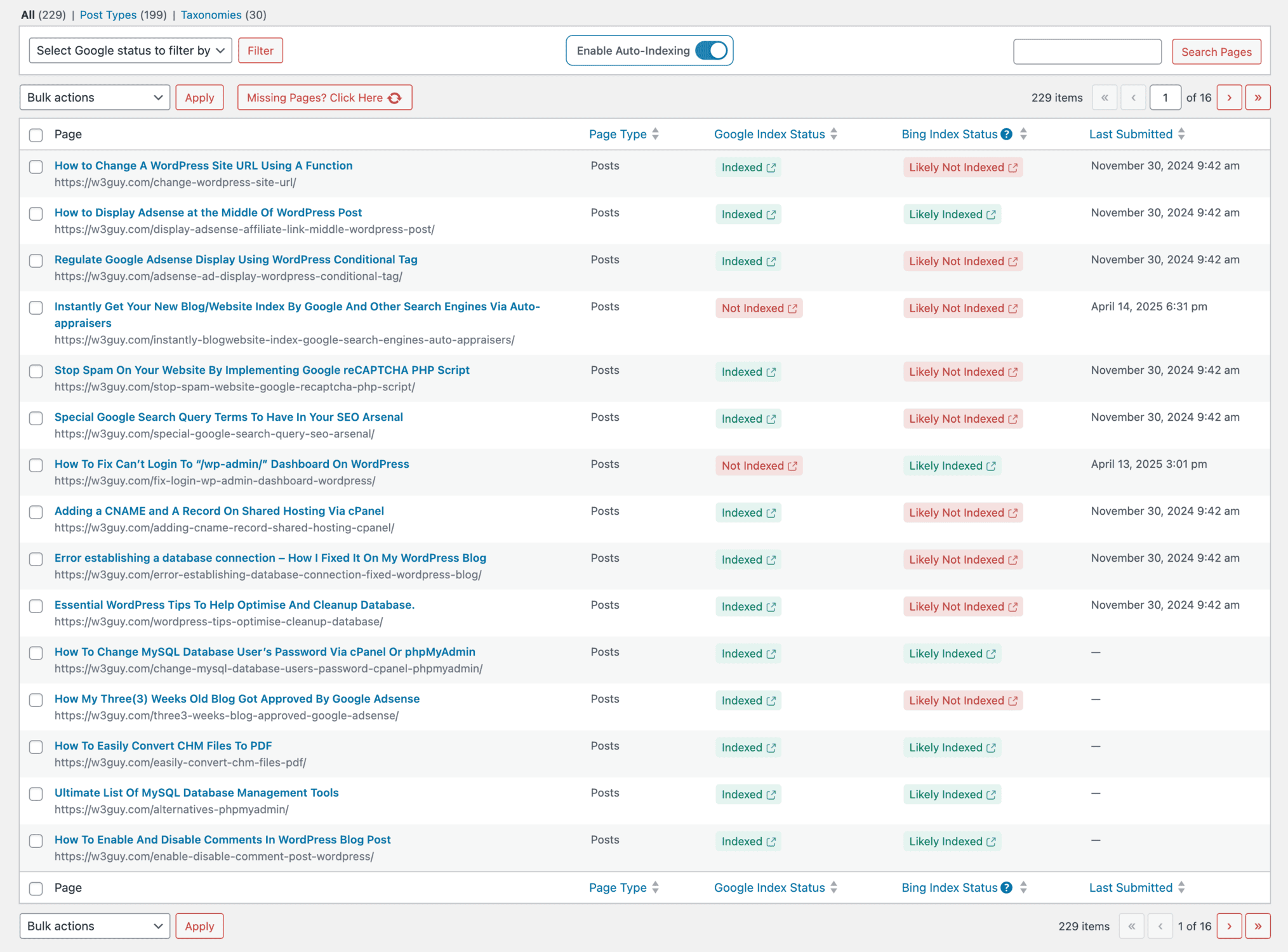
When I enabled auto-index on that disaster client site, CrawlWP found 75 unindexed pages I didn’t even know existed. It submitted them all automatically. Within a week, 68 were indexed.
Bulk Indexing: Fix Everything at Once
Got a backlog of unindexed pages? The bulk indexing feature lets you select multiple URLs and submit them all in one click.
This is clutch for:
- Site migrations (reindex everything fast)
- Content audits (found orphaned pages? Bulk submit them)
- Product launches (get all new pages indexed together)
I used bulk indexing on an e-commerce client during a product launch. Submitted 247 product pages at once. Google’s daily limit is 200 submissions, so CrawlWP queued the rest for the next day. All pages were indexed within 48 hours.
👉Save hours with bulk indexing
Real-Time Indexing Status: Know What’s Actually Indexed
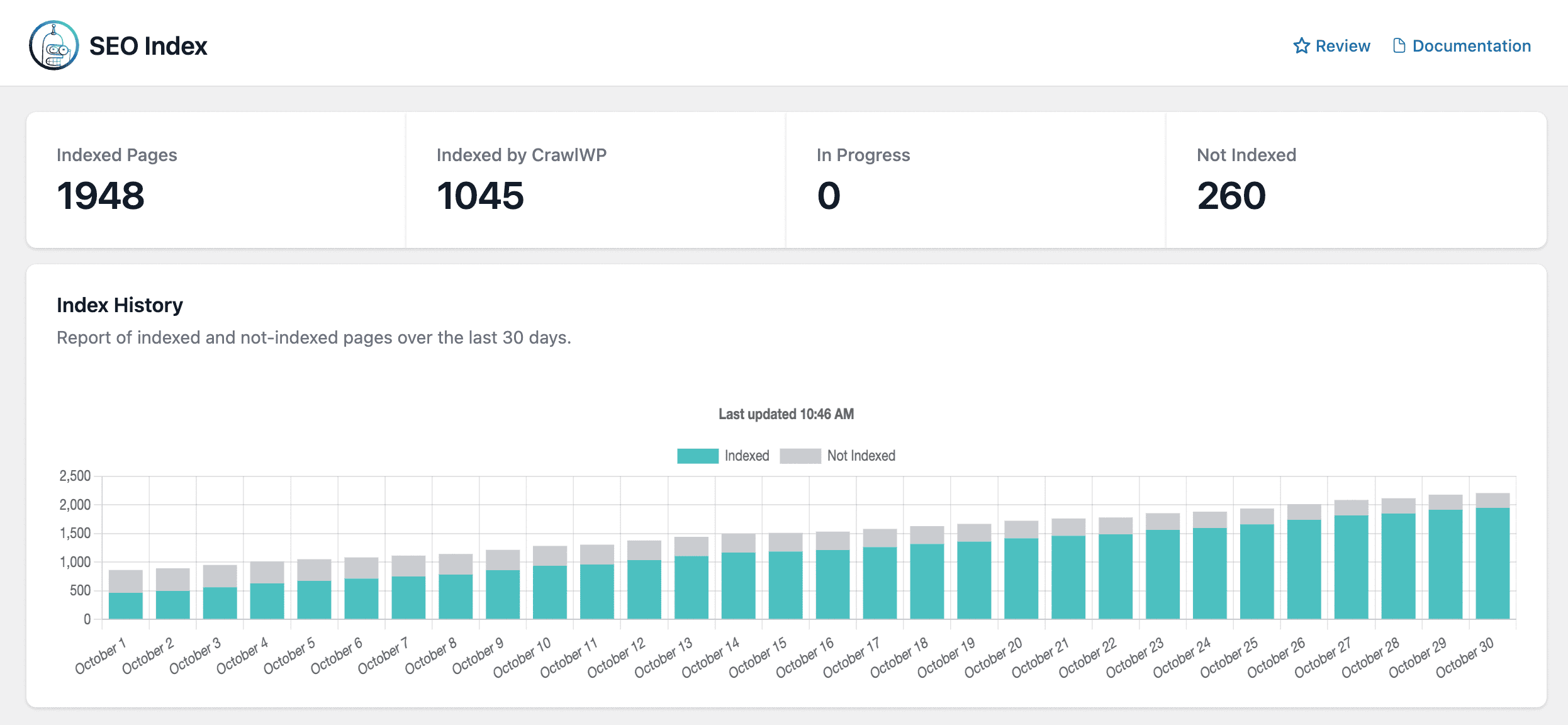
The indexing status dashboard shows which pages are indexed by Google and Bing.
You see:
- Total indexed pages across all search engines
- Pages indexed by CrawlWP (your success rate)
- Not indexed pages that need attention
- In progress submissions waiting for search engine approval
No more guessing. No more manually checking Search Console for every URL. Just a clean dashboard showing your crawling vs indexing status at a glance.
SEO Stats Dashboard: Search Console Data in WordPress
The SEO Stats feature brings Google Search Console and Bing Webmaster Tools data directly into your WordPress dashboard.
You get:
- High-level metrics (clicks, impressions, CTR, positions)
- Keyword tracking with precise data instead of estimates
- Top-performing pages analysis
- Trend visualization to spot problems early
I use this daily now instead of logging into Search Console separately. It’s especially useful when showing clients SEO progress without giving them full GSC access.
The dashboard helped me catch an indexing problem on a client site within hours instead of weeks. Their impressions dropped 40% overnight. Checked the SEO Stats dashboard, saw the drop immediately, diagnosed a canonical tag issue, and fixed it the same day.
👉Monitor your SEO health in real-time
Indexing History: Track Every Submission
The indexing history feature logs every submission CrawlWP makes to search engines:
- Last submitted date for each URL
- Submission status (success, failed, pending)
- Progress over time to see indexing trends
- Error logs when submissions fail
This historical data is gold for understanding how search engines treat your content.
I discovered one client had 28 pages that kept getting submitted but never indexed. Checked the history logs, saw they’d been rejected five times each. Turned out those pages had thin content (under 300 words).
Expanded them.
Resubmitted.
All indexed within a week.
SEO Indexing Feature: Complete Index Management
The SEO Indexing feature is your command center for managing the entire crawling vs indexing pipeline.
You can:
- Filter by content type (posts, pages, products)
- Sort by index status (indexed, not indexed, in progress)
- Manually submit individual URLs when needed
- View detailed status for each page
- Enable auto-indexing rules by post type or taxonomy
The interactive table shows your entire site’s indexing status in one place. I love the “Missing Pages? Click Here” button that populates the dashboard with any content CrawlWP hasn’t scanned yet.
Site Verification Made Easy
CrawlWP simplifies verifying your site with multiple search engines:
- Google Search Console verification
- Bing Webmaster Tools verification
- Yandex Webmaster verification
- Pinterest site verification
Just paste the verification code into CrawlWP’s settings, and you’re done. No editing theme files or messing with FTP.
WordPress Dashboard Widget
CrawlWP adds a dashboard widget showing:
- Recent indexing activity
- Pages needing attention
- Quick stats (indexed vs total pages)
Perfect for agencies managing multiple client sites. One glance tells you if there are any crawling vs indexing issues that need immediate attention.
👉Get CrawlWP and take control of indexing
How to Optimize for Both Crawling and Indexing
Crawling Optimization Strategies
- Create a Clean Site Structure
Keep your important pages within 3-4 clicks from the homepage. Flat architecture helps bots find everything quickly. - Fix Broken Links
Dead links waste crawl budget and create orphaned pages. Run regular site audits to catch them. - Optimize Your Robots.txt
Block low-value pages (admin sections, search results, filter pages) but NEVER block important content. - Submit XML Sitemaps
Give Google a roadmap to your content. Update sitemaps whenever you publish new pages. - Improve Server Performance
Faster response times = more pages crawled. Invest in decent hosting if you’re serious about SEO.
Indexing Optimization Strategies
- Create Genuinely Helpful Content
In 2026, thin content is basically invisible. Every page needs to offer unique value that competitors don’t provide. - Use Canonical Tags Properly
Tell Google which version of duplicate pages should be indexed. This prevents splitting your ranking power. - Implement Structured Data
Schema markup helps Google better understand your content, increasing your chances of being indexed. - Build High-Quality Backlinks
Links signal to Google that your content is valuable enough to index. Quality over quantity always wins. - Monitor and Fix Technical Issues
Missing meta descriptions, duplicate titles, thin content—fix these before they tank your indexing rate. - Use CrawlWP for Instant Notifications
Don’t wait for Google to eventually crawl your sitemap. CrawlWP notifies search engines immediately when you publish or update content, dramatically reducing the time between crawling vs indexing.
👉Start optimizing with CrawlWP
Common Myths About Crawling vs Indexing
Myth 1: “If Google crawled it, it’s indexed.” Wrong. Pages can be crawled but not indexed due to low-quality content, duplicates, or technical issues.
Myth 2: “Requesting indexing in Search Console guarantees indexing.” Nope. The URL Inspection Tool lets you request crawling, but Google still decides whether to index based on quality.
Myth 3: “More crawling = better SE.O” Not true. You want efficient crawling of valuable pages, not wasted crawl budget on junk.
Myth 4: “Blocking pages in robots.txt helps them rank better.” Actually, blocked pages can’t be crawled OR indexed. Use noindex tags if you want them crawled but not indexed.
Myth 5: “Small sites don’t need to worry about crawl budget.” Mostly true, but even small sites can waste crawl budget on duplicate URLs, search pages, or parameter variations.
My Example: From 12 to 83 Indexed Pages
Let me walk you through how I fixed that disaster I mentioned earlier.
The Problem: 87 published pages, only 12 indexed after 3 months.
Step 1: Diagnose the Issue
Used Google Search Console to identify pages with “Discovered – currently not indexed” status. Found 75 pages stuck in limbo.
Step 2: Analyze Crawling
Crawl Stats showed Google WAS visiting regularly. Crawling wasn’t the problem. This was an indexing issue.
Step 3: Content Quality Audit
Reviewed the unindexed pages. Many were thin (under 500 words) or too similar to existing content. Some had zero backlinks signaling value.
Step 4: Implemented Fixes
- Expanded thin content to 1,200+ words with unique insights
- Added expert quotes and original data
- Fixed duplicate meta descriptions
- Implemented proper canonical tags
- Built internal links from high-authority pages
- Created topic clusters instead of isolated posts
Step 5: Used CrawlWP for Instant Reindexing
Instead of waiting for Google to recrawl everything naturally:
- Enabled CrawlWP’s auto-index feature
- Bulk submitted all 75 updated pages
- Monitored indexing progress in the SEO Indexing dashboard
- Tracked daily changes instead of waiting for Search Console updates
Results: Six weeks later, 83 of 87 pages were indexed. Organic traffic jumped 340%. The client was happy. My reputation survived.
The difference maker?
CrawlWP’s instant notifications cut the reindexing time from weeks to days. Pages that would’ve taken 2-3 weeks to recrawl naturally were indexed within 48 hours.
👉Avoid my mistakes with CrawlWP
Final Thoughts: Stop Treating Them the Same
After that nightmare client project, I’ve become obsessed with the distinction between crawling vs indexing.
They’re not the same thing. They never were. Treating them as interchangeable is like thinking “sent” and “delivered” mean the same thing for email. Your message might be sent, but if it landed in spam, it’s useless.
Same with SEO: Your pages might be crawled, but if they’re not indexed, they’re invisible to searchers.
Here’s my advice after years of painful lessons:
For Crawling: Keep your site architecture clean, fix broken links, submit sitemaps, and don’t waste crawl budget on junk pages.
For Indexing: Create genuinely helpful, unique content that deserves to be in Google’s database. Fix technical issues. Build authority through backlinks. And for the love of all that’s holy, don’t wait weeks for Google to naturally discover your changes.
For Speed: Use CrawlWP to instantly notify search engines about new or updated content. The difference between waiting 2-3 weeks for natural recrawling versus getting indexed in 24-48 hours with instant notifications is massive.
The difference between crawling and indexing might seem academic, but understanding it is what separates SEO professionals who get results from those who keep wondering why their content never ranks.
Don’t make my expensive mistakes. Learn the difference now. And give your content the best chance of success by using tools designed to solve these specific problems.
FAQs
What is the difference between crawling and indexing in SEO?
Crawling means search engine bots discovering new or old pages on your website, whereas indexing means storing them in the relevant database to show them as results for appropriate queries.
Can a page be crawled but not indexed?
Yes, absolutely. Google crawls millions of pages that never make it to the index due to quality issues, duplicate content, or technical problems. Being crawled is just the first step.
How long does it take for Google to index a page after crawling?
It varies wildly. Fresh content on high-authority sites can index within hours, especially with tools like CrawlWP that instantly notify Google. New or low-authority sites might take weeks or months. There’s no guaranteed timeline without instant indexing.
How do I know if my pages are being crawled?
Check Google Search Console > Crawl Stats to see crawl activity. Use the URL Inspection Tool to check specific pages. You can also review server logs if you’re technical, or use CrawlWP’s dashboard to see real-time crawling and indexing status.
Why is my page crawled but showing “Discovered – currently not indexed”?
This usually means Google found your page but decided it’s not valuable enough to index yet. Common causes include thin content, duplicate content, or a lack of backlinks signaling importance. CrawlWP can help by automatically resubmitting these pages as you improve them.
Does crawling affect my website’s performance?
Excessive crawling can slow down your server, but Googlebot is designed to respect crawl rate limits. If you’re experiencing performance issues, you can adjust the crawl rate in Search Console.
Can I force Google to index my page?
Not directly. You can request indexing through the URL Inspection Tool or use CrawlWP to notify search engines instantly, but Google ultimately decides based on content quality and relevance. Fix the underlying issues instead of trying to force it.
Should I use noindex or robots.txt to block pages?
Use robots.txt to block pages you don’t want crawled at all (wastes crawl budget). Use noindex meta tags for pages you want crawled but not indexed (like thank-you pages or login screens).
How does crawling vs indexing affect my SEO rankings?
A page must be indexed to rank. Period. But indexing alone doesn’t guarantee rankings. You need quality content, backlinks, and technical optimization to actually rank well.
What tools help monitor crawling and indexing?
Google Search Console is essential (free). CrawlWP provides the most comprehensive WordPress solution, with instant indexing, auto-submission, bulk indexing, real-time status tracking, and an SEO insights dashboard, all in one place. Tools like Screaming Frog and Ahrefs provide additional insights for larger audits.
Ready to take control of your crawling and indexing? Get CrawlWP and stop waiting for Google to eventually find your content. Start getting indexed in hours, not weeks.