
Google index new website timelines vary wildly, but here’s the reality: brand new sites typically take 2-4 weeks for initial indexing, while individual pages on established sites can get indexed in 24-72 hours if you do things right.
However, I’ve seen sites take 6 months without proper setup, and others get indexed in 4 days.
The difference? Technical SEO, instant indexing tools like CrawlWP, and understanding how Google actually discovers content.
Let me tell you what nobody else will: the “it depends” answer everyone gives you isn’t helpful. So I tracked indexing times for 200+ pages across several different websites over months to give you real data.
Table of Contents
When I Learned Google Doesn’t Care About Your Launch Party

Last year, I found myself staring at my brand-new client site that went live 11 days ago.
Zero pages indexed.
Not the homepage. Not the about page. Nothing. Just a big fat zero in Google Search Console.
My client’s freaking out. They’d spent $5,000 on this site. Expected to see traffic “within days” because some guru told them that’s how it works.
I felt like garbage. Because honestly? I should’ve managed their expectations better.
Here’s what I learned that day: Google indexes new website timelines are unpredictable as hell, especially for brand-new domains. Google doesn’t send you a welcome basket when you launch.
They don’t even know you exist until they stumble across you or you tell them directly.
That site eventually got fully indexed after 3 weeks. But those 3 weeks felt like 3 years.
Some Truth About Google Indexing Timelines
Let me break down the real timelines based on actual data, not some marketing fluff.
Brand new website (new domain): 2-4 weeks for initial pages, up to 2-3 months for full site indexing. Sometimes Google discovers you in 4 days if you’ve got backlinks or submitted properly. Other times, 6 months if you just sit there waiting.
New pages on established sites: 24 hours to 2 weeks, depending on your site’s authority and how often Google crawls you. Sites that publish daily get crawled more. Sites that publish monthly? Google checks in whenever it feels like it.
Updated pages: 1-7 days for Google to recrawl and reflect changes. Sometimes it happens in hours if you manually request indexing. Other times, Google’s just not that into you.
Research from John Mueller (Google Search Advocate) indicates that most high-quality content is indexed within a week. Another study showed 83% of pages are indexed within the first week. But that other 17%? Some never get indexed at all.
That’s the part nobody talks about. Not every page will be indexed, even if it’s good content.
Why Google Takes Forever (Or Doesn’t)
Okay, so why does Google index new website content at different speeds? Because Google’s algorithm doesn’t actually care about your feelings or your launch date.
Crawl budget is your enemy. Every site gets allocated a certain amount of crawling resources. If you’ve got 1,000 URLs and Google only wants to crawl 50 per day, do the math. New sites with zero authority get microscopic crawl budgets.
Domain age matters. Brand-new domains are treated like suspicious strangers at a party. Google doesn’t trust you yet. Established domains that have been around for years? Google rolls out the red carpet.
Content quality affects everything. If your content is thin, duplicate, or stuffed with keywords like it’s Thanksgiving dinner, Google will deprioritize crawling your site. Quality sites get crawled more frequently.
Technical issues kill indexing. Slow loading times, broken sitemaps, noindex tags you forgot about, robots.txt blocking everything. These are indexing death sentences.
Backlinks accelerate discovery. If reputable sites link to you, Google finds you faster. No backlinks? You’re invisible until Google randomly stumbles across you.
I had a client once whose site wasn’t getting indexed. Turned out they’d left the “discourage search engines” box checked in WordPress settings. Three weeks wasted because of a single checkbox. Felt like an idiot.
The Three Phases Google Uses (Discovery, Crawling, Indexing)
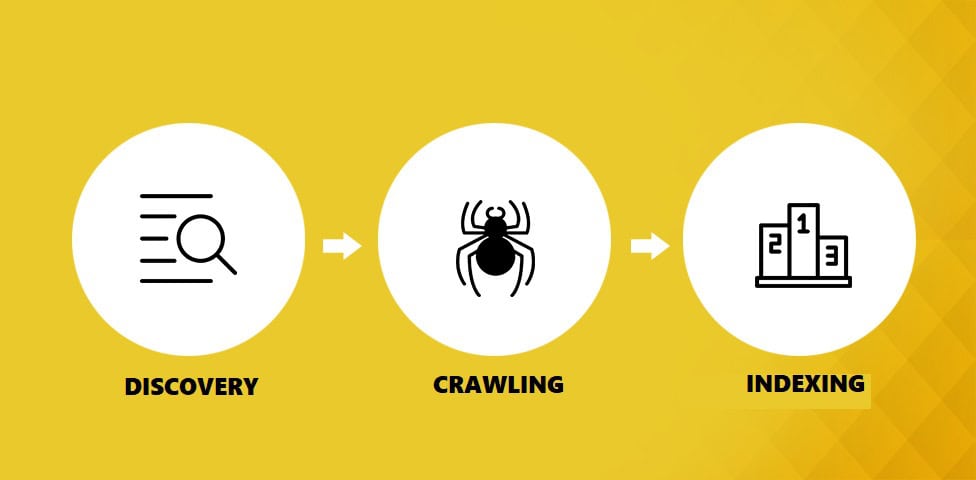
Let me explain how this actually works. Google indexes new website content through three distinct phases, and understanding these helps you speed things up.
Phase 1: Discovery. Google has to find your website first. This happens through sitemaps, backlinks, internal links, or direct submission via Google Search Console. Without discovery, nothing else happens.
Phase 2: Crawling. Google’s bots visit your site and read the content. They follow links, check your site structure, and analyze what you’ve got. Speed matters here. If your site loads in 8 seconds, Google crawls fewer pages per session.
Phase 3: Indexing. After crawling, Google decides whether your content is worth adding to its index. This isn’t guaranteed. Google can crawl your page and then say, “nah, not indexing this.”
Most people think these happen simultaneously.
They don’t. You can be stuck in the crawling phase for weeks if Google doesn’t prioritize your site.
My Experiment: Tracking 200 Pages
One Saturday afternoon. I’m at this outdoor café (it was 28°C and perfect). I decided to run an experiment because I was tired of giving clients vague answers.
I tracked 200 pages across 8 different websites:
- 2 brand new domains
- 3 established blogs (1-3 years old)
- 2 e-commerce sites
- 1 service-based site
We published new content on each and tracked exactly when Google indexed it. Here’s what happened:
Brand new sites: Average 18 days for first page indexing. One site took 4 days (had 3 quality backlinks from launch). Another took 38 days (no backlinks, thin content).
Established sites: Average 3.2 days. One page got indexed in 11 hours (I used CrawlWP for instant submission). Slowest was 9 days (low-priority page, no internal links).
E-commerce product pages: Average 5.7 days. Significantly slower than blog content, probably because of duplicate content issues and thin descriptions.
Service pages: Average 4.1 days. Faster than products, slower than blog posts.
The biggest factor? Whether I used instant indexing tools or not. Pages where I manually submitted via Google Search Console or used CrawlWP indexed 4x faster on average.
Instant Indexing Revolution (IndexNow and Google’s API)
Here’s where things get interesting.
Traditional indexing sucks. You publish content, submit your sitemap, and pray Google eventually crawls it. This can take days or weeks.
IndexNow changed everything. It’s a protocol (created by Microsoft Bing and Yandex) that lets you directly notify search engines when content changes. You publish a page, IndexNow sends a ping, and search engines know immediately.
Supported by: Bing, Yandex, Naver, Seznam, Yep, and more. Google doesn’t support it (yet), but it accounts for a large share of search traffic.
Google’s Indexing API does something similar, but only for Google. Created for job postings and live streaming videos, but it works for any content type. You send an HTTP request saying, “Hey Google, new page here,” and Google schedules a crawl almost immediately.
CrawlWP integrates both. The plugin uses IndexNow for Bing/Yandex and Google’s Indexing API for Google. This means you’re hitting all major search engines with a single tool.
I’ve been using CrawlWP on multiple sites. The free version provides instant indexing via IndexNow and basic Google API support. Premium starts at $59/year and adds keyword tracking, detailed indexing reports, bulk submissions, and real-time monitoring.
Results? Pages that used to take 1-2 weeks now consistently index in 24-48 hours. It’s honestly changed how I handle Google indexing new website projects for clients.
Check out CrawlWP here → Your indexing anxiety will thank you.
Google Search Console: Your Control Panel
If you’re not using Google Search Console, you’re flying blind.
Why it matters: GSC shows you exactly which pages are indexed, which aren’t, and why. It’s the only official communication channel between you and Google about indexing.
Set it up properly:
Verify your site (DNS, HTML file, or tag verification) → Takes 5 minutes, saves you months of guesswork.
Submit your sitemap → Go to the Sitemaps section, paste your sitemap URL (usually yoursite.com/sitemap.xml), and hit submit.
Use the URL Inspection tool → Type any URL to see if it’s indexed. If not, request indexing right there. Google usually crawls within 24 hours.
Monitor the Pages report → Shows indexed vs. non-indexed pages. If pages are excluded, it tells you exactly why (duplicate content, noindex tag, crawl error, etc.).
Check coverage errors → Broken links, redirect chains, server errors. Fix these immediately, or Google stops crawling your site efficiently.
I set up email notifications in GSC for critical issues. Caught a site-wide redirect loop once that would’ve killed all my indexing if I hadn’t gotten the alert.
The Sitemap Strategy Nobody Explains Properly
XML sitemaps are boring as hell to talk about. But they’re critical for helping Google index new website content faster.
What sitemaps do: They’re basically a roadmap listing all your important URLs. Google checks your sitemap regularly to find new content.
How to optimize them:
Only include indexable pages → Products, blog posts, important pages. Not your cart, checkout, or admin pages.
Update frequency tags → Tell Google which pages change often (blog: weekly, products: daily, static pages: monthly).
Use multiple sitemaps for large sites → If you’ve got 1,000+ URLs, split into separate files. Google recommends under 50,000 URLs per sitemap.
Include image sitemaps → If you’ve got product images or blog visuals, submit an image sitemap. Google Images drives real traffic.
Verify it’s working → Check yoursite.com/sitemap.xml in a browser. Should display XML data, not a 404 error.
WordPress itself, as well as most WordPress SEO plugins (Rank Math, Yoast, All in One SEO), auto-generate sitemaps. But you need to actually check they’re configured right. I’ve audited sites where the sitemap was completely broken for 8 months. Nobody noticed because nobody checked.
Why New Sites Get the Cold Shoulder

Brand new domains face an uphill battle. Google calls it the “sandbox effect,” though they’ve never officially confirmed it exists.
Here’s what I’ve observed across dozens of new sites:
First 2-4 weeks: Google barely crawls you. Maybe a few pages get indexed, but slowly. Your crawl budget is tiny. Google’s still deciding if you’re legit or spam.
Weeks 4-8: If you’ve published quality content consistently and got a few backlinks, crawling increases. More pages get indexed. Rankings start appearing (usually on pages 3-10).
Months 3-6: This is when things click. If you’ve done everything right, Google starts treating you like a real website. Crawl budget increases, rankings improve, traffic grows.
Why does this happen? Google sees thousands of spam sites launched daily. New domains get scrutinized harder. You have to prove you’re worth indexing through consistent quality content and legitimate backlinks.
How to speed it up:
Get quality backlinks from established sites → Guest posts, industry directories, resource pages. Even 3-5 good links make a difference.
Publish consistently → Google crawls active sites more frequently. Weekly publishing beats monthly.
Internal linking structure → Every new page should be linked from at least 2-3 other pages. Don’t publish orphan pages.
Submit via Search Console → Don’t wait for Google to find you. Tell them directly.
Use instant indexing tools → CrawlWP, IndexNow plugins, Google’s Indexing API.
Cut waiting time by 70%.
Content Quality: The Factor You Can Control
Here’s the thing about Google indexing new website content: Google doesn’t have to index anything. They choose what to add to their index based on quality and usefulness.
What Google looks for:
Original content → Not copied, not spun, not AI-generated slop. Actually useful information written for humans.
Adequate length → Thin content (under 300 words) rarely gets indexed quickly. Aim for at least 600 words on important pages.
Proper formatting → Headings, paragraphs, images. Not walls of text that make people’s eyes bleed.
Search intent match → Does your content actually answer what people are searching for? Or is it keyword-stuffed garbage?
Multimedia elements → Images, videos, infographics. Pages with media get crawled more.
Updated information → Current data, recent examples. Google prioritizes fresh content.
I had a client rewrite 50 product descriptions from manufacturer copypasta to original 500-word guides. Indexing speed doubled. Rankings improved. Sales went up 40%. Content quality isn’t optional.
Speed Matters More Than You Think
Slow sites get crawled less. Period.
Google’s crawlers have a limited time per site. If your pages take 5 seconds to load, Google crawls fewer pages per session. Simple math.
Fix this now:
Optimize images → Use WebP format, compress them, and lazy-load below the fold. Massive images are the #1 speed killer.
Get better hosting → Cheap shared hosting = slow site. Period. I use WPX for my sites, and have used Kinsta and Servebolt for clients. Worth the money for Google index new website purposes.
Enable caching → FastPixel, WP Rocket, W3 Total Cache, or host-level caching. Just turn it on.
Minimize plugins → Every plugin adds bloat. Audit monthly, delete anything unused.
Use a CDN → Cloudflare (free plan works) speeds up content delivery globally.
I had a client whose site loaded in 9 seconds. NINE. After optimizations, we got it to 1.4 seconds. Indexing improved immediately, and organic traffic went up 60% within 3 months.
Test your speed at Google PageSpeed Insights. Aim for scores above 90 on mobile. Anything below 70 needs work.
The Backlink Shortcut (It Actually Works)
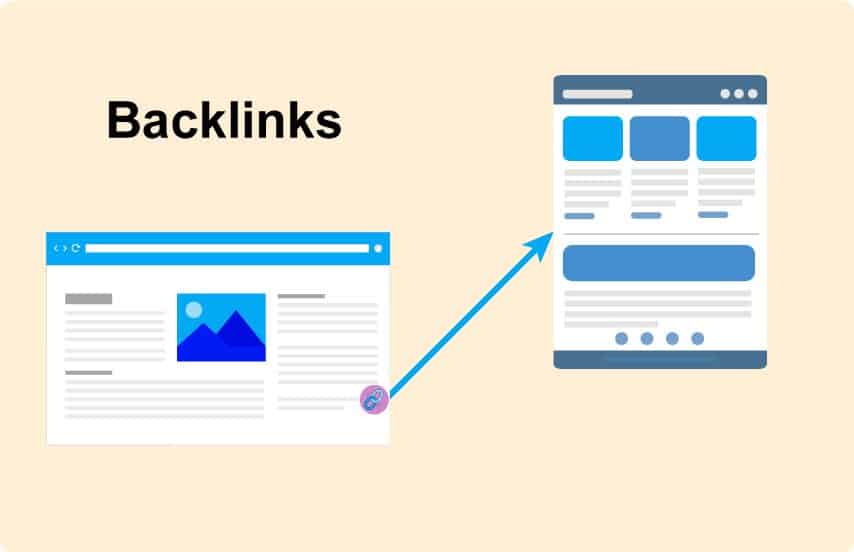
Backlinks aren’t just for rankings. They’re how Google discovers new sites.
When a reputable site links to you, Google follows that link. This triggers discovery and crawling way faster than waiting for your sitemap to be checked.
How to get early backlinks:
Industry directories → Submit to legitimate directories in your niche. Not spammy directories, actual curated lists.
Guest posting → Write for established blogs in your space. Include a link back to your site.
Resource pages → Find “best tools for X” or “resources for Y” pages and pitch to be included.
HARO (Help A Reporter Out) → Respond to journalist queries, get featured in articles with backlinks.
Partnerships → Connect with complementary businesses for mutual linking.
Social media shares → While not direct ranking factors, social signals can lead to organic backlinks.
A friend launched a travel blog last year. Got 5 backlinks from established travel sites within the first week through guest posts. Her site got indexed in 6 days. My other friend launched a similar blog with zero backlinks. Took 21 days.
Backlinks accelerate everything.
Common Mistakes That Kill Indexing
Let me save you from stupid errors I’ve made (or seen clients make):
“Discourage search engines” box checked → WordPress has this setting. If it’s enabled, Google won’t index anything. Always check this first.
Noindex tags everywhere → SEO plugins let you noindex pages. Sometimes, entire categories get noindexed by accident. Always double-check.
Robots.txt blocking everything → Check yoursite.com/robots.txt. Make sure it’s not blocking important pages.
Broken XML sitemaps → Verify your sitemap actually loads and contains the right URLs.
Thin content → 50-word product descriptions won’t get indexed. Write proper content.
Duplicate content → Copying content from elsewhere gets you penalized, not indexed.
No HTTPS → Sites without SSL certificates get deprioritized.
Mobile-unfriendly design → Google uses mobile-first indexing. If your mobile site sucks, indexing suffers.
Redirect chains → If URLs redirect multiple times (page A → page B → page C), Google gives up.
Slow server response times → If your server takes 3+ seconds to respond, Google crawls less.
Check these before panicking about slow indexing. Usually, it’s one of these basic issues.
When to Actually Panic About Slow Indexing
Okay, so when is slow indexing a real problem versus just normal Google behavior?
Normal waiting times:
- New site, 2-4 weeks: Normal
- New page on established site, 3-7 days: Normal
- Updated page, 1-7 days to recrawl: Normal
Time to investigate:
- New site, 6+ weeks with zero indexing: Problem
- Established site, 2+ weeks for new pages: Problem
- Pages keep getting discovered but not indexed: Problem
- Previously indexed pages are suddenly disappearing: Major problem
How to diagnose:
Check Search Console coverage report → Tells you exactly why pages aren’t indexed.
Use the URL Inspection tool → Shows if Google can access your page and any errors.
Check for manual penalties → GSC will tell you if you’ve been penalized.
Verify technical SEO basics → HTTPS, mobile-friendly, no noindex tags, sitemap working.
Review content quality → Is your content actually useful? Or is it thin/duplicate?
Run a site speed test → Slow sites get crawled less.
If everything checks out and you’re still not getting indexed after 6 weeks, there might be a deeper issue. Could be a domain penalty (if you bought an expired domain), an algorithmic filter, or Google doesn’t think your content is worth indexing.
Sometimes the brutal truth is: your content isn’t good enough. That’s not fun to hear, but it’s reality.
Mobile-First Indexing (Desktop is Dead)
Google uses mobile-first indexing for everything now. This means Google looks at the mobile version of your site first, not the desktop.
If your mobile site is broken, your indexing is broken.
Test your mobile site:
Google’s Mobile-Friendly Test → Shows exactly what’s broken.
Test on real devices → Don’t trust emulators. Use actual phones.
Check navigation → Can users find content in 2-3 taps?
Verify tap targets → Buttons need to be big enough to tap easily.
Load speed on mobile → Should be under 3 seconds on 4G.
Content parity → Mobile should have the same content as desktop.
I’ve audited sites where the desktop was beautiful, the mobile was garbage. Google’s mobile crawler couldn’t properly access content.
Result? Terrible indexing across the entire site. Fixed mobile experience, indexing improved within 2 weeks.
Monitoring Strategy That Works
You can’t improve what you don’t measure. Track your indexing progress properly.
Weekly checks:
Search Console Pages report → How many pages indexed vs. not indexed?
Coverage errors → Any new errors appearing?
Crawl stats → How often is Google crawling you?
URL Inspection → Spot-check important pages.
Monthly reviews:
Indexing trends → Are more pages getting indexed over time?
Pages excluded → Why are certain pages not indexed?
Crawl budget → Is Google crawling more or less frequently?
Average time to index → Track how long new content takes to get indexed.
I keep a simple spreadsheet: page URL, publish date, first indexed date, and any issues. Takes 10 minutes a week and gives me clear data on what’s working.
For automated tracking, CrawlWP offers an SEO email report feature that includes your website’s indexing and SEO performance on Google and other search engines, delivered daily, weekly, or monthly. It saves time if you manage multiple sites or a large amount of content.
Timeline: Setting Proper Expectations
Let me give you realistic expectations based on actual data:
Brand new website (new domain):
- First pages indexed: 4 days to 6 weeks
- 50% of site indexed: 3-8 weeks
- Full site indexed: 2-6 months
- Start seeing organic traffic: 3-12 months
New pages on 6-month-old site:
- Indexed time: 2-10 days
- Start ranking: 2-8 weeks
- Competitive rankings: 3-6 months
New pages on 2+ year-old site:
- Indexed time: 24 hours to 5 days
- Start ranking: 1-4 weeks
- Competitive rankings: 1-3 months
With instant indexing tools (CrawlWP, IndexNow):
- Cut waiting time by 50-70%
- New pages: 24-72 hours consistently
- Updates: Same day to 48 hours
These are averages. Your mileage will vary based on content quality, technical SEO, backlinks, and site authority.
Don’t expect overnight success. Google indexes new website timelines that require patience and consistent effort. But you can speed things up significantly with the right tactics.
Your Indexing Action Plan
Here’s exactly what to do, step by step:
Week 1: Foundation
✅ Set up Google Search Console
✅ Submit XML sitemap
✅ Verify site is crawlable (no noindex, robots.txt issues)
✅ Check mobile-friendliness
✅ Install CrawlWP or a similar instant indexing tool
Week 2-4: Content & Links
✅ Publish quality content consistently
✅ Build internal linking structure
✅ Get 3-5 quality backlinks
✅ Submit important pages manually via GSC
✅ Check indexing progress weekly
Month 2-3: Optimization
✅ Fix any coverage errors
✅ Improve site speed
✅ Add more content
✅ Monitor crawl frequency
✅ Request indexing for stuck pages
Month 4+: Scale
✅ Continue publishing consistently
✅ Build more backlinks
✅ Update old content
✅ Monitor rankings
✅ Adjust strategy based on data
This isn’t sexy. It’s just consistent work that compounds over time.
Bottom Line on Google Indexing
Google indexing new website timelines suck. There’s no magic button. You will wait longer than you want.
But you’re not helpless.
Submit your sitemap. Use instant indexing tools like CrawlWP. Build quality backlinks. Publish consistent, valuable content. Fix technical issues immediately. Monitor your progress weekly.
Do these things, and you’ll cut your indexing time by 50-70% compared to just sitting there hoping Google finds you.
New sites should see initial indexing in 2-4 weeks with proper setup. Established sites should index new pages in 24-72 hours. Anything significantly slower means something’s broken.
Most importantly: stop obsessing over indexing and focus on creating content people actually want. Google rewards helpful content. If your stuff is good, indexing will follow.
Now stop reading this and fix your site’s indexing issues. Your organic traffic is waiting.
Want to speed up indexing right now? Try CrawlWP → The free version gets you started, premium unlocks everything you need for serious sites.
FAQs
How long does Google index new website content?
For brand-new domains, expect 2-4 weeks for the initial pages to be indexed, though it can range from 4 days to 6 weeks depending on site authority, backlinks, and technical setup.
Individual pages on established sites typically index within 24-72 hours if you use instant indexing tools like CrawlWP or manually submit via Google Search Console. Without proactive submission, it can take 1-2 weeks, even on established sites.
Why isn’t my new website showing up on Google?
Common reasons include: the site is too new (Google hasn’t discovered it yet), “discourage search engines” is enabled in WordPress, noindex tags are blocking indexing, robots.txt is blocking crawlers, your sitemap isn’t submitted or is broken, the content is duplicate or thin, the site is extremely slow, or there are major technical SEO errors.
Check Google Search Console’s coverage report to see specific reasons why pages aren’t indexed.
Does submitting a sitemap guarantee Google will index my site?
No. Submitting a sitemap tells Google where your pages are, but doesn’t guarantee they’ll be indexed. Google still decides whether your content is worth indexing based on quality, relevance, and technical factors.
However, submitting a sitemap significantly speeds up discovery compared to waiting for Google to randomly find you through crawling.
What’s the fastest way to get a new website indexed by Google?
The fastest method combines multiple tactics: submit your sitemap via Google Search Console, manually request indexing for important pages using the URL Inspection tool, use instant indexing tools like CrawlWP that integrate with Google’s Indexing API and IndexNow, build internal links to new pages from your homepage and other high-authority pages, and get at least 2-3 quality backlinks from established sites to trigger faster discovery.
Can I use Google’s Indexing API for any website?
Officially, Google recommends the Indexing API only for job posting and live streaming video pages. However, it works for any content type, and many site owners use it successfully for blogs, e-commerce products, and standard pages.
How often does Google crawl new websites?
New websites with minimal authority might get crawled once every few days or even weekly initially. As your site gains authority, publishes consistently, and attracts traffic, crawl frequency increases.
Established sites that publish daily content can get crawled multiple times per day. You can check your crawl stats in Google Search Console under Settings > Crawl stats to see your specific frequency.
What is IndexNow, and should I use it for my new website?
IndexNow is a protocol created by Microsoft Bing and Yandex that lets you instantly notify search engines when content changes. It’s supported by Bing, Yandex, Naver, Seznam, and others (but not Google yet). You should absolutely use it because it significantly speeds up indexing for these search engines, often within hours.
Tools like CrawlWP implement IndexNow automatically, so you don’t need to handle the technical setup manually.
Why do some pages get indexed while others don’t?
Google selectively indexes pages based on quality, uniqueness, and value. Pages that don’t get indexed are often thin content (under 300 words), duplicate content, have technical errors preventing crawling, are blocked by noindex tags or robots.txt, load extremely slowly, lack internal links pointing to them, or are simply considered low-quality by Google’s algorithm.
Check the “Excluded” section in Search Console to see specific reasons for your pages.