
Here is my quick answer for those who scroll straight here: IndexNow vs Google Indexing API vs Sitemaps is not an either/or battle. It’s a “use all three, but know exactly what each one does” situation.
- Sitemaps: Still non-negotiable. Your foundation. Always needed.
- Google Indexing API: Powerful but highly limited. It officially works only for JobPosting and BroadcastEvent (livestream video) schema pages, although most users have had success using it for regular blog posts.
- IndexNow: The fastest push protocol for Bing, Yandex, Naver, Seznam, and more. Google still doesn’t support it.
The winning strategy is to run all three together, which tools like CrawlWP automate for you.
Now let me explain this properly. Get comfortable.
Table of Contents
Why I’m Writing This (A Story of Public Embarrassment)

Okay, real talk. A few months ago, I was on a call with a client who runs a fast-fashion WooCommerce store. Sweet lady. Very trusting. Probably too trusting, because she paid me good money to sort her SEO.
She’d launched 120 new product pages. We’re talking Friday evening, full collection drop, influencer posts scheduled, email blast queued.
Saturday morning, she messages me: “None of the pages are on Google. Is something wrong?”
I checked Google Search Console. Sitemap submitted. ✅
Pages crawled? Barely 11 out of 120.
Reader, I sat there staring at my screen thinking: so… how exactly is Google finding my client’s pages right now?
That panic spiral sent me down a rabbit hole that took days, three browser tabs with 40+ articles each, two conversations with Diane, and one very embarrassing SEO forum post to untangle.
What came out of it was a complete understanding of IndexNow vs Google Indexing API vs Sitemaps, how they work in 2026, and which one you actually need to use, when, and why.
This article is the article I wish had existed then. Let’s go. 🔍
First Things First: Why Does Indexing Even Matter?
Before I get into the IndexNow vs Google Indexing API vs Sitemaps comparison, let me make sure we’re all on the same page here.
Publishing a page doesn’t mean it’s indexed.
These are two completely different things, and confusing them has cost real people real traffic.
When you publish a page, it exists on your server.
That’s it.
Google, Bing, Yandex, and every other search engine have no idea it’s there unless they find it somehow. The process of them finding it, visiting it, and adding it to their database? That’s indexing.
Without indexing, your page is invisible in search. Full stop.
Now, how fast your pages get indexed depends entirely on how you notify search engines. And that’s where the whole IndexNow vs Google Indexing API vs Sitemaps debate comes from.
Let’s tackle each one properly.
Method 1: XML Sitemaps (The OG, The Foundation, The One You Can’t Skip)
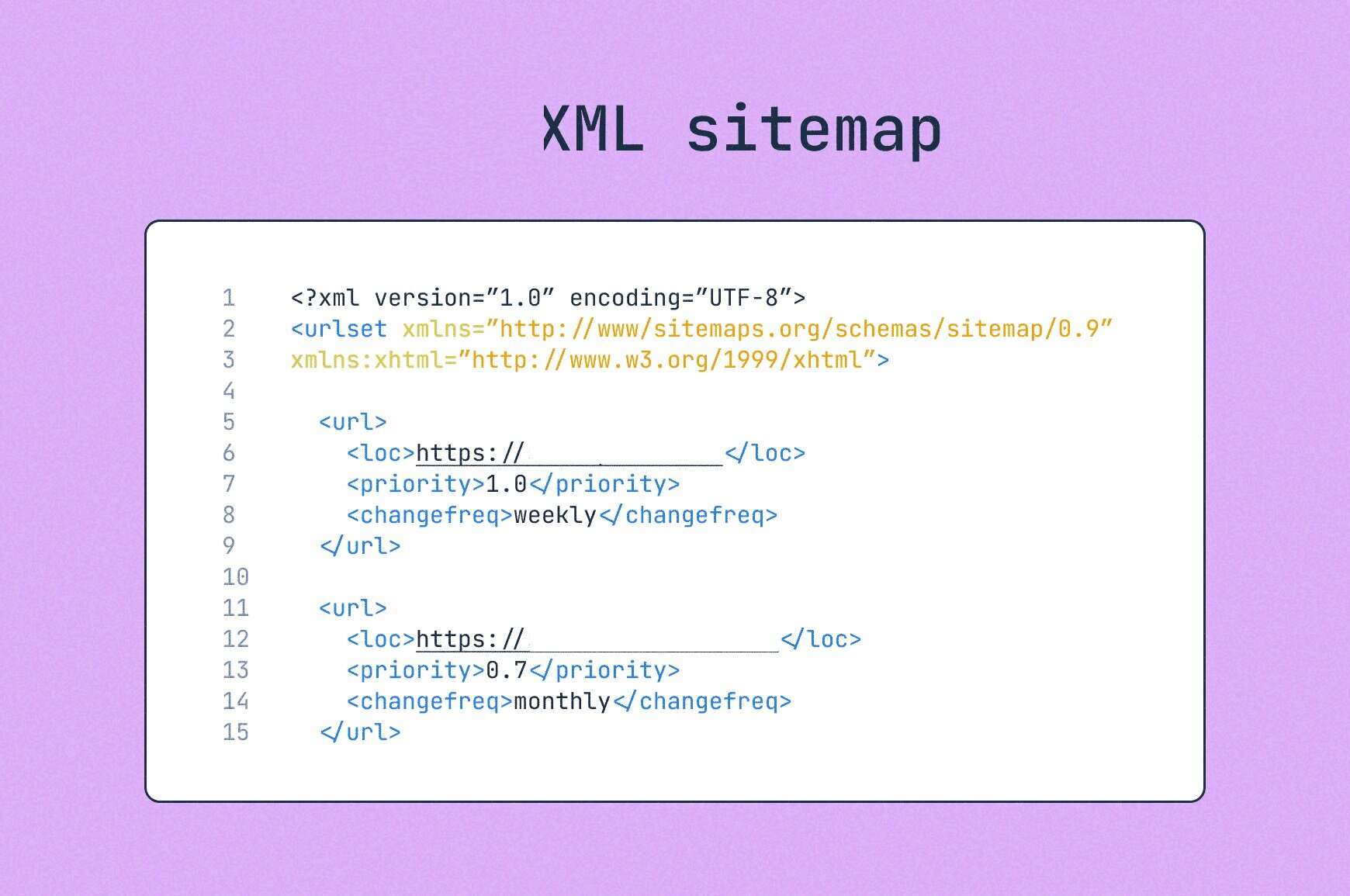
What Is an XML Sitemap?
An XML sitemap is a file that lives at yoursite.com/sitemap.xml (or similar). It’s basically a structured list of every URL on your site you want search engines to find and index.
Think of it like handing Google a detailed map of your entire house and saying, “Here are all the rooms. Some are important, some less so. Please visit them all.”
It doesn’t guarantee that Google will visit immediately. It doesn’t guarantee Google indexes what it finds. But it gives Google the full picture of what exists on your site.
If your website is built with WordPress, it automatically generates your sitemaps. You submit those sitemaps to Google Search Console and Bing Webmaster Tools, and that’s your baseline.
How Sitemaps Work
Search engines crawl your sitemap periodically. They don’t check it every hour.
Google might pull your sitemap daily for active sites, or every few days for slower ones. It depends on your site’s crawl budget, how often you publish, your domain authority, and, honestly, Google’s mood.
The sitemap has some optional metadata you can include:
- <lastmod>: When the page was last updated
- <priority>: How important this page is (0.1 to 1.0)
- <changefreq>: How often the page changes (daily, weekly, monthly)
One important truth: Google treats <priority> and <changefreq> as suggestions, not instructions. Google crawls what it wants, when it wants. Your sitemap just helps ensure it doesn’t miss anything.
A single XML sitemap file can hold up to 50,000 URLs and must be under 50MB uncompressed.
Larger sites use a sitemap index file that references multiple sitemaps.
Where Sitemaps Fall Short
Here’s the thing about sitemaps that nobody in 2019 wanted to talk about: they’re slow for new content.
You publish a post. You have a sitemap. Great. Now you wait for Google to:
- Notice your sitemap was updated
- Schedule a crawl visit
- Actually, crawl your new page
- Add it to the index
That process can take anywhere from a few hours to several weeks for smaller or newer sites. And on a busy Friday, a product launch for a WooCommerce store? A few weeks is a catastrophe.
Sitemaps alone are not enough for time-sensitive content in 2026. They are necessary but not sufficient.
Who Still Needs Sitemaps? (Everyone)
- New websites that Google hasn’t fully crawled yet
- Large sites with complex architectures
- Sites with pages buried deep in the navigation
- Media-heavy sites with images and video content
- Sites with over 50,000 URLs needing index management
- Any site that wants baseline discoverability guaranteed
The answer is literally everyone. Sitemaps are non-negotiable. Don’t let anyone tell you otherwise.
Method 2: Google Indexing API (The VIP Door)
What Is the Google Indexing API?
The Google Indexing API is Google’s own “push” system that lets you directly notify Google when a page is added, updated, or deleted. Instead of waiting for Google to pull your sitemap, you’re pushing the URL directly to Google and saying: “Hey, go crawl this. Now.”
Sounds amazing, right? A direct line to Google? Sign me up!
…except there’s a catch. A big one.
The Brutal Truth About Google Indexing API
As of 2026, Google’s Indexing API officially only supports two content types:
- Pages with JobPosting schema markup (job listing pages)
- Pages with BroadcastEvent embedded in a VideoObject (livestream video pages)
That’s it. That’s the list.
If you run a blog? Not officially supported.
An e-commerce store? Not officially supported.
A membership site? Not officially supported.
A news portal? Not officially supported.
I know. I was furious too.
It turns out that many SEO tools and WordPress SEO plugins, including CrawlWP, have found the Google Indexing API to also work for regular content pages.
If you’re concerned or want to proceed cautiously, we offer a one-click option to view your WordPress content in Google Search Console. This allows you to request indexing manually, which is a safe approach.
The default quota for the Indexing API is 200 publish requests per day per project. That’s it. If you need more, you have to apply for additional quota, and Google approves it based on your site quality and content type.
Setting Up Google Indexing API (It’s Not Quick)
Here’s what the setup of the Google Indexing API looks like:
- Create a Google Cloud project
- Enable the Indexing API
- Create a service account and download JSON credentials
- Grant the service account access as an owner in Google Search Console
- Make API calls via HTTP POST requests to https://indexing.googleapis.com/v3/urlNotifications:publish
It’s technical. It’s fiddly. And if you mess up the service account permissions, you’ll get unhelpful 403 errors and cry.
Tools like CrawlWP SEO Plugin guide you on the entire Google Indexing API connection from inside your WordPress dashboard.
Is Google Indexing API Worth It?
For job sites and livestream platforms: absolutely yes. It’s the fastest way to get those specific content types into Google’s index.
For everyone else: while the official answer is no, it still works. If you are cautious, we offer a one-click preview of your content in Google Search Console so you can request indexing of your WordPress content safely. And you’ll need to rely on sitemaps and IndexNow for other search engines (Bing, Yandex, Yep, etc.).
Method 3: IndexNow (The Speed Demon That Google Refuses to Invite to the Party)

What the Hell Is IndexNow?
IndexNow is an open-source indexing protocol launched in October 2021 by Microsoft Bing and Yandex. The idea is elegantly simple:
When you publish or update content, your site sends a lightweight HTTP ping to any one IndexNow-supporting search engine, which automatically shares the notification with every other participating search engine. You submit once. They all get the memo.
Search engines supporting IndexNow include:
- Microsoft Bing
- Yandex
- Naver (South Korea’s dominant search engine)
- Seznam.cz (Czech Republic)
- Yep (Ahrefs’ search engine)
- DuckDuckGo (gets data through Bing)
You can submit up to 10,000 URLs in a single HTTP POST request. Compare that to Google Indexing API’s 200-per-day limit, and you start to see why IndexNow is genuinely exciting for large sites.
By 2024, IndexNow had grown to 2.5 billion submitted URLs daily, with 17% of all new clicked URLs on Bing coming through the IndexNow protocol.
That is not a small number.
The Google Problem
Here’s the big elephant in the room, and I’m not going to sugarcoat it:
Google does not yet support IndexNow.
Google tested the protocol at some point. They haven’t adopted it. Their position seems to be that their crawler is efficient enough, and they don’t need the external push notification.
Whether you believe that or not (personally, I have… opinions), the practical reality is: IndexNow speeds up indexing on Bing, Yandex, Naver, and others.
But for Google?
You’re still relying on sitemaps, internal linking, crawl budget optimization, and whatever Google feels like doing that day.
This is frustrating. I said what I said.
However, don’t dismiss IndexNow just because Google isn’t playing ball. Bing is a real source of traffic. Naver is massive if you have any reach in South Korea or East Asia. Yandex matters for Russian-speaking audiences.
And if Google ever does adopt IndexNow (they’ve shown interest), sites already set up with it will have an immediate advantage.
How IndexNow Actually Works Technically
The setup is refreshingly simple compared to Google Indexing API:
- Generate an API key (random alphanumeric string, 8–128 characters)
- Host a text file with that key at your domain root: https://yourdomain.com/yourkey.txt
- Send HTTP POST requests to the IndexNow API endpoint whenever content changes.
The JSON payload looks like this:
{

"host": "www.yourdomain.com",

"key": "yourAPIkey",

"keyLocation": "https://www.yourdomain.com/yourAPIkey.txt",

"urlList": [

"https://www.yourdomain.com/new-post",

"https://www.yourdomain.com/updated-product"

]

}
You can submit to any participating engine’s endpoint (like https://www.bing.com/indexnow), and they’ll forward it to all other participating engines within 10 seconds.
Platforms like Wix, Shopify, and Cloudflare have native IndexNow integrations baked in. For WordPress, you need either a dedicated plugin or a tool that handles it automatically.
CrawlWP handles IndexNow submissions alongside Google Indexing API connections, making it genuinely the most complete indexing solution for WordPress in 2026.
Get CrawlWP and Automate All Three Methods →
Side-by-Side Breakdown: IndexNow vs Google Indexing API vs Sitemaps 📊
Let’s stop the storytelling for a second and just lay it all out flat.
| Feature | XML Sitemaps | Google Indexing API | IndexNow |
| Search Engine Support | All engines | Google only | Bing, Yandex, Naver, Seznam, Yep |
| Google Support | ✅ Yes | ✅ Yes | ❌ No |
| Push or Pull | Pull (passive) | Push (active) | Push (active) |
| Speed | Days to weeks | Near-instant | Near-instant |
| Content Types | All | JobPosting & BroadcastEvent only | All content types |
| Daily Limit | No limit | 200 URLs/day (default) | 10,000 URLs per request |
| Setup Complexity | Easy | Complex | Simple |
| Cost | Free | Free | Free |
| Automation Available | Yes (plugins) | Yes (plugins/tools) | Yes (plugins/tools) |
| Best For | Foundation for all sites | Job boards, livestream platforms | Speed across non-Google engines |
Honest Question: So What Should YOU Use in 2026?
Good, you made it this far. Here’s the practical guide based on site type.
If you’re a blogger or content creator:
Use: Sitemaps + IndexNow + optimize Google Crawl Budget
Why: Google Indexing API won’t officially work for your content. IndexNow helps you get indexed quickly on Bing, Yandex, Yep, and other search engines. Sitemaps keep Google’s crawlers properly guided.
Tool recommendation: CrawlWP handles IndexNow and Google Search Console integration natively within WordPress and automatically surfaces unindexed pages.
If you run a WooCommerce or ecommerce store:
Use: Sitemaps + IndexNow for fast product page discovery
Why: Product pages change constantly. Prices update. New items launch. IndexNow delivers those updates to Bing quickly. For Google, strong internal linking and regular sitemap updates matter most.
Real talk: On that client launch I mentioned at the start? We now use CrawlWP to trigger IndexNow pings when new products are published. Bing indexed all 120 pages within 48 hours. Google took longer, but sitemap + internal linking did the work.
If you run a job board or recruitment site:
Use: All three. Sitemaps + Google Indexing API + IndexNow
Why: You’re one of the rare sites where Google Indexing API actually works as intended. Use it. Get your listings indexed on Google in near-real time. Add IndexNow for Bing and others. Sitemaps are the foundation.
If you’re a news publisher or time-sensitive content site:
Use: Sitemaps (Google News sitemap specifically) + IndexNow + push for Google Indexing API access
Why: News sitemaps are handled differently by Google. IndexNow gets your breaking stories onto Bing and Yandex faster. And some news platforms have been granted Indexing API access outside the official scope, so it’s worth exploring.
If you’re running a new website (under 6 months old):
Use: All three immediately, plus aggressively build internal links
Why: New sites have the hardest time getting crawled. You need every advantage. Don’t wait for Google to “discover” you organically. Hit sitemaps, IndexNow, and GSC URL inspection manually for your most important pages.
The CrawlWP Angle: How I Automate All of This Without Losing Sleep
Look, I’m going to be honest about why I keep mentioning CrawlWP in this article, because I don’t do fake enthusiasm, and you deserve transparency.
Here’s what CrawlWP actually does in the context of this IndexNow vs Google Indexing API vs Sitemaps conversation:
- Auto-pings IndexNow every time you publish, update, or delete content on WordPress
- Connects to Google Indexing API directly from your WordPress dashboard (handles the service account setup with way less drama)
- Scans for un-indexed pages across your site and submits them in bulk
- Shows index status by pulling data from Google Search Console right into your WP dashboard
- Monitors Core Web Vitals and SEO health metrics in one place
Essentially, CrawlWP solves the IndexNow vs Google Indexing API vs Sitemaps problem by automating all three layers without you needing to be a developer.
Is it the only tool that does this?
No.
But it’s WordPress-native, actively maintained, and priced fairly.
See CrawlWP Pricing and Features →
Properfraction Ecosystem: Because These Tools Are Quietly Crushing It
Since we’re talking about WordPress SEO and content infrastructure, let me drop some truth about the other tools in the Properfraction family, because they slot into the same creator workflow beautifully.
Mistakes I See Creators Make (Don’t Be This Person)
In the spirit of this entire IndexNow vs Google Indexing API vs Sitemaps deep-dive, let me call out the most common screwups I see.
Mistake #1: Thinking Sitemap Submission = Instant Indexing
Submitting your sitemap to Google Search Console does not mean your pages are indexed. It means you’ve handed Google a map. Google will visit when it’s ready.
This is the most common misunderstanding in all of SEO, and it has caused so much unnecessary confusion. Breathe. Sitemaps are passive. They work overtime.
Mistake #2: Ignoring Bing Because “Nobody Uses Bing”
Bing, Yandex, Yep, and other IndexNow engines collectively reach hundreds of millions of users. As of 2024, 17% of all new clicked URLs on Bing were discovered through the IndexNow protocol.
That’s nothing. That’s a real traffic source that takes 10 minutes to activate with the right tool. Dismissing non-Google engines because “Google is king” is leaving real visitors and revenue on the table.
Mistake #3: Setting Up IndexNow and Forgetting to Check the Key File
The first time you use a new IndexNow key, search engines will attempt to download the key file from your site to verify you own the domain. If that key file gets deleted, moved, or returns a 404, your IndexNow submissions will start failing silently.
Check your key file is accessible at least once a month. It takes 30 seconds.
Mistake #4: Not Fixing the Content Problem Before Submitting
Here’s the cold, hard truth about IndexNow, the Google Indexing API, and Sitemaps: none of these methods can index bad content. Not one.
Without IndexNow, it can take days to weeks for search engines to discover that the content has changed. But even with IndexNow, if your content is thin, duplicated, or technically broken, search engines will crawl it and decide not to index it, regardless of how many times you ping them.
Fix your content first. Then use these tools to get it discovered faster.
What’s Coming and Beyond
A few trends worth watching in this IndexNow vs Google Indexing API vs Sitemaps space:
Will Google Ever Adopt IndexNow?
The honest answer: maybe. Google has shown passing interest and participated in early discussions. But they’ve been very clear that their crawler is “efficient” and they haven’t committed to adoption.
Given Google’s dominance (97-98% of search in many markets), they have less incentive to join a protocol that also benefits Bing.
But as AI search engines like Perplexity, ChatGPT Search, and others grow, the pressure on Google to offer faster indexing solutions for all content types will increase. The indexing landscape is shifting.
AI Search and Indexing
Perplexity, ChatGPT Search, Grok, and Gemini are all pulling live web data more aggressively now. Being indexed fast isn’t just about Google search rankings anymore. It’s about whether your content shows up in AI-generated answers.
This makes fast indexing even more valuable than it was 18 months ago. Getting your content discovered quickly across all channels, not just Google, is increasingly important.
IndexNow Growing Adoption
As of 2024, IndexNow has grown to 2.5 billion submitted URLs daily. Wix, Shopify, Cloudflare, and WordPress.com all have native IndexNow integrations. The protocol is becoming infrastructure-level for the web.
Even if Google doesn’t adopt it, IndexNow is decisively winning the non-Google search world.
The Verdict: What Works in 2026
After all of this, here’s my clean IndexNow vs Google Indexing API vs Sitemaps verdict:
For Google: Sitemaps + internal linking + crawl budget optimization + Google Indexing API (only if you have JobPosting/BroadcastEvent content) + patience.
For everything else: IndexNow. Set it up. Automate it. Forget about it.
For the lazy (or smart, depending on how you look at it): Use CrawlWP to automate all of this inside WordPress and stop manually submitting URLs like it’s 2014.
The three methods aren’t competitors. They’re teammates. Use all of them, understand what each one does and doesn’t do, and stop expecting a sitemap alone to do the work of an entire indexing strategy.
Your content deserves to be found. Go make that happen.
Start Automating Your Indexing with CrawlWP →
FAQs
Does Google support IndexNow?
No. Google does not support IndexNow. The protocol is supported by Bing, Yandex, Naver, Seznam.cz, and Yep, among others. For Google, you still need to rely on XML sitemaps, internal linking, crawl budget optimization, and Google’s own Indexing API (for eligible content types only).
What is the Google Indexing API daily limit?
The default quota is 200 publish requests per day per Google Cloud project. If you need more, you must apply for additional quota through Google’s approval process, and Google evaluates your request based on content quality and the type of content you’re submitting.
How many URLs can I submit with IndexNow at once?
You can submit up to 10,000 URLs in a single HTTP POST request to IndexNow. This is significantly more generous than the Google Indexing API’s default daily limit of 200 URLs.
Does IndexNow guarantee indexing?
No. Like all indexing notification methods, IndexNow tells search engines that content exists and should be crawled. Whether those engines actually index the content depends on their own evaluation criteria, including content quality, relevance, uniqueness, and compliance with their guidelines. IndexNow can help speed up discovery, but it does not guarantee that a page will be indexed.