
Do you want to reduce Time to First Byte (TTFB) in WordPress and make your website load faster?
A high TTFB can affect SEO rankings, increase bounce rates, and create a poor user experience. Even with a great design, users may leave if your site feels slow at the start.
The good news is that reducing TTFB in WordPress is possible. With the right hosting, caching, database optimization, and performance improvements, you can improve server response time and make your website load much faster.
In this guide, we will explain what Time to First Byte (TTFB) is, why it matters for WordPress performance, and the common causes of high TTFB. You will also learn how to measure it accurately and discover practical ways to reduce it, along with answers to frequently asked questions.
Table of Contents
What Is Time to First Byte (TTFB)?
Time to First Byte (TTFB) measures how long it takes for a browser to receive the first byte of data from your server after making a request.
Think of it like ordering food at a restaurant. The total loading speed is the full dining experience, but TTFB is the time it takes for the waiter to even acknowledge your order.
If your server responds slowly, everything else gets delayed.
TTFB includes three main stages:
- The browser sends a request to the server
- The server processes the request
- The first byte of data is returned to the browser
When your WordPress site has a high TTFB, visitors experience delays before the page even begins loading. That blank white screen or loading spinner? That is often a TTFB issue.
Performance experts generally consider these benchmarks reasonable:
| TTFB Score | Performance |
| Under 500ms | Excellent |
| 500ms to 800ms | Good |
| 800ms to 1800ms | Needs Improvement |
| Above 1800ms | Poor |
According to Google, good TTFB values are 0.8 seconds or less, and poor values are greater than 1.8 seconds.
Why TTFB Matters for WordPress SEO and User Experience
A fast-loading site creates a pleasant experience that keeps visitors to your WordPress website engaged. A slow website creates friction immediately.
Google has repeatedly emphasized website performance through Core Web Vitals, and server response time directly impacts those metrics. While TTFB itself is not officially a Core Web Vitals metric, it strongly influences metrics like Largest Contentful Paint (LCP), which measures how quickly the main content becomes visible.
Imagine trying to fill a bucket with water while the tap takes five seconds to start running. No matter how fast the flow becomes afterward, the delay already hurts the experience.
That is exactly how slow TTFB affects websites. Slow TTFB affects:
- SEO rankings
- Bounce rates
- Conversion rates
- Crawl efficiency
- Mobile usability
- User satisfaction
Some SEO professionals now believe poor TTFB also affects AI search visibility because AI systems often rely on fast page retrieval before citing websites.
From a business perspective, the consequences can be serious. An ecommerce store with slow server response times loses impatient buyers before products even load.
A blog with high TTFB sees higher bounce rates. A lead generation site loses inquiries because users abandon the page before interacting with forms.
Website speed is no longer optional. It is part of the user experience itself.
Common Causes of High TTFB in WordPress
Most WordPress websites suffer from high TTFB due to avoidable technical issues. Let us break down the most common culprits.
1. Cheap or Overloaded Hosting: This is the biggest issue by far. Shared hosting environments host hundreds or even thousands of websites on a single server. If another site suddenly experiences high traffic or resource spikes, your site slows down too.
No caching plugin can fully compensate for a weak hosting infrastructure. Multiple WordPress optimization studies emphasized that hosting quality remains the most underestimated performance factor.
If your hosting provider struggles with CPU allocation, RAM availability, or outdated server technology, your TTFB will suffer.
2. Too Many Plugins: Plugins are convenient, but every active plugin adds processing overhead. Some plugins create excessive database queries. Others inject heavy scripts or trigger unnecessary API requests. Even plugins advertised as lightweight can create hidden delays.
A recent Reddit discussion revealed that removing a single inefficient plugin instantly reduced TTFB by 200ms.
That is the frustrating reality of WordPress performance. Sometimes, one poorly coded plugin becomes the bottleneck for the entire website.
3. Slow Database Queries: Every WordPress page relies heavily on database communication. If your database is bloated with revisions, transients, spam comments, or inefficient queries, server response time increases.
WooCommerce websites often experience this problem on a much larger scale. Large product databases, excessive taxonomies, and dynamic filtering systems can dramatically increase PHP execution time.
4. Poor Theme Optimization: Your WordPress theme plays a bigger role in TTFB than most people realize. A poorly optimized theme can slow down your server response time before a single plugin even loads.
How to Measure TTFB Accurately
Before you can reduce Time to First Byte (TTFB) in WordPress, you first need to measure it properly. There are several tools available for checking TTFB, but keep in mind that each one may produce slightly different results depending on the testing method and server location.
Below, we will show you four effective ways to measure Time to First Byte (TTFB)
1. Using Google PageSpeed Insights
The easiest way to measure TTFB is by using Google PageSpeed Insights.
To check your TTFB, visit Google PageSpeed Insights, enter your website URL, and run the test.
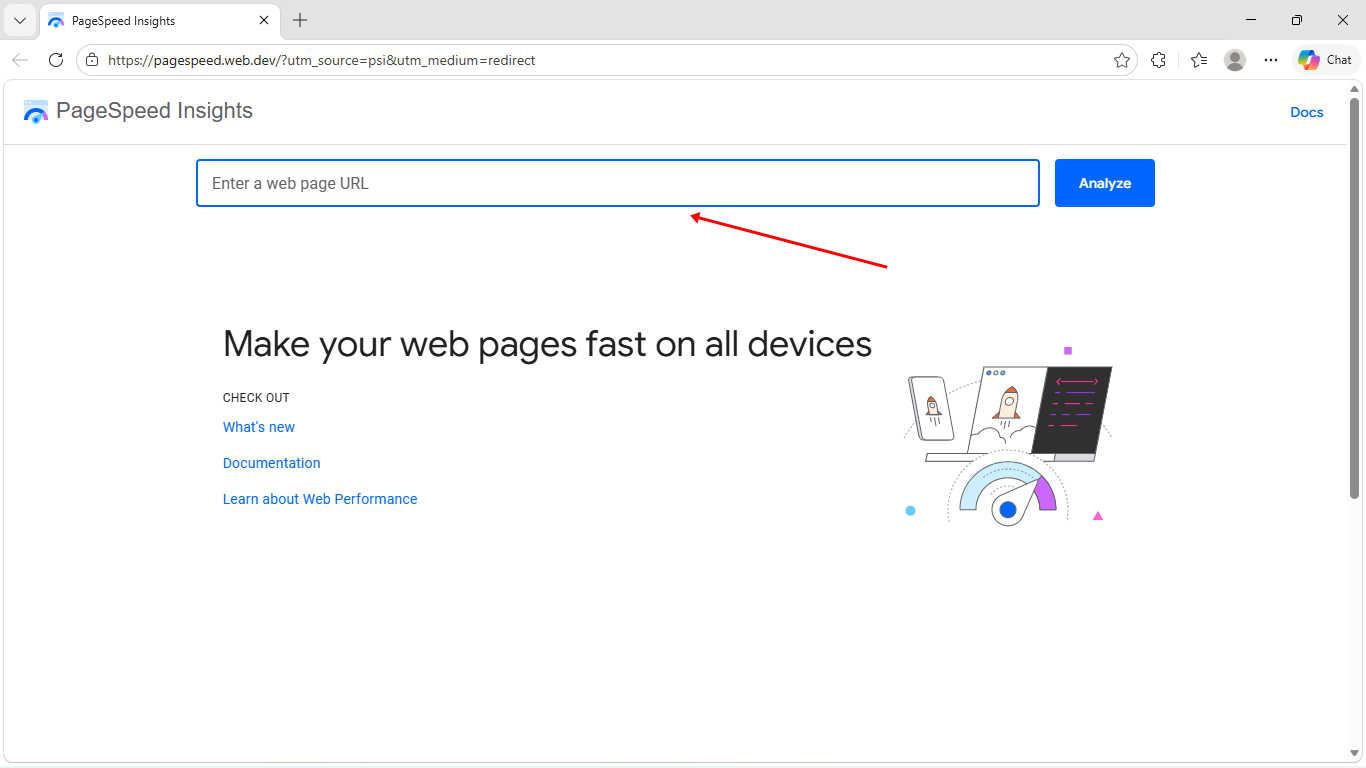
Once the report loads, check the Time to First Byte (TTFB) results.
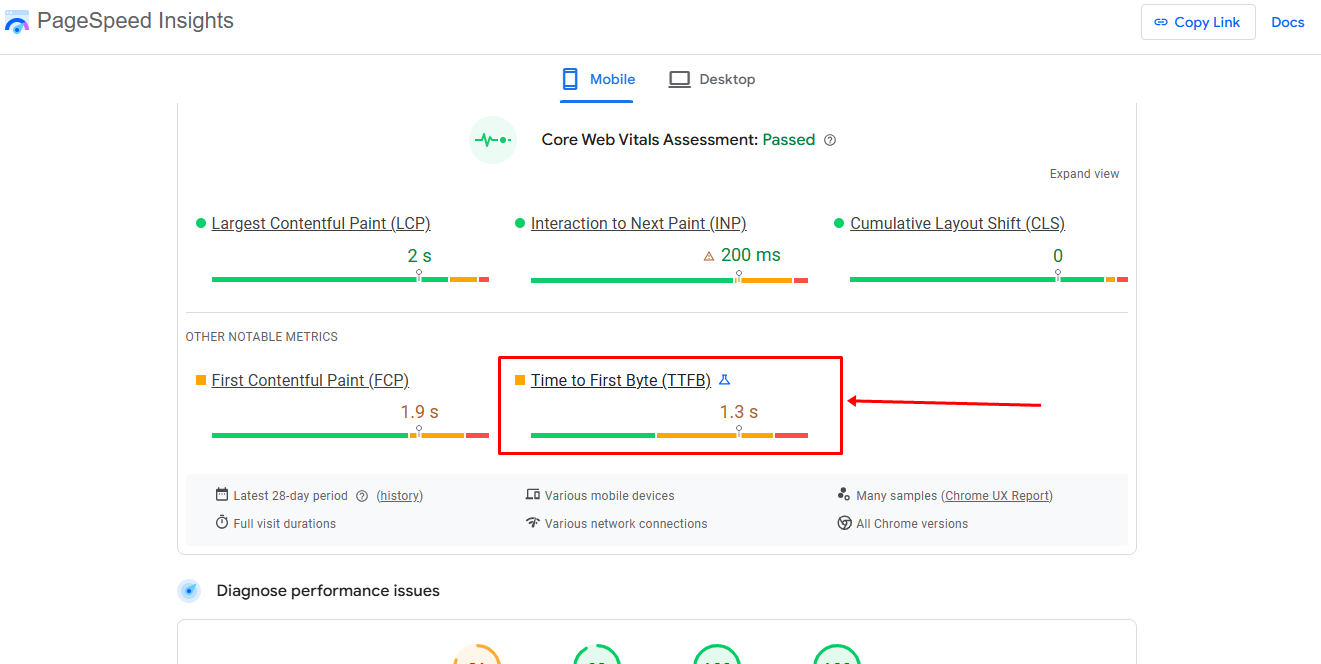
If your TTFB is high, Google may recommend improvements such as:
- Better hosting
- Proper caching
- Reducing server work
- Optimizing WordPress plugins and themes
This gives you a clearer direction on where to focus your optimization efforts.
2. Using GTmetrix
Another excellent way to measure Time to First Byte (TTFB) is using GTmetrix. It is a popular website performance testing tool that provides a detailed breakdown of how your WordPress site loads.
To begin, visit GTmetrix, enter your website URL, and run a test.
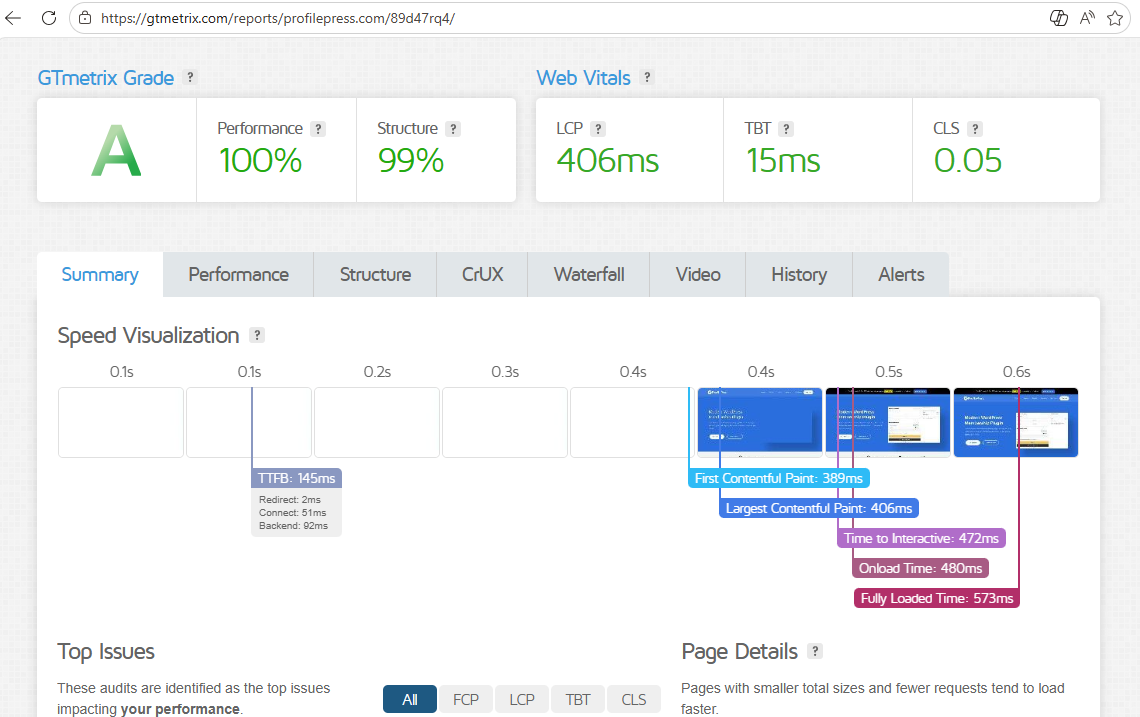
After the analysis is complete, GTmetrix will generate a full performance report that shows key speed metrics, loading behavior, and server response details.
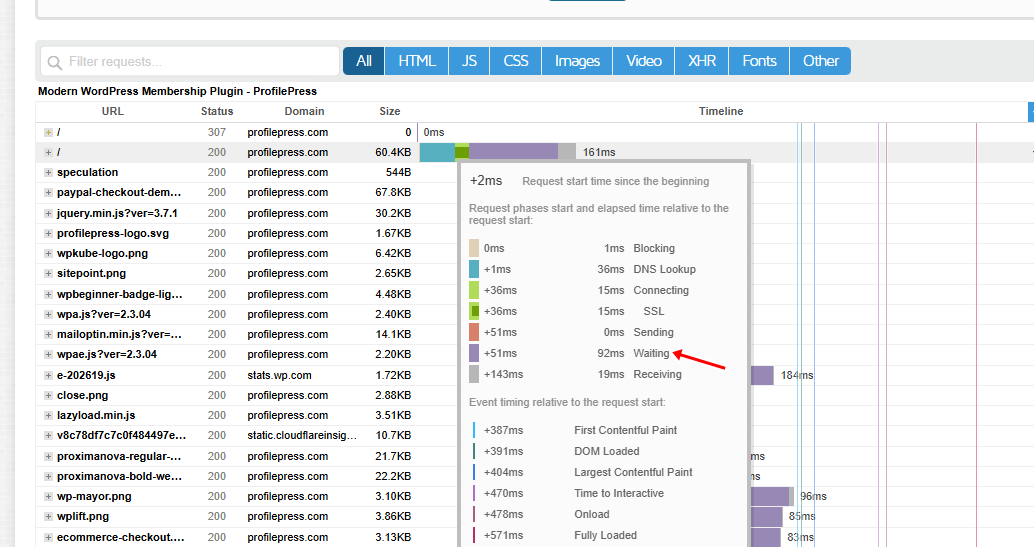
One of the most useful parts of GTmetrix for checking TTFB is the Waterfall Chart. This section provides a visual timeline of all requests your website makes during page load. It shows how long each file, image, script, or server request takes to process.
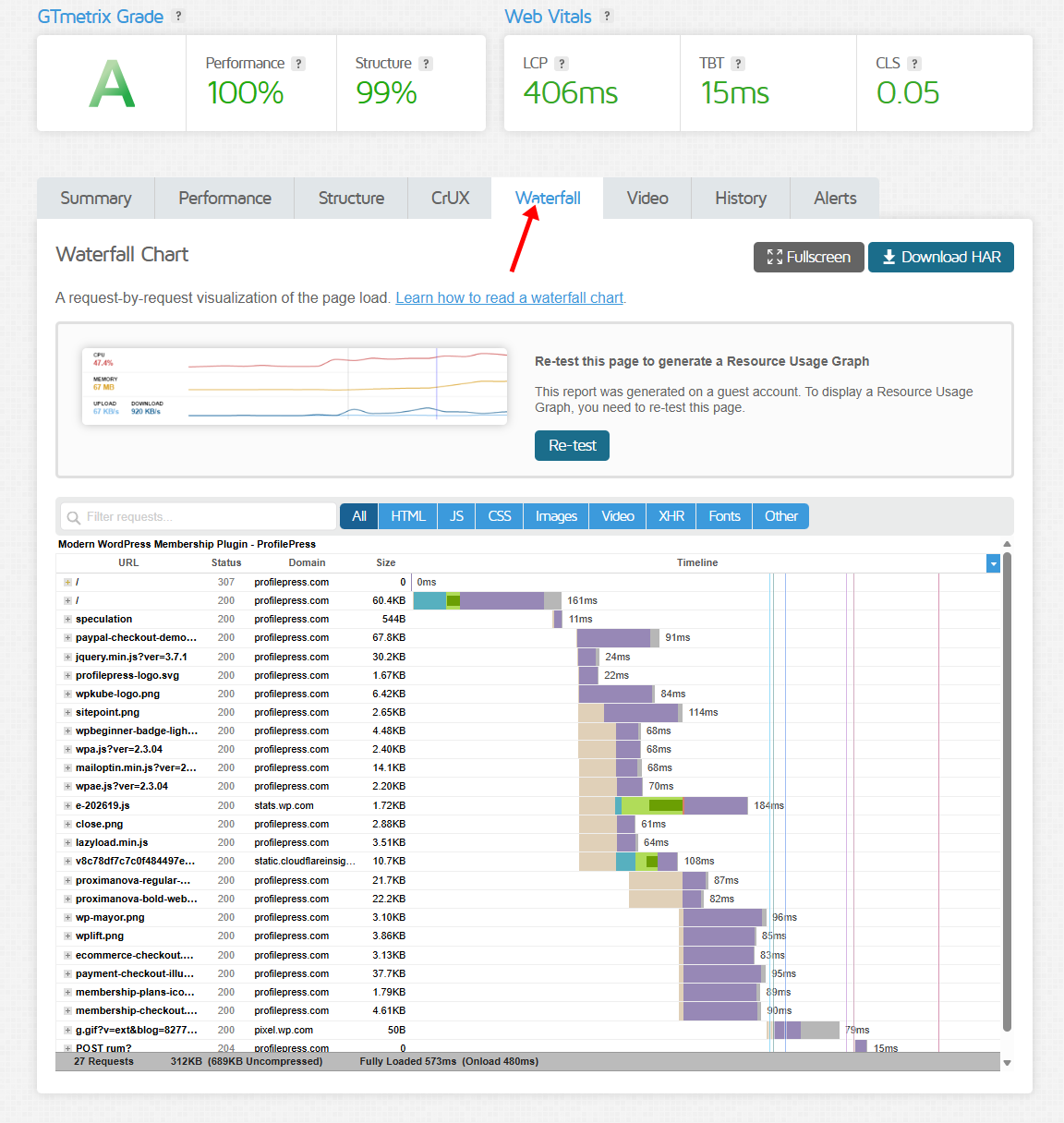
When analyzing your TTFB, pay attention to the Waiting phase in the waterfall report. This stage represents the time your browser waits for the server to respond. If the waiting time is unusually high, it usually means your server response time is slow.
GTmetrix is particularly helpful because it allows you to test your website from different locations around the world. This matters because server response times can vary depending on where your visitors are located.
A website hosted in the United States may load quickly for North American users but respond more slowly for visitors in Europe, Africa, or Asia.
GTmetrix also lets you test your site using different browsers, internet speeds, and devices, helping you understand how your WordPress site performs under real-world conditions.
3. Using WebPageTest
If you want a more advanced way to measure Time to First Byte (TTFB), then WebPageTest is the best tool you can use. It provides detailed performance reports that go far beyond basic speed scores, helping you understand exactly how your WordPress website responds when someone visits it.
To get started, visit WebPageTest, enter your website URL, choose a testing location, select your device and your connection type, then run the test.
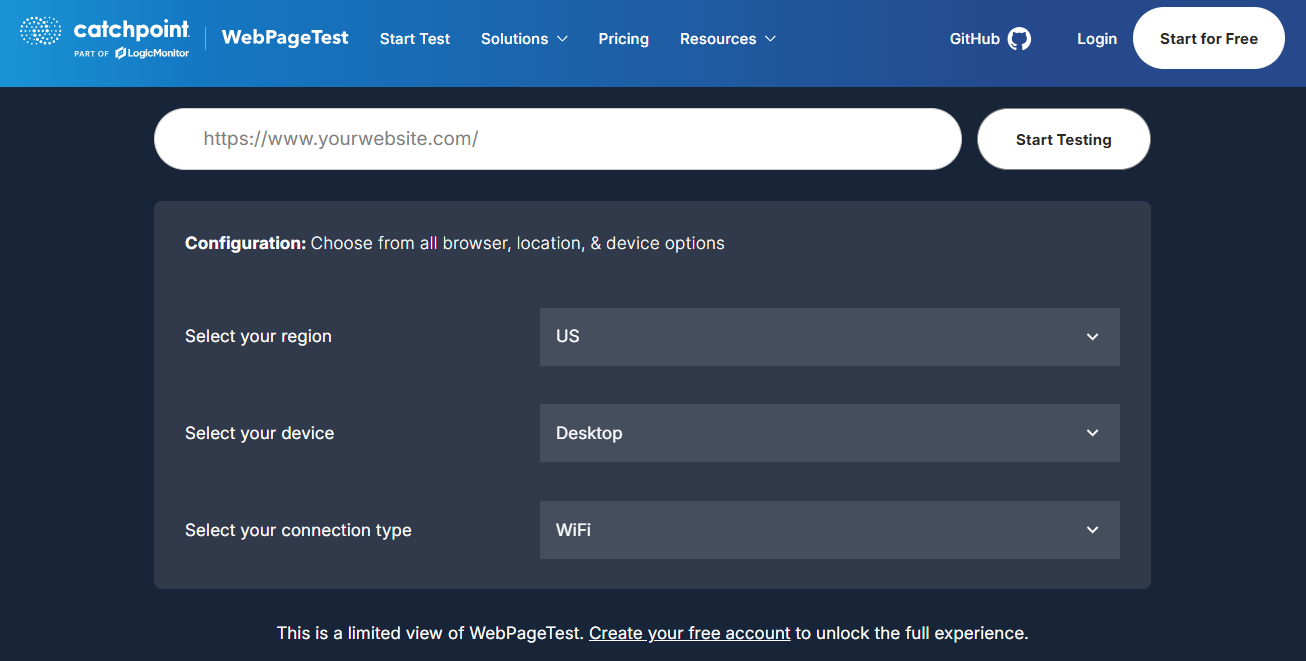
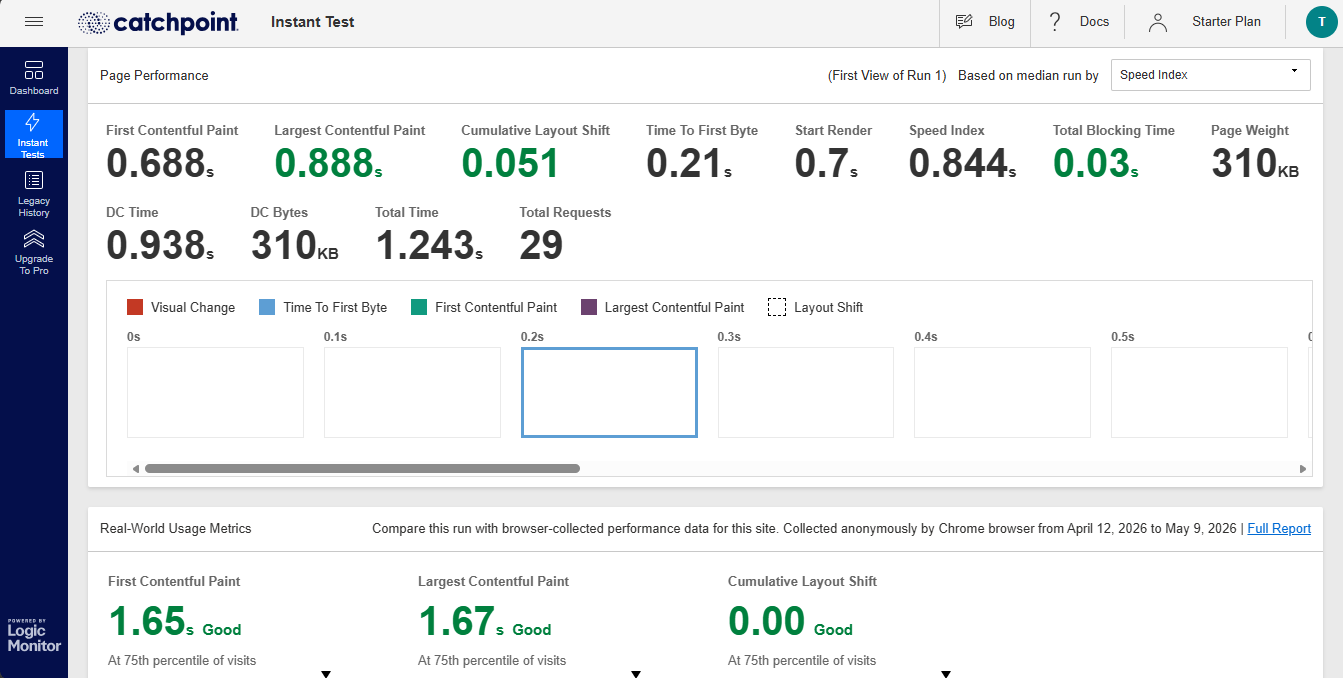
After a few moments, the tool will generate a complete performance report with detailed loading data.
One of the biggest advantages of WebPageTest is the level of control it gives you during testing. Unlike some basic speed testing tools, WebPageTest allows you to:
- Test your site from different countries and cities
- Choose different browsers and devices
- Simulate mobile network speeds
- Run multiple tests for more accurate results
- Analyze both first-time and repeat visits
This is extremely useful because TTFB can vary depending on the visitor’s location, internet speed, and caching conditions.
When reviewing the report, pay close attention to the First Byte Time metric. This shows how long your server takes to start responding after receiving a request from the browser.
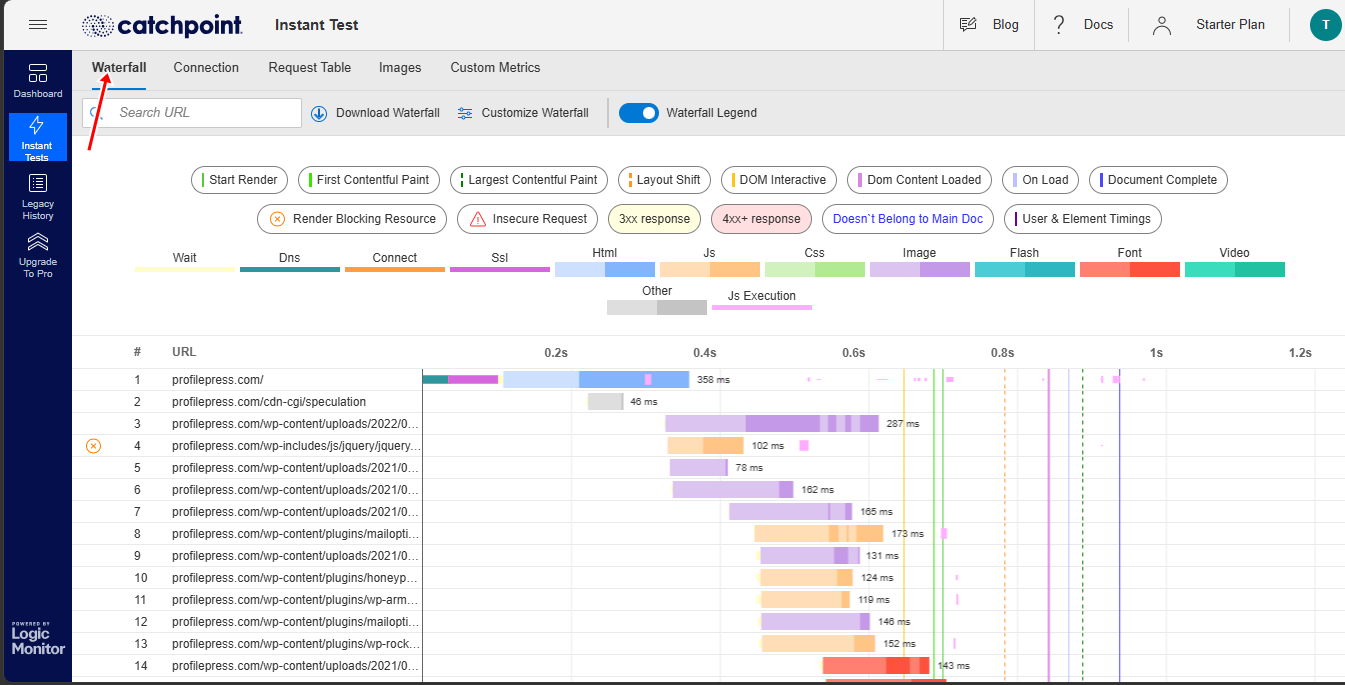
WebPageTest also includes a detailed waterfall chart similar to GTmetrix, but with even deeper insights. You can see:
- DNS lookup times
- SSL connection time
- Server processing delays
- Redirect chains
- CDN performance
- File loading behavior
This makes it easier to pinpoint the exact cause of slow server response times.
For example, if your DNS lookup is slow, the issue may be with your domain provider. If the server processing stage is slow, the problem could be your hosting, plugins, or database. If delays happen after the initial response, large files or external scripts may be affecting performance instead.
Another useful feature in WebPageTest is the ability to compare your first-view and repeat-view performance. The first view measures how quickly your website loads for new visitors, while the repeat view shows how caching affects returning users. This can help you determine whether your caching setup is working properly.
4. Check TTFB Directly in Your Browser
Another effective way to measure Time to First Byte (TTFB) is to check it directly in your browser’s built-in developer tools. This method is useful because it allows you to analyze your website’s server response time in real time without relying on third-party testing platforms.
Most modern browsers, including Google Chrome, Microsoft Edge, and Firefox, come with developer tools that provide detailed information about how your website loads.
If you are using Google Chrome, start by opening your website in Chrome, then right-click anywhere on the page and select Inspect from the menu that appears.
Once the developer tools window opens, navigate to the Network tab and refresh the page. Chrome will then display all the requests made while loading your website, allowing you to analyze your server response time and other loading details.
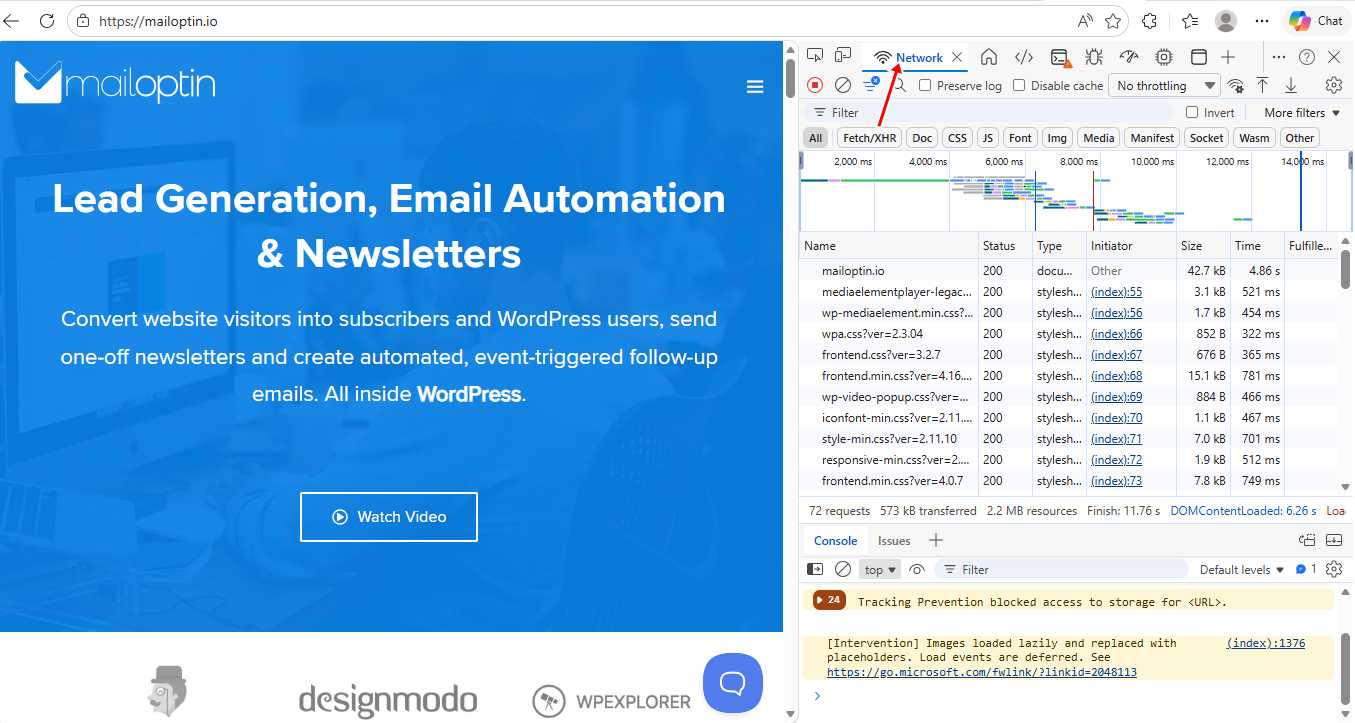
This method is particularly useful because it helps you see your website’s actual response behavior directly from your browser.
You can also use this method to identify whether certain pages on your WordPress website have higher TTFB than others. For example, your homepage may load quickly while WooCommerce product pages, checkout pages, or blog archives respond more slowly due to heavier database queries or additional plugin processing.
Another advantage of browser testing is that it helps you analyze how caching affects your website. If your TTFB improves significantly after refreshing the page a second time, it may indicate that your caching system is working correctly.
Effective Ways to Reduce Time to First Byte (TTFB) in WordPress
Now that you know how to measure Time to First Byte (TTFB), the next step is improving it. A high TTFB usually means your server is taking too long to process requests before sending data back to the visitor’s browser. The longer the delay lasts, the slower your website feels from the start.
Below, we will walk you through 12 effective ways to reduce Time to First Byte (TTFB) on WordPress and improve your website’s overall speed and performance.
1. Upgrade to Faster WordPress Hosting
Your hosting provider plays the biggest role in your website’s Time to First Byte (TTFB). No matter how optimized your WordPress site is, a poor host can still slow down server response times and create delays before your website even begins loading.
When someone visits your website, your hosting server processes the request, runs PHP scripts, accesses the database, and sends data back to the visitor’s browser. If the server is slow or overloaded, your TTFB will increase significantly.
This is one of the reasons many WordPress websites struggle with performance, even after installing caching plugins and speed optimization tools. The problem often starts at the server level.
Cheap shared hosting plans are usually the biggest culprit. In shared hosting environments, hundreds or even thousands of websites share the same server resources. If another website on the server experiences heavy traffic or consumes excessive resources, your website performance can suffer as well.
It is similar to living in a crowded apartment building with a limited water supply. Even if your own apartment uses very little water, you may still experience slow water pressure because too many people are sharing the same system.
Upgrading to better hosting can dramatically improve TTFB because stronger servers process requests faster and handle traffic more efficiently.
When choosing a hosting provider, look for features such as:
- Server-level caching
- SSD or NVMe storage
- Latest PHP versions
- Built-in CDN support
- Optimized database performance
- HTTP/3 support
- Adequate CPU and RAM resources
Managed WordPress hosting is often a good option because it is specifically optimized for WordPress performance. These hosting providers usually include caching systems, security optimization, automatic updates, and performance enhancements designed to reduce server response times.
Server location also matters. If most of your visitors are located in Europe but your server is hosted in Asia, the physical distance can increase latency and slow down TTFB. Choosing a data center closer to your target audience helps reduce the time it takes for requests to travel between the browser and the server.
2. Use a Reliable Caching Plugin
Another way to reduce Time to First Byte (TTFB) in WordPress is by using a reliable caching plugin. Without caching, WordPress has to generate pages dynamically every single time someone visits your website. This process involves running PHP scripts, querying the database, loading plugins, and rendering your theme before the page can be displayed.
All of that takes time, especially on websites with heavy themes, multiple plugins, or large amounts of content. The more work your server has to do before delivering a page, the higher your TTFB becomes.
Caching solves this problem by storing ready-made versions of your pages so they can be delivered much faster to visitors. Instead of rebuilding the page from scratch every time, the server serves a cached copy almost instantly.
Think of it as preparing meals in advance, rather than cooking from scratch whenever someone places an order. The response becomes much faster because most of the work has already been done.
A good caching plugin can significantly reduce server processing time and improve your website’s overall speed.
Some popular WordPress caching plugins include:
- WP Rocket
- LiteSpeed Cache
- W3 Total Cache
- FlyingPress
- WP Super Cache
Note that installing a caching plugin is not always enough. Incorrect settings can sometimes create conflicts or prevent caching from working properly. That is why it is a good idea to test your website after enabling caching and monitor whether your TTFB actually improves.
You should also avoid using multiple caching plugins at the same time. Many website owners make the mistake of installing several optimization plugins together, hoping for better performance. In reality, this can create plugin conflicts and increase server load instead of reducing it.
3. Set Up a Content Delivery Network (CDN)
Using a Content Delivery Network (CDN) is another effective way to reduce Time to First Byte (TTFB) in WordPress, especially if your website receives visitors from around the world.
Normally, when someone visits your website, their browser sends a request directly to your hosting server. If the visitor is located far away from the server’s physical location, the request takes longer to travel back and forth, increasing latency and slowing down your website’s response time.
A CDN helps solve this problem by storing copies of your website’s static content across multiple servers located around the world. Instead of every visitor connecting to your main hosting server, they are connected to the server closest to their location. This reduces the distance data has to travel, helping your website load faster.
Think of it as having multiple pickup locations for a product, rather than forcing every customer to travel to a single central warehouse. The closer the delivery point is to the customer, the faster the service becomes.
A CDN can improve TTFB by:
- Reducing network latency
- Delivering cached files faster
- Lowering the workload on your origin server
- Handling traffic spikes more efficiently
- Improving global website performance
This is especially important for WordPress websites with international audiences. For example, if your server is hosted in the United States but you have visitors from Europe, Africa, and Asia, users located far from the server may experience slower response times. A CDN helps bridge that gap by serving content from nearby locations.
Popular CDN services include:
- Cloudflare
- Bunny.net
- KeyCDN
- Amazon CloudFront
- Fastly
Another advantage of a CDN is reduced server strain. Since the CDN handles many static file requests, such as images, CSS, and JavaScript, your hosting server has fewer tasks to process. This allows your server to respond faster to incoming requests.
4. Optimize Your WordPress Database
Your WordPress database plays a major role in your website’s Time to First Byte (TTFB) because almost every page request depends on database queries. Whenever someone visits your site, WordPress communicates with the database to retrieve posts, pages, settings, comments, plugin data, user information, and other content before the page can fully load.
Over time, your database can become cluttered with unnecessary data, which slows these queries and increases server response time. This is especially common on websites that have been running for a long time or frequently install and remove plugins.
A bloated database forces the server to work harder before sending the first byte of data back to the browser. The more time the server spends processing database requests, the higher your TTFB becomes.
Think of it as searching for an important document in a messy storage room full of unused files and clutter. The more disorganized the room becomes, the longer it takes to find what you need.
Some of the most common causes of database bloat in WordPress include:
- Old post revisions
- Spam comments
- Expired transients
- Unused plugin tables
- Trashed posts and pages
- Excessive metadata
- WooCommerce session data
WooCommerce websites are particularly affected because online stores constantly generate product data, customer sessions, order records, and cart information. As the database grows, poorly optimized queries can significantly slow server response times.
An easy way to improve database performance is by cleaning unnecessary data regularly. Several WordPress optimization plugins can help automate this process safely.
It is also important to limit excessive post revisions in WordPress. By default, WordPress stores multiple revisions every time you update a post or page. While revisions are useful, too many of them can quickly increase the database size.
Another important step is choosing high-quality plugins that use efficient database queries. Some poorly coded plugins continuously send unnecessary requests, slowing the database and increasing server processing time.
You should also schedule regular database maintenance rather than waiting until performance problems arise. A clean and optimized database helps WordPress process requests faster, reduces server workload, and improves your website’s overall performance.
5. Reduce the Number of Installed Plugins
Plugins are one of the reasons WordPress is so flexible and easy to customize. They allow you to add new features, improve functionality, and extend your website without writing code.
However, installing too many plugins can negatively affect your website’s performance and increase Time to First Byte (TTFB).
Every active plugin adds extra work for your server. Some plugins load additional scripts, run database queries, process background tasks, or communicate with external servers whenever someone visits your site. The more plugins your server has to process, the longer it may take before sending the first byte of data back to the browser.
Some plugins are especially known for increasing server load, including:
- Heavy page builders
- Poorly optimized security plugins
- Statistics and tracking plugins
- Broken link scanners
- Related posts plugins
- Resource-intensive backup plugins
- Plugins that constantly query external APIs
So regularly review your installed plugins and remove anything you no longer need.
You should also avoid installing multiple plugins that perform the same function. For example, using several optimization or caching plugins together can cause conflicts and increase server processing, rather than improving performance.
It is also important to keep your plugins up to date. Developers often release performance improvements, bug fixes, and compatibility updates that help plugins run more efficiently.
6. Use a Lightweight WordPress Theme
Your WordPress theme has a direct impact on your website’s Time to First Byte (TTFB) because it affects how much work your server has to do before a page can load.
A heavy theme usually loads more CSS, JavaScript, fonts, and database queries, all of which require the server to work harder before sending data back to the browser. The result is a higher TTFB and a slower overall website experience.
Think of it like carrying extra luggage during a race. The heavier the load becomes, the slower the movement.
Lightweight WordPress themes are designed with performance in mind. They use cleaner code, fewer resources, and minimal design elements to help pages load faster and more efficiently. This reduces the amount of processing your server must handle whenever someone visits your site.
Popular lightweight WordPress themes include:
- Astra
- GeneratePress
- Kadence
- Neve
- Blocksy
These themes are widely used because they balance design flexibility with strong performance optimization.
Another important factor is page builders. Some heavy page builders generate excessive HTML markup and large script files, increasing server workload and slowing TTFB. If you use a page builder, it is important to choose one that is well-optimized and avoid adding unnecessary design elements to every page.
You should also remove unused theme features whenever possible. Many themes come with built-in widgets, templates, fonts, and functionality that may never be used on your website but still consume server resources.
A good practice is to test your website speed before and after switching themes. In some cases, replacing a bloated theme with a lightweight alternative can noticeably improve TTFB without making any other major changes.
7. Update to the Latest PHP Version
Updating your website to the latest PHP version is one of the quickest ways to improve Time to First Byte (TTFB) in WordPress. Since WordPress is built using PHP, your server relies on it to process requests, run plugins, communicate with the database, and generate pages whenever someone visits your website.
If your website is running on an outdated PHP version, your server may take longer to process requests, which can increase TTFB and slow down your entire site. Older PHP versions are not only slower but may also lack important security updates and performance improvements.
Upgrading to a newer PHP version can improve:
- Server response time
- Page generation speed
- Database processing
- Plugin performance
- Overall WordPress efficiency
Modern PHP versions also handle memory usage better, which helps reduce server strain during high traffic periods.
You can check your current PHP version through:
- Your hosting control panel
- WordPress Site Health
- Hosting support dashboard
Before updating PHP, it is important to ensure your WordPress theme and plugins are compatible with the newer version. Some outdated plugins may not work properly after upgrading, so it is always a good idea to back up your website first.
If possible, test the update on a staging site before applying it to your live website. This allows you to identify compatibility issues without affecting visitors.
Another benefit of using the latest PHP version is improved security. Unsupported PHP versions no longer receive security patches, which can expose your website to vulnerabilities and server risks.
Keeping PHP updated helps your server process WordPress requests faster, improves overall website performance, and reduces unnecessary delays before your site begins loading.
8. Enable GZIP or Brotli Compression
Another effective way to reduce Time to First Byte (TTFB) in WordPress is by enabling compression on your server. This is usually done using GZIP or the newer Brotli compression, and it helps your website deliver files to visitors much more efficiently.
When a user visits your WordPress site, the server has to send HTML, CSS, JavaScript, and other resources back to the browser. Without compression, these files can be large and take longer to transmit. This increases the overall response time and, in turn, affects how quickly the first byte reaches the browser.
Compression reduces the size of these files before they are sent. Instead of sending full, uncompressed data, the server compresses it into a smaller format, and the browser quickly decompresses it upon arrival. The result is faster data transfer and improved loading performance.
Most modern hosting providers support GZIP or Brotli compression by default. However, it is still important to confirm that it is enabled on your WordPress website. If it is not active, you may be missing out on a simple but effective performance improvement.
You can enable compression in several ways, depending on your setup:
- Through your hosting control panel
- Using caching plugins like WP Rocket or LiteSpeed Cache
- By configuring your server (Apache or Nginx)
- Via CDN services like Cloudflare
Many CDN platforms automatically enable compression as part of their optimization features, so if you are already using a CDN, this may already be handled for you.
It is important to test your website after enabling compression to ensure everything is working correctly. Tools like GTmetrix or PageSpeed Insights can confirm whether GZIP or Brotli is active on your site.
9. Optimize Images and Media Files
Optimizing images and media files is another important step in reducing Time to First Byte (TTFB) in WordPress, even if it may not seem directly related at first. While images mainly affect page size and loading speed, they also influence how much work your server has to do before responding to a request, especially on dynamic pages.
When someone visits your WordPress site, the server doesn’t just send text. It also processes and delivers images, thumbnails, and media files depending on the page structure. If your images are large, uncompressed, or poorly formatted, they can increase server load and slow down the initial response time.
Think of it like trying to send a package. A small, well-packed box moves quickly, but a bulky, oversized package takes more effort, more time, and more resources to process and deliver.
Focus on reducing image size without sacrificing quality. This helps your server process requests faster and reduces the overall workload during page generation.
Some effective ways to optimize images include:
- Compressing images before uploading them to WordPress
- Using modern formats like WebP or AVIF
- Resizing images to the correct display dimensions
- Avoiding unnecessarily large featured images
- Enabling lazy loading for below-the-fold content
It is also important to ensure that your WordPress theme and plugins are not generating oversized thumbnails or multiple unnecessary image sizes. Some themes create several versions of the same image, which can increase storage usage and slow down media handling.
Another often overlooked issue is external media sources. Embedding large videos, unoptimized images from third-party sites, or heavy media widgets can also increase server processing time and indirectly affect TTFB.
10. Reduce External HTTP Requests
Reducing external HTTP requests is another important way to improve Time to First Byte (TTFB) in WordPress, especially if your website relies heavily on third-party services.
Every time your site loads, it may not only communicate with your own server but also reach out to external servers to fetch additional resources. These extra requests can slow the initial response time and delay how quickly your page loads.
External HTTP requests occur when your WordPress site loads assets from external sources, such as fonts, scripts, analytics tools, ads, or embedded content. Each request adds extra wait time because your server must coordinate with another server before the browser can fully render the page. If any of those external services are slow, your website’s performance is affected as well.
Some common sources of external HTTP requests include:
- Google Fonts
- Analytics tools like Google Analytics or other tracking scripts
- Social media widgets and embedded feeds
- Advertising networks
- Chat widgets and customer support tools
- External video embeds and media players
While many of these tools are useful, using too many of them can increase server dependency and slow down your WordPress website’s initial response time.
One effective way to reduce external requests is to self-host certain assets. For example, instead of loading fonts from external servers, you can host them directly on your website. This reduces dependency on third-party connections and improves loading efficiency.
Another approach is to remove unnecessary scripts or only load them on specific pages where they are actually needed. For instance, you may not need tracking scripts on every single page of your website.
You should also evaluate whether every external tool is truly necessary. Some plugins automatically load external scripts even when they are not essential for page functionality. Disabling or replacing these plugins can reduce unnecessary server communication.
CDNs and performance optimization plugins can also help manage external requests by combining, deferring, or delaying non-critical scripts. This allows your website to prioritize important content first before loading additional resources.
The goal is to reduce the number of external calls your website makes during initial load. The fewer external dependencies your WordPress site has, the faster your server can respond and deliver content.
11. Enable Object Caching With Redis or Memcached
Another powerful way to reduce Time to First Byte (TTFB) in WordPress is to enable object caching with tools like Redis or Memcached. This method goes a step beyond basic page caching by improving how WordPress handles database queries behind the scenes.
Every time a visitor loads a page, WordPress often needs to repeatedly query the database for the same information, site settings, menu structures, plugin data, user roles, and more. Without object caching, these queries are executed again and again for every request, increasing server workload and slowing down response time.
Object caching solves this by storing the results of database queries in memory. Instead of asking the database the same questions repeatedly, WordPress retrieves stored results from memory instantly. This significantly reduces processing time and helps the server respond faster to new requests.
Redis and Memcached are the two most commonly used technologies for object caching in WordPress:
Redis is more advanced and widely used in modern hosting environments. It stores data in memory and offers better performance for complex and dynamic websites.
Memcached is simpler but still effective for reducing database load and improving response speed.
Both options help reduce the time your server spends processing repeated database requests, which directly lowers Time to First Byte (TTFB).
12. Optimize DNS and Server Configuration
This step in reducing Time to First Byte (TTFB) in WordPress is often overlooked, yet it can make a noticeable difference: optimizing your DNS and server configuration. While many people focus only on WordPress settings, plugins, or caching, the way your domain connects to your server also plays a role in how quickly your website responds.
Every time someone visits your website, their browser first needs to find your server through a process called DNS lookup. If this lookup is slow, it delays the entire request before WordPress even starts loading. That means your TTFB can already be affected before your website begins processing anything.
Think of DNS like a phonebook. If it takes too long to find the correct number, the call is delayed, even if the person on the other end picks up quickly.
To improve this, you need a fast and reliable DNS provider. Some DNS services are optimized for speed and can significantly reduce lookup time. Using a high-performance DNS system ensures that users are quickly connected to your server without unnecessary delays.
Another important factor is reducing unnecessary redirects. Every redirect adds extra steps between the browser and your server, increasing response time. For example, multiple redirects, such as HTTP to HTTPS or non-www to www, can slow the initial connection if not properly configured.
You should ensure that:
- Your website uses a single preferred domain version (www or non-www)
- HTTPS is properly enforced without multiple redirect chains
- Unnecessary plugin-based redirects are removed or minimized
Using modern server technologies such as HTTP/2 or HTTP/3 can also improve connection efficiency. These protocols allow multiple requests to be processed more efficiently, reducing communication delays between the browser and the server.
When DNS and server configuration are properly optimized, your WordPress site can connect to users faster, process requests more efficiently, and reduce unnecessary delays before the first byte is delivered.
FAQs About TTFB in WordPress
Q1: Why is my TTFB so high in WordPress?
A high TTFB usually comes from slow hosting, poor server configuration, heavy themes, or too many plugins running at once. In some cases, a lack of caching or a bloated database can also increase server response time. Fixing these issues helps reduce server response times (TTFB) and improves overall website speed.
Q2: How to improve TTFB without changing hosting?
You can still improve TTFB even without switching hosting. Enable a caching plugin, use a CDN, optimize images, clean your database, and reduce the number of external scripts. These steps help reduce initial server response time by lowering the amount of work your server has to do before sending a response.
Q3: How to improve server response time in WordPress?
To improve server response time, focus on reducing server workload. This includes optimizing the PHP version, removing unnecessary plugins, enabling object caching, and using a lightweight theme. These actions directly improve how quickly your server processes requests and help reduce server response times.
Q4: What is a good TTFB score?
A good TTFB is usually under 500ms. Between 500ms and 800ms is acceptable, but anything above 800ms is considered slow. If your website falls into the higher range, you should focus on improving TTFB by optimizing your hosting, caching, and database performance.
Q5: Is TTFB important for SEO?
Yes, TTFB is important because it affects how quickly your page starts loading. A slow TTFB can impact Core Web Vitals, increase bounce rates, and reduce user engagement. Search engines prefer websites that load faster, so improving TTFB can positively influence your SEO performance.
That’s how to reduce Time to First Byte (TTFB) in WordPress!
So here’s the truth nobody likes to admit: there is no single magic fix. Reducing TTFB is not about one quick change; it comes down to small, consistent improvements across your entire setup.
Better hosting. Smarter caching. A cleaner database. Fewer plugins. Improved server settings. Each one removes a bit of delay.
When all these improvements work together, your website stops wasting time on unnecessary processing and starts delivering content much faster to your visitors. The result is a smoother browsing experience, better SEO performance, and better user satisfaction from the first click.
Now run a speed test, pick one fix from this list, and get started today.