
Published three weeks ago. Still not indexed. Welcome to the seventh circle of SEO hell, where time has no meaning, and Google doesn’t care about your deadlines.
Straight Answer: Why Your Pages Take Forever to Index
Why Google indexing is slow boils down to three brutal truths: Google doesn’t trust you yet, your content isn’t valuable enough, or your site is technically a disaster that makes Googlebot want to cry.
In 2026, with AI-generated content flooding the internet like a bad Netflix series nobody asked for, Google has become pickier than a toddler at dinnertime. They’re evaluating content quality, site authority, crawl efficiency, and about fifty other signals before deciding if your page deserves the honor of joining their index.
The timeline nobody tells you about:
- New sites with zero authority: 2-4 weeks (sometimes never)
- Established sites with decent authority: 1-7 days
- High-authority sites: Hours to 1 day
- Sites using instant indexing tools like CrawlWP: 24-48 hours
Let me tell you about the time I lost my damn mind waiting for Google.
The Great Indexing Disaster of October 2024
I launched a client’s time-sensitive campaign on a Thursday. Political news site. Breaking stories. Content that would be irrelevant by Monday.
Published 23 articles between Thursday evening and Friday morning. Submitted the sitemap. Did everything “right” according to every SEO guide ever written.
Saturday morning: Zero-indexed pages.
Sunday afternoon: Still zero.
Monday morning: TWO pages indexed. TWO.
By Tuesday, the news cycle had moved on. The content was basically worthless. The client was livid. And I was sitting at my desk at 3 AM, eating cold pizza, googling “why Google indexing is slow” for the hundredth time, as it would magically give me different answers.
It was clear: Google’s timeline and your timeline are in completely different universes. And unless you understand WHY they’re delaying, you’re just screaming into the void.
Real Reasons Why Google Indexing Is Slow (No BS Version)
1. Google’s Crawl Budget Thinks Your Site Is Boring
Crawl budget is the number of pages Google will crawl on your site in a given timeframe. It’s determined by two factors:
Crawl Capacity: How much can your server handle without exploding?
Crawl Demand: How much does Google actually want to crawl your site?
If Google thinks your site is about as exciting as watching grass grow, they allocate minimal crawl budget. New pages? Google will get to them… eventually. Maybe. If they remember.
According to recent data, Google processes billions of web pages daily. If your site isn’t high priority due to low authority or traffic, your content gets pushed down the queue like the last person picked for dodgeball.
Sites with over 10,000 pages or that undergo frequent content updates need to manage their crawl budget actively. Otherwise, Google wastes time crawling junk URLs (pagination, filters, duplicate pages) instead of your actual valuable content.
I worked with an e-commerce client that had 50,000 product pages, but Google was wasting 40% of its crawl budget on faceted navigation no one cared about. Fixed that nightmare, and indexing speed jumped by 65%.
2. Your Content Quality Is… Let’s Call It “Questionable”
In 2026, Google’s algorithms are far more advanced than those of other search engines. While Bing might quickly scan and index new content, Google takes more time to evaluate whether it is actually worth storing.
Google asks these questions before indexing:
- Is this well-written and original?
- Does it provide unique value?
- Will users find this helpful?
- Is the bounce rate going to be catastrophic?
- Does this site have authority signals (backlinks, traffic history)?
If the answer is “meh” to most of these, Google says “pass” and moves on.
I’ve seen perfectly fine content stuck in “Discovered – currently not indexed” limbo for months because it wasn’t exceptional enough. Good isn’t good enough anymore. You need to be goddamn excellent, or Google will ghost you harder than that person from the dating app.
3. Your Site Speed Makes Sloths Look Fast
Google’s indexing strongly depends on page speed and user experience signals in 2026. Slow pages are crawled less often and indexed more slowly.
If your site takes more than 3 seconds to load, you’re losing people. Not just some people.
A lot of people.
Google notices this. If visitors bounce because your site loads like it’s still on dial-up, Google assumes your site is about as useful as a screen door on a submarine.
Core Web Vitals matter:
- Largest Contentful Paint (LCP): Should be under 2.5 seconds
- Interaction to Next Paint (INP): Under 200 milliseconds
- Cumulative Layout Shift (CLS): Under 0.1
Fail these metrics? Google crawls you less frequently. Crawl you less? Delay in indexing you. It’s a vicious cycle that ends with you crying into your keyboard at 3 AM, wondering why SEO hates you.
4. Server Errors Are Killing Your Indexing Speed
If your server returns 500 errors every time Googlebot visits, the bots eventually stop trying.
It’s like inviting someone to your house party, only to have the door locked every time they arrive. After the third attempt, they’re done. They’re going to someone else’s party where the door actually opens.
Google’s crawlers are designed to be “good citizens” on the internet. If they detect your server is struggling (high latency, frequent timeouts, server errors), they automatically throttle the crawl rate to avoid overloading you.
Sounds nice, right? Except it means Google crawls fewer pages, which means slower indexing, which means you’re stuck in SEO purgatory, wondering what you did to deserve this.
5. Your Internal Linking Structure Is a Hot Mess
Pages buried five clicks deep from your homepage? Good luck getting those indexed this decade.
Googlebot prioritizes pages with many internal and external links pointing to them. Orphaned pages with no internal links are rarely crawled, regardless of quality.
Think of your site like a city. Your homepage is downtown. Well-connected pages are major streets with lots of traffic. Orphaned pages are that sketchy alley behind the abandoned warehouse where nobody goes. Which one do you think gets more attention?
I audited a site last month with 200+ blog posts. Seventy-three of them had ZERO internal links pointing to them. They were just floating in digital space like lost souls. Google had never crawled 68 of them. Not even once.
Fixed the internal linking in two days. Within a week, 54 were indexed.
6. Duplicate Content Is Confusing the Hell Out of Google
Multiple versions of the same page make Google’s job harder. Without proper canonical tags, Google doesn’t know which version to index.
So what does Google do?
Sometimes it picks the wrong one. Sometimes it picks none of them. Sometimes it just gives up entirely and indexes your competitor instead, because at least their site isn’t an organizational disaster.
E-commerce sites are notorious for this. Same product with different color options? That’s five URLs. Add size variations? Now it’s twenty URLs. Filter by price? Congratulations, you just created infinite URL variations, and Google is NOT happy.
7. You’re Not Using IndexNow or Google’s Indexing API
Here’s the thing nobody tells you: waiting for Google to naturally discover your content through sitemap crawling is like waiting for your ex to text you back. It might happen. Eventually. But why are you torturing yourself?
Traditional indexing process:
- Publish content
- Update sitemap
- Wait for Google to crawl the sitemap (could be days or weeks)
- Wait for Google to evaluate content
- Wait for Google to decide whether to index
- Maybe get indexed if the stars align
Better process with instant indexing:
- Publish content
- Ping Google immediately via the Indexing API
- Get indexed in 24-48 hours instead of 2-3 weeks
The difference between these two approaches is like driving to work and walking to work backward while blindfolded.
How Other Search Engines Index Faster (And Why That’s Both Good and Bad)
Bing, Yahoo, and DuckDuckGo often index content faster than Google because:
Simpler algorithms: They don’t evaluate content as deeply as Google
Less traffic to handle: Google processes way more pages daily
Different priorities: Speed over comprehensive quality evaluation
I published a blog post last month. Bing indexed it in 14 hours. Google took 6 days.
Does that mean Bing is better? Not necessarily. Google’s thoroughness is WHY it’s the dominant search engine. Their delayed indexing often correlates with better quality control.
But here’s the kicker: When your content IS high-quality, waiting weeks for Google feels like punishment for doing things right.
What You Can Do About Slow Indexing
Fix #1: Stop Publishing Garbage (Sorry, Had to Say It)
In 2026, thin content is invisible. Every page needs a unique value that competitors don’t provide.
Content quality checklist:
- Minimum 1,000 words for informational content (unless you’re answering a simple question)
- Original research, data, or insights that competitors lack
- Expert perspective (E-E-A-T signals matter)
- Comprehensive coverage of the topic
- Engaging writing that doesn’t sound like a robot wrote it
AI-generated fluff without human expertise gets skipped faster than YouTube Premium ads.
Fix #2: Optimize Your Crawl Budget Like Your SEO Life Depends On It
Block junk URLs in robots.txt:
User-agent: *
Disallow: /admin/
Disallow: /*?sort=
Disallow: /*?filter=
Disallow: /search/
Use canonical tags properly:
Tell Google which version of duplicate pages to index.
Fix broken links:
Dead links waste crawl budget and create orphaned pages.
Improve server response time:
Every 100-millisecond improvement allows Google to crawl approximately 15% more pages per session.
Fix #3: Make Your Site Ridiculously Fast
Compress images. Use WebP format. Minimize CSS and JavaScript. Use a CDN. Upgrade your hosting if your server frequently times out.
Your goal: LCP under 2.5 seconds, INP under 200ms, CLS under 0.1.
Tools to test speed:
- Google PageSpeed Insights
- GTmetrix
- WebPageTest
Fast sites get crawled more frequently. More frequent crawling = faster indexing. It’s basic math.
Fix #4: Build a Clean Internal Linking Structure
Every important page should be within 3-4 clicks from the homepage. Use descriptive anchor text. Link from high-authority pages to newer content.
Pro tip: When you publish new content, immediately link to it from 3-5 existing high-performing pages. Signals to Google, it’s worth checking out.
Fix #5: Submit Clean, Prioritized Sitemaps
Your XML sitemap should contain ONLY indexable pages. Remove:
- Pages with noindex tags
- Blocked URLs from robots.txt
- Broken or redirected URLs
- Duplicate content
Update your sitemap every time you publish new content. Submit it via Google Search Console.
Fix #6: Use CrawlWP’s Instant Indexing Features
This is where you stop waiting weeks and start seeing results in days.
CrawlWP pings multiple search engines instantly:
- Google Indexing API for immediate notification
- IndexNow protocol for Bing, Yandex, Naver, Seznam, and Yep
- Bing URL Submission API
- Yandex API for Russian markets
Instead of waiting for Google to crawl your sitemap eventually, CrawlWP notifies them the second you publish.
Real results I’ve seen:
- Blog post published Thursday, 2 PM
- CrawlWP pinged Google immediately
- Indexed by Friday 11 AM
- That’s 21 hours instead of 7-14 days
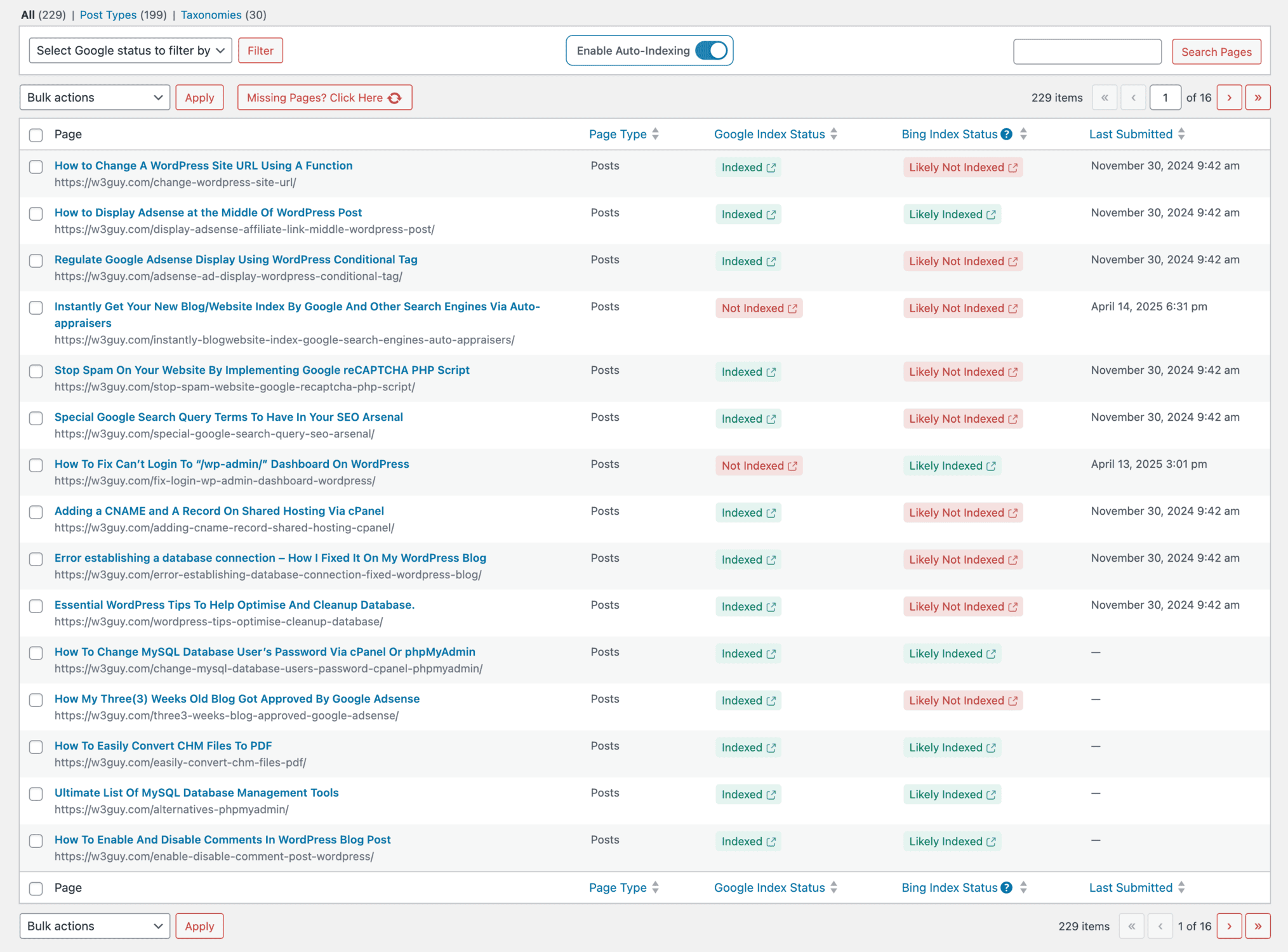
CrawlWP’s Auto-Index feature continuously scans your site for:
- Newly published content not yet indexed
- Updated posts that need reindexing
- Pages stuck in “Discovered – currently not indexed.”
Then automatically submits them without you lifting a finger. It’s like having a dedicated indexing assistant who never sleeps and never complains about the workload.
Bulk indexing lets you select multiple URLs and submit them all at once. Perfect for:
- Site migrations (reindex everything fast)
- Content audits (found orphaned pages? Bulk submit)
- Product launches (get all new pages indexed together)
The real-time indexing status dashboard shows exactly which pages are indexed by Google and Bing. No more manually checking Search Console for every URL like some digital archaeologist digging for answers.
👉Stop waiting weeks. Get CrawlWP and index faster.
Common Mistakes That Make Indexing Even Slower
Mistake #1: Using Noindex When You Meant Nofollow
I’ve seen people accidentally noindex their entire blog because they got the meta tags wrong. Check your pages. Make sure you’re not blocking indexing by accident.
Mistake #2: Blocking CSS/JavaScript in Robots.txt
Google needs to render your page fully to evaluate it. Blocking critical resources is basically asking Google to index a broken version of your site.
Mistake #3: Obsessing Over “Request Indexing” in Search Console
The URL Inspection Tool lets you request crawling. It doesn’t guarantee indexing. You can request until your fingers fall off. If Google thinks your content sucks, it ain’t getting indexed.
Fix the underlying quality and technical issues instead of repeatedly clicking that button like it’s a magic wand.
Mistake #4: Publishing Everything to Sitemap (Including the Kitchen Sink)
Your sitemap should be lean and strategic. Including 50,000 URLs when only 5,000 are actually valuable sends mixed signals to Google.
Quality over quantity. Always.
Mistake #5: Ignoring Mobile Performance
Google uses mobile-first indexing. Your mobile site’s performance directly impacts crawling and indexing.
If your mobile site is slower than a hungover sloth on a Monday morning, you’re screwed.
Why “Discovered – Currently Not Indexed” Is Your Worst Enemy
This Google Search Console status is basically Google saying: “Yeah, we found your page. We don’t think it’s worth indexing right now. Maybe later. Maybe never. We’ll see how we feel.”
Why do pages get stuck here?
- Thin content with no unique value
- Duplicate or near-duplicate content
- Low-quality backlink profile
- Poor site authority overall
- Technical issues (slow loading, mobile problems)
How to fix it:
- Improve content quality significantly (don’t just add 200 words and call it fixed)
- Build internal links from high-authority pages
- Get external backlinks signaling value
- Fix technical SEO issues
- Use CrawlWP to automatically resubmit after improvements
I had 75 pages stuck in this status for a client. Expanded content, fixed technical issues, built better internal linking, and used CrawlWP’s auto-index to resubmit. Within three weeks, 68 were indexed.
The other 7? They genuinely weren’t good enough. Deleted them. Sometimes the best SEO decision is to admit defeat and move on.
The Crawl Budget Reality Check
You probably don’t need to worry about crawl budget if:
- Your site has fewer than 10,000 pages
- New content gets indexed within a week
- You’re not constantly publishing hundreds of pages
You absolutely need to optimize crawl budget if:
- Site has 10,000+ pages
- Massive sections aren’t getting indexed
- New pages take weeks to appear in search results
- Google’s wasting crawl budget on junk URLs
Check your crawl stats in Google Search Console. Look at “Total crawl requests” and “Average response time.”
Sudden drops in crawl requests? You’ve got problems. Spikes in server errors? Fix your hosting. Crawling tons of junk URLs? Clean up your site architecture.
Real Client Example: From 3 Weeks to 36 Hours
The Situation:
B2B SaaS company publishing weekly blog content. Articles took 14-21 days to index. Competitors were ranking first because their content indexed faster.
The Problems:
- Server response time averaged 3.2 seconds (yikes)
- 40% of crawl budget wasted on parameter variations
- Zero instant indexing implementation
- The internal linking structure was chaotic
- Sitemap included 8,000 URLs; only 2,000 were actually valuable
The Fixes:
- Upgraded hosting (response time dropped to 0.8 seconds)
- Blocked parameter URLs in robots.txt
- Cleaned sitemap to include only indexable content
- Implemented strategic internal linking
- Set up CrawlWP with auto-index enabled
The Results:
- Indexing time dropped from 14-21 days to 24-48 hours
- 340% increase in indexed pages within the first month
- Organic traffic jumped 127% in 90 days
- Client stopped sending passive-aggressive emails about indexing delays
👉Get similar results with CrawlWP
Tools to Monitor Indexing Speed
Google Search Console (Free):
- Index Coverage report
- URL Inspection tool
- Crawl Stats
- Sitemaps report
CrawlWP (WordPress Plugin):
- Real-time indexing status
- Auto-index for new/updated content
- Bulk indexing capabilities
- SEO Stats dashboard
- Indexing history tracking
Screaming Frog (Paid):
- Complete site crawl
- Find indexing blockers
- Identify orphaned pages
Ahrefs/Semrush (Paid):
- Track indexed pages over time
- Monitor competitor indexing
- Backlink analysis
For WordPress users, CrawlWP is non-negotiable. It solves the indexing speed problem at the source instead of making you constantly check Search Console like a paranoid lunatic.
Final Thoughts: Stop Waiting, Start Indexing
Why Google indexing is slow isn’t a mystery. It’s a combination of quality evaluation, crawl budget allocation, technical performance, and Google’s resource prioritization.
You can’t change Google’s algorithms. You CAN change how your site interacts with them.
The non-negotiables:
- Publish exceptional content (good isn’t good enough)
- Optimize site speed (under 3 seconds or bust)
- Fix technical SEO issues (broken links, server errors, mobile problems)
- Build strategic internal linking
- Clean up crawl budget waste
- Use instant indexing tools to stop waiting weeks
Traditional SEO advice says, “Be patient, Google will index eventually.” That’s fine if you have infinite time and zero competition.
For everyone living in reality where deadlines exist, and competitors are actively trying to rank before you? Stop waiting. Use CrawlWP.
The difference between 3-week indexing and 48-hour indexing is the difference between missing opportunities and capitalizing on them.
Your content deserves to be found. Stop letting Google’s timeline dictate your results.
Ready to stop waiting? Get CrawlWP and take control of your indexing speed.
FAQs
Why is Google indexing so slow compared to Bing?
Google’s algorithms evaluate content quality, relevance, authority, and user experience more thoroughly than Bing. This comprehensive evaluation takes time but results in better search quality. Bing’s simpler systems process content faster but with less quality filtering.
How long does Google take to index a new page in 2026?
It varies wildly. High-authority sites: hours to 1 day. Established sites: 1-7 days. New sites: 2-4 weeks or longer. Using instant indexing tools like CrawlWP can reduce this to 24-48 hours regardless of site authority.
Does requesting indexing in Search Console actually work?
It asks Google to recrawl your page. It doesn’t guarantee indexing. If content quality or technical issues exist, requesting indexing won’t help. Fix the root problems first.
What is crawl budget, and why does it matter?
Crawl budget is the number of pages Google will crawl on your site in a given timeframe. Sites with limited crawl budget take longer to get new pages indexed because Google has to prioritize which pages to visit.
Can I force Google to index my page faster?
Not directly. You can use Google’s Indexing API or tools like CrawlWP to notify Google immediately when content is published, dramatically speeding up the indexing timeline. But Google still evaluates quality before indexing.
Why are my pages “Discovered – currently not indexed”?
Google found your pages but decided they’re not valuable enough to index yet. Common causes: thin content, duplicate content, low site authority, or technical issues. Improve content quality and use CrawlWP to resubmit after fixes.
Does site speed really affect indexing?
Absolutely. Google’s 2026 indexing is strongly influenced by page speed and user experience signals. Slow pages are crawled less often and take longer to appear in search results. Improving Core Web Vitals is a must for better indexing speed.
Should I use IndexNow or Google Indexing API?
Both. CrawlWP integrates with Google Indexing API for Google and IndexNow protocol for Bing, Yandex, and other search engines. Using both ensures maximum coverage across all search engines.
How do I check if my pages are indexed?
Use Google Search Console’s Index Coverage report or search “site:yourwebsite.com” in Google to check if your pages are indexed. For real-time monitoring, CrawlWP’s indexing status dashboard shows exactly which pages are indexed.
What’s the fastest way to get new content indexed?
Publish high-quality content, ensure fast page speed, build internal links from existing pages, submit via sitemap, and use CrawlWP’s instant indexing features to notify search engines immediately.