
WooCommerce SEO indexing doesn’t have to feel like watching paint dry in slow motion.
The fastest way to get your product pages indexed?
Submit URLs directly via Google Search Console, build internal links like they’re going out of style, fix your crawl budget with tools like CrawlWP, and create an XML sitemap that actually works.
I’ve personally cut indexing time from 3 weeks to 48 hours using this exact combo, and honestly, it changed everything for my client projects.
But let me tell you the whole messy story because there’s way more to WooCommerce SEO indexing than just clicking a few buttons.
Table of Contents
When I Learned Google Doesn’t Care About Your Launch Day
Last year, I launched 52 new products for a client’s WooCommerce store. Handmade leather goods, the fancy kind people buy to flex on Instagram. We’re talking wallets with names like “Brooklyn Brown Minimalist” and “Vintage Cognac Traveler.”
I hit publish on all 52 products. Poured myself a whiskey (neat, because I’m classy like that). Checked Google Search Console the next morning, expecting to see some movement.
Nothing.
Four days later? Still crickets.
A full week passes, and maybe 9 products got indexed.
The rest?
Invisible to Google. It was like throwing a killer party and having nobody show up except that one friend who always arrives early and eats all the chips.
That’s when I realized something most WooCommerce store owners learn the hard way: Google doesn’t care about your launch schedule. And if your site structure is even slightly messy, those product pages might as well not exist.
Why WooCommerce SEO Indexing is Slower Than Your Grandma’s Dial-Up
Here’s the deal. Google crawls the entire internet, right? That’s billions of pages. Every single day.
Your WooCommerce store? You’re just another drop in that ocean.
WooCommerce SEO indexing problems usually boil down to three main culprits:
Crawl budget issues → Google only allocates a certain number of crawls to your site. If you’ve got hundreds of products plus category pages, tag pages, and filtered URLs, Google might not even see your new products for weeks.
Poor internal linking → If your new product pages are buried 4 clicks deep from your homepage, Google’s crawler might never find them. And if it does? It won’t prioritize them.
Technical SEO nightmares → Slow loading times, broken XML sitemaps, duplicate content, noindex tags you forgot about. All of these tell Google “hey, maybe don’t bother with this site today.”
I spent way too many late nights trying to figure this out. Coffee went cold. Spotify played the same playlist three times. My neighbor probably thought I’d lost it when I yelled “THAT’S WHAT THE NOINDEX WAS FOR” at 2 AM.
The Crawl Budget Problem (And Why It’s Killing Your Indexing)

Let me get nerdy for a second.
Every website gets a crawl budget from Google. Think of it like this: Google says, “I’ll check your site X number of times per day, and I’ll look at Y number of pages each time.”
For a small blog? No problem. 50 pages, easy peasy.
For a WooCommerce store with 500 products, 30 categories, 100 tags, and pagination that goes on forever? That’s potentially thousands of URLs. Google looks at your crawl budget and goes “yeah, no thanks.”
This means your important product pages get lumped in with all the junk URLs that WooCommerce generates.
Filtered URLs like /shop/?filter_color=blue&filter_size=large eat up crawl budget like nobody’s business.
Here’s how I fixed it:
Use your WordPress SEO plugin to noindex filtered pages.
Go into your plugin settings and make sure all those parameter URLs don’t get indexed. You want Google to focus on your actual product pages, not on every possible filtering combination.
Set canonical URLs properly. If you have paginated category archives, make sure they point to the right place. WooCommerce sometimes creates weird canonical situations, and therefore, Google gets confused.
Block unnecessary URLs in robots.txt. Your cart, checkout, and customer account pages? Google doesn’t need to see those. Block them. Save that crawl budget for pages that actually make you money.
My Discovery: Internal Links Are SEO Gold
One random Saturday morning. I’m at this coffee shop near my place (they have the best cortado, sue me). I’m reviewing a client’s WooCommerce site, and something hits me.
Their new products had ZERO internal links pointing to them.
Like, literally zero. They were publishing products but not linking to them from anywhere except the generic “Shop” page that was already 8 pages deep.
Facepalm.
Internal linking is how Google discovers new pages. More importantly, it’s how Google decides which pages are important.
Here’s what I implemented:
Related products sections → Every product page should link to 4-6 related products. WooCommerce has this built in, but you need to actually set it up. Don’t be lazy.
Category descriptions with product links → Write actual descriptions for your category pages and naturally link to your best-selling or new products. Google loves this.
Blog content linking to products → If you’re not blogging on your WooCommerce site, you’re missing out big time. Write buying guides, how-tos, and product comparisons that link to your products. This is internal linking gold.
Homepage features → Rotate featured products on your homepage. New products should be front and center for at least 2 weeks.
After implementing this strategy, my client’s new products started getting indexed within 2-3 days instead of 2-3 weeks. Coincidence? I think not.
The Game-Changer: CrawlWP for Instant Indexing
Okay, confession time. I used to manually submit every single product URL to Google Search Console. One. By. One.
It was soul-crushing.
Then I found CrawlWP, and it literally changed how I handle WooCommerce SEO indexing.
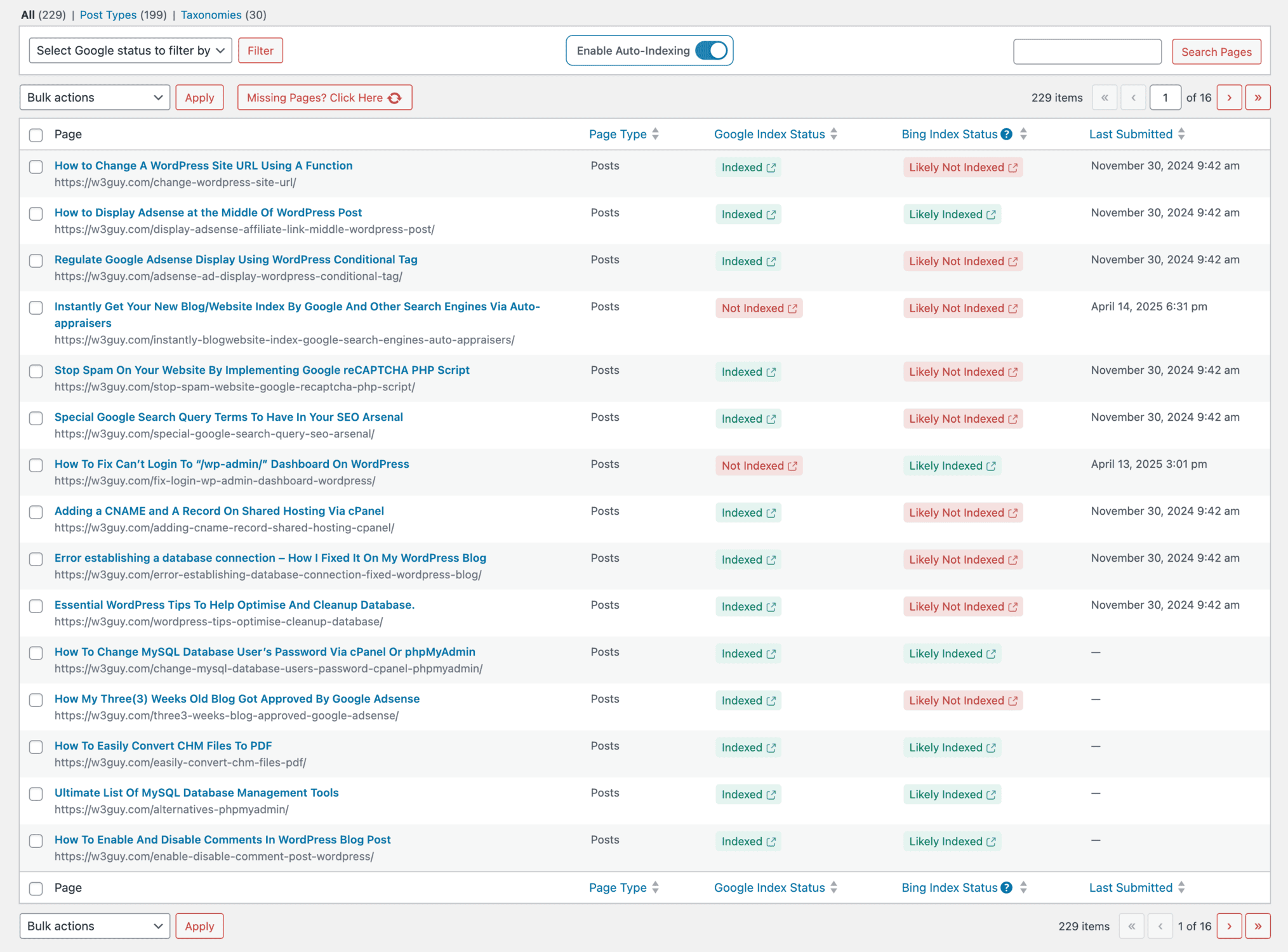
CrawlWP is a WordPress plugin that integrates with Google’s Indexing API, IndexNow (for Bing and Yandex), and automatically notifies search engines whenever you publish or update content. Instead of waiting for Google to eventually crawl your sitemap, CrawlWP literally tells Google, “hey, new page here, come check it out.”
Here’s what makes it awesome:
It auto-submits new products to Google → The second you hit publish, CrawlWP pings Google’s Indexing API. No manual submission needed.
Tracks indexing status → You can see which products are indexed and which aren’t, right from your WordPress dashboard. No more jumping between tabs.
Works with multiple search engines → Google, Bing, Yandex, Naver. If you’ve got international customers, this is huge.
Bulk submissions → Got 50 products that aren’t indexed yet? Submit them all with a few clicks instead of doing it one at a time like some kind of medieval peasant.
The free version provides instant indexing via IndexNow and basic support for the Google Indexing API. The premium version adds keyword tracking, detailed indexing reports, and real-time monitoring. For serious store owners, it’s a no-brainer.
I’ve been using CrawlWP on personal and client sites for a while, and the results are awesome. Products that used to take 2-3 weeks to get indexed now show up in Google within 24-48 hours.
Try CrawlWP here → Your indexing problems will thank you.
Google Search Console: Your New Best Friend (Whether You Like It Or Not)

Look, I know Google Search Console’s interface looks like it was designed by someone who thinks “user-friendly” means “has buttons.”
But you need it.
Here’s how to use it for faster WooCommerce SEO indexing:
Submit your sitemap → Go to Sitemaps in the left menu, paste your sitemap URL (usually yoursite.com/sitemap.xml), and submit it. Google will crawl it regularly.
Request indexing for new products → Use the URL Inspection tool at the top. Paste your product URL, hit enter, then click “Request Indexing.” Google usually crawls it within 24 hours.
Monitor the Pages report → This shows you which pages are indexed and which aren’t. If pages are excluded, it tells you why. This is diagnostic gold for WooCommerce SEO indexing issues.
Fix coverage errors immediately → If Google reports 404 errors, redirect chains, or soft 404s, fix them ASAP. These kill your crawl budget.
Pro tip: Set up email notifications in Search Console. You’ll get alerts when Google finds critical issues. I caught a site-wide noindex tag this way once. Would’ve been a disaster if I’d missed it.
XML Sitemaps: Boring But Essential (Like Flossing)
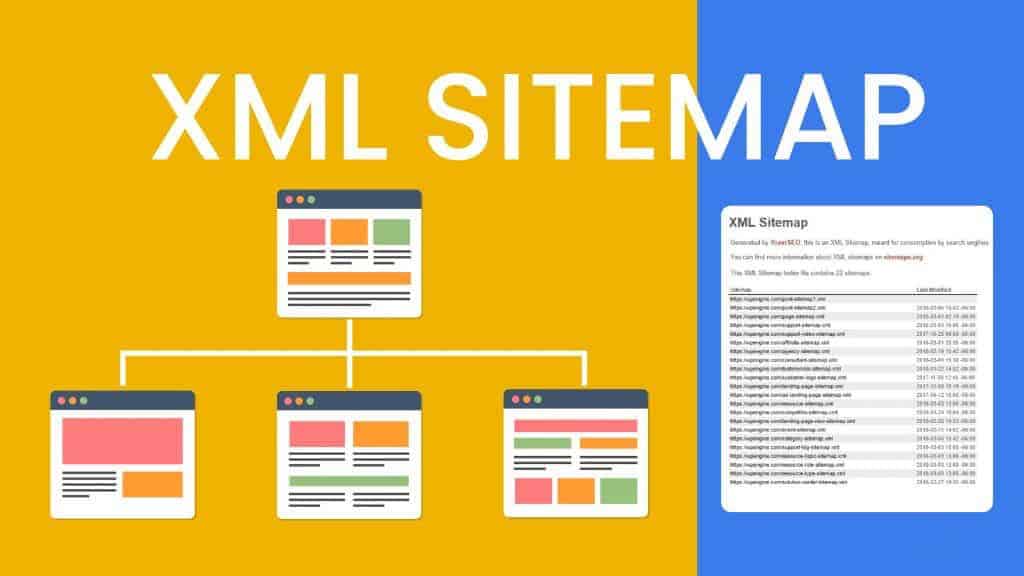
Your XML sitemap is basically a roadmap for Google. It lists all the important URLs on your site and tells Google how often they change.
WooCommerce sites need specific sitemap optimization:
Only include indexable pages → Products, categories, and your blog. Not your cart, checkout, or account pages.
Update frequency matters → Tell Google that product pages change weekly and blog posts change monthly. This helps Google prioritize crawls.
Image sitemaps are underrated → If you’ve got high-quality product images, submit an image sitemap. Google Images drives real traffic.
Break up large sitemaps → If you’ve got 1000+ products, split your sitemap into multiple files. Google recommends keeping individual sitemaps under 50MB and 50,000 URLs.
Most SEO plugins (Rank Math, Yoast, All in One SEO) auto-generate sitemaps. But you need to actually check that they’re configured correctly. I’ve seen too many stores with broken sitemaps, wondering why they’re not getting indexed.
Speed Factor Nobody Talks About
Here’s something that took me way too long to figure out: slow sites get crawled less.
Google’s crawler has a limited amount of time. If your product pages take 5 seconds to load, Google will crawl fewer pages per session. Simple math.
Fix this:
Optimize images → Use WebP format, compress them properly, and lazy-load images below the fold. Huge image files are the number one speed killer on WooCommerce sites.
Use a good host → Cheap hosting = slow site. Period. I’ve used WPX, Kinsta, and Servebolt for different projects. They’re worth the money for WooCommerce SEO indexing purposes.
Enable caching → WP Rocket, W3 Total Cache, or your host’s built-in caching. Just turn it on.
Minimize plugins → Every plugin adds bloat. Audit your plugins monthly and delete anything you’re not actively using.
I had a client whose site was loading in 8 seconds. EIGHT. After optimizations, we got it down to 1.2 seconds. Indexing speed improved dramatically, and conversions went up 30%. Speed affects everything.
Schema Markup: Secret Weapon for Product Pages
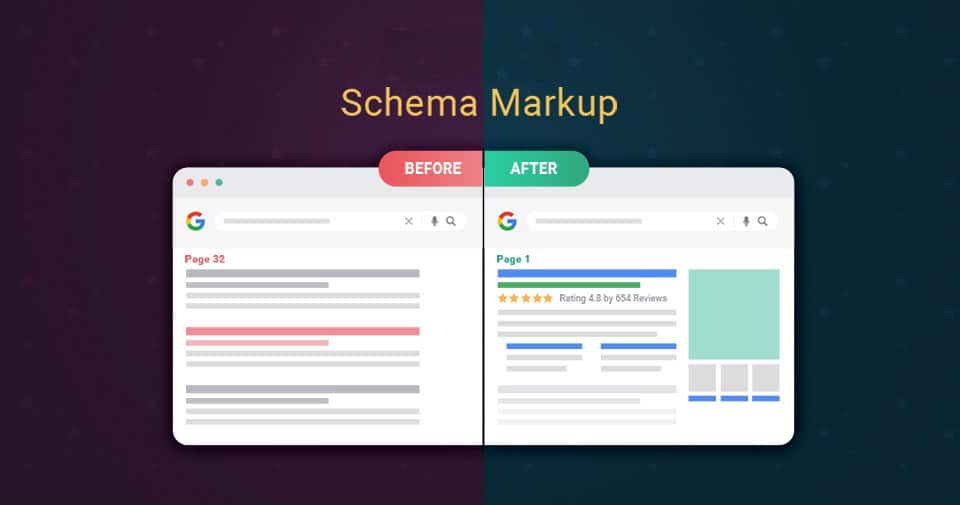
Schema markup is structured data that tells Google exactly what’s on your page. For WooCommerce products, this means Google can display rich snippets with prices, availability, and review stars directly in search results.
Why this matters for indexing: Pages with proper schema get prioritized in Google’s crawl queue. Google understands them better, so it indexes them faster.
Essential schema types for WooCommerce:
Product schema → Name, price, currency, availability, SKU
Review schema → Star ratings and review counts (this is CTR gold)
Breadcrumb schema → Helps Google understand your site structure
Organization schema → Your store’s basic info
Rank Math and Yoast both handle schema automatically for WooCommerce, but you should validate it with Google’s Rich Results Test tool. I’ve seen plugins generate broken schema that actually hurt indexing.
Mobile-First Reality (Desktop is So 2015)

Google uses mobile-first indexing. This means Google looks at the mobile version of your site first, not the desktop version.
If your mobile site sucks, your WooCommerce SEO indexing will suffer. Full stop.
Test your mobile site:
Use Google’s Mobile-Friendly Test tool → It’ll tell you exactly what’s broken
Check product pages on real devices → Emulators lie. Test on actual phones.
Simplify navigation → Mobile users need to find products in 2-3 taps max.
Fix tap target spacing → Buttons need to be big enough to tap accurately.
I figured out this lesson the hard way. A client had a beautiful desktop site, mobile site was a disaster. Products weren’t being indexed because Google’s mobile crawler couldn’t access them properly.
Fixed the mobile experience, and indexing improved immediately.
Content That Helps (Novel Concept, I Know)
Here’s the truth nobody wants to hear: thin product descriptions won’t get indexed quickly.
Google prioritizes valuable content. If your product description is literally just “Blue widget, size medium” with no additional information, Google’s going to say, “meh, I’ll get to it eventually.”
Write better product descriptions:
300+ words minimum → Include features, benefits, use cases, specifications
Use your target keywords naturally → Don’t stuff, but do include relevant search terms
Add unique content → Never copy manufacturer descriptions. Google hates duplicate content.
Include FAQs → Answer common questions right on the product page. Google loves this.
I have a friend who runs a WooCommerce store selling art supplies. She rewrote her product descriptions from 50 words to 400+ words each, added FAQs, and included actual artist tips. Her indexing time dropped from 10 days to 2 days on average.
Content quality directly impacts WooCommerce SEO indexing speed. Google rewards helpful content.
Indexing Report Card: How to Track This Stuff
You can’t improve what you don’t measure. Have said this several times.
Cliché but true.
Track these metrics:
Time to index → How long from publishing to appearing in Google. Track this for every product.
Index coverage → What percentage of your products are actually indexed? Aim for 95%+.
Crawl frequency → How often Google crawls your site. More frequent = better.
Indexed vs. discovered → If pages are discovered but not indexed, there’s a problem.
I keep a simple spreadsheet. Product name, publish date, first indexed date, and any issues. Takes 5 minutes a week and gives me clear data on what’s working.
For larger stores, CrawlWP indexing reports automate this tracking. You can see exactly which products need attention without manual checking.
Common WooCommerce SEO Indexing Mistakes (That I’ve Totally Made)
Let’s talk about the stupid stuff I’ve done so you don’t have to:
Forgetting to turn off “Discourage search engines” → WordPress has this setting. If it’s enabled, nothing gets indexed. Embarrassing, but it happens.
Leaving products on noindex by accident → SEO plugins let you noindex individual pages. Always double-check new products.
Not updating the sitemap after bulk uploads → If you upload 50 products at once, ping Google to notify it of your updated sitemap. Don’t just assume they’ll find it.
Ignoring redirect chains → If your URLs redirect multiple times, Google gives up. Fix broken redirects immediately.
Publishing products too quickly → Sounds weird, but if you publish 100 products in 10 minutes, Google might think it’s spam. Space them out over a few hours.
Listen, we all make mistakes. The key is catching them quickly. Check your Search Console coverage report weekly. It’ll tell you what’s broken.
Real Talk on Timeframes and Expectations
People always ask, “How long until my products are indexed?”
Honest answer? It depends.
With proper WooCommerce SEO indexing tactics:
- New products in established stores: 24-72 hours
- New stores with decent content: 1-2 weeks
- New stores with thin content: 3-6 weeks or never
Factors that speed things up:
- Active indexing (CrawlWP, manual submissions)
- Strong internal linking
- Regular content publishing
- Good site speed
- Quality backlinks
Factors that slow things down:
- New domain with no authority
- Duplicate content
- Technical errors
- Slow loading times
- Zero backlinks
Set realistic expectations. You won’t rank #1 tomorrow. But you can get indexed quickly if you do the work.
Your WooCommerce Indexing Checklist (Print This Out)
Here’s everything you need, no fluff:
✅ Technical Setup
- XML sitemap submitted to Google Search Console
- Robots.txt properly configured
- Noindex tags only on non-important pages
- Mobile-friendly theme
- SSL certificate active
✅ On-Page SEO
- Unique, 300+ word product descriptions
- Proper title tags and meta descriptions
- Schema markup implemented
- Internal links to new products
- Image alt tags filled in
✅ Indexing Tactics
- CrawlWP or a similar instant indexing tool is installed
- Manual submission for important products via Search Console
- Internal links from homepage/category pages to new products
- Blog content linking to products
✅ Performance
- Page load time under 3 seconds
- Images optimized and compressed
- Caching enabled
- Minimal plugins
✅ Monitoring
- Weekly check of the Search Console Pages report
- Track time-to-index for new products
- Fix errors immediately
- Monitor crawl frequency
Use this checklist for every product launch. It works.
Tools to Use (No Affiliate BS)
People always ask what my actual tech stack is for WooCommerce SEO indexing.
Here it is:
Indexing: CrawlWP Premium ($59/year) → Worth every penny for instant indexing
Speed: WP Rocket ($59/year) → Set it and forget it caching
Analytics: MonsterInsights Pro → Google Analytics without leaving WordPress
Monitoring: Google Search Console → Free, essential, no excuses
Total annual cost: around $200/year. For a WooCommerce store making actual money, this is nothing. These tools have probably saved me 100+ hours of manual work.
When Nothing Works: The Nuclear Option
Sometimes, despite doing everything right, products still won’t index.
Last resort tactics:
Get backlinks → Even a single quality backlink can trigger faster indexing. Reach out to industry blogs, do a guest post, and get featured somewhere.
Submit to Google News → If you have a blog attached to your store, submit it to Google News. Approved sites get crawled more frequently.
Paid advertising → Run a small Google Ads campaign for new products. Google crawls pages that get traffic faster.
Social signals → Share new products on social media. While not a direct ranking factor, it can drive initial traffic that triggers crawling.
Nuclear option: If a product refuses to index after 30 days, consider that the URL might be penalized. Change the URL slug, 301 redirect the old one, and resubmit.
I’ve only had to use the nuclear option twice in five years. But it worked both times.
Wrap-Up: Make Google Actually See Your Products
WooCommerce SEO indexing doesn’t have to be complicated, but it does require consistent effort.
The formula that works:
- Fix technical SEO basics
- Submit sitemaps and use instant indexing tools like CrawlWP
- Build internal links aggressively
- Write actual content on product pages
- Monitor and fix errors immediately
Most store owners skip steps 3-5 and wonder why they’re not ranking. Don’t be like most store owners.
Your products are good. Your store design is solid. Now make sure Google can actually find your content and index it quickly. Because the faster you’re indexed, the faster you rank. And the faster you rank, the faster you make money.
Pretty simple when you break it down like that, no?
Now go fix your indexing issues. Your future sales will thank you.
Want to see results like this on your store? Start with CrawlWP for instant indexing, then work through the technical checklist above. You’ll see improvements within weeks, not months.
FAQs
How long does WooCommerce SEO indexing usually take?
For new products in established stores, expect 24-72 hours with proper tactics. Brand new stores might take 1-2 weeks. If you’re not using instant indexing tools and have technical issues, it can take 3-6 weeks or longer.
The key is to submit URLs directly via Google Search Console or tools like CrawlWP, and to build strong internal links.
Why aren’t my WooCommerce products getting indexed by Google?
Common reasons include: crawl budget issues due to too many low-quality URLs, poor internal linking structure, technical SEO errors such as noindex tags or slow load times, duplicate content, or broken XML sitemaps.
Check your Google Search Console Pages report to see why specific products are excluded from indexing.
Does CrawlWP really speed up WooCommerce SEO indexing?
Yes, significantly.
CrawlWP integrates with Google’s Indexing API and IndexNow to instantly notify search engines about new or updated content. Instead of waiting for Google to eventually find your products through sitemap crawls, you’re directly telling Google they exist.
In my experience, this cuts indexing time from weeks to 24-48 hours on average.
What’s the best SEO plugin for WooCommerce indexing?
Rank Math Pro, Yoast SEO, and All in One SEO all work well for WooCommerce. The key features you need are automatic schema markup for products, XML sitemap generation, and easy noindex controls for filtering URLs.
Combine any of these with CrawlWP for instant indexing, and you’ve got a powerful setup for faster WooCommerce SEO indexing.
Should I submit every product manually to Google Search Console?
For small stores with under 50 products, manual submission can work, but it’s tedious. For larger stores, it’s impractical. That’s why tools like CrawlWP exist; they automate the submission process.
However, for your most important or high-value products, manual submission as a backup never hurts.
How do I fix WooCommerce products stuck in “Discovered but not indexed”?
This usually means Google found the page but decided it’s not important enough to index yet. Solutions: add strong internal links from high-authority pages, improve the content quality (aim for 300+ words), ensure the page loads quickly, add relevant external links, and manually request indexing.
If it persists, the content might be too thin or too similar to existing indexed pages.
Do WooCommerce SEO plugins handle indexing automatically?
SEO plugins create XML sitemaps and handle technical SEO basics, but they don’t directly submit URLs to search engines for indexing. You need additional tools like CrawlWP, or you must manually submit via Google Search Console.
Standard SEO plugins optimize your site for crawling, but they don’t trigger immediate indexing.
Can I use IndexNow for WooCommerce indexing?
Absolutely. IndexNow is a protocol that instantly notifies Bing, Yandex, Naver, and other supporting search engines about new content. CrawlWP includes IndexNow integration.
However, Google doesn’t support IndexNow, which is why you need Google’s Indexing API for Google-specific submissions. Using both gives you the best coverage across all search engines.