
Here’s something that should terrify every website owner: Google cannot see images.
Not in the way you do. Google’s crawlers can’t look at a product photo and say, “Oh, that’s a blue running shoe with white laces.” They process pixels, run some computer vision analysis, and make educated guesses. But they fundamentally don’t see as humans see.
That’s where image alt text comes in. It’s your translator. Your bridge between what Google thinks is in an image and what’s actually there.
Get Alt text right, and Google Images, the second-largest search engine on the planet, responsible for 20.45% of all web searches, sends traffic to your site.
Get it wrong, and your images vanish into the void while your site looks broken to the 2.2 billion people using screen readers.
Here’s the infuriating part: most websites absolutely botch it. According to the 2026 WebAIM Million report, 16.2% of images on popular websites are completely missing alt text. Another 10.8% have useless, repetitive, or keyword-stuffed descriptions.
More than one in four images on the web has broken, missing, or inadequate alt text. Your competitors probably have it. Your site probably has it. And you’re losing traffic because of it.
This guide explains what image alt text actually is, why Google and accessibility laws care about it, and exactly how to write alt text that ranks instead of sabotaging your SEO.
Let’s make Google understand what you’re showing.
Table of Contents
What Is Image Alt Text (And Why Should You Care)?
Image alt text is an HTML attribute that describes what’s in an image for search engines and people who can’t view images visually.
Here’s what it looks like in HTML:
<img src="blue-running-shoes.jpg" alt="Men's blue running shoes with white laces and reflective strips">That text inside alt=””? That’s the alt text. Simple concept. World-changing impact.
What does alt text actually do?
For Screen Readers (Accessibility)
When a blind or low-vision user navigates your site with a screen reader (JAWS, NVDA, VoiceOver), the screen reader reads alt text aloud. The user hears your description.
Example:
- Good alt text: “Men’s blue running shoes with white laces and reflective strips.”
- User hears: “Men’s blue running shoes with white laces and reflective strips.”
- User understands what they’re looking at
Without alt text:
- No alt text on the image
- User hears: “Image.”
- User has zero idea what the image shows
- User leaves your site confused and frustrated
That’s not just bad for accessibility. It’s bad for SEO because Google considers accessibility a ranking signal. A site that’s broken for millions of people is considered lower quality.
For Google and Search Engines (SEO)
Google’s algorithm reads alt text to understand what’s in your image. It uses that information for:
- Image indexing – Does this image match search queries?
- Image ranking – Which position should this image rank in Google Images?
- Page relevance – Does this image help explain the page’s topic?
- Contextual understanding – How does this image relate to the surrounding content?
Real impact: Sites with comprehensive alt text optimization see 40% higher Google Images traffic compared to sites without proper alt text. That’s not marginal. That’s doubling your image search traffic.
For Users Without Image Support
When images fail to load (due to a slow connection, a network error, or the image being deleted), users see alt text instead of a broken image icon. They understand what was supposed to be there.
Why Alt Text Matters Right Now
Google Images drives massive revenue:
- 20.45% of all web searches are image searches
- Google Images represents $2.1 billion in annual ecommerce revenue
- For ecommerce, fashion, home services, food, travel, and real estate: image search is HIGH-intent traffic
Accessibility is legally required:
- Digital accessibility lawsuits are at an all-time high
- Many jurisdictions treat websites as “public accommodations” under the ADA and similar laws
- Missing alt text can expose your business to legal liability
Accessibility is a ranking signal:
- Google’s 2023 Helpful Content Update confirmed accessibility affects rankings
- Sites with good accessibility get a ranking boost
- Sites with poor accessibility get subtle ranking suppression
Your competitors are probably failing it:
- More than one in four images on the web have inadequate alt text
- If you fix yours, you’ll have a competitive advantage that most sites don’t
- Low-hanging fruit that most competitors are ignoring
How Alt Text Affects SEO (The Mechanisms That Drive Rankings)
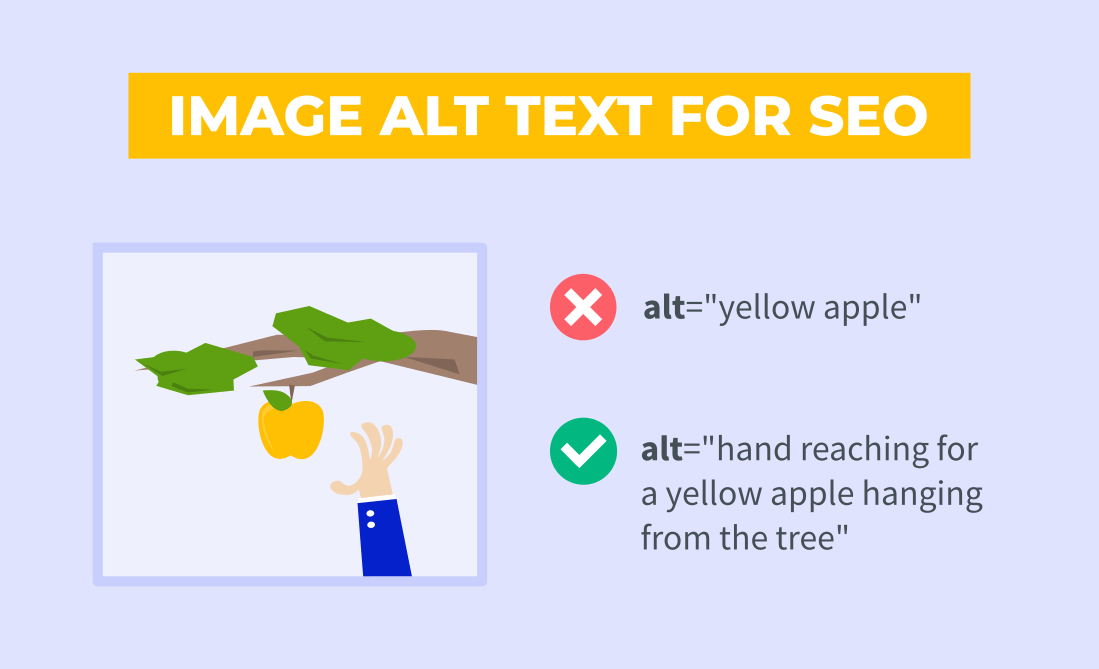
Image alt text impacts your SEO through several proven pathways:
1. Google Images Visibility (Direct Traffic Source)
According to Google’s official image SEO documentation, alt text is the most important metadata element for image indexing.
Here’s how Google ranks images:
- Alt text (primary ranking signal)
- File name (primary ranking signal)
- Surrounding page text (contextual signal)
- Computer vision analysis (backup signal)
Strong alt text = confident indexing = better Google Images rankings = traffic.
Weak or missing alt text = uncertain indexing = poor Google Images visibility = no traffic.
2. Page Relevance and Topical Authority
Every piece of alt text with a relevant keyword reinforces your page’s topic.
Example:
- Article: “How to optimize WordPress speed”
- Contains 10 images
- Each image has alt text mentioning “WordPress speed optimization.”
- Google reads all that contextual reinforcement
- Page becomes more topically relevant for “WordPress speed optimization”
- Better ranking potential for that keyword
Missing alt text means missing topical relevance signals. You’re not building the authority you could be.
3. Accessibility As A Quality Signal
Google explicitly states that accessibility is a ranking factor. Poor accessibility (including missing alt text) signals to Google that your site is lower quality.
Why?
A site that doesn’t work for 2.2 billion people with vision impairments is objectively lower quality than an accessible site. Google rewards quality. Sites lacking accessibility get subtle ranking suppression.
4. Reduced Crawl Budget Waste
When alt text is present and descriptive, Google confidently indexes your images on the first crawl. When it’s missing, Google has to use computer vision, which takes more resources and may misindex.
Better alt text = more efficient crawling = more resources for indexing new content = faster discovery of new pages.
Real-World Impact: The Numbers
- 40% increase in Google Images traffic for sites with comprehensive alt text
- 15% improvement in overall organic visibility (not just image search)
- 16.2% of images on popular sites have zero alt text (opportunity)
- 10.8% of images with alt text have inadequate descriptions (more opportunity)
- Over 25% of all images on the web have broken or missing alt text
If your site has 500 images and 25% have inadequate alt text, that’s 125 missed opportunities for image search traffic.
How To Write Image Alt Text That Truly Works
Writing good alt text requires balancing two audiences:
- People using screen readers (accessibility)
- Google’s algorithms (SEO)
The good news: These audiences both benefit from the same thing; accurate, descriptive text.
The Core Principle: Write For Someone Who Can’t See The Image
Imagine describing this image to someone over the phone who’s never seen it. What would they need to understand?
That question guides everything.
Ask yourself:
- What’s the main subject?
- What details matter for context?
- Why does this image exist on this page?
- What would confuse someone if they couldn’t see it?
The Character Length Sweet Spot
Industry standard: 80-140 characters, with ~125 characters being optimal.
Why? Most screen readers stop reading after 125 characters. Exceeding that means visually impaired users never hear the full description.
This isn’t a hard limit; accuracy matters more than hitting an exact number. But it’s a target.
Examples (Good vs Bad)
PRODUCT IMAGES:
❌ Bad: “Blue shoes”
- Too vague. What kind of shoes? What’s notable about them?
❌ Bad: “Men’s blue running shoes size 10 with white reflective strips perfect for marathon training best running shoes 2026.”
- Keyword stuffing. No screen reader user needs that run-on sentence.
✅ Good: “Men’s blue running shoes with white reflective strips and cushioned sole”
- Specific, descriptive, natural, under 125 characters
CHARTS AND DATA VISUALIZATIONS:
❌ Bad: “Chart”
- Completely useless. What does the chart show?
❌ Bad: “Bar chart showing the 20% increase in organic traffic after image alt text SEO optimization for websites in 2026”
- Way too long. Screen readers cut off after ~125 characters
✅ Good: “Bar chart showing 20% increase in organic traffic after alt text optimization”
- Conveys the key finding in under 125 characters
For complex charts, provide a brief alt text + a longer description below the image in regular text format.
Example:
<img src="traffic-chart.jpg" alt="Bar chart showing 20% organic traffic increase after alt text optimization">

<p>The chart details show website traffic grew from 10,000 monthly visits (January 2026) to 12,000 visits (March 2026) after implementing comprehensive alt text across 2,000 product images.</p>
INFOGRAPHICS:
❌ Bad: “Infographic”
- Zero information value
✅ Good: “Infographic showing 7 steps to optimize WordPress speed with estimated time savings”
- Describes content + context in ~125 characters
DECORATIVE IMAGES:
For purely decorative images (background images, spacers, ornamental graphics), use empty alt text:
<img src="decorative-line.jpg" alt="">Empty alt text (alt=””) tells screen readers to skip this image because it’s purely decorative. This is correct accessibility practice and doesn’t waste screen reader user’s time.
SEO + Accessibility Balance
Start with accessibility:
- What would a visually impaired user need to know?
- Write a clear, accurate description
Then optimize for SEO: 3. Look for natural places to include your target keyword 4. Only if it fits naturally, never force it
Example workflow:
Step 1 (Accessibility): “A woman in professional attire presenting at a marketing conference”
Step 2 (SEO optimization): Notice the article targets “content marketing strategy.” Can I naturally include that keyword?
Step 3 (Final): “Woman presenting content marketing strategy at professional business conference”
That’s natural, descriptive, includes the target keyword, and doesn’t feel forced.
What NOT To Do (Common Alt Text Mistakes)
❌ Keyword Stuffing
Bad: “WordPress speed optimization WordPress fast loading WordPress performance best WordPress plugins WordPress SEO 2026”
- Screen readers read this as nonsense
- Google treats it as spam
- No accessibility value
- Penalties outweigh any SEO benefit
❌ Starting With “Image Of” or “Picture Of”
Bad: “Image of men’s blue running shoes”
- Redundant. The user already knows it’s an image.
- Screen reader users hear: “Image of… image of… image of…”
- Wastes precious characters
- Industry best practice: skip this
✅ Better: “Men’s blue running shoes with reflective strips”
❌ Being Too Vague
Bad: “Shoes” (for a product page)
- Doesn’t describe specific product features
- Missing long-tail keyword opportunities
- Weak for Google Images ranking
✅ Better: “Men’s blue running shoes with cushioned sole and reflective strips”
❌ Ignoring Context
Your alt text should reflect why the image exists on this specific page.
Example: You have a photo of a blue running shoe on two different pages:
- Product page: “Men’s blue running shoes with white laces”
- Blog about shoe manufacturing: “Blue running shoe during quality control inspection”
Same image. Different purposes. Different alt text. Context matters.
❌ Forgetting Updates
If you replace a hero image or update a product photo, update the alt text too.
Don’t have: “Product photo” (generic). Do have: “Product photo updated March 2026”
Best Practices By Image Type

Ecommerce Product Images
What works:
- Include product name, color, key features, and size/dimensions when relevant
- Describe visible details (materials, fit, unique features)
- Under 125 characters when possible
Example: “Women’s black leather crossbody bag with adjustable strap and multiple pockets”
What to include:
- ✅ Color
- ✅ Material
- ✅ Style
- ✅ Key features
- ❌ Price (doesn’t help with search or accessibility)
- ❌ “Click here” (should be in surrounding text, not alt text)
Multiple Product Views
If the same product has multiple images (front, back, detail shots), use unique alt text for each:
❌ Bad: All images have identical alt text
- Google struggles to understand which view is which
- Screen reader users hear the same description repeatedly
✅ Good: Unique alt text reflecting each angle
- Front view: “Blue running shoes, front angle showing laces and toe box”
- Back view: “Blue running shoes, back view showing heel support”
- Detail: “Close-up of running shoe sole showing cushioned technology”
Blog and Article Images
What works:
- Describe what’s in the image
- Explain relevance to surrounding text if not obvious
- Keep it natural and conversational
Example for an SEO article: “Screenshot of Google Search Console Pages report showing crawl errors”
Not: “Screenshot” (too vague) “Google Search Console Pages report showing crawl errors SEO ranking optimization tools” (keyword stuffing)
Infographics and Data Visualizations
Approach:
- Brief alt text summarizing the main finding (125 characters max)
- Extended description below the image in paragraph or list format
Example:
<img src="seo-ranking-factors.jpg" alt="Infographic listing 15 most important SEO ranking factors for 2026">
<p><strong>15 Most Important SEO Ranking Factors (2026):</strong></p>

<ol>

<li>Content relevance and topical authority</li>

<li>Backlinks from authoritative sites</li>

<li>Core Web Vitals performance</li>

<li>Content quality and E-E-A-T signals</li>

... (list continues)

</ol>
The alt text gives the overview. The extended description provides full details accessible to all users.
Charts and Graphs
Brief alt text: “Line chart showing organic traffic growth from January to December 2026”
Extended description below: “Website organic traffic increased steadily from 5,000 monthly visits in January to 15,000 in December, representing 200% growth year-over-year. Peak traffic occurred in September (18,000 visits). Lowest traffic was in January (5,000 visits).”
How To Audit Your Site For Alt Text Issues
You can’t fix what you don’t see. Here’s how to identify alt text problems:
Method 1: Better way to audit alt text
Use a crawler such as Screaming Frog or Sitebulb to scan your site for missing, duplicate, or poorly optimized alt text. Google Search Console can help you measure image search performance, but it does not provide an alt text audit report.
Method 2: WordPress Plugins (If You Use WordPress)
Rank Math:
Rank Math‘s Content AI and SEO analysis can flag some image-related issues within individual posts, but it does not provide a site-wide alt text audit dashboard.
Yoast SEO:
Yoast may flag image-related SEO recommendations in the editor, but it is not designed as a dedicated alt text auditing tool.
AIOSEO:
AIOSEO offers image SEO features, but site-wide alt text auditing capabilities are limited compared to dedicated crawling tools.
Method 3: Manual Inspection
For smaller sites:
Visit key pages, inspect images using browser developer tools, and review the alt attributes directly in the HTML.
Method 4: SEO Tools (Ahrefs, SEMrush, Screaming Frog)
They can:
- Find missing alt text
- Find duplicate alt text
- Export image reports
- Audit thousands of pages
Prioritization Strategy
Fix images in this order:
- Revenue-generating pages (products, services, landing pages)
- High-traffic pages
- Above-the-fold images
- Template/category pages affecting many URLs
- Remaining content
The reason is that fixing alt text on pages that already drive traffic or conversions usually produces the highest business impact.
Image Alt Text At Scale (For Large Sites)
If you have hundreds or thousands of images, manual alt text writing becomes impractical. According to research from 2026, manually writing alt text for 20,000 images takes approximately 167 hours (more than a month of full-time work).
Solutions for scale:
AI-Powered Alt Text Generation
Tools like AltText.ai, Ryze AI, and similar platforms use AI to generate alt text automatically:
How it works:
- Upload images or connect your WooCommerce/Shopify store
- AI analyzes each image and generates descriptions
- You review and edit as needed
- Bulk publish back to your site
Advantages:
- Process thousands of images in hours, not weeks
- AI learns your brand style over time
- Integrates with WooCommerce/Shopify automatically
- Significantly faster than manual writing
Reality check:
- AI-generated alt text needs human review (not perfect)
- Better as a starting point than a final product
- Edit for accuracy and brand voice
- Verify keywords align with your SEO strategy
WordPress Bulk Editors
Tools like Bulk Image Alt Text (free plugin) let you:
- Bulk edit alt text across multiple images
- Apply templates with variables
- Add prefixes/suffixes for consistency
- Batch process updates
Outsourcing
Hire writers or accessibility specialists to write alt text for your catalog. Cost varies but typically $0.50-2.00 per image depending on complexity.
Image Alt Text + Image Technical SEO
Alt text is important, but it’s just one part of complete image SEO. For maximum impact, also optimize:
File Names (Second Most Important Signal)
❌ Bad: image-1234.jpg, photo.jpg, product.jpg
✅ Good: mens-blue-running-shoes-reflective.jpg, wordpress-speed-optimization-chart.jpg
Descriptive, hyphenated file names are a primary ranking signal for Google Images.
Image Format and Compression
Modern formats load faster and rank better:
- WebP – Best for photographs, 25-30% smaller than JPEG
- AVIF – Even better compression, newer format
- PNG – Only for lossless transparency needs
- JPEG – Legacy format, larger file sizes
Slower images hurt Core Web Vitals, which affects rankings. Optimize images for speed.
Image Dimensions and Responsive Design
Set explicit width and height attributes to prevent layout shift (CLS):
<img src="image.jpg" alt="Description" width="800" height="600">Use loading=”lazy” for below-the-fold images (except hero images—always load those immediately).
Image Sitemaps
Create XML image sitemaps to help Google discover all your images:
<?xml version="1.0" encoding="UTF-8"?>

<urlset xmlns="http://www.sitemaps.org/schemas/sitemap/0.9"

xmlns:image="http://www.google.com/schemas/sitemap-image/1.1">

<url>

<loc>https://example.com/products/blue-shoes/</loc>

<image:image>

<image:loc>https://example.com/images/blue-shoes-1.jpg</image:loc>

<image:title>Men's Blue Running Shoes</image:title>

</image:image>

</url>

</urlset>
Most WordPress SEO plugins (Rank Math, Yoast, AIOSEO) generate these automatically.
Image Alt Text in the AI Era
In 2026, image alt text matters even more because:
AI Overviews pull from multiple sources: When Google’s AI Overview summarizes information, it needs to cite sources. Strong alt text helps Google identify your images as authoritative sources worth citing.
Google Lens integration: When users search by image (uploading a photo), Google uses alt text and surrounding content to understand what they’re looking for. Better alt text = better matching.
ChatGPT search, Perplexity, and other AI search engines: These platforms pull from Google’s indexed content. Properly indexed images (via good alt text) are more likely to appear in AI search results.
Accessibility lawsuits: Digital accessibility lawsuits are at an all-time high. Missing alt text exposes your business to legal liability in the US and EU (EAA compliance deadline).
Image Alt Text + CrawlWP
Here’s something you should know about: instant indexing helps you catch image SEO issues faster.
With CrawlWP’s instant indexing:
- Publish a page with optimized alt text
- CrawlWP notifies Google immediately
- Google can crawl the page sooner instead of waiting to find it on its next crawl
- You can verify that Google has indexed your images quickly
- If something’s wrong, you catch it before it spreads across your site
Traditional approach: Publish, wait a week, realize alt text problems, spend weeks fixing. By then, Google may have already indexed dozens of pages with weak alt text.
With instant indexing: Publish, get crawled sooner, catch issues early, and maintain consistency across your site.
Get instant indexing with CrawlWP →
Image Alt Text Checklist (Before Publishing)
Before you publish any page with images:
✅ Every image has alt text (or intentional empty alt=”” for decorative images)
✅ Alt text is 80-140 characters (screen reader friendly)
✅ Alt text is descriptive and specific (not vague like “image”)
✅ No keyword stuffing (reads naturally, not spammy)
✅ No “Image of” or “Picture of” prefix (redundant)
✅ Target keyword included naturally (if it fits the description)
✅ File name is descriptive (not image-1234.jpg)
✅ Image format is optimized (WebP when possible, under 200KB)
✅ Width and height attributes set (prevents layout shift)
✅ Multiple product views have unique alt text (not identical descriptions)
FAQs
Does alt text actually help SEO?
Yes. According to Google’s official image SEO documentation, alt text is the most important metadata element for image indexing. Sites with comprehensive alt text see 40% higher Google Images traffic. It’s also a ranking signal; accessibility (including alt text) affects overall site rankings.
How long should alt text be?
The industry standard is 80-140 characters, with ~125 characters being optimal. That’s when most screen readers stop reading. Longer isn’t better. Accuracy and clarity matter more than hitting a specific number.
Does alt text help with keyword rankings (not image search)?
Indirectly yes. Alt text reinforces your page’s topical relevance, which helps with rankings. Every piece of well-written alt text with a relevant keyword strengthens your page’s theme. But alt text alone won’t rank you; it’s part of a comprehensive SEO strategy.
Can I use the same alt text for multiple images?
Not ideal. Each image should have unique alt text reflecting its specific content. If you have multiple product views, each needs its own description (front angle, back angle, detail shot, etc.). Identical alt text confuses Google and provides poor accessibility.
What if I don’t know what’s in an image?
Don’t guess. Write what you can verify. If it’s a complex chart or graph you don’t understand, ask someone who does. Wrong alt text is worse than generic alt text because it misleads both users and search engines.
Should I include keywords in alt text?
Yes, if they fit naturally. Start by writing an accurate description. Then check if your target keyword fits naturally. If it does, include it. If forcing it makes the text awkward, skip it. Natural > forced.
Is alt text required by law?
Yes, in many jurisdictions. The ADA (US), AODA (Canada), and EU’s EAA (European Accessibility Act) all require accessible websites, including proper alt text. Violations can result in lawsuits. It’s both an SEO best practice and a legal requirement.
What about decorative images?
Use empty alt text: alt=””. This tells screen readers to skip the image because it’s purely decorative. This is the correct accessibility practice.
Can I use alt text to deceive users (alt text says one thing, image shows another)?
Absolutely not. Google treats this as spam. Never use alt text that doesn’t match the actual image. It violates accessibility principles, violates Google’s guidelines, and can get your site penalized.
How do I fix thousands of images without alt text?
Use AI tools like AltText.ai, Ryze AI, or WordPress plugins for bulk generation. AI generates descriptions, you review and edit for accuracy, then bulk publish. For 20,000 images, manual writing takes ~167 hours; AI-assisted takes ~20 hours.
Does alt text impact page speed?
No. Alt text is HTML metadata and adds zero weight to page load. Image file size and format are what affect speed, not alt text.