
SEOPress alternative
CrawlWP: the SEOPress alternative that tracks what actually gets indexed
SEOPress is a plugin we admire for its clean design and transparent pricing, without the upsell nagging. If you are looking for a SEOPress alternative, the deciding factor usually is not quality. It is whether you need index tracking and search data from engines beyond Google.
The short answer
Why people look for a SEOPress alternative
SEOPress users rarely leave because the plugin is bad. These are the three reasons they come to us.
You want more than Google
SEOPress reads Google Search Console. If a meaningful share of your traffic comes from Bing or Yandex, you can’t see it inside WordPress.
Submitting is not the same as being indexed
SEOPress sends your URLs to Google and Bing. It does not come back and tell you which ones made it into the index, or which are still missing.
You would rather pay once
SEOPress is annual only, with no lifetime license. CrawlWP sells both, so you can stop renewing.
On this page
Side by side
CrawlWP vs SEOPress, feature by feature
SEOPress covers on-page SEO as well as we do, and its free tier is one of the most generous available. The gap opens up around index tracking and non-Google data.
| CrawlWP | SEOPress | |
|---|---|---|
| Meta title and description templates | Free | Free |
| Focus keywords per post | Unlimited | Unlimited |
| Bulk editor for titles and descriptions | Free | Free |
| Schema, breadcrumbs, Open Graph | Free | Free |
| LocalBusiness schema | Free | Pro |
| Image alt text automation | Free | Free, from file names |
| robots.txt editing | Free, pre-filled with live output | Free, with revision history in Pro |
| llms.txt | Free | Free |
| Redirect manager | Free: 301, 302, 410, regex | Pro: 301, 302, 307, 410, 451 |
| 404 monitor | Free | Pro |
| Internal link automation | Keyword rules | Pro |
| XML sitemap | Uses the WordPress core index | Its own sitemap |
| Google News and video sitemaps | Premium | Pro |
| HTML sitemap | Premium | Free |
| Multilingual sitemaps | Premium: WPML, Polylang, TranslatePress | WPML and Polylang |
| GA4 and Tag Manager fields | Free | Free, plus Matomo and Clarity |
| Import from other SEO plugins | Free | Free |
| Instant indexing to Google | Free, Google Indexing API | Google Indexing API |
| Indexing to Bing and Yandex | Free, APIs plus IndexNow | IndexNow |
| Indexing to Naver, Yep, Seznam.cz | Free, IndexNow | Not included |
| Index status per post | Premium: Google, Bing, Yandex | Not included |
| 30-day index history and bulk resubmission | Premium | Not included |
| Google Search Console data in WordPress | Premium | Free, including on the posts list |
| Bing and Yandex data in WordPress | Premium | Not included |
| Backlinks and rank tracking | Not included | Insights add-on |
| SEO email reports | Premium | Not included |
| Lifetime licence | Yes | Not offered |
| Price for one site | Starts at $59 a year | From $49 a year |
Being fair about it
Where SEOPress is the better choice
No SEOPress alternative wins on every point, and these are the ones where they are genuinely ahead.
Price, if you run many sites
SEOPress Pro is $49 a year for one site and $149 for unlimited. At ten sites, that is cheaper than us, and renewals are billed at the price you first paid.
A genuinely complete free version
Unlimited focus keywords, Search Console data on the posts list, an HTML sitemap, and llms.txt, all free, with no advertising inside the plugin.
Speed and restraint
A well-built plugin that stays out of your way. The same design values we aim for.
Privacy by default
SEOPress makes a point of not calling home, which matters for sites under strict privacy rules.
Backlinks and rank tracking
Their Insights add-on covers broken links, backlinks, and keyword positions. We do none of that.
Maturity
Years of development and a large, settled install base.
Where CrawlWP is ahead
Knowing whether it actually got indexed
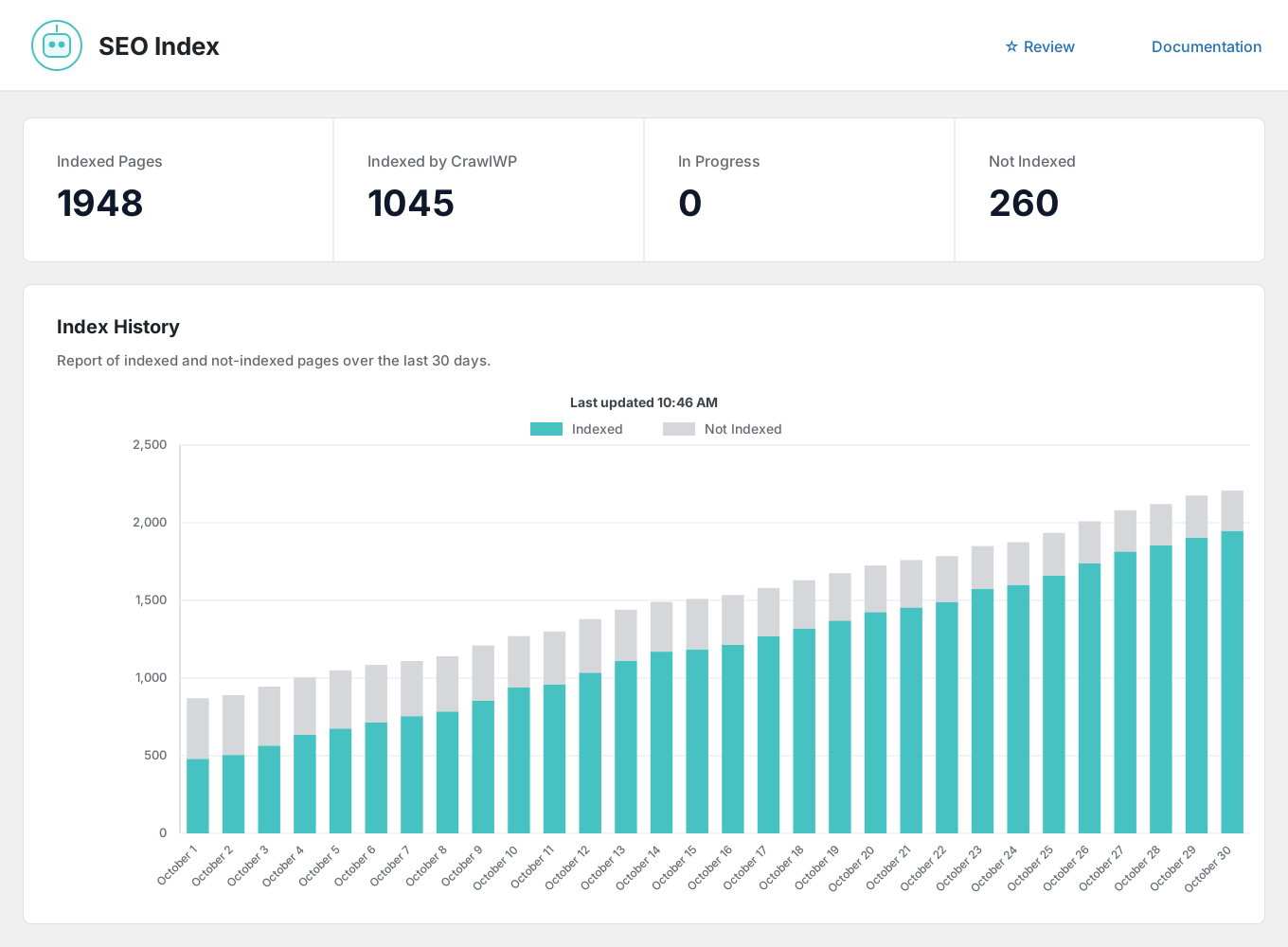
Both plugins submit your pages to Google and Bing. The difference is what happens next: SEOPress sends the request, and CrawlWP also checks the result, records it, and shows you which pages are still missing.
Index status per post
Indexed, pending, or missing on Google, Bing, and Yandex, on the posts list you already use.
30-day index history
A chart of indexed and not-indexed pages over time so that you can see the trend rather than a snapshot.
Bulk resubmission
Filter to pages that aren’t indexed, select them, and resubmit in one click.
Automatic indexing
A scheduled scan finds older content that never made it into the index and submits it.
Submission log
Every request is recorded with its date, engine, and result, on its own Log screen.
Three more engines
Naver, Yep, and Seznam.cz through IndexNow, alongside Google, Bing, and Yandex.
The gap nobody else fills
Bing and Yandex, not just Google
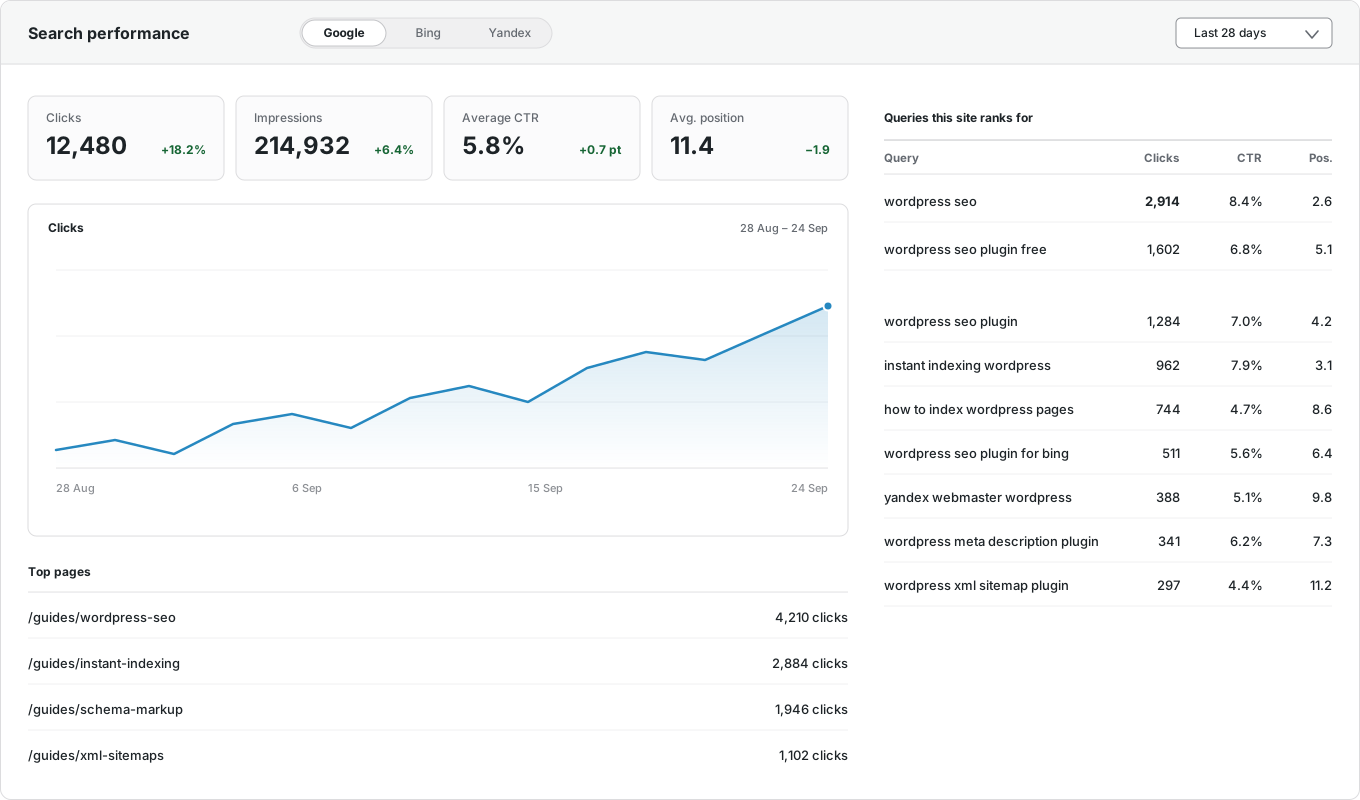
SEOPress shows Google Search Console data in WordPress and lists clicks, impressions, CTR, and position on the posts list for free. It does not cover Bing or Yandex. CrawlWP reads all three and reports them together.
Google Search Console
Clicks, impressions, CTR, and average position, inside WordPress.
Bing Webmaster Tools
The same numbers from Microsoft Bing, on the same screen.
Yandex Webmaster
Clicks, impressions, ranking keywords, and positions from Yandex.
Per-post performance
Each post’s own numbers and top keywords, in the editor sidebar and the Insights tab.
Top pages and queries
Your best-performing URLs and the searches that bring visitors, with top countries and devices.
One screen for all three
Switch between engines without opening three separate tools.
And it comes to you
The SEO report your client will actually read
Daily, weekly, or monthly, to as many recipients as you like, in your own brand color. SEOPress does not send a scheduled performance report.

Your schedule
Daily, weekly on a day you choose, or monthly.
Multiple recipients
Comma-separated addresses, so clients and colleagues get it without a WordPress login.
Search performance
Impressions, clicks, CTR, and average position, with changes from the previous period.
Indexing insights
Pages indexed on Google, pages likely indexed on Bing, and pages still not indexed.
Keywords and pages
The searches driving traffic and the URLs earning the clicks.
Recent movements
What was newly indexed and what was dropped since the last report.
Switching
Moving from SEOPress takes minutes
Install CrawlWP alongside SEOPress, import the titles, descriptions, canonicals, robots settings, and redirects it already saved, spot-check a few posts, then deactivate it. The importer copies rather than moves so that you can roll back. The full migration guide walks through it step by step.
Questions
CrawlWP and SEOPress questions
Answers to the questions people ask most when comparing the two.
Is CrawlWP a good SEOPress alternative?
It depends on what you are missing. For on-page SEO, the two are close, and SEOPress does it well. CrawlWP is the better SEOPress alternative if you want to know which pages actually reached the index, want search data from Bing and Yandex in addition to Google, or want a lifetime license instead of an annual one.
Why would I switch from SEOPress?
For index tracking and non-Google data. SEOPress submits your pages but doesn’t tell you which ones actually made it into the index, and it doesn’t read Bing or Yandex. If you don’t need those, SEOPress is a fine plugin, and we wouldn’t pretend otherwise.
Is CrawlWP cheaper than SEOPress?
Not on a single site. SEOPress Pro starts at $49 a year against our $59, and their unlimited tier is $149 against our $259. We sell a lifetime license, and they do not, so the maths flips if you plan to keep the plugin for more than about six years.
Does SEOPress do instant indexing?
Yes. It supports the Google Indexing API and IndexNow. CrawlWP adds Naver, Yep, and Seznam.cz, and then checks and records whether each page was indexed.
Can I import my SEOPress data?
Yes. Titles, descriptions, robots rules, canonicals, social images, and redirects copy over, and your SEOPress data stays where it is.
Which has the better content analysis?
They are close. Both score a post against unlimited target keywords from the editor. SEOPress has been doing it longer; if content scoring is the main reason you open an SEO plugin, there is no strong reason to move.
Which should I choose?
If you want a well-priced plugin for on-page SEO across many sites, SEOPress is the stronger pick. If you want to know whether your pages got indexed and how they perform on Bing and Yandex, CrawlWP is built for that.
Pricing
Straightforward pricing, every feature included
Standard
For 1 Site
$59
/ year
Pro
For 5 Sites
$159
/ year
Agency
For Unlimited Sites
$259
/ year
Standard
For 1 Site
$359
once
Pro
For 5 Sites
$559
once
Agency
For Unlimited Sites
$759
once
Try the SEOPress alternative alongside what you have
Install CrawlWP, import your SEOPress data, and compare the two for a week before you deactivate anything. There is a 14-day money-back guarantee either way.
yoursite.com
https://yoursite.com › guides › wordpress-seo
A Practical Guide to WordPress SEO in 2026
Learn how to structure, optimize, and index a WordPress site so search engines find your content within hours rather than weeks.
Google · indexed
Bing · indexed
Yandex · indexed