
Slim SEO alternative
CrawlWP: the Slim SEO alternative for when automatic is not enough
Slim SEO’s whole argument is that SEO plugins are bloated and most settings are noise. It is a good argument, and if it convinces you, you should use Slim SEO. People look for a Slim SEO alternative when automatic SEO stops being enough, or when they need the half of SEO that happens after a page is published.
The short answer
Why people look for a Slim SEO alternative
Slim SEO users rarely leave because the plugin is bad. These are the three reasons they come to us.
Automatic is wrong on some pages
Slim SEO generates titles and descriptions from your content. That is right most of the time, but there is no bulk editor for the pages where it is not.
Nothing gets submitted
Slim SEO writes your meta tags and sitemap, then stops. It doesn’t notify Google, Bing, or anything else when you publish, and nothing checks whether a page reached the index.
It reports Google only
Slim SEO Pro brings Search Console into WordPress, and does it well. If Bing or Yandex matter to your traffic, it won’t show you anything.
On this page
Side by side
CrawlWP vs Slim SEO, feature by feature
These two plugins aren’t trying to do the same job, so read this as a map of where their approaches run out, not a scorecard.
| CrawlWP | Slim SEO | |
|---|---|---|
| Works with no configuration | Defaults applied on activation | Fully automatic |
| Meta title and description templates | Free, editable templates | Automatic, minimal settings |
| Bulk editor for titles and descriptions | Free | Not included |
| Schema | Core types, free | Automatic free, visual builder in Pro |
| Breadcrumbs | Free | Free, via shortcode |
| Image alt text automation | Free | Free |
| Header and footer code | Free | Free |
| RSS attribution | Free | Free |
| robots.txt editing | Free, pre-filled with live output | Free |
| llms.txt | Free | Not included |
| Redirect manager | Free: 301, 302, 410, regex | Basic redirects |
| 404 monitor | Free | Yes |
| Internal link automation | Keyword rules, Premium | Link reports and suggestions, Pro |
| XML sitemap | Uses the WordPress core index | Its own sitemap |
| Google News and video sitemaps | Premium | Not included |
| HTML sitemap | Premium | Not included |
| Multilingual sitemaps | Premium: WPML, Polylang, TranslatePress | Not documented |
| GA4 and Tag Manager fields | Free | Free, via header code |
| Instant indexing | Free, 6 engines | Not included |
| Index status per post | Premium: Google, Bing, Yandex | Not included |
| 30-day index history | Premium | Not included |
| Google Search Console data in WordPress | Premium | Slim SEO Pro |
| Bing and Yandex data in WordPress | Premium | Not included |
| SEO email reports | Premium | Not included |
| Lifetime licence | Yes | Not offered |
| Paid entry price | Starts at $59 a year | $59 a year for 1 site, $179 unlimited |
Being fair about it
Where Slim SEO is the better choice
No Slim SEO alternative beats it at what it set out to do, and for many sites that is the whole decision.
Truly zero configuration
It works the moment you activate it, with almost nothing to set. For a brochure site or a personal blog, that is exactly right.
The lightest footprint here
Independent benchmarks consistently put it at the top for front-end weight. If you are fighting for Core Web Vitals points, that matters.
No upsell surface
The plugin doesn’t use its interface to advertise to you, which is rarer than it should be.
Sensible automatic output
Titles, descriptions, schema, and breadcrumbs generated from your content without you thinking about it.
Everything in one Pro plugin
Slim SEO Pro consolidated its schema builder and link manager into a single plugin, so you don’t have to assemble anything.
A clear philosophy
It knows what it is not, and it does not drift. That matters when you are picking software to live with.
Where CrawlWP is ahead
Control, and the indexing half
Slim SEO stops at generating good output. It doesn’t submit your pages to anything, and it doesn’t come back to tell you what happened to them.
Instant indexing, free
Submission to Google, Bing, Yandex, Naver, Yep, and Seznam.cz as your content changes. Slim SEO does not submit to any search engine.
Index status per post
Indexed, pending, or missing on Google, Bing, and Yandex, on the posts list you already use.
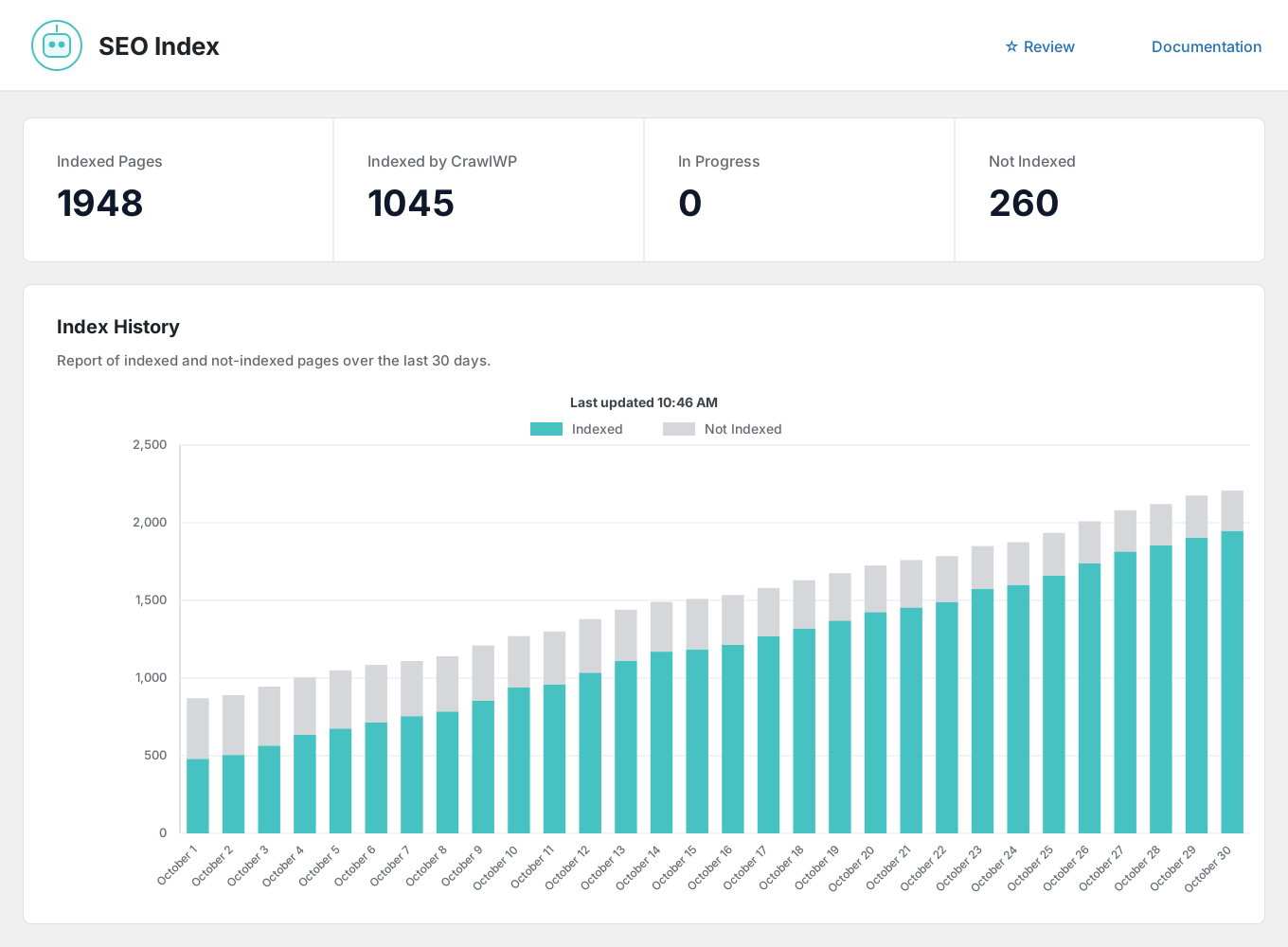
30-day index history
A chart of indexed and not-indexed pages over time so that you can see the trend rather than a snapshot.
A bulk editor
Fix the pages where automatic got the title wrong, without opening each one.
Submission log
Every request recorded with its date, engine, and result, on its own Log screen.
Sitemaps beyond the basics
News, video, HTML and multilingual sitemaps, plus custom URLs for pages WordPress does not manage.
The gap nobody else fills
Bing and Yandex, not just Google
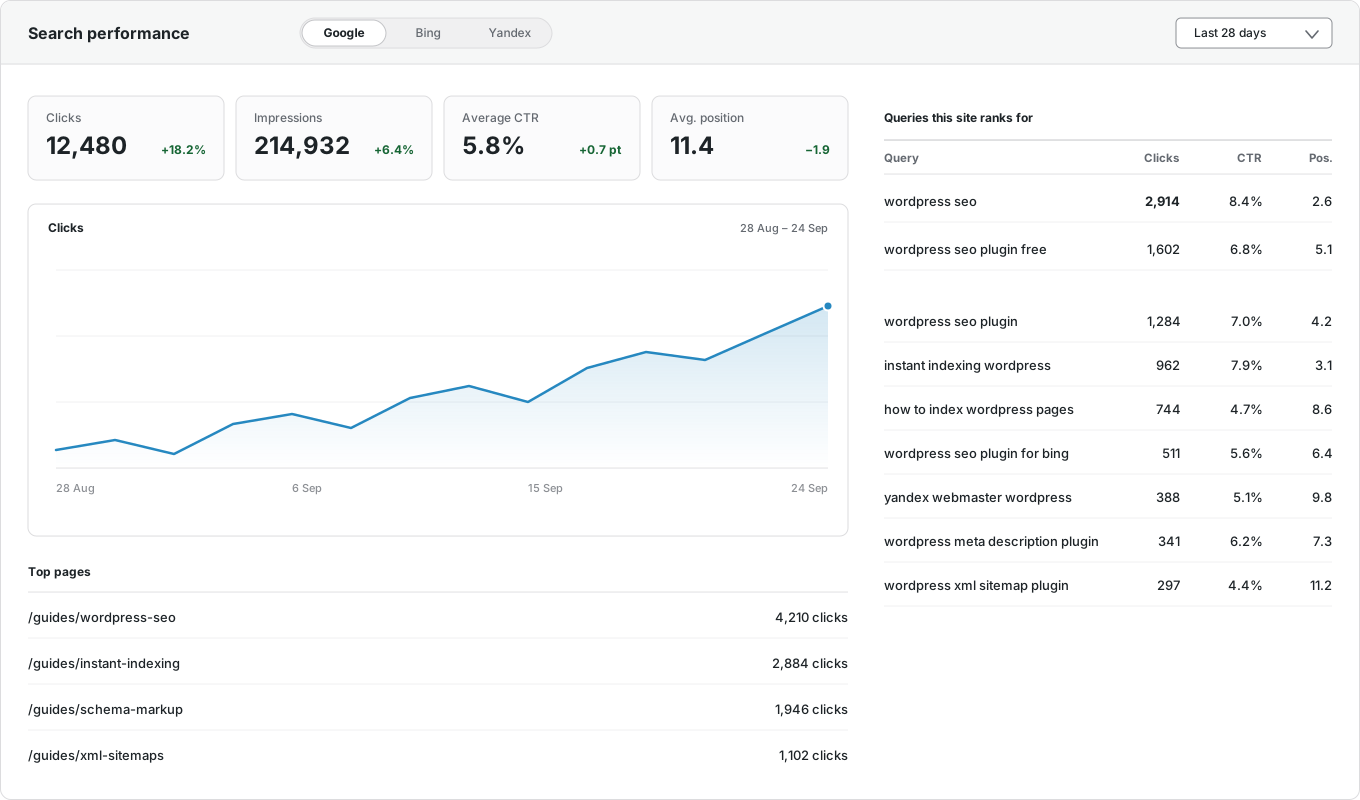
Slim SEO Pro brings Google Search Console into WordPress, with per-page performance and the keywords driving traffic, so this gap no longer exists. It doesn’t cover Bing or Yandex. CrawlWP reads all three and reports them together.
Google Search Console
Clicks, impressions, CTR, and average position, inside WordPress.
Bing Webmaster Tools
The same numbers from Microsoft Bing, on the same screen.
Yandex Webmaster
Clicks, impressions, ranking keywords, and positions from Yandex.
Per-post performance
Each post’s own numbers and top keywords, in the editor sidebar and the Insights tab.
Top pages and queries
Your best-performing URLs and the searches that bring visitors, with top countries and devices.
One screen for all three
Switch between engines without opening three separate tools.
And it comes to you
The SEO report your client will actually read
Daily, weekly, or monthly, to as many recipients as you like, in your own brand color. Slim SEO doesn’t send a scheduled report, which fits its philosophy but not an agency’s workflow.

Your schedule
Daily, weekly on a day you choose, or monthly.
Multiple recipients
Comma-separated addresses, so clients and colleagues get it without a WordPress login.
Search performance
Impressions, clicks, CTR, and average position, with the change from the previous period.
Indexing insights
Pages indexed on Google, pages likely indexed on Bing, and pages still not indexed.
Keywords and pages
The searches driving traffic and the URLs earning the clicks.
Recent movements
What was newly indexed and what was dropped since the last report.
Switching
Moving from Slim SEO takes minutes
Install CrawlWP alongside Slim SEO, import the titles, descriptions, canonicals, and robots settings it saved, spot-check a few posts, then deactivate it. Slim SEO is one of the six plugins our importer detects. The importer copies, not moves, so that you can roll back. The full migration guide walks through it step by step.
Questions
CrawlWP and Slim SEO questions
Answers to the questions people ask most when comparing the two.
Is CrawlWP a good Slim SEO alternative?
It depends on what you are looking for. If you want control over the pages where automatic output is wrong, a bulk editor, or anything to do with indexing, then yes. If you chose Slim SEO because you never want to open a settings screen, no alternative will suit you better.
Is CrawlWP bloated compared with Slim SEO?
It does more, so it is bigger. Our defaults are applied on activation too, and most posts need nothing from you, but Slim SEO is the lighter plugin, and we are not going to pretend otherwise.
Does Slim SEO do instant indexing?
No. It generates your meta tags and sitemap, but it does not submit pages to Google, Bing, or anything else. CrawlWP submits to six engines in the free version and then checks whether each page was indexed.
Does Slim SEO show Search Console data?
Yes, in Slim SEO Pro, with per-page performance and the keywords bringing you traffic. It does not cover Bing or Yandex, and it does not report index status.
Is CrawlWP cheaper than Slim SEO?
They start at the same price, $59 a year for one site. Slim SEO is better value across many sites at $179 for unlimited against our $259. We sell a lifetime license, and they no longer do, so the maths flips if you plan to keep the plugin for years.
Can I import from Slim SEO?
Yes. It is one of the six plugins the importer detects, alongside Yoast, Rank Math, All in One SEO, SEOPress and The SEO Framework.
Which should I choose?
If your site is small and you want it handled without thinking, Slim SEO. If you need to correct automatic output at scale, or want to know what actually got indexed and how it performs beyond Google, CrawlWP is for that.
Pricing
Straightforward pricing, every feature included
Every plan includes every feature. The difference is how many sites you can run it on, and there is a lifetime option.
Standard
For 1 Site
$59
/ year
Pro
For 5 Sites
$159
/ year
Agency
For Unlimited Sites
$259
/ year
Standard
For 1 Site
$359
once
Pro
For 5 Sites
$559
once
Agency
For Unlimited Sites
$759
once
Try the Slim SEO alternative alongside what you have
Install CrawlWP, import your Slim SEO data, and compare the two for a week before you deactivate anything. There is a 14-day money-back guarantee either way.
yoursite.com
https://yoursite.com › guides › wordpress-seo
A Practical Guide to WordPress SEO in 2026
Learn how to structure, optimize, and index a WordPress site so search engines find your content within hours rather than weeks.
Google · indexed
Bing · indexed
Yandex · indexed