
CrawlWP started as an indexing plugin. Version 3.1 makes it a full SEO plugin — meta titles, schema, redirects, sitemaps, and everything else you expect — while keeping the indexing work that made it different in the first place.
For the last few years, CrawlWP did two things well. It sent your pages to search engines the moment you published them, and it showed you how those pages performed. That solved a real problem. But it left you running a second plugin for everything else: your meta titles, your schema, your redirects.
That stops today. CrawlWP 3.1 does the whole job.
Table of Contents
Why we did this
The old setup had a gap in the middle of it.
Your SEO plugin wrote your meta tags and built your sitemap, then waited. CrawlWP submitted your pages and reported on them. Two plugins, two settings screens, and a fair amount of overlap — both wanted to handle your sitemap, and both had opinions about what search engines should see.
Worse, the two halves never talked to each other. Your SEO plugin did not know whether a page had been indexed. CrawlWP did not know whether a page was set to noindex. You were the one holding it together.
One plugin that does both removes that. Your robots rules, your sitemap and what gets submitted for indexing now come from the same place, so they cannot disagree.
What is new
On-page SEO
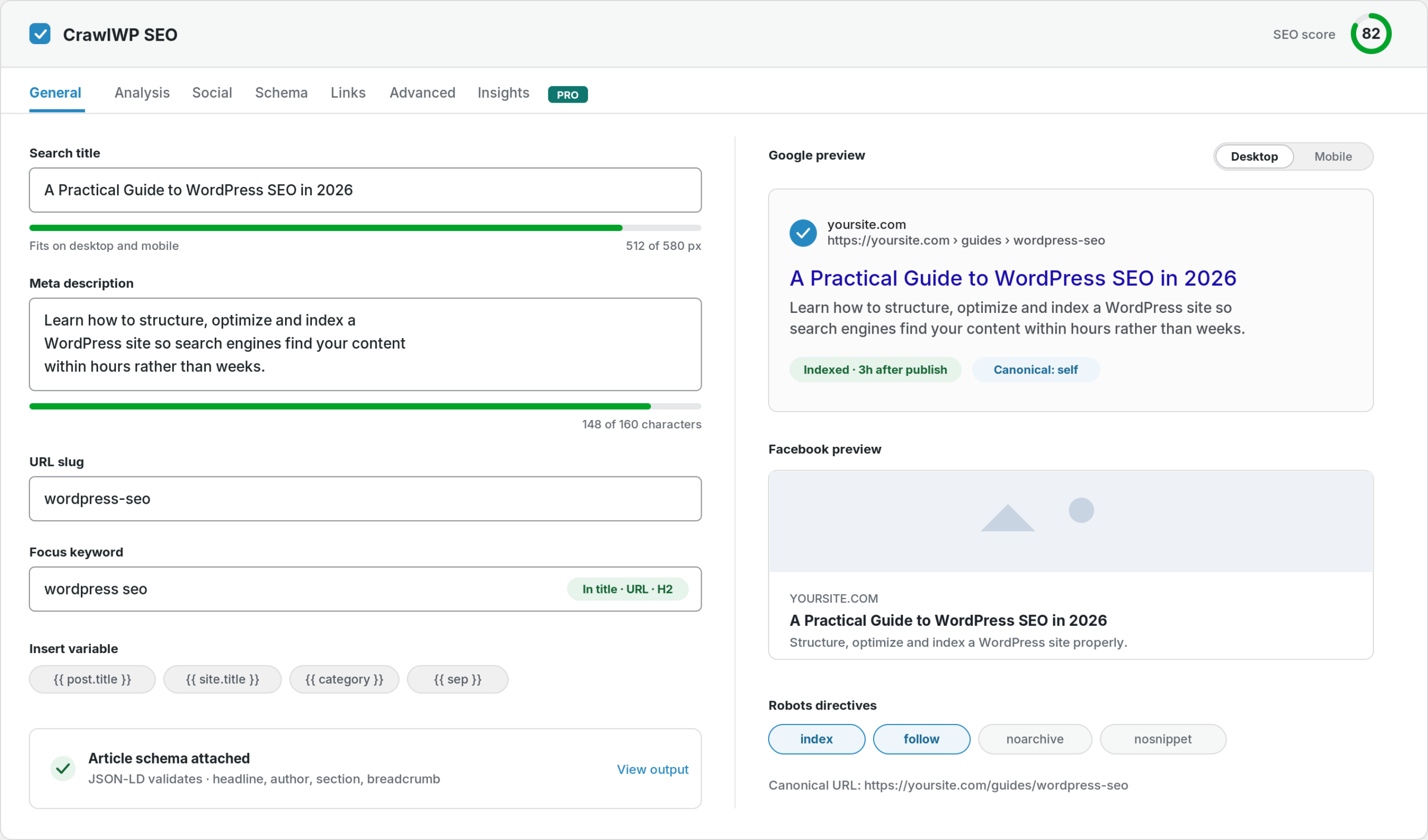
Meta title and description templates for your homepage, every post type, every taxonomy and the author, date, search and 404 archives. The SEO metabox sits under the post editor with a live Google preview, measured in pixels rather than characters, because that is how Google actually decides where to cut.
Structured data
A JSON-LD graph you configure rather than guess at: organisation or person, your logo, the sitelinks search box, your social profiles, article markup and breadcrumbs. LocalBusiness schema with your address and opening hours, for businesses that need it.
Technical SEO
A redirect manager with 301, 302 and 410 rules and regex matching. Automatic redirects when you change a post’s URL. A 404 monitor that logs every broken link with its hit count. A robots.txt editor pre-filled with what your site actually serves, including whatever other plugins add.
Files search engines want
The WordPress core sitemap, kept rather than replaced. On paid plans, Google News, video, HTML and multilingual sitemaps. And llms.txt, for the AI crawlers that now read your site as often as search crawlers do.
The small things that save hours
- A bulk editor for fixing a hundred titles from one table.
- Image alt text filled in automatically from the image title, without ever overwriting alt text you wrote.
- Content analysis that tells you where your keyword is missing instead of nagging you to repeat it.
- Internal link suggestions in the editor.
- AI help where it is useful: CrawlWP can write your SEO titles and meta descriptions using the AI connectors already in WordPress.
What has not changed
Everything CrawlWP was already good at.
Your pages still go to Google, Bing, Yandex, Naver, Yep and Seznam.cz the moment you publish, update or delete them. You still see which pages are actually in the index, with a 30-day history. You still get Google, Bing and Yandex performance data in one screen, on the posts list, in the editor and by email.
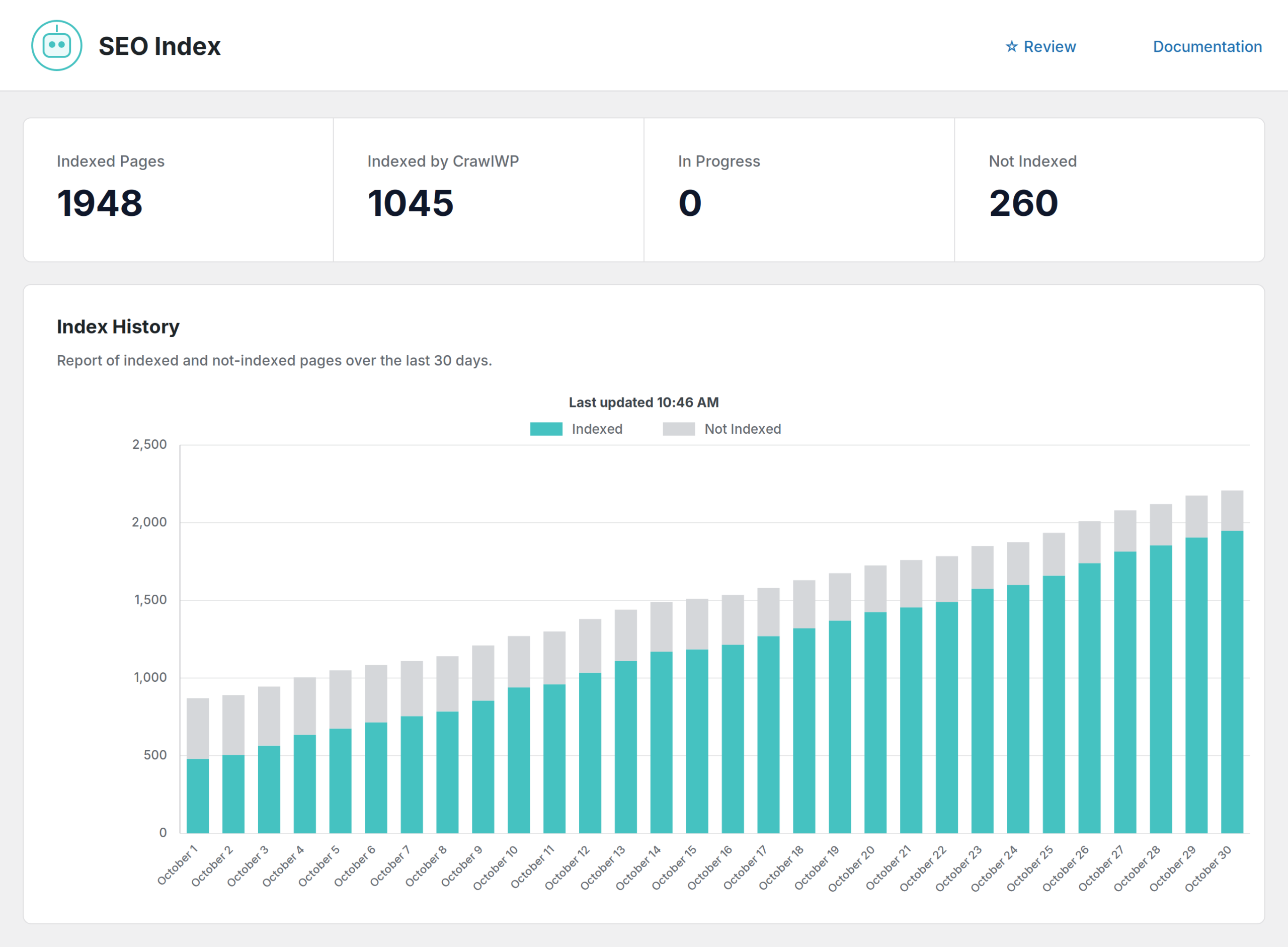
That is still the part no other WordPress SEO plugin does. Now you do not need a second plugin for the rest.
Moving from Yoast, Rank Math or another SEO plugin
This is the part we spent the most time on, because it is the part that stops people switching.
CrawlWP finds Yoast SEO, Rank Math, All in One SEO, SEOPress, The SEO Framework and Slim SEO — even if you deactivated them and never deleted the data. It shows how many posts, terms and redirects each one holds before you import anything.
Titles, meta descriptions, robots rules, canonical URLs, social images and redirects all come across. Your old plugin’s data is never deleted, so you can go back if you want to. Your URLs do not change, so to search engines your site looks exactly the same the morning after.
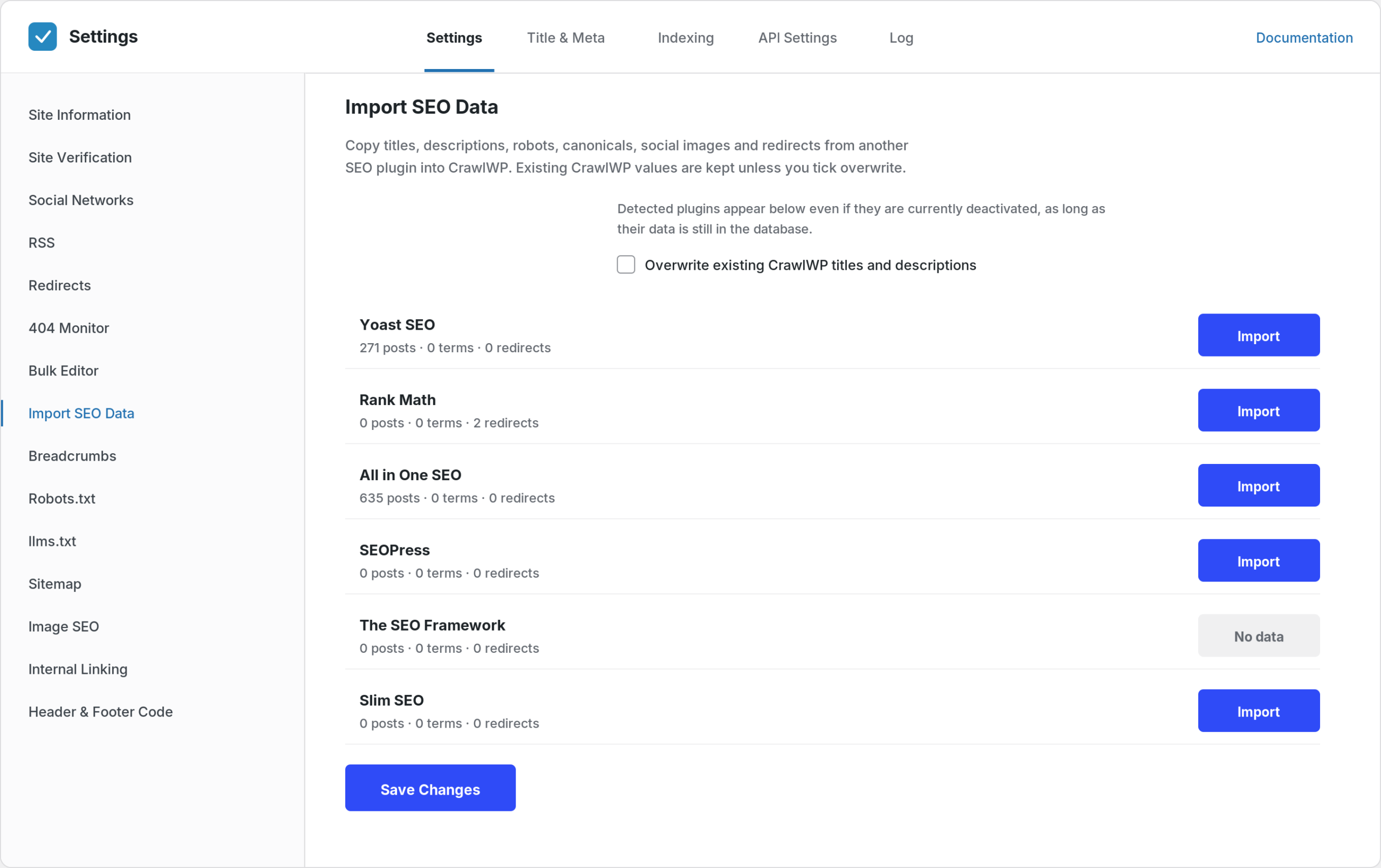
It takes about ten minutes. Then deactivate the old plugin — running two SEO plugins at once produces duplicate meta tags and competing sitemaps, which helps nobody.
What this costs
The free version is a complete SEO plugin. On-page SEO, schema, breadcrumbs, social cards, robots.txt, redirects, the 404 monitor, the bulk editor, sitemaps, llms.txt, the importer — and instant indexing on all six search engines. Not a trial. Not a crippled version.
CrawlWP Premium adds the part that shows whether any of it worked: Google, Bing and Yandex search data inside WordPress, index status and history, automatic and bulk indexing, email reports, the News, video, HTML and multilingual sitemaps, and internal link automation. From $59 a year, with a 14-day money-back guarantee. Every plan includes every feature — plans differ only in how many sites you can use them on.
Updating
If you already run CrawlWP, update as usual. Your indexing settings, API connections and history are untouched. The new features sit alongside them, switched off where they need a decision from you — CrawlWP will not start writing meta tags over the top of your existing SEO plugin.
When you are ready, run the importer, check a few posts, and deactivate the other plugin.