
Features
WordPress Sitemaps: News, Video, HTML, Multilingual and Custom URLs
A sitemap is a list of the pages on your site, made for search engines. WordPress already creates a basic XML sitemap, and CrawlWP keeps it instead of adding a second one. CrawlWP Premium then adds the five sitemaps WordPress does not provide: Google News, video, HTML, multilingual, and one for URLs that WordPress does not manage at all.
What it does
The sitemaps CrawlWP gives you
Keep the sitemap WordPress already makes, and add the ones it leaves out. Each sitemap helps search engines with a different kind of content.
On this page
WordPress XML sitemap
WordPress’s own sitemap stays in place, so nothing needs to be migrated and there are no duplicates. Free.
Open it in one click
Open your sitemap from the Sitemap screen to check that it loads.
Listed in robots.txt
Your sitemap addresses appear in robots.txt so that crawlers can find them.
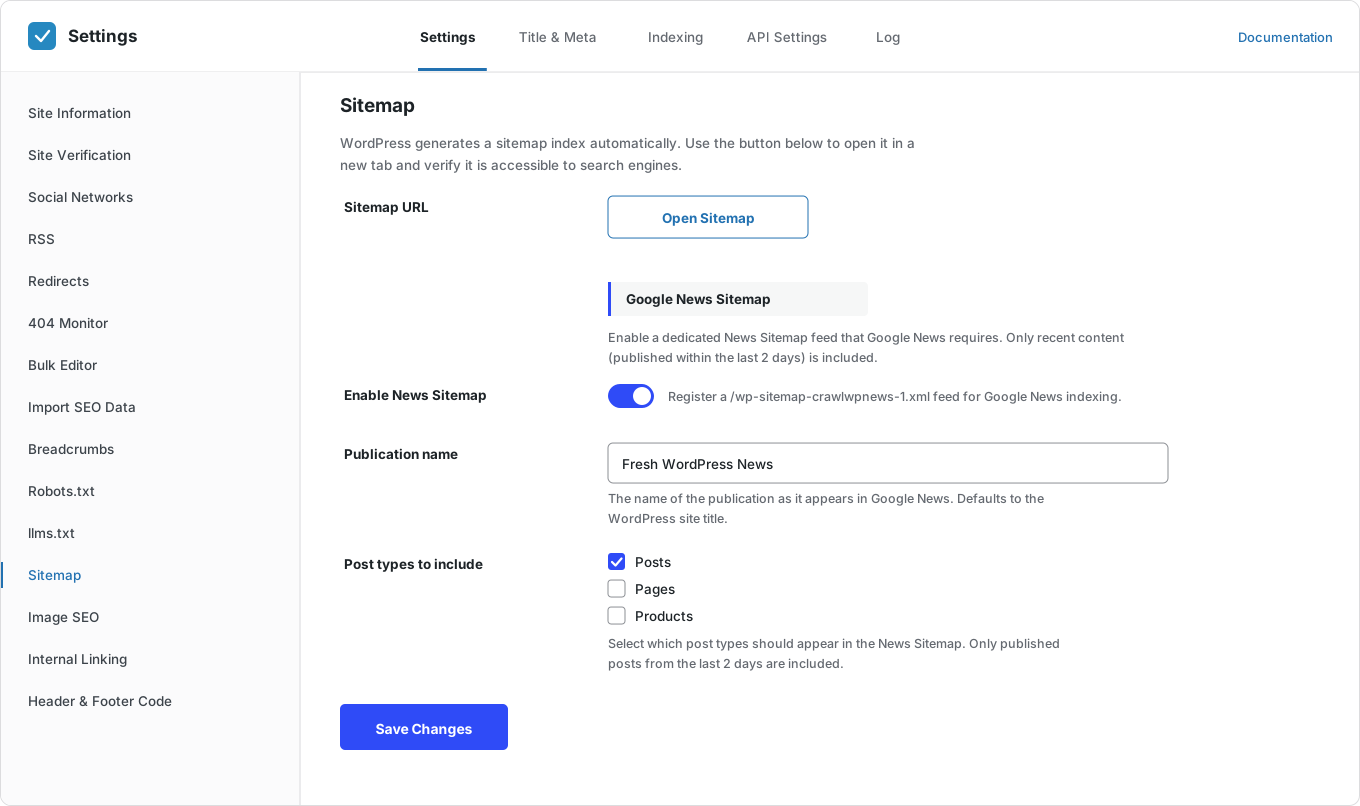
Google News sitemap
Your newest articles with your publication name, covering the last two days as Google’s rules ask.
Choose post types
Pick which WordPress post types go in the Google News sitemap.
Video sitemap
Helps Google find the videos in your posts and pages so that they can appear in video results.
HTML sitemap
A page that lists your content for visitors and search engines.
Multilingual sitemaps
Every language version of your site, through WPML, Polylang or TranslatePress, so that each translation can be found.
Custom URLs sitemap
Pages on your domain that WordPress does not manage: a static landing page, a sub-path served by another app, a custom checkout flow. One URL per line.
Use only what you need
Add only the sitemaps that fit your site. A blog without videos does not need a video sitemap.
Always up to date
Sitemaps change as you publish, so you never have to rebuild them.
Works with instant indexing
Sitemaps list every page. Instant indexing tells search engines about new pages straight away.
Why it matters
Why sitemaps matter
Search engines find pages by following links. A sitemap gives them a full list, so they don’t miss pages with few links pointing to them.
Some content needs its own sitemap. A news sitemap lists your freshest stories, a video sitemap describes your videos, and multilingual sitemaps point to each translation. And some pages are not in WordPress at all, so nothing would list them without being told.
How it works
Set up your sitemaps in three steps
Your WordPress sitemap already works. Add the others in a few minutes.
Step 1
Keep the WordPress sitemap
Open it from the Sitemap screen to check that it loads, then submit it in Google Search Console and Bing Webmaster Tools.
Step 2
Add the sitemaps you need
News for publishers, video for sites with videos, HTML for visitors, multilingual for translated sites, and custom URLs for anything outside WordPress.
Step 3
Let instant indexing do the rest
Sitemaps list your pages. Instant indexing tells search engines the moment a page is new or updated.
Which sitemaps you need
Which sitemaps does your site need?
Most sites only need one or two. Use this list to decide.
Questions
WordPress sitemap questions
Answers to the questions people ask most about WordPress sitemaps.
What is a sitemap?
A sitemap is a list of the pages on your site, made for search engines. It helps them find pages they might otherwise miss.
What is the difference between an XML sitemap and an HTML sitemap?
An XML sitemap is a file for search engines. An HTML sitemap is a normal page that lists your content for people and search engines to browse.
Does CrawlWP replace the WordPress sitemap?
No. WordPress already creates a sitemap, and CrawlWP works with it instead of adding a competing one. There is nothing to migrate and no duplicate to clean up.
Where is my WordPress sitemap?
At yoursite.com/wp-sitemap.xml. You can also open it from the Sitemap screen in CrawlWP.
Can I add pages that are not in WordPress?
Yes. The Additional Custom URLs field takes any URL on your domain, one per line: a static landing page, a sub-path served by another app, a custom checkout flow. Save at least one and CrawlWP publishes them as their own sitemap, linked from your sitemap index.
Where does the custom URLs sitemap live?
At yoursite.com/wp-sitemap-crawlwpcustom-1.xml, with further pages numbered after it. The link appears in the settings field once you save. Invalid and duplicate entries are skipped.
How do I submit my sitemap to Google?
In Google Search Console, open Sitemaps, enter wp-sitemap.xml, and click Submit. Do the same for any extra sitemaps you use.
Which sitemaps are included in the free version?
The WordPress XML sitemap, with a one-click way to open it. The Google News, video, HTML, multilingual, and custom URLs sitemaps are part of CrawlWP Premium.
Do I still need a sitemap if CrawlWP submits my pages?
Yes. Instant indexing tells search engines about a page now. A sitemap is the full list they come back to. They do different jobs.
Which translation plugins are supported?
WPML, Polylang and TranslatePress.
Pricing
Straightforward pricing, every feature included
Standard
For 1 Site
$59
/ year
Pro
For 5 Sites
$159
/ year
Agency
For Unlimited Sites
$259
/ year
Standard
For 1 Site
$359
once
Pro
For 5 Sites
$559
once
Agency
For Unlimited Sites
$759
once
The WordPress XML sitemap is free. The Google News, video, HTML, multilingual, and custom URLs sitemaps are in every Premium plan.
Every sitemap your site should have
Join thousands of website owners using CrawlWP for their WordPress SEO. Keep the sitemap WordPress gives you, and add the five it does not.
yoursite.com
https://yoursite.com › guides › wordpress-seo
A Practical Guide to WordPress SEO in 2026
Learn how to structure, optimize, and index a WordPress site so search engines find your content within hours rather than weeks.
Google · indexed
Bing · indexed
Yandex · indexed