
A focus keyword tells CrawlWP which search phrase you want a post or page in WordPress to target.
CrawlWP SEO plugin uses it to run keyword-related checks in the Analysis tab and help you spot areas where the content could be better optimized for SEO.
The focus keyword is for analyzing and optimizing your content in WordPress. It is not automatically added to your page as a special SEO tag or sent to search engines as a ranking instruction.
Choose a Useful Focus Keyword
Your focus keyword should describe the main topic of the page and match what you expect people to search for. For example, a gardening article about growing vegetables in containers might target grow tomatoes in pots.
- Choose one main phrase. Pick the search query that best represents the purpose of the WordPress post or page.
- Match the content. The keyword should describe a question or topic that the page actually answers.
- Use a realistic search phrase. Think about the words someone would naturally type into a search engine.
- Avoid targeting the same phrase repeatedly. Two pages built around exactly the same target can end up competing for the same search intent.
You do not need to force an exact-match phrase into every sentence. The goal is to make the page clearly relevant to the topic while keeping the writing natural.
Add a Focus Keyword in CrawlWP
To add a focus keyword in CrawlWP for your WordPress post or page, follow the steps below.
- Open the post or page in the WordPress editor.
- In the CrawlWP SEO box below the content, open the General tab. If you are on an older CrawlWP plugin version, open the Analysis tab.
When no keyword has been entered, CrawlWP displays the message Enter a focus keyword above to run the analysis.
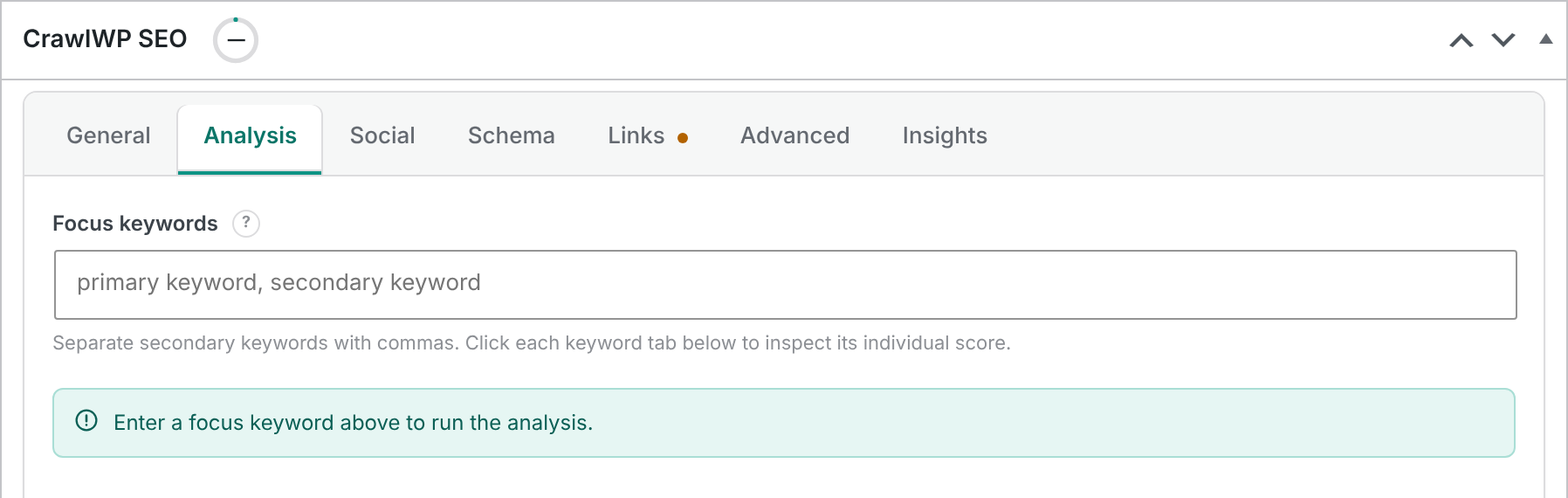
- In the Focus keywords field, enter your main search phrase or keyword for the article or post.
- Update or publish the post to save the keyword.
The keyword checks appear as soon as you enter the phrase. CrawlWP then uses the keyword while calculating the content analysis and SEO score. For more information, see Using the content analysis and SEO score.
Add Secondary Keywords
You can target related search phrases in addition to the primary keyword. Enter multiple phrases in the Focus keywords field and separate them with commas.
grow tomatoes in pots, container tomatoesThe first phrase is treated as the primary keyword. Every phrase after it is a secondary keyword.
CrawlWP does not impose a limit on the number of keywords you can enter, but keeping the list focused is usually more useful than adding many loosely related phrases. Two or three secondary keywords are often enough for a single article.
When multiple keywords are entered, CrawlWP creates a separate tab for each one. Each tab has its own analysis and score, allowing you to see which parts of the content support each keyword.
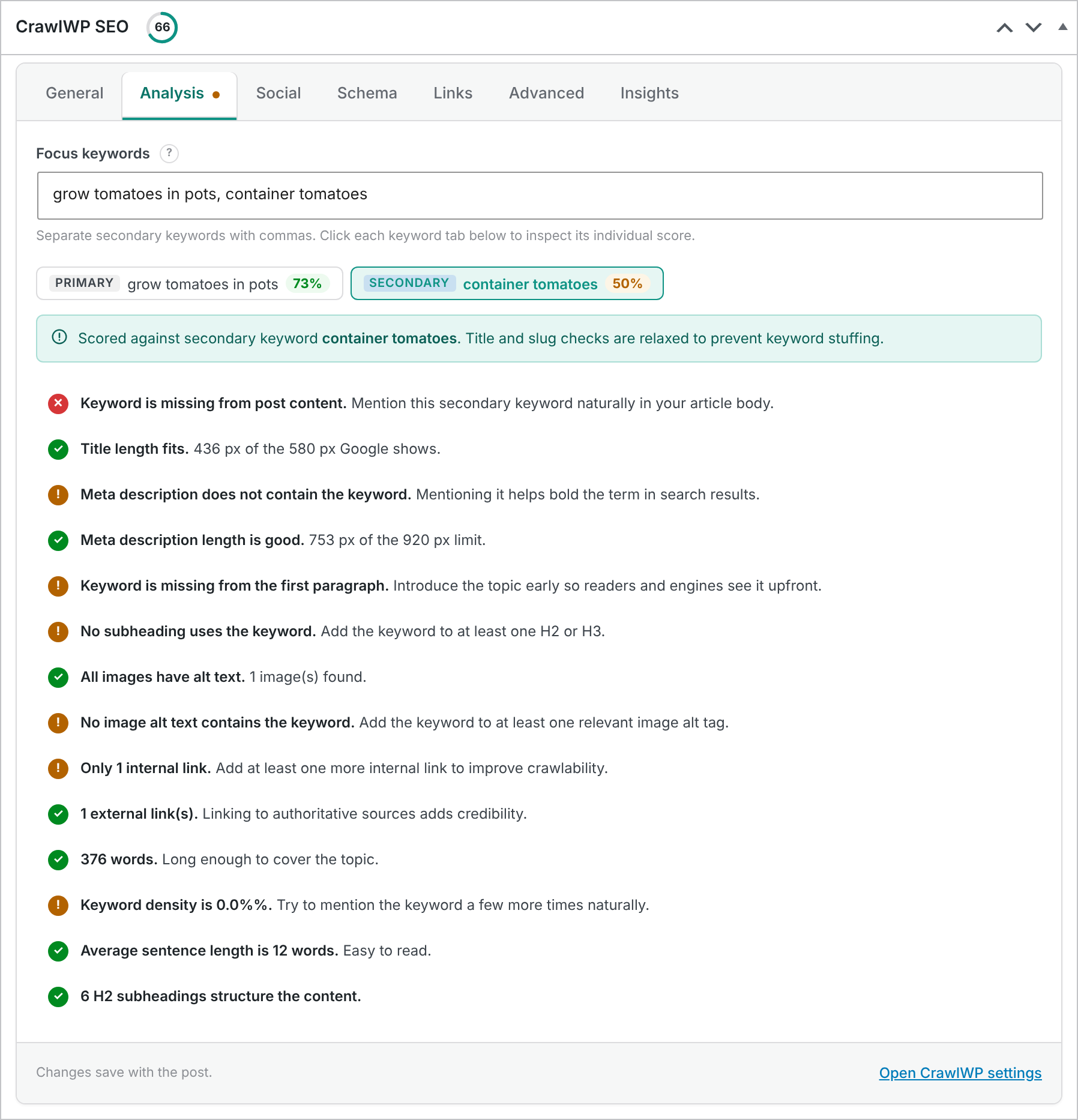
Secondary keywords are handled differently from the primary keyword. CrawlWP does not check them in every location where the primary keyword is checked.
- Secondary keywords are not checked in the SEO title or URL slug, so you are not encouraged to force every related phrase into those fields.
- CrawlWP checks whether the secondary phrase appears in the post content.
- If a secondary keyword does not appear in a subheading, CrawlWP treats this as a warning rather than a critical problem.
The overall SEO score gives the primary keyword a 70% weighting and the average score of the secondary keywords a 30% weighting.
How CrawlWP Matches Keywords
CrawlWP compares the characters in your keyword phrase without considering uppercase or lowercase letters. It can also match a shorter word when it appears inside a longer word. For example, tomato can match tomatoes.
The matching is not a general language or semantic match. Changes to the wording, word order, or word form may therefore produce a different result.
For example, if your focus keyword is grow tomatoes in pots:
- Grow Tomatoes in Pots matches because capitalization is ignored.
- Ten ways to grow tomatoes in pots matches because the exact phrase appears within the sentence.
- Growing tomatoes in pots does not match because the wording has changed.
- Grow tomatoes in containers does not match because
containersis different frompots. - Tomatoes grown in pots does not match because the word order and wording are different.
How the Keyword Is Matched in the URL Slug
CrawlWP treats spaces in a multi-word focus keyword as hyphens when checking the URL slug. For example, the keyword how to grow tomatoes in pots can match a slug such as how-to-grow-tomatoes-in-pots.
In the editor analysis, a slug where the words are run together, such as growtomatoesinpots, can also satisfy the check. The K signal shown in the posts list uses the slug’s normal hyphen-separated form when checking the keyword.
Do not rewrite a URL simply to make a keyword check turn green. A short, readable URL is generally preferable to a long slug containing every possible variation of the keyword.
Do Not Force Exact-Match Keywords Into Your Writing
CrawlWP’s analysis is a guide, not a requirement to make every check green. An exact keyword can sound unnatural when inserted into a sentence, heading, or paragraph simply for the sake of passing a check.
Write for the reader first. When the exact phrase fits naturally, use it. When it makes the sentence awkward, a warning in the analysis can be acceptable.
Avoid Duplicate Focus Keywords
CrawlWP can warn you when a keyword is already being used on another piece of published content. After you change the Focus keywords field, CrawlWP checks the entered phrases against keywords assigned to your other published posts, pages, and other content.
If the same phrase is already assigned as a primary or secondary keyword elsewhere, a warning appears below the field. When the other content can be edited, the warning includes a link to it.
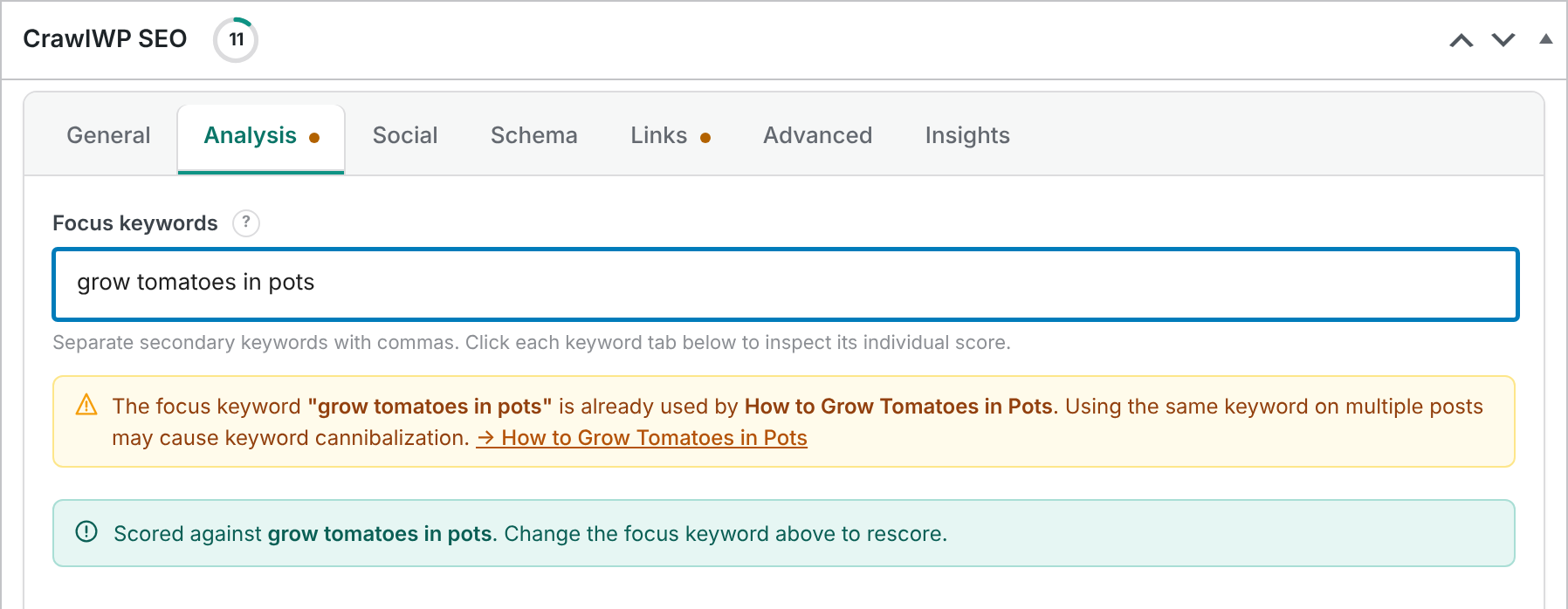
The duplicate check runs after you change the field, not when the editor loads the post. It does not prevent you from saving the keyword. The warning helps you decide whether the two pieces of content should target different phrases or cover the same search intent.
A duplicate warning does not automatically mean something is wrong. Two pages can legitimately mention the same topic. The warning is most useful when both pages are deliberately targeting the exact same search phrase.
Where CrawlWP Uses the Focus Keyword
The focus keyword affects more than the checklist in the Analysis tab. CrawlWP uses it in several parts of the plugin:
- The content analysis and SEO score use the keyword to run their keyword checks.
- The K indicator in the posts list SEO column reflects the keyword analysis.
- The primary keyword influences Suggested links on the Links tab, where CrawlWP finds related published posts of the same type.
When there is no focus keyword, the Suggested links feature falls back to other signals: first the same category, then the same tag, and finally recent posts.
The Focus Keyword Is Not Automatically Published
Your focus keyword is an internal optimization setting. CrawlWP does not output it as a special tag on the page or send it to search engines simply because you assigned it to a post.
There is one exception: you can deliberately insert the primary keyword into an SEO title or description by using the {{ post.focus_keyword }} template variable. That variable returns the primary keyword, not the secondary keywords.
The focus keyword is also provided to your configured AI provider when you use CrawlWP’s AI buttons.
Import Focus Keywords From Another SEO Plugin
If you are moving to CrawlWP from another WordPress SEO plugin, you may not need to enter all of your focus keywords manually. CrawlWP can import focus keyword data from several popular SEO plugins.
- Yoast SEO: the main focus keyphrase is imported.
- Rank Math: the primary keyword and secondary keywords are imported.
- All in One SEO: the main focus keyphrase is imported.
- SEOPress: the primary and secondary keywords are imported.
- Slim SEO: it does not provide focus keyword data to import.
- The SEO Framework: it does not provide focus keyword data to import.
For Yoast SEO and All in One SEO, related or additional keyphrases are not imported. See What gets imported and what doesn’t for the complete migration details.
A Practical Keyword Workflow
A simple workflow is to choose the main search phrase before or while writing the article, add it as the primary focus keyword, and then review the analysis for obvious optimization opportunities.
Next, add a small number of closely related secondary phrases when they represent genuine subtopics covered by the article. Review each keyword tab rather than trying to satisfy every warning at once.
Finally, read the article as a visitor would. If making a keyword check green makes the title, heading, URL, or body copy awkward, prioritize clarity and usefulness instead.
Troubleshooting Focus Keywords
No keyword checklist appears
Make sure the Focus keywords field contains a keyword and that you are viewing the Analysis tab in the CrawlWP SEO box.
The keyword is split into the wrong number of tabs
CrawlWP uses commas to separate keywords. If a comma is part of the search phrase you intended to analyze, remove it or adjust the phrase so CrawlWP does not interpret it as a separator.
The duplicate keyword warning does not appear
The duplicate check compares your keywords with published content. Draft content is not included. The check also runs after you change the field, not just when you first open the post.
The focus keyword is not being retained
After entering the keyword, update or publish the post. The keyword needs to be saved with the post before it will remain available the next time you edit it.
A keyword check stays orange
Review what the specific check is asking for, but do not change the content solely to achieve a perfect score. Some exact-match recommendations may not fit naturally into well-written content. Use the analysis to identify useful improvements rather than treating every warning as mandatory.
A well-chosen focus keyword gives CrawlWP the context it needs to evaluate your content.
Keep the primary phrase closely aligned with the page’s main topic, use secondary keywords only when they add genuine coverage, and use the analysis as a guide for improving the article rather than a reason to over-optimize it.