
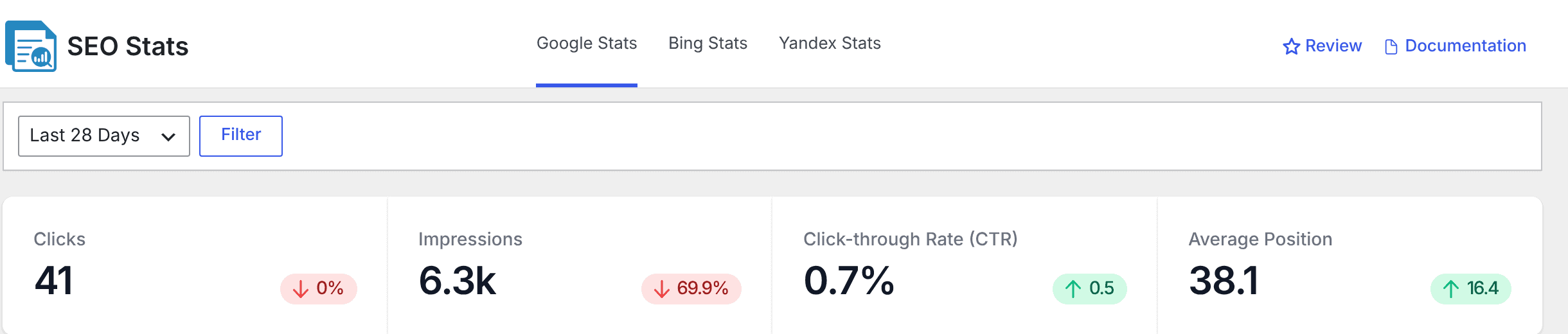
It is normal for CrawlWP and Google Search Console to show different click, impression, CTR, and position figures. CrawlWP does not calculate these metrics itself; the Google Stats tab displays data returned by Google’s Search Console API.
The useful question is not whether the numbers match exactly, but whether CrawlWP and Search Console are using the same property, dates, search type, and level of data. The following checks help you make an apples-to-apples comparison.
1. Compare the exact same dates
Date ranges are the most common source of a difference. CrawlWP and Search Console do not define their preset ranges in exactly the same way.
- CrawlWP’s ranges end yesterday. For example, Last 28 Days covers the 28 days ending yesterday.
- Search Console’s ranges end on its latest available day. That is often two or three days earlier, so its Last 28 days can cover a different period.
- The day boundary is different. CrawlWP determines “yesterday” using UTC, while Search Console counts days using Pacific Time.
The safest comparison uses explicit dates. Select Custom in CrawlWP and enter the same start and end dates shown by Search Console. Then use Custom in Search Console and select that identical range.
2. Remember that recent Search Console data can change
Google’s most recent Search Console data is preliminary. Google can continue adding or adjusting data for several days. CrawlWP includes those recent days too, so a number you record today may be different when you check again later.
This means that even after matching the date range, the latest days may not remain identical from one check to the next.
3. CrawlWP may be showing a cached API response
CrawlWP stores responses from Search Console for 12 hours so the SEO Stats page can load without requesting fresh data every time. There is no refresh button for forcing a new Google response.
As a result, Search Console may already contain newer data while CrawlWP is still displaying the response it previously saved. Once the 12-hour cache expires, CrawlWP can pick up the newer figures.
4. Make sure both are using the same Search Console property
A single website can have several Search Console properties, and they do not necessarily cover the same URLs.
- A Domain property such as
example.comcovers the site’shttpandhttpsversions,wwwand non-wwwversions, and its subdomains. - A URL prefix property such as
https://www.example.com/only covers URLs beginning with that exact prefix.
Because a Domain property can include more of the site, it can show higher totals than a URL prefix property.
When you connect or save the Google API settings, CrawlWP looks for a matching Domain property or URL prefix property and uses the first match it finds. CrawlWP does not show you which property it selected. When the totals differ substantially, compare CrawlWP with each relevant property in Search Console to identify the one that matches.
5. Set Search Console to Web search
CrawlWP displays Google Web search data. Search Console’s Performance report can also expose Image, Video, and News search data, in addition to separate Discover and Google News reports.
For a direct comparison, choose Search type: Web in Search Console. Otherwise, you may be comparing CrawlWP’s web-search figures with a broader or different Search Console view.
Why the totals can be higher than the tables
The totals displayed at the top of the Google Stats page are not expected to equal the sum of every row in the tables below them. CrawlWP requests a limited number of rows, and Google also withholds some queries.
- Rare search queries are omitted. Google hides queries made by very few users for privacy reasons. Their clicks still contribute to the totals even though the queries are not shown in the keyword table.
- CrawlWP requests the top 200 rows. The top-page, keyword, and country tables can therefore contain fewer rows than Search Console’s own tables, which can show up to 1,000 rows. Data below CrawlWP’s top 200 still contributes to the totals.
- Page filtering changes how results are counted. When you filter by page, Google reports data at page level. A search result that led to two of your pages can therefore appear once for each page in page-level reporting, while the site-level total counts it once. Search Console behaves the same way.
For details on the tables and why they may not add up to the totals, see Top keywords, pages, countries and devices (reference).
Small differences can simply be rounding
CrawlWP abbreviates large numbers, such as displaying 6,312 as 6.3k, and rounds CTR and position values. Search Console has its own display rounding. A small difference in the displayed last digit is therefore not necessarily a data problem.
Bing and Yandex can differ for the same reasons
The Bing Stats and Yandex Stats tabs obtain their data from Bing Webmaster Tools and Yandex Webmaster. Differences there can also result from date ranges, recent data changing, and stored responses.
CrawlWP keeps Bing’s figures for up to 24 hours, so a newly updated figure in Bing Webmaster Tools may take some time to appear in CrawlWP.
Troubleshooting specific mismatches
CrawlWP shows 0, but Search Console has data. Start by checking that the Google API connection is working and that the service account has access to the site in Search Console. Then open CrawlWP > Settings > Log and look for google-webmaster errors. See Reading the SEO Stats dashboard.
The difference remains huge even after matching the dates. Check the Search Console property. Because CrawlWP chooses a matching property automatically and does not display the property it selected, compare the figures with each relevant property in Search Console.
Search Console changed, but CrawlWP did not. CrawlWP may still be showing a response saved within its 12-hour cache. There is no manual refresh button, so allow that cache period to expire before comparing again.
Google Analytics also shows different numbers. That is expected. Analytics measures visits to your website when its tracking code runs, including traffic from sources other than Google Search. Search Console measures clicks from Google search results, so the two systems are tracking different things.
The fairest way to compare CrawlWP with Search Console
Use the same Search Console property, select Web search, enter identical start and end dates, and remember that the newest Search Console data may still be changing. Then account for CrawlWP’s 12-hour cache before treating a difference as an error.
Once those conditions match, most apparent discrepancies have a straightforward explanation. CrawlWP is reporting Google’s Search Console data through the API; it is not independently calculating the clicks, impressions, CTR, or position figures.