
Polylang gives you separate language versions of your WordPress posts, pages, and taxonomy terms.
CrawlWP works with those translations individually, so each language version can have its own SEO settings, while CrawlWP Premium can also add the translated URLs to your XML sitemaps.
This makes the setup fairly simple: Polylang handles the language relationships and page-level hreflang tags, while CrawlWP handles the SEO fields and, in Premium, multilingual sitemap output.
How CrawlWP sees Polylang translations
Polylang stores each translation as its own WordPress post, page, or taxonomy term. CrawlWP therefore treats an English post and its French translation as two separate pieces of content for SEO purposes.
- Each translation has its own CrawlWP SEO box.
- SEO titles, meta descriptions, focus keywords, social settings, and schema can be different for each language.
- Content analysis evaluates a translation against the focus keyword entered for that translation.
- The page’s
og:localeand schema language follow the language of the page being viewed.
You do not need a special CrawlWP switch for Polylang. CrawlWP Premium detects Polylang automatically in your WordPress website.
Confirm that CrawlWP detected Polylang
The detection message is useful because it also confirms that CrawlWP can enable its multilingual sitemap handling.
- Go to CrawlWP > Settings.
- Make sure the Settings tab at the top is selected, then click Sitemap in the left-hand menu.
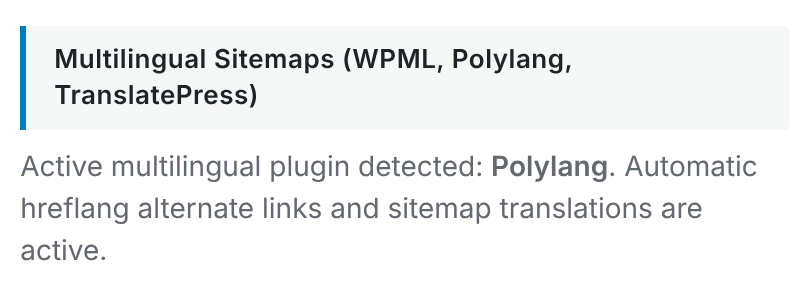
- Scroll to Multilingual Sitemaps (WPML, Polylang, TranslatePress).
When Polylang is detected, the section should report: “Active multilingual plugin detected: Polylang.”
Give each language its own SEO settings
Because each translation is treated as its own WordPress object, you can write SEO information specifically for the language of that page instead of forcing the same title or description across every translation.
- Open the post or page in one language and fill in its CrawlWP SEO box.
- Open the translated version using the language links in the posts list or the Languages box in the editor.
- Enter the SEO title, meta description, focus keyword, social settings, and other values for that translation.
CrawlWP does not copy SEO fields from one language to another. If a translation has no custom SEO values, CrawlWP falls back to the templates configured under Title & Meta.
The templates under CrawlWP > Settings > Title & Meta are shared across languages, but variables such as {{ post.title }} and {{ post.auto_description }} use the data from the translation being viewed. This lets one template adapt to different languages without hard-coding text in one language.
See Title and meta description template variables for the available variables.
How Polylang and CrawlWP divide the multilingual work
There are two related but separate jobs. Polylang knows which posts belong together as translations and adds the language relationships to the page. CrawlWP uses those relationships when building multilingual sitemaps.
| Task | Handled by |
|---|---|
| Store translations and their relationships | Polylang |
Page-level hreflang tags in <head> | Polylang |
| Per-language CrawlWP SEO values | CrawlWP |
| Multilingual XML sitemap links | CrawlWP Premium |
This is why you should not try to replace Polylang’s page-level hreflang output with another set generated by CrawlWP. The two systems serve different parts of the multilingual setup.
What CrawlWP Premium adds to the sitemaps
With CrawlWP Premium, translated posts and terms are included in the WordPress XML sitemap, and each translated address can contain xhtml:link entries for its language versions.
- Translated posts and terms are included rather than limiting the sitemap to the default language.
- Each relevant sitemap entry can list the other language versions of the same content.
- A language version lists itself as well as its translated versions.
For example, a sitemap entry can contain:
<url>
  <loc>https://example.com/how-to-grow-tomatoes-in-pots/</loc>
  <xhtml:link rel="alternate" hreflang="en" href="https://example.com/how-to-grow-tomatoes-in-pots/"/>
  <xhtml:link rel="alternate" hreflang="fr" href="https://example.com/fr/cultiver-tomates-en-pot/"/>
</url>
A page with no French translation does not get a French hreflang line. CrawlWP uses the translation relationships provided by Polylang when building this part of the sitemap.
Language codes need special attention
Polylang’s language codes are used in the WordPress sitemap, while the hreflang values Polylang generates in the page source can use locale information in some situations. Most sites will never notice a problem, but sites using regional variants should check both outputs.
For example, if a site has both en-GB and en-US, the language values in the sitemap and the page source may not look identical. The same applies if you use a non-standard language code.
When you use multiple variants of the same language, inspect the actual values in both the sitemap and page source instead of assuming that the two systems format them in the same way.
Do translated XML sitemaps need separate submission?
Polylang can create a sitemap index for each language, such as /fr/wp-sitemap.xml. With CrawlWP Premium, these language-specific copies list the multilingual URLs as well.
For Google Search Console, submit the main sitemap index at https://your-site.com/wp-sitemap.xml. You do not need to submit a separate sitemap for every language.
See Submitting your sitemap to Google Search Console for the submission process.
Google News also includes the different languages
If you use the Google News sitemap in CrawlWP Premium, articles can be listed for each language with the corresponding language value. See Setting up the Google News sitemap.
The page’s hreflang tags come from Polylang
Polylang adds the hreflang tags to the page <head>. CrawlWP does not add another set there, so keep Polylang’s hreflang functionality enabled.
This also creates an important difference between the page source and the sitemap. Polylang leaves unpublished translations out of its page-level hreflang tags, while CrawlWP’s sitemap integration can include translation URLs supplied by Polylang even when those translations have not been published yet.
For a clean multilingual setup, publish a translation before relying on it as an alternate URL. If a translation is not ready, remove the translation relationship in Polylang until the URL is ready to use.
What happens to noindexed translations?
CrawlWP’s sitemap output follows its normal sitemap rules, so content excluded from the sitemap is not given sitemap hreflang links. At the same time, CrawlWP does not independently validate every translation’s indexability before using the translation relationships returned by Polylang.
If a translated page is noindexed or otherwise not ready for search engines, check its Polylang relationship and its own CrawlWP SEO settings rather than assuming that every language URL is automatically in the same state.
Check Both Sides When Debugging Multilingual SEO
- Open a translated page and view its source. Search for
hreflangand review the URLs added by Polylang. - Open the corresponding XML sitemap and use View Page Source if the browser hides the XML details.
- Compare the language codes and URLs in both places.
- Check especially for unpublished translations, regional language variants, or URLs that are noindexed.
Hreflang can be present in the page source, the sitemap, or both. The useful check is whether the two sources describe the same translation relationships.
Troubleshooting Polylang and CrawlWP
Polylang is active, but CrawlWP does not report it. Confirm that Polylang is active. If WPML or TranslatePress is also active, deactivate the multilingual plugin you do not use. CrawlWP checks for Polylang first and supports one multilingual plugin at a time.
A translated post is missing from the sitemap. Check that the translation is linked to the original in Polylang, that the content is eligible for the sitemap, and that it is not excluded by its indexing settings.
The sitemap contains a URL such as /fr/?p=74. This can happen when the translation relationship exists before you publish the translated page. Publish the translation, or remove the relationship in Polylang until the translated URL is ready.
The page has hreflang tags, but the sitemap does not match them. Compare the translation relationships in Polylang with the sitemap generated by CrawlWP. Pay particular attention to unpublished translations and regional language codes.
The same page has duplicate hreflang tags. CrawlWP does not add page-level hreflang for Polylang. Look for another SEO plugin or custom code that is generating an additional set alongside Polylang.
The search result appears in the wrong language. First check the page’s hreflang tags, because those are generated by Polylang. Then check that the translated page has its own SEO title and meta description in the correct language.
A good setup for Polylang sites
- Use Polylang to manage translations and page-level hreflang.
- Give each translation its own CrawlWP SEO title, meta description, focus keyword, and other page-level SEO values where needed.
- Use CrawlWP Premium’s multilingual sitemap support when you want translated URLs and sitemap hreflang links.
- Check both the page source and sitemap when troubleshooting language relationships.
With this setup, Polylang remains responsible for understanding which pages are translations of one another, while CrawlWP gives each translation its own SEO configuration and extends that multilingual information into the sitemap.