
CrawlWP can automatically fill in missing image alt text in WordPress, giving images a fallback when no alternative text is provided. The feature is included in the free version.
Automatic alt text is a fallback, not a replacement for writing useful descriptions yourself. For important images, the most accurate option is to enter the Alternative Text manually.
Why alt text matters
Alt text describes an image for people using screen readers and gives search engines text that helps them understand an image. It can also be shown when an image fails to load.
Good alt text describes what matters in the image rather than simply repeating its filename. CrawlWP’s automatic value is useful when no better description has been supplied.
Turn automatic alt text on or off
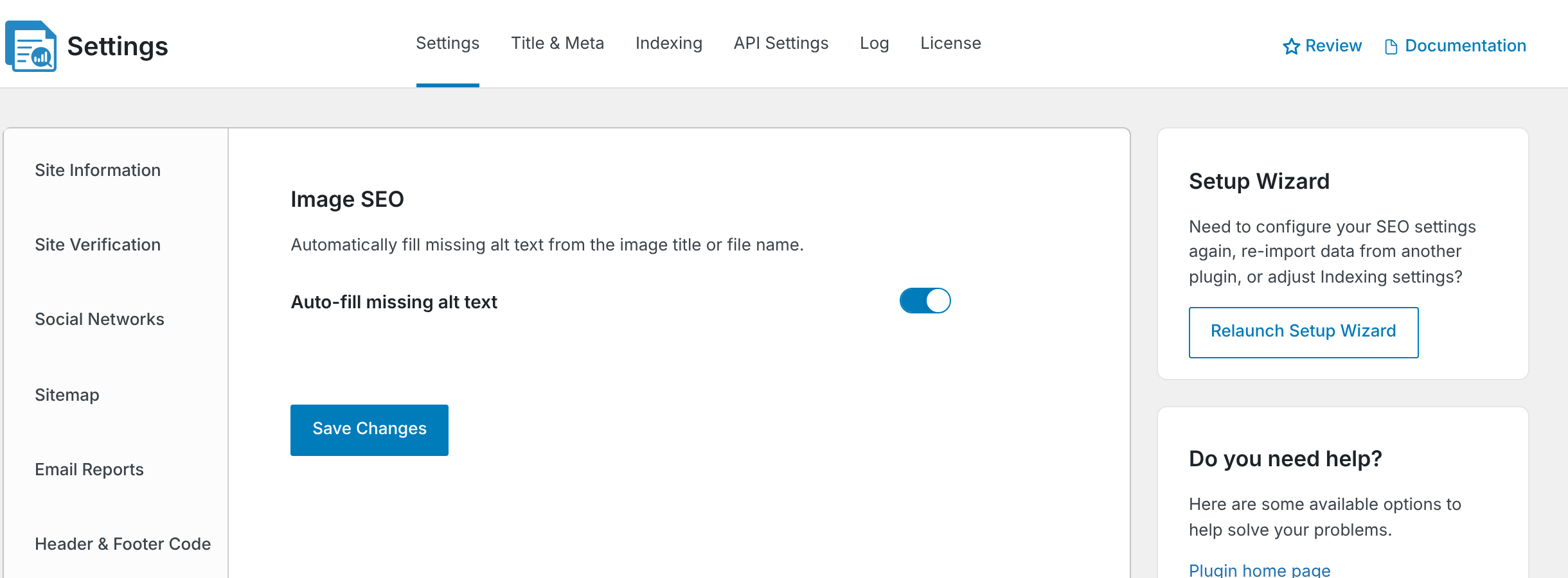
To enable or disable automatic alt text generation for WordPress through CrawlWP, follow the steps below.
- Go to CrawlWP > Settings.
- Make sure the Settings tab is selected, then click Image SEO in the left-hand menu.
- Switch Auto-fill missing alt text on or off. It is on by default.
- Click Save Changes.
How CrawlWP fills missing alt text
When an image is uploaded
When you upload an image in WordPress without alt text, CrawlWP saves the image’s Title as its alt text. You can view and change it in the Media Library.
When WordPress outputs an image
When a page is displayed, CrawlWP also fills empty alt text for images that WordPress outputs through its image functions. This includes featured images, classic galleries, and many theme images. The fallback is applied while the WordPress page loads and is not saved, so it can also cover images uploaded before CrawlWP was installed.
Images inside your content
CrawlWP does not fill empty alt text for images inside post content, such as Image and Gallery blocks. Their alt text is stored with the post, so add it in the block’s settings.
Where the automatic text comes from
CrawlWP uses the image’s Title from the Media Library. WordPress usually creates that title from the filename when you upload the image.
| File name | Possible alt text |
|---|---|
red-rose-garden.jpg | red-rose-garden |
IMG_4021.jpg | IMG_4021 |
If the title is empty or looks like a random code, CrawlWP uses the filename instead, converting hyphens and underscores to spaces and capitalizing the words. WordPress may also use a title stored in the image metadata, such as information written by a camera or editing application, instead of the filename.
Improve the fallback value
- Use a meaningful filename before uploading the image, such as
red-roses-in-a-garden-border.jpg. - For important images, write the Alternative Text yourself in the Media Library. Changing the Title later does not change alt text that has already been saved.
Be careful with decorative images
Some images are decorative and should have empty alt text so screen readers can skip them. CrawlWP can fill those empty values when the images are displayed through WordPress’s image functions.
If intentionally empty alt text is important on your site, switch Auto-fill missing alt text off and manage the values yourself. Turning the setting off does not remove alt text that CrawlWP already saved when images were uploaded. Clear the saved Alternative Text in the Media Library for those images.
Check image alt text in your posts
The content analysis in each WordPress post’s CrawlWP SEO box checks the images in the post content for alt text. Use it to find images that still need a description. See what each SEO score check means.
Troubleshoot missing alt text
An image in my post still has no alt text. Images inserted into post content keep the alt text they had when inserted. Select the image block and enter Alternative text in its settings.
The alt text is a filename such as IMG_4021. CrawlWP used the image’s title, which was likely based on the filename. Update the Alternative Text or Title in the Media Library. For important images, write the alternative text yourself.
I changed the Media Library title, but the post still has the old alt text. Alt text already saved with the post is not replaced when you change the media item’s title. Edit the image block’s Alternative text field.
I turned off automatic alt text, but an image still has alt text. Disabling the setting does not remove text CrawlWP previously saved during an upload. Clear the saved Alternative Text in the Media Library when needed.
Use automatic alt text as a fallback
CrawlWP’s automatic alt text for WordPress can fill obvious gaps, especially for images added outside post content. For the best accessibility and image descriptions, review important images and add accurate Alternative Text yourself.