
CrawlWP SEO plugin can add a short piece of text before or after every post in your WordPress site’s RSS feed. This is useful when you want syndicated copies of your content to retain a link to the original post and your site. The feature is included in the free version.
You can use the default attribution, replace it with your own wording, or add information such as the author’s name. The text is inserted into both the full post and the summary version of the feed.
Why add attribution to an RSS feed?
RSS feeds make it easy for other sites and tools to republish your posts in WordPress automatically. When the feed includes a link to the original article, those copies can retain a clear connection to your site.
A link back to the original post can also make it easier for readers to find the source of the content. It is not a guarantee that a copied page will be treated as the original by search engines, but it gives the published content a direct attribution link.
What CrawlWP adds by default
CrawlWP has a default footer enabled for RSS feeds. It appears after each post and looks like this:
The post *How to Grow Tomatoes in Pots* appeared first on *Example Site*.The post title links to the original post, while the site name links to your site’s home page.
Customize the WordPress RSS content
To add content that is displayed before and after every post in the RSS feed, follow the steps below.
- Go to CrawlWP > Settings.
- Make sure the Settings tab is selected, then click RSS in the left-hand menu.
- Edit Content to put before each post in the feed or Content to put after each post in the feed.
- Click Save Changes.
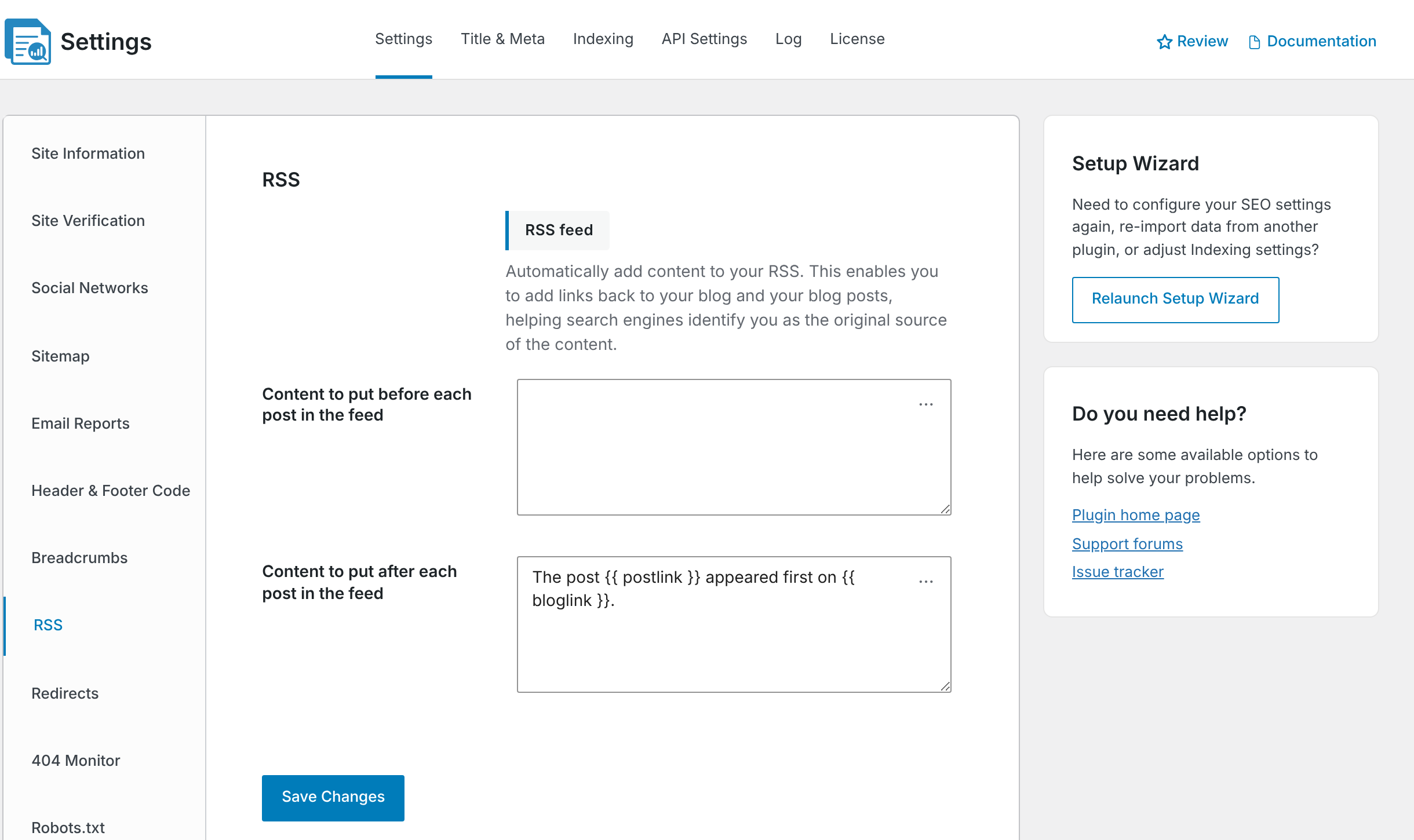
You can click the … button in either field to insert one of the available variables.
| Variable | What it inserts |
|---|---|
{{ postlink }} | The post title linked to the original post |
{{ bloglink }} | Your site name linked to the home page |
{{ blogdesclink }} | Your site name and tagline linked to the home page |
{{ authorlink }} | The author’s name linked to the author’s archive |
For example, you could use:
{{ postlink }} was written by {{ authorlink }} for {{ bloglink }}.CrawlWP adds each configured field as its own paragraph before or after the WordPress post content. The text is included in both the full-content and summary versions of the RSS feed.
Use the variables instead of formatting the text with HTML
HTML formatting is removed when you save the RSS content. For links to the post, site, or author, use the variables supplied by CrawlWP rather than adding your own HTML tags.
This keeps the attribution simple while still giving readers clickable links to the original content and your site.
Remove the RSS footer
To stop adding a footer after each post in the RSS feed, delete everything from Content to put after each post in the feed and click Save Changes.
You can use the same approach for Content to put before each post in the feed if you no longer want any text inserted before your posts.
Check the live feed
After saving your settings, open https://your-site.com/feed/ and inspect one of the posts. Look before or after the post content for the text you configured.
RSS feeds can be cached by feed readers, browsers, caching plugins, or other services, so a change may not appear immediately. Check the live feed again after clearing any relevant cache.
Troubleshoot missing or unexpected RSS content
My text does not appear in the feed. Confirm that the text was saved under the correct RSS setting. Then clear your page cache and any cache specifically used for feeds. Open the feed directly in your browser to check what is actually being served.
The links or formatting are different from what I entered. CrawlWP removes HTML when the RSS content is saved. Use {{ postlink }}, {{ bloglink }}, {{ blogdesclink }}, and {{ authorlink }} for the links provided by CrawlWP.
The footer appears twice. Another plugin or your theme may also be adding attribution to the RSS feed. Check for another RSS footer or content-injection feature and keep the attribution in only one place.
The old footer is still visible. Clear the feed and page caches and then open the feed directly. If a feed reader has cached the previous version, it may continue showing the older content until it refreshes.
Choose wording that helps identify the source
A useful RSS attribution should make the original source obvious without adding unnecessary text. The default CrawlWP footer already links the post title to the original article and the site name to the home page, while the available variables let you include the author when that is useful.
For most sites, a short attribution after the post is enough. Keep the wording consistent across your feed so syndicated copies retain a clear link back to where the content was originally published.