
This article is a developer reference for the WordPress filters and actions provided by CrawlWP. It explains what each hook receives, what it can change, and includes practical examples. Hooks marked Premium only run when CrawlWP Premium is active.
Before You Start
- Put your code in your child theme’s
functions.phpfile or use a code snippets plugin. Do not modify CrawlWP’s plugin files because updates can overwrite your changes. - Three hooks are read as soon as CrawlWP loads, before your theme and most code snippets plugins:
crawlwp_seo_features_is_enabled,crawlwp/post_types, andcrawlwp/taxonomies. Put code for these hooks in a must-use plugin, such as a PHP file insidewp-content/mu-plugins/. - CrawlWP uses two hook naming styles. Most hooks begin with
crawlwp_, while the indexing hooks begin withcrawlwp/. Enter the hook name exactly as documented. - Except for the indexing hooks and
crawlwp_site_verification_scope, these hooks only run when CrawlWP’s SEO features are enabled. See My meta title isn’t showing in Google. - CrawlWP also uses hooks internally for its settings screens. Those hooks are not included in this reference.
Titles, Descriptions and Canonical URLs
These filters run on the front end once per page, after CrawlWP has determined the value from the post’s CrawlWP SEO box or the template configured under Title & Meta. Template variables such as {{ post.title }} have already been resolved by this point.
| Filter | Arguments | What It Changes |
|---|---|---|
crawlwp_meta_title | $title, $entity_key, $context | The SEO title. |
crawlwp_meta_description | $description, $entity_key, $context | The meta description. |
crawlwp_canonical_url | $canonical, $entity_key, $context | The canonical URL. Returning an empty string prevents CrawlWP from printing one, after which WordPress prints its own canonical URL on single posts and pages. |
crawlwp_title_separator | $separator | The character used for {{ sep }}. |
The $entity_key value tells you what type of page is being rendered:
| Entity Key | Page |
|---|---|
home | The home page. |
pt_post, pt_page, pt_product and so on | A single post, page, or other post type, using pt_ followed by the post type name. This also covers its archive. |
tax_category, tax_post_tag and so on | A category, tag, or other taxonomy archive, using tax_ followed by the taxonomy name. |
author | An author archive. |
date | A date archive. |
search | Search results. |
not_found | The 404 page. |
$context is an array. Depending on the page being rendered, it can contain post (a WP_Post), post_type (a WP_Post_Type), term (a WP_Term), user (a WP_User), or posts_page (the page configured as your posts page).
For example, you can add the current year to the title of every post in the Reviews category:
add_filter( 'crawlwp_meta_title', function ( $title, $entity_key, $context ) {
    if ( 'pt_post' === $entity_key && ! empty( $context['post'] ) && has_category( 'reviews', $context['post'] ) ) {
        $title .= ' (' . gmdate( 'Y' ) . ')';
    }

    return $title;
}, 10, 3 );
Because CrawlWP has already replaced template variables before these filters run, any variable you add inside these filters is output literally. To create your own template variable, use the variable filters described next.
Template Variables
| Filter | Arguments | What It Does |
|---|---|---|
crawlwp_resolve_title_variable | $value, $token, $context | Provides a value for a template variable that CrawlWP does not know. $value is empty. $token is the variable name without braces, in lowercase, such as custom.reading_time. |
crawlwp_title_meta_variables | $definitions | Controls the variables shown in the Insert variable menus on the Title & Meta tab. The definitions are grouped, with each group containing a label and a variables array mapping variable names to descriptions. |
crawlwp_variable_resolved | $value, $token, $context | Runs for every variable after CrawlWP has resolved its value. |
crawlwp_template_resolved | $output, $template, $context | Runs after all variables have been replaced in the title or description, but before extra separators and spaces are cleaned up. |
Variable names can contain letters, numbers, and underscores, with parts separated by dots. Use your own prefix, such as custom.. Names beginning with post., term., author., post_type., or product. are handled by CrawlWP and do not reach crawlwp_resolve_title_variable.
For example, you can create a {{ custom.reading_time }} variable that displays an estimated reading time:
add_filter( 'crawlwp_resolve_title_variable', function ( $value, $token, $context ) {
    if ( 'custom.reading_time' === $token && ! empty( $context['post'] ) ) {
        $words = str_word_count( wp_strip_all_tags( $context['post']->post_content ) );
        return max( 1, (int) ceil( $words / 200 ) ) . ' min read';
    }

    return $value;
}, 10, 3 );

add_filter( 'crawlwp_title_meta_variables', function ( $definitions ) {
    $definitions['post']['variables']['custom.reading_time'] = 'Reading time';
    return $definitions;
} );
The second filter adds the variable to the Post group in the Insert variable menus on the Title & Meta tab. Add custom variables to one of CrawlWP’s existing groups, such as post, term, author, or general. The menus only display CrawlWP’s own groups, so a new group created by your code will not appear there.
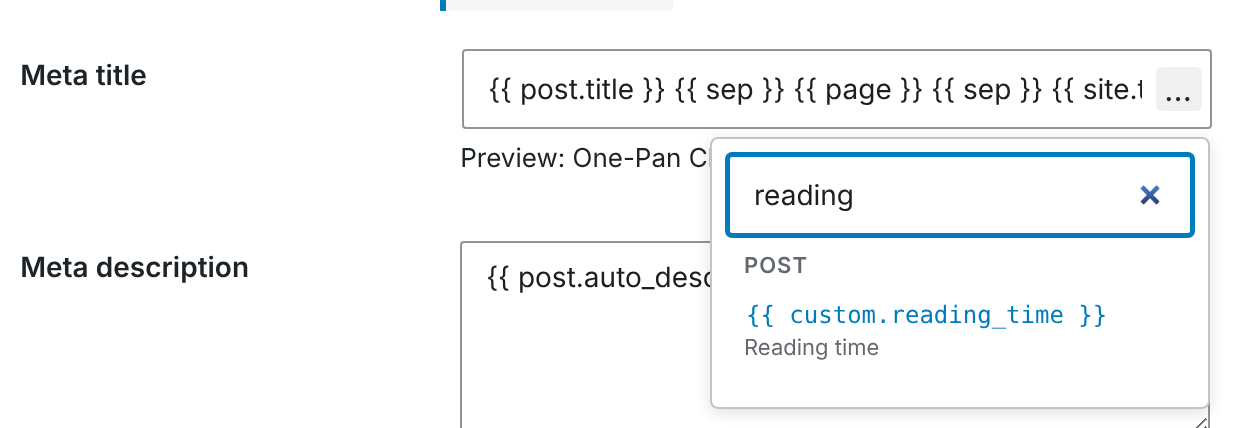
You can then select or type {{ custom.reading_time }} in a template. You can also type it directly into a post’s SEO title. The CrawlWP SEO box does not list the custom variable, and its preview shows the variable as blank, but the value is still displayed on the page. See Title and meta description template variables (reference).
AI generation
These filters change how the AI buttons in the CrawlWP SEO box work. See Generating SEO titles and descriptions with AI.
| Filter | Arguments | What it changes |
|---|---|---|
crawlwp_ai_generate_seo | $text, $field, $context | Return text to use instead of asking the connected provider. Empty by default. $field is title, description, og_title, og_description, x_title or x_description |
crawlwp_ai_system_instruction | $system, $field, $language | The instructions sent to the provider |
crawlwp_ai_prompt | $prompt, $field, $context | The prompt with the post’s title, keyword, and content |
crawlwp_ai_generated_text | $text, $field, $context | The text after CrawlWP has cleaned it, before it goes into the field |
crawlwp_ai_content | $content, $post_id | The cleaned post content sent to the provider |
crawlwp_ai_max_content_chars | $max, $post_id | How many characters of content are sent. Default 8000 |
crawlwp_ai_content_head_ratio | $ratio, $post_id, $max | The share of long content taken from the start, between 0.1 and 1. Default 0.7 |
crawlwp_ai_language | $language, $post_id, $locale | The language the text must be written in, such as English (United Kingdom) |
crawlwp_ai_rate_limit | $limit | How many AI requests each user can make per window. Default 20. 0 removes the limit |
crawlwp_ai_rate_limit_window | $seconds | The length of the window. Default 300 |
Robots Directives
crawlwp_robots_directives receives $directives and $entity_key. The $directives value is a list of strings such as index, follow, noarchive, or max-snippet:-1. WordPress uses the resulting list in the page’s robots meta tag.
For example, this keeps posts tagged internal out of search results:
add_filter( 'crawlwp_robots_directives', function ( $directives, $entity_key ) {
    if ( 'pt_post' === $entity_key && is_singular() && has_tag( 'internal' ) ) {
        $directives   = array_values( array_diff( $directives, [ 'index' ] ) );
        $directives[] = 'noindex';
    }

    return $directives;
}, 10, 2 );
When a page is set to noindex, CrawlWP omits that page’s own WebPage or Article schema node. Setting noindex through this filter has the same effect. Site-wide schema nodes are still printed.
Open Graph and X (Twitter) Tags
| Filter | Arguments | What It Changes |
|---|---|---|
crawlwp_open_graph_tags | $og_tags, $data | The Open Graph tags as an array of property names to content, such as 'og:title' => 'My post'. When the content is an array, CrawlWP prints one tag for each value. |
crawlwp_twitter_card_tags | $twitter_tags, $data | The X (Twitter) tags as an array of names to content, such as 'twitter:card' => 'summary_large_image'. |
Remove an array key to stop that tag from being printed. Add a key to add a tag. Empty values are not printed.
The $data array contains values CrawlWP has determined for the page, including title, description, canonical, robots, og_title, og_description, og_image, x_title, x_description, x_image, og_type, entity, and post.
For example, you can remove og:updated_time and add a reading-time label for X:
add_filter( 'crawlwp_open_graph_tags', function ( $tags ) {
    unset( $tags['og:updated_time'] );
    return $tags;
} );

add_filter( 'crawlwp_twitter_card_tags', function ( $tags ) {
    $tags['twitter:label1'] = 'Reading time';
    $tags['twitter:data1']  = '4 minutes';
    return $tags;
} );
To disable all of CrawlWP’s Open Graph or X tags, use the settings under Social Networks instead.
Schema
CrawlWP outputs its schema as a single JSON-LD @graph.
| Filter | Arguments | What It Changes |
|---|---|---|
crawlwp_schema_data | $schema, $post | The schema node for the content being displayed, such as WebPage or Article. $post is the WP_Post, or null on archives and other pages that are not a single post. |
crawlwp_site_graph | $graph | The site-wide nodes: WebSite, your Organization or Person, and BreadcrumbList. They are contained in $graph['@graph']. |
crawlwp_schema_graph | $nodes | Every schema node immediately before output. Return an empty array to output no schema. |
For example, you can add post tags as keywords to the schema of single posts:
add_filter( 'crawlwp_schema_data', function ( $schema, $post ) {
    if ( $post instanceof WP_Post ) {
        $tags = wp_get_post_tags( $post->ID, [ 'fields' => 'names' ] );

        if ( $tags ) {
            $schema['keywords'] = implode( ', ', $tags );
        }
    }

    return $schema;
}, 10, 2 );
You can also disable all of CrawlWP’s schema output:
add_filter( 'crawlwp_schema_graph', '__return_empty_array' );See How CrawlWP generates schema markup.
hreflang
crawlwp_hreflang_links receives $links, which is empty by default, and $data. Return either an array mapping language codes to URLs, such as [ 'en-GB' => 'https://example.com/', 'x-default' => 'https://example.com/' ], or a list of arrays containing hreflang and href keys. CrawlWP prints one hreflang tag for each entry. See How hreflang alternate links are generated.
Breadcrumbs
| Filter | Arguments | What It Does |
|---|---|---|
crawlwp_breadcrumbs_enabled | $enabled | Controls whether breadcrumbs are enabled. |
crawlwp_breadcrumbs_args | $args | Controls the settings used to build the trail: separator, taxonomy, display_current, label_home, label_search, and label_404. |
crawlwp_breadcrumbs_links | $links | The links in the trail, as an array of url and text values. The current page is not included in this list. |
crawlwp_breadcrumbs_post_taxonomy | $taxonomy, $post | The taxonomy used to determine the term shown in the breadcrumb trail for a single post. |
crawlwp_breadcrumbs_html | $output, $links, $args | The final breadcrumb HTML. |
For example, use the Topics taxonomy instead of categories in the breadcrumb trail for posts:
add_filter( 'crawlwp_breadcrumbs_post_taxonomy', function ( $taxonomy, $post ) {
    return 'post' === $post->post_type ? 'topic' : $taxonomy;
}, 10, 2 );
See Setting up breadcrumbs, including adding them to your theme.
Sitemaps
| Filter | Arguments | What It Does |
|---|---|---|
crawlwp_news_sitemap_query_args | $args | The WP_Query arguments used to find posts for the Google News sitemap (Premium). |
crawlwp_news_sitemap_entry | $entry, $post, $entries | Controls one Google News sitemap entry containing loc, title, and publication_date. Return false to exclude the post (Premium). |
crawlwp_news_sitemap_language | $language | The language code used in the News sitemap when no multilingual plugin is active (Premium). |
crawlwp_custom_sitemap_urls | $urls | The list of URLs in the custom URLs sitemap (Premium). |
crawlwp_custom_sitemap_entry | $entry, $url | Controls one custom URLs sitemap entry containing loc and, when available, lastmod. Return false to exclude it (Premium). |
crawlwp_video_sitemap_entries | $entries | The entries included in the video sitemap, each containing loc and video (Premium). |
crawlwp_html_sitemap_post_types | $post_types | The default post types used by the HTML sitemap shortcode, as a comma-separated string. The default is page,post (Premium). |
crawlwp_html_sitemap_query | $args, $atts | The get_posts() arguments used for each post type in the HTML sitemap (Premium). |
For example, you can add a custom URL to the custom URLs sitemap from code:
add_filter( 'crawlwp_custom_sitemap_urls', function ( $urls ) {
    $urls[] = 'https://example.com/landing/spring-sale/';
    return $urls;
} );
This filter only runs when at least one URL has been saved in the Custom URLs setting.
robots.txt
crawlwp_robots_txt receives $content, which is the robots.txt content saved in CrawlWP, and $public. The $public value is false when Discourage search engines from indexing this site is enabled.
The filter runs after the Robots.txt section has been saved with Enable robots.txt editing enabled. Return an empty string to use WordPress’s own robots.txt output.
add_filter( 'crawlwp_robots_txt', function ( $content ) {
    return $content . "\nUser-agent: ExampleBot\nDisallow: /";
} );
See Editing robots.txt.
Redirects and the 404 Monitor
| Hook | Type | Arguments | What It Does |
|---|---|---|---|
crawlwp_auto_redirect_permalink_change | Filter | $should_create, $old_url, $new_url, $post_id | Return false to stop CrawlWP from creating a redirect when a post’s URL changes. |
crawlwp_redirect_before_insert | Filter | $data | The values of a new redirect before they are saved. |
crawlwp_redirect_before_update | Filter | $data, $id | The values of an existing redirect before an update is saved. |
crawlwp_redirect_allowed_hosts | Filter | $hosts | Other domains, such as shop.example.com, that redirects are allowed to point to. Empty by default. |
crawlwp_allow_external_redirects | Filter | $allowed, $post_id | Controls whether the current user can save a redirect to another site from a post’s CrawlWP SEO box. By default, users who can manage options are allowed. |
crawlwp_redirect_gone_title | Filter | $title, $type, $redirect | The page title displayed for a 410 or 451 rule on the Redirects screen. |
crawlwp_redirect_gone_message | Filter | $message, $type, $redirect | The message displayed for a 410 or 451 rule on the Redirects screen. |
crawlwp_410_title, crawlwp_451_title | Filter | $title, $post_id | The page title when a post’s CrawlWP SEO box sets a 410 or 451 response. |
crawlwp_410_message, crawlwp_451_message | Filter | $message, $post_id | The message when a post’s CrawlWP SEO box sets a 410 or 451 response. |
crawlwp_404_retention_days | Filter | $days | How many days 404 log entries are retained. The default is the configured retention setting, which is 30 days unless changed. Set to 0 to keep entries forever. |
crawlwp_404_max_rows | Filter | $max_rows | The maximum number of 404 log entries retained. The default is 10000. Set to 0 for no limit. |
crawlwp_redirect_rule_auto_disabled | Action | $id, $reason, $pattern | Runs when CrawlWP automatically disables a redirect rule that cannot work, such as one containing an invalid regular expression. |
For example, you can prevent CrawlWP from creating automatic redirects when pages change their URLs:
add_filter( 'crawlwp_auto_redirect_permalink_change', function ( $create, $old_url, $new_url, $post_id ) {
    return 'page' === get_post_type( $post_id ) ? false : $create;
}, 10, 4 );
Site Verification
crawlwp_site_verification_scope controls where the verification tags configured under Site Verification are printed. By default, the value is front_page, which prints the tags on the front page and the posts page only.
Return site_wide to print the verification tags on every page:
add_filter( 'crawlwp_site_verification_scope', function () {
    return 'site_wide';
} );
RSS Feed
| Filter | Arguments | What It Changes |
|---|---|---|
crawlwp_rss_content_before | $before, $post | The content added before each RSS feed item, after variables have been replaced. |
crawlwp_rss_content_after | $after, $post | The content added after each RSS feed item. |
CrawlWP removes HTML from the RSS settings when they are saved. These filters can add HTML afterward, such as a link. See RSS footer and content attribution.
Indexing
These hooks are provided by CrawlWP’s indexing features in the free version.
| Hook | Type | Arguments | When It Runs |
|---|---|---|---|
crawlwp/post_added | Action | $post_id, $post | After a post is published and CrawlWP is about to submit it. |
crawlwp/post_updated | Action | $post_id, $post | After a published post is updated and CrawlWP is about to submit it. |
crawlwp/post_deleted | Action | $post_id, $permalink | After a published post is deleted, moved to the bin, or unpublished. |
crawlwp/term_updated | Action | $term_id, $taxonomy | After a term is added or edited. |
crawlwp/comment_updated | Action | $post_id, $comment | After a comment is added or approved. |
crawlwp/index_pinged | Action | $type, $id | After CrawlWP has attempted to submit a post or term. $type is post or taxonomy. |
crawlwp/host | Filter | $host | The host name sent to IndexNow. The default is your site’s host. |
crawlwp/taxonomies | Filter | $taxonomies | The taxonomies whose terms IndexNow submits when term submission is enabled under Indexing. This hook must be added through a must-use plugin. |
CrawlWP’s IndexNow, Google, Bing, and Yandex submissions listen for crawlwp/post_added and crawlwp/post_updated. This means your own code can trigger a submission by firing one of these actions:
$post_id = 123;
do_action( 'crawlwp/post_updated', $post_id, get_post( $post_id ) );
This sends the post to every enabled engine, regardless of its post type, status, or ping delay setting, unless the engine has been paused after an error. Only fire the action for published posts.
The result is shown in the Log tab. CrawlWP Premium uses the same action for automatic indexing.
There is also a crawlwp/post_types filter that is read when CrawlWP loads. At the moment, it does not control which posts are submitted when they are saved. Select the post types to submit from the General tab under Indexing instead.
The CrawlWP SEO Box and Score
| Filter | Arguments | What It Changes |
|---|---|---|
crawlwp_seo_meta_box_context | $context | Where the CrawlWP SEO box appears on the edit screen. The default is normal. Use side or advanced. |
crawlwp_seo_meta_box_priority | $priority | The box priority. The default is high, or default for WooCommerce products. |
crawlwp_post_seo_score | $score, $post_id | The 0–100 score shown in the posts list when a post has no score saved from the editor. It is not used for noindex posts. |
Switching the SEO Features On or Off
crawlwp_seo_features_is_enabled receives true or false. It overrides the switch on the SEO Features tab and must be added through a must-use plugin.
For example, this disables CrawlWP’s SEO features on a staging site so that only indexing continues to run. Save the code as wp-content/mu-plugins/crawlwp-staging.php:
<?php
add_filter( 'crawlwp_seo_features_is_enabled', function ( $enabled ) {
    return 'staging' === wp_get_environment_type() ? false : $enabled;
} );
WooCommerce
| Filter | Arguments | What It Does |
|---|---|---|
crawlwp_woocommerce_schema_enabled | $enabled | Return false to keep WooCommerce’s own product schema and prevent CrawlWP from replacing it. |
crawlwp_woocommerce_noindex_account_pages | $noindex | Return false to prevent CrawlWP from setting the cart, checkout, and account pages to noindex. |
Premium Features
| Filter | Arguments | What It Changes |
|---|---|---|
crawlwp_google_sc_site_url | $site_url | The Search Console property used for SEO Stats and index status, such as sc-domain:example.com or https://www.example.com/. Useful when CrawlWP has selected the wrong property. |
crawlwp_search_console_request_row_limit | $row_limit, $args, $is_previous_period, $generator | The number of rows requested in each Search Console statistics request on SEO Stats, in email reports, and on the Insights tab. The default is 200 and the maximum is 1000. |
crawlwp_yandex_stats_request_row_limit | $row_limit | The number of rows requested by Yandex statistics. The default is capped at 5000. |
crawlwp_email_report_record_limit | $limit, $builder | The number of rows displayed in each table in the email report. The default is 10. |
crawlwp_email_report_cta_text | $text, $builder | The button text used in the email report. The default is “View Complete Analysis”. |
crawlwp_autolink_max_per_keyword | $max | The maximum number of times automatic internal linking can link a particular keyword in one post. The default is 3. |
crawlwp_autolink_max_per_post | $max | The maximum number of automatic links added to one post. The default is 0, meaning no limit. |
crawlwp_autoindex_inspection_interval | $interval | How long CrawlWP waits before checking a page’s index status again, expressed as a MySQL interval. The default is 72 HOUR. |
crawlwp_autoindex_days_before_index_resubmit | $days | How many days CrawlWP waits before resubmitting a page that is still not indexed. The default is 7. |
crawlwp_autoindex_cron_check_page_number | $number | The batch size for index status checks. The default is 500, and each run processes up to two batches. |
crawlwp_autoindex_cron_submit_for_indexing_number | $number | The batch size for automatic indexing submissions. The default is 500, and each run processes up to two batches. |
crawlwp_insights_data | $data, $post_id, $days, $permalink | The data displayed on the Insights tab of the CrawlWP SEO box. |
For example, this forces CrawlWP to use the Domain property in Google Search Console:
add_filter( 'crawlwp_google_sc_site_url', function () {
    return 'sc-domain:example.com';
} );
Replace example.com with your own domain. The service account must have access to that Search Console property.
If It Does Not Work
My filter has no effect. Check the hook name carefully, including whether it uses crawlwp_ or crawlwp/. Also check that add_filter() is configured to accept the correct number of arguments. For example, a filter with three arguments should use 10, 3. Then clear your page cache and test again.
Nothing changes on the front end. CrawlWP’s SEO features may be disabled. Check whether an SEO Features tab is available under CrawlWP > Settings.
A variable I added in crawlwp_meta_title is printed as it is. Template variables have already been replaced before crawlwp_meta_title runs. Use crawlwp_resolve_title_variable to resolve your custom variable, then use that variable in the SEO title or template.
My schema change is missing. On pages set to noindex, and on posts whose schema Page type is None, CrawlWP does not output the page’s own schema node. As a result, crawlwp_schema_data has no page-level node to modify in those cases.
crawlwp_seo_features_is_enabled, crawlwp/post_types, or crawlwp/taxonomies has no effect. These hooks are read before your theme loads. Move the code into a must-use plugin under wp-content/mu-plugins/.