
IndexNow is an open-source protocol that lets websites tell participating search engines when a URL has been added, updated, or removed.
CrawlWP uses IndexNow to send these notifications automatically, and the feature is included in the free version of CrawlWP.
The easiest way to understand IndexNow is to think of it as a change notification. It tells a search engine that something on your site changed so the URL can be considered for crawling sooner. It does not guarantee that the search engine will crawl the page or add it to its index.
What happens when a URL changes?
Normally, a search engine has to discover a new or changed URL during one of its regular crawls. IndexNow gives your site a way to send that URL directly to a participating search engine instead.
For example, when you publish a qualifying WordPress post, CrawlWP can send its URL through IndexNow. The receiving engine can then share the URL notification with other search engines that participate in IndexNow.
This is useful for sites that publish or update content regularly. You are telling search engines about the change instead of relying entirely on them to discover it on their own.
Which search engines use IndexNow?
The following services accept IndexNow submissions:
- Bing
- Yandex
- Seznam.cz
- Naver
- Yep
- Internet Archive
- Amazonbot
The list of participating services can change over time. IndexNow publishes the current list at https://www.indexnow.org/searchengines.json.
Google does not participate in IndexNow. CrawlWP uses the Google Indexing API separately for Google submissions. See Google Indexing API daily quotas and what happens when you hit them.
Turn on IndexNow in CrawlWP
There is no IndexNow account to create. CrawlWP creates the key needed for IndexNow and provides settings to choose where submissions are sent.
- Go to CrawlWP > Settings and open the Indexing tab.
- Click IndexNow in the left-hand menu.
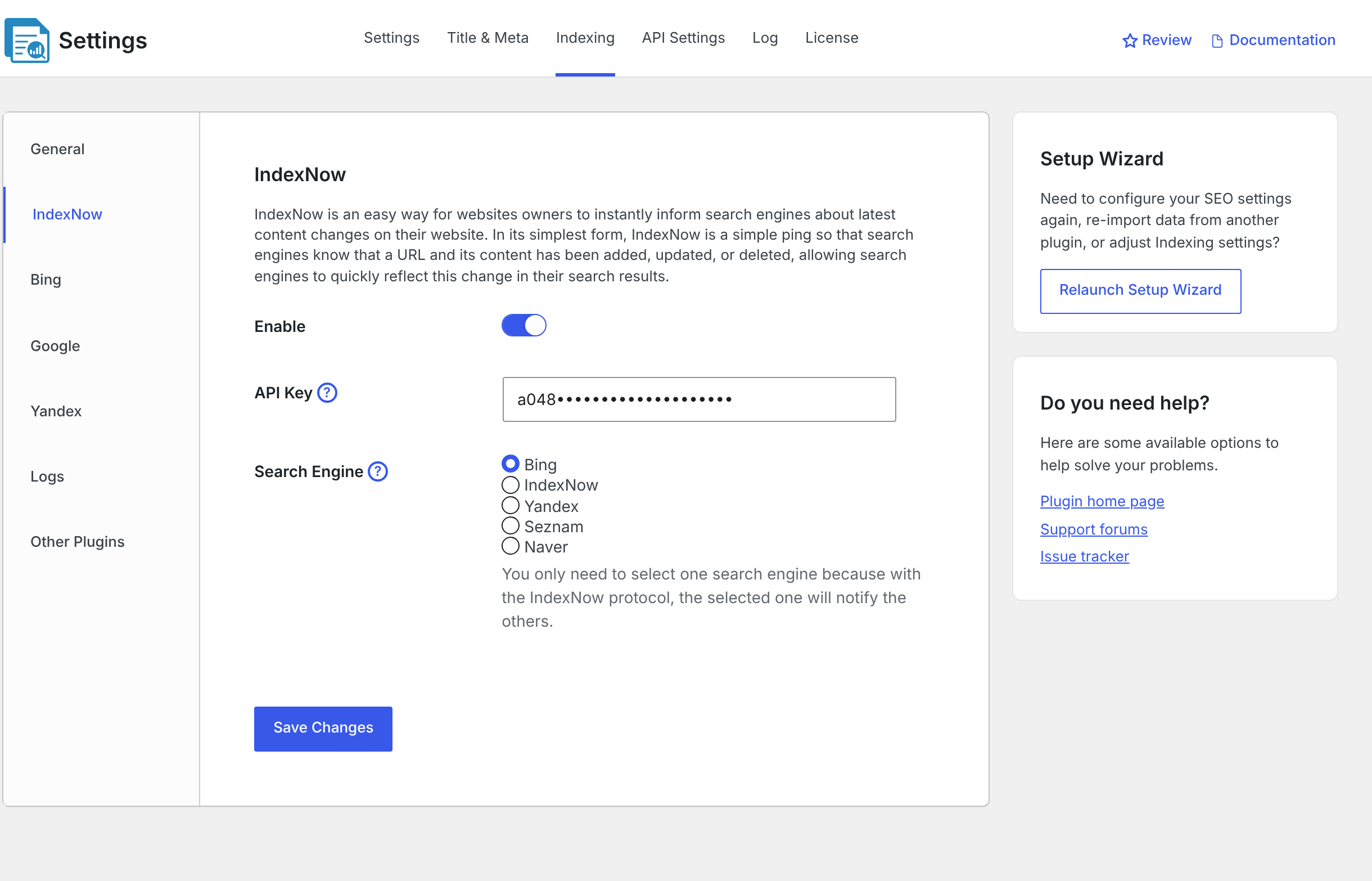
- Make sure Enable is switched on.
- Leave the API Key as it is unless you have a reason to replace it. CrawlWP creates the key for you.
- Under Search Engine, select the destination you want to use for your IndexNow requests.
- Click Save Changes.
After that, choose which post types and taxonomies CrawlWP should submit and which events should trigger a notification from the General settings. See Excluding posts or post types from indexing.
Which IndexNow option should you select?
CrawlWP has several IndexNow destinations. The main difference is the endpoint CrawlWP sends the request to. Participating search engines can then share the submitted URL.
| Option | Endpoint |
|---|---|
| Bing | https://www.bing.com/indexnow |
| IndexNow | https://api.indexnow.org/indexnow |
| Yandex | https://yandex.com/indexnow |
| Seznam | https://search.seznam.cz/indexnow |
| Naver | https://searchadvisor.naver.com/indexnow |
If you want to target one participating engine directly, select that engine. Otherwise, IndexNow uses the shared endpoint at https://api.indexnow.org/indexnow.
There are no separate Yep, Internet Archive, or Amazonbot options in CrawlWP. Those services receive URLs through the participating IndexNow network.
How the IndexNow API key works
IndexNow uses a key to verify that a URL submission is authorized for your site. CrawlWP creates a random 32-character key when IndexNow is first set up.
- CrawlWP stores the key in the IndexNow settings.
- The key is available at
https://your-site.com/{key}.txt. - You do not need to upload a physical text file to your server because CrawlWP responds to requests for the key URL.
- The IndexNow request tells the search engine where to find the key so it can verify the submission.
You can see search-engine requests for the key in the CrawlWP log. The entry uses the message “Bot checked the key file”.
It is possible to replace the key, but there is normally no reason to change a working key. IndexNow keys can contain 8 to 128 letters, numbers, or hyphens, and CrawlWP does not validate the format for you.
What triggers an IndexNow submission?
Once IndexNow is enabled, CrawlWP can submit more than just newly published posts. The exact behavior depends on the indexing settings you enable.
- Post added: a qualifying post can be submitted when it is published.
- Post updated: CrawlWP can resubmit a qualifying published post for search engine indexing when it is updated.
- Term added: a qualifying category, tag, or other taxonomy term can be submitted when it is added or edited.
- Approved comments: adding an approved comment can trigger a submission for the post.
- Removed content: when a published post is binned, unpublished, or deleted, CrawlWP can submit its old URL so participating engines can process the change.
Only post types and taxonomies selected on the General tab are submitted automatically to search engines for indexing.
You can also submit an individual published post manually from the post editor. See Bulk submitting posts for indexing.
IndexNow versus the Bing and Yandex APIs
IndexNow and the separate Bing or Yandex APIs are different submission methods. Because Bing and Yandex participate in IndexNow, you can notify them through IndexNow without connecting their individual APIs.
The separate Bing and Yandex API connections are still useful in CrawlWP Premium because they provide additional index-status and search-statistics data.
So, connecting the Bing or Yandex API isn’t required for IndexNow submissions. It is an additional connection for the CrawlWP features that use those APIs.
How to confirm an IndexNow request was accepted
The CrawlWP log is the quickest place to verify that a submission actually left your site.
- Publish a qualifying post, or open a published post and click Submit for Indexing from the Advanced tab of the CrawlWP SEO box.
- Go to CrawlWP > Settings and open the Log tab.
- Find the new IndexNow request and inspect the Status column.
A 200 response means the search engine accepted the address. A 202 response means IndexNow accepted the address but has not finished checking the key yet. Neither response means the page has already been indexed.
See Reading the indexing submission log for more information about the log and its status codes.
Why a successful submission does not guarantee indexing
There are two different stages: notification and indexation. CrawlWP handles the notification by sending the URL through IndexNow. The search engine handles the decision about whether and when to crawl the URL.
That is why it is possible to see a successful IndexNow response while the page is still missing from search results. The successful response confirms the notification, not the final indexing decision.
When you are investigating a missing page, first check the CrawlWP log. If the IndexNow request was accepted, the next thing to investigate is the search engine’s own crawling and indexing status.
Troubleshooting IndexNow
Nothing appears in the log after publishing. Check that Enable is turned on under IndexNow. Then check the General settings to make sure the relevant post type is selected and the correct notification event, such as Post added, is enabled.
The request returns 403. The search engine could not confirm the IndexNow key. Open https://your-site.com/{key}.txt in a browser using the key shown in the API Key field. The page should display the key.
If the key URL returns a 404 page, go to Settings > Permalinks in WordPress and choose an option other than Plain. Also check whether a security plugin or firewall is blocking the key URL.
Submissions stop after an error. After an error in the 400 range, such as 403 or 429, CrawlWP pauses IndexNow submissions to the affected engine for 3 hours. Fix the underlying problem and wait for the pause to end before testing again.
The URL was accepted but is still not in search. This is not necessarily an IndexNow problem. A successful submission does not guarantee crawling or indexing. Use the relevant search engine’s webmaster tools or index-status tools to investigate the next stage.
A useful way to think about the IndexNow setup
CrawlWP’s IndexNow setup has three main parts: where to send the notification, which content should be submitted, and when the submission should happen.
- Where: choose the appropriate option under Search Engine.
- Which: select the required post types and taxonomies under General.
- When: enable events such as Post added, Post updated, or Term added as needed.
Once those settings are correct, CrawlWP takes care of the IndexNow request and key handling. The search engine then decides what to do with the notification.
IndexNow checklist
- Enable is switched on under CrawlWP > Settings > Indexing > IndexNow.
- An appropriate option is selected under Search Engine.
- The key URL
https://your-site.com/{key}.txtis accessible. - The required content types are selected under General.
- The submission events you need are enabled.
- The CrawlWP log shows a successful IndexNow response such as
200or202.
With these pieces in place, CrawlWP can notify participating IndexNow search engines when your WordPress content changes. The notification helps with discovery, while crawling and indexing remain under the control of each search engine.