
When CrawlWP sends URLs to Google or checks whether pages have been indexed, it uses Google APIs with their own usage limits. Understanding those quotas helps you make sense of failed submissions, delayed index checks, and entries in the CrawlWP indexing log.
CrawlWP uses two different Google services for indexing-related tasks:
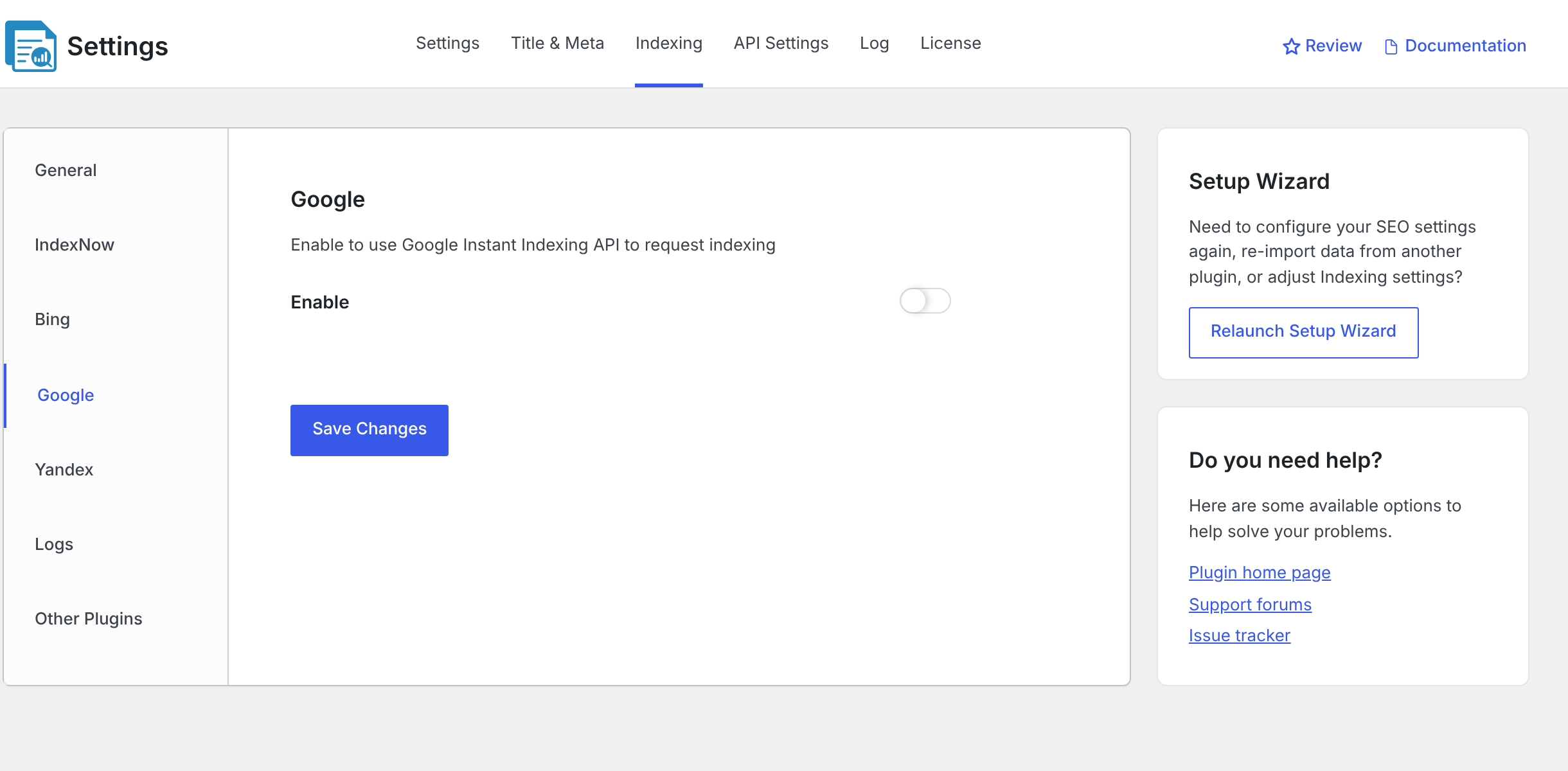
- Google Indexing API: sends URL update or deletion requests to Google. CrawlWP uses it when Google is enabled under CrawlWP > Settings > Indexing.
- URL Inspection API: checks the indexing status of a URL. CrawlWP Premium uses it to populate the Google status information on the SEO Indexing page.
Both services require a connected Google API setup under API Settings. See Integrating WordPress with Google Search API.
To enable or disable Google submissions, go to CrawlWP > Settings, select the Indexing tab, click Google in the left-hand menu, change Enable, and click Save Changes.
What the Google Indexing API Is Designed For
Google’s Indexing API is specifically intended for pages containing JobPosting structured data or BroadcastEvent structured data embedded in a VideoObject. In other words, its documented use is for job posting pages and livestream content.
CrawlWP can still send requests for other types of pages when Google indexing is enabled, but Google may ignore those requests. For ordinary blog posts, pages, products, and most other website content, your XML sitemap and Google’s normal crawling process remain important ways for Google to discover URLs.
See Submitting your sitemap to Google Search Console for information about submitting your main sitemap to Google.
Google’s Indexing API Quotas
The Google Indexing API starts with a default quota intended for initial setup and testing. Your actual quota is shown in your Google Cloud project and can differ depending on your approved usage.
| API | Default limit |
|---|---|
| Indexing API: publish requests | 200 per day per Google Cloud project |
| Indexing API: all requests | 380 per minute per Google Cloud project |
| URL Inspection API | 2,000 requests per day and 600 per minute per Search Console property |
The Indexing API’s 200 daily publish requests are a default onboarding and testing quota. Google requires additional approval before you can use the API beyond that initial allocation for its supported use cases.
The daily Indexing API quota resets at midnight Pacific Time. Google notes that a newly available daily quota can take up to 24 hours to become effective.
To see the limits and current usage for your project, open Google Cloud Console, select your project, go to APIs & Services, choose Web Search Indexing API, and open the Quotas tab.
What Happens When URL Inspection Hits Its Limit?
URL Inspection has a separate quota from the Indexing API. After a quota error from the URL Inspection API, CrawlWP Premium pauses Google index-status checks for 3 hours before trying again.
This affects index-status checks, not the other indexing services. It also doesn’t mean your Google submissions have necessarily failed; the submission and inspection APIs have separate limits.
Do Not Confuse Submission With Index Status Checking
A common source of confusion is assuming that sending a URL to Google’s Indexing API and checking whether the URL has been indexed are the same operation. They are not.
| Operation | Google API | Quota in this setup |
|---|---|---|
| Send a URL to Google | Google Indexing API | 200 publish requests/day by default, plus a 380 requests/minute default project limit |
| Check whether a URL is indexed | URL Inspection API | 2,000 checks/day and 600/minute per Search Console property |
This distinction is important when investigating a site with many URLs. You can run out of inspection quota while submissions are still available, or encounter a submission error while URL inspection continues to work.
How to Reduce Unnecessary API Usage
- Leave Post updated off unless you need it. When enabled, every qualifying save of a published post outside the Ping Delay can generate another submission.
- Use an appropriate Ping Delay. A longer delay can help when you regularly edit and save the same posts several times in a short period.
- Expect large index-status checks to take time. A site with thousands of URLs cannot inspect every URL through a single Search Console property within one day because of the 2,000-per-day inspection limit.
- Use the sitemap for general discovery. For ordinary website content, keep your XML sitemap healthy instead of relying on the Google Indexing API for every URL.
If your site needs more Google Indexing API capacity for Google’s supported job-posting or livestream use cases, you can request additional quota and approval through Google’s Indexing API process. Google evaluates these requests rather than automatically granting a higher limit.
Plan Bulk Indexing Around the Quotas
On a large site, avoid assuming that a bulk indexing request means every URL will be sent to Google immediately. The Google API itself has quotas, and CrawlWP may also have queued processing and retry behavior depending on the indexing method being used.
For this reason, the most useful things to monitor are the SEO Indexing status, the Last Submitted time, and the indexing log. These show whether a URL is waiting, has been submitted, is being checked, or has encountered an API error.
Troubleshooting Google Indexing Quota Problems
The log shows a 429 error
A 429 response indicates that Google has rate-limited or quota-limited the request. For the daily Indexing API quota, check your current usage in Google Cloud Console and wait for the daily quota to become available again.
CrawlWP also pauses Google submissions for six hours after an Indexing API error. The pause is separate from Google’s own quota reset time.
The log shows a 403 error
Check that the Indexing API is enabled in the correct Google Cloud project and that the service account represented by your JSON credentials has the required ownership access to the Search Console property. After fixing the problem, CrawlWP may still be within its six-hour error pause.
Nothing is being sent to Google, and there are no new log entries
CrawlWP may currently be in its six-hour pause following an earlier Google Indexing API error. Look further down the indexing log for the most recent google-webmaster entry and check the time and error message.
The Google index-status checks stop working
You may have reached the URL Inspection API quota. Remember that this limit is separate from the quota for submitting URLs. CrawlWP Premium pauses Google index checks for three hours after a quota error before continuing.
The submit button says the request succeeded, but Google did not receive it
The success message means CrawlWP accepted the submission action. It does not necessarily mean a Google request was sent successfully. Check that Google is enabled under CrawlWP > Settings > Indexing, that your API is connected, and that the indexing log contains a response from google-webmaster.
The Main Takeaway
Google’s indexing APIs have limits, and CrawlWP cannot make those limits disappear. The Google Indexing API controls how many submission requests your Google Cloud project can make, while the URL Inspection API limits how many index-status checks can be performed for a Search Console property.
Keep these two quotas separate when troubleshooting. Use the sitemap for normal content discovery, avoid unnecessary repeat submissions, and check the CrawlWP indexing log whenever Google requests start failing. This makes it much easier to tell whether you have reached a quota, hit an API configuration problem, or are simply within CrawlWP’s temporary error pause.
What Happens When Google Rejects a Request?
When Google refuses a request, the indexing log records the Google service under the SE column as google-webmaster, along with an error indicator, the HTTP status code, and Google’s response message. A quota-exceeded request normally returns HTTP 429.
See Reading the indexing submission log for more information about the log.
CrawlWP’s Pause After a Google Indexing Error
After an error from the Google Indexing API, CrawlWP pauses Google submissions for 6 hours. This applies to any error in the 400 range, not just quota errors.
For example, the pause can also happen when the JSON credentials are invalid or when the service account is not an owner of the relevant Search Console property.
During the six-hour pause:
- CrawlWP does not send further URLs to the Google Indexing API, and skipped requests are not added to the log.
- IndexNow submissions and the Bing and Yandex APIs continue to operate.
- The Submit for Indexing button can still display its success message.
URLs skipped because of the pause are not automatically replayed when the pause ends. You can publish or update the content again, use Submit for Indexing, or let CrawlWP Premium’s automatic indexing process pick up content that is still not indexed on a later run.
What Happens When URL Inspection Hits Its Limit?
URL Inspection has a separate quota from the Indexing API. After a quota error from the URL Inspection API, CrawlWP Premium pauses Google index-status checks for 3 hours before trying again.
This affects index-status checks, not the other indexing services. It also does not mean that your Google submissions have necessarily failed; the submission and inspection APIs have separate limits.
Do Not Confuse Submission With Index Status Checking
A common source of confusion is assuming that sending a URL to Google’s Indexing API and checking whether the URL has been indexed are the same operation. They are not.
| Operation | Google API | Quota in this setup |
|---|---|---|
| Send a URL to Google | Google Indexing API | 200 publish requests/day by default, plus a 380 requests/minute default project limit |
| Check whether a URL is indexed | URL Inspection API | 2,000 checks/day and 600/minute per Search Console property |
This distinction is important when investigating a site with many URLs. You can run out of inspection quota while submissions are still available, or encounter a submission error while URL inspection continues to work.
How to Reduce Unnecessary API Usage
- Leave Post updated off unless you need it. When enabled, every qualifying save of a published post outside the Ping Delay can generate another submission.
- Use an appropriate Ping Delay. A longer delay can help when you regularly edit and save the same posts several times in a short period.
- Expect large index-status checks to take time. A site with thousands of URLs cannot inspect every URL through a single Search Console property within one day because of the 2,000-per-day inspection limit.
- Use the sitemap for general discovery. For ordinary website content, keep your XML sitemap healthy instead of relying on the Google Indexing API for every URL.
If your site needs more Google Indexing API capacity for Google’s supported job-posting or livestream use cases, you can request additional quota and approval through Google’s Indexing API process. Google evaluates these requests rather than automatically granting a higher limit.
Plan Bulk Indexing Around the Quotas
On a large site, avoid assuming that a bulk indexing request means every URL will be sent to Google immediately. The Google API itself has quotas, and CrawlWP may also have queued processing and retry behavior depending on the indexing method being used.
For this reason, the most useful things to monitor are the SEO Indexing status, the Last Submitted time, and the indexing log. These show whether a URL is waiting, has been submitted, is being checked, or has encountered an API error.
Troubleshooting Google Indexing Quota Problems
The log shows a 429 error
A 429 response indicates that Google has rate-limited or quota-limited the request. For the daily Indexing API quota, check your current usage in Google Cloud Console and wait for the daily quota to become available again.
CrawlWP also pauses Google submissions for six hours after an Indexing API error. The pause is separate from Google’s own quota reset time.
The log shows a 403 error
Check that the Indexing API is enabled in the correct Google Cloud project and that the service account represented by your JSON credentials has the required ownership access to the Search Console property. After fixing the problem, CrawlWP may still be within its six-hour error pause.
Nothing is being sent to Google, and there are no new log entries
CrawlWP may currently be in its six-hour pause following an earlier Google Indexing API error. Look further down the indexing log for the most recent google-webmaster entry and check the time and error message.
The Google index-status checks stop working
You may have reached the URL Inspection API quota. Remember that this limit is separate from the quota for submitting URLs. CrawlWP Premium pauses Google index checks for three hours after a quota error before continuing.
The submit button says the request succeeded, but Google did not receive it
The success message means CrawlWP accepted the submission action. It does not necessarily mean a Google request was sent successfully. Check that Google is enabled under CrawlWP > Settings > Indexing, that your API is connected, and that the indexing log contains a response from google-webmaster.
The Main Takeaway
Google’s indexing APIs have limits, and CrawlWP cannot make those limits disappear. The Google Indexing API controls how many submission requests your Google Cloud project can make, while the URL Inspection API limits how many index-status checks can be performed for a Search Console property.
Keep these two quotas separate when troubleshooting. Use the sitemap for normal content discovery, avoid unnecessary repeat submissions, and check the CrawlWP indexing log whenever Google requests start failing. This makes it much easier to tell whether you have reached a quota, hit an API configuration problem, or are simply within CrawlWP’s temporary error pause.
The URL Inspection API Has a Separate Quota
The URL Inspection API is separate from the API that sends indexing requests. Its quota is tied to the Search Console property being inspected rather than simply to the Google Cloud project.
The documented limit is 2,000 URL inspection requests per day and 600 requests per minute for the same Search Console property.
This matters on large websites because checking a URL’s index status consumes inspection quota even though the request does not submit the page to Google for indexing.
How CrawlWP Uses Google’s Quotas
Every URL that CrawlWP sends through the Google Indexing API uses one publish request. Depending on your settings, submissions can happen when:
- A post is published, and Post added is enabled.
- A published post is updated and Post updated is enabled.
- You click Submit for Indexing in a post’s CrawlWP SEO box.
- CrawlWP Premium’s automatic indexing process submits the URL.
See How automatic indexing works and how to schedule it for more information about Premium automatic indexing.
Comments, categories, and removed posts are not submitted to Google through this process.
Separately, every page that CrawlWP Premium checks on the SEO Indexing page uses one URL Inspection API request.
CrawlWP Does Not Count Your Daily Google Quota for You
CrawlWP sends requests when its indexing features tell it to. It does not maintain a daily counter that stops submissions when Google’s 200-request default is reached, or when the URL Inspection API reaches 2,000 checks.
Google is therefore responsible for enforcing the quota. When a request exceeds a limit, Google returns an error, and CrawlWP records the result in its indexing workflow.
What Happens When Google Rejects a Request?
When Google refuses a request, the indexing log records the Google service under the SE column as google-webmaster, along with an error indicator, the HTTP status code, and Google’s response message. A quota-exceeded request normally returns HTTP 429.
See Reading the indexing submission log for more information about the log.
CrawlWP’s Pause After a Google Indexing Error
After an error from the Google Indexing API, CrawlWP pauses Google submissions for 6 hours. This applies to any 400-range error, not just quota errors.
For example, the pause can also happen when the JSON credentials are invalid or when the service account is not an owner of the relevant Search Console property.
During the six-hour pause:
- CrawlWP does not send further URLs to the Google Indexing API, and skipped requests are not added to the log.
- IndexNow submissions and the Bing and Yandex APIs continue to operate.
- The Submit for Indexing button can still display its success message.
URLs skipped because of the pause are not automatically replayed when the pause ends. You can publish or update the content again, use Submit for Indexing, or let CrawlWP Premium’s automatic indexing process pick up content that is still not indexed on a later run.
What Happens When URL Inspection Hits Its Limit?
URL Inspection has a separate quota from the Indexing API. After a quota error from the URL Inspection API, CrawlWP Premium pauses Google index-status checks for 3 hours before trying again.
This affects index-status checks, not the other indexing services. It also does not mean that your Google submissions have necessarily failed; the submission and inspection APIs have separate limits.
Do Not Confuse Submission With Index Status Checking
A common source of confusion is assuming that sending a URL to Google’s Indexing API and checking whether the URL has been indexed are the same operation. They are not.
| Operation | Google API | Quota in this setup |
|---|---|---|
| Send a URL to Google | Google Indexing API | 200 publish requests/day by default, plus a 380 requests/minute default project limit |
| Check whether a URL is indexed | URL Inspection API | 2,000 checks/day and 600/minute per Search Console property |
This distinction is important when investigating a site with many URLs. You can run out of inspection quota while submissions are still available, or get a submission error while URL inspection still works.
How to Reduce Unnecessary API Usage
- Leave Post updated off unless you need it. When enabled, every qualifying save of a published post outside the Ping Delay can generate another submission.
- Use an appropriate Ping Delay. A longer delay can help when you regularly edit and save the same posts several times in a short period.
- Expect large index-status checks to take time. A site with thousands of URLs cannot inspect every URL through a single Search Console property within one day because of the 2,000-per-day inspection limit.
- Use the sitemap for general discovery. For ordinary website content, keep your XML sitemap healthy instead of relying on the Google Indexing API for every URL.
If your site needs more Google Indexing API capacity for Google’s supported job-posting or livestream use cases, you can request additional quota and approval through Google’s Indexing API process. Google evaluates these requests rather than automatically granting a higher limit.
Plan Bulk Indexing Around the Quotas
On a large site, avoid assuming that a bulk indexing request means every URL will be sent to Google immediately. The Google API itself has quotas, and CrawlWP may also have queued processing and retry behavior depending on the indexing method being used.
For this reason, the most useful things to monitor are the SEO Indexing status, the Last Submitted time, and the indexing log. These show whether a URL is waiting, has been submitted, is being checked, or has encountered an API error.
Troubleshooting Google Indexing Quota Problems
The log shows a 429 error
A 429 response indicates that Google has rate-limited or quota-limited the request. For the daily Indexing API quota, check your current usage in Google Cloud Console and wait for the daily quota to become available again.
CrawlWP also pauses Google submissions for six hours after an Indexing API error. The pause is separate from Google’s own quota reset time.
The log shows a 403 error
Check that the Indexing API is enabled in the correct Google Cloud project and that the service account represented by your JSON credentials has the required ownership access to the Search Console property. After fixing the problem, CrawlWP may still be within its six-hour error pause.
Nothing is being sent to Google, and there are no new log entries
CrawlWP may currently be in its six-hour pause following an earlier Google Indexing API error. Look further down the indexing log for the most recent google-webmaster entry and check the time and error message.
The Google index-status checks stop working
You may have reached the URL Inspection API quota. Remember that this limit is separate from the quota for submitting URLs. CrawlWP Premium pauses Google index checks for three hours after a quota error before continuing.
The submit button says the request succeeded, but Google did not receive it
The success message means CrawlWP accepted the submission action. It does not necessarily mean a Google request was sent successfully. Check that Google is enabled under CrawlWP > Settings > Indexing, that your API is connected, and that the indexing log contains a response from google-webmaster.
The Main Takeaway
Google’s indexing APIs have limits, and CrawlWP cannot make those limits disappear. The Google Indexing API controls how many submission requests your Google Cloud project can make, while the URL Inspection API limits how many index-status checks can be performed for a Search Console property.
Keep these two quotas separate when troubleshooting. Use the sitemap for normal content discovery, avoid unnecessary repeat submissions, and check the CrawlWP indexing log whenever Google requests start failing. This makes it much easier to tell whether you have reached a quota, hit an API configuration problem, or are simply within CrawlWP’s temporary error pause.