
CrawlWP can automatically notify search engines when you publish or update WordPress content.
Sometimes, however, you may not want certain post types or individual pages included in those search-engine indexing submissions. CrawlWP lets you control which post types and taxonomies are submitted and which events trigger a submission.
There is an important distinction between excluding a URL from indexing submissions and preventing a page from appearing in search results. Excluding a post from CrawlWP’s submission process does not stop search engines from discovering it elsewhere on your site.
To tell search engines not to index a page, use a noindex directive instead. See Noindex, nofollow and other robots directives per post.
Choose Which Post Types and Taxonomies CrawlWP Submits
You can control the WordPress content types that participate in CrawlWP’s automatic indexing submissions to search engines from the general indexing settings.
- Go to CrawlWP > Settings and click the Indexing tab at the top.
- Make sure General is selected in the left-hand menu.
- Under Post Types, select the post types you want CrawlWP to submit. Clear the ones you want to exclude.
- Under Taxonomies, select the categories, tags, or other taxonomies you want submitted.
- Click Save Changes.
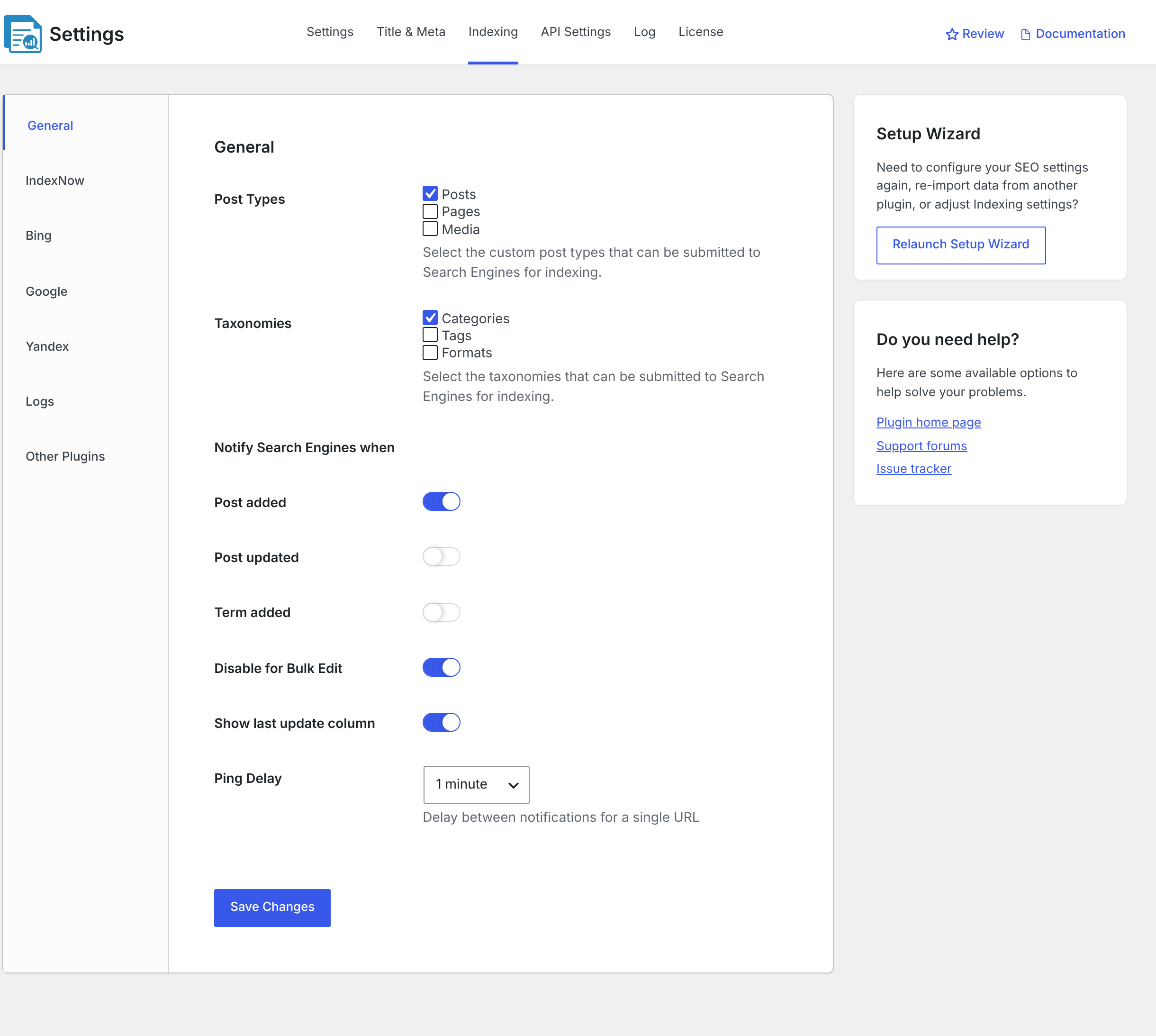
When a WordPress post type is not selected, CrawlWP does not automatically submit content from that type when it is published or updated.
In CrawlWP Premium, content from an excluded type is also excluded from the SEO Indexing page and its automatic indexing process.
Save the General indexing settings at least once before relying on automatic submissions. If these settings have never been saved, CrawlWP does not submit posts automatically. Completing the indexing step in the Setup Wizard also saves the settings.
Choose When CrawlWP Sends a Submission
The Notify Search Engines when options determine which events trigger automatic search engine submissions.
| Setting | What it does |
|---|---|
| Post added | Submits a post when it is first published. A scheduled post is submitted when it goes live. Enabled by default. |
| Post updated | Submits a published post whenever it is updated. Disabled by default. |
| Term added | Submits a category, tag, or other taxonomy term when it is added or edited. This applies to IndexNow only and is disabled by default. |
| Disable for Bulk Edit | Prevents submissions when WordPress Bulk Edit changes multiple posts at once. Enabled by default. Quick Edit can still trigger a submission. |
Only published public posts are submitted automatically for indexing to search engines. Draft, pending, and private posts are never submitted. Password-protected posts are still submitted when their post type is enabled.
Other Events That Can Trigger IndexNow
When the post type is enabled for submissions, CrawlWP also sends the post URL to IndexNow for two additional events.
- When a comment on a published post is approved, including comments that are automatically approved, the post URL is submitted again.
- When a published post is moved to the bin, unpublished, or deleted, its previous URL is submitted so search engines can remove the old address. This event ignores Post added, Post updated, and Ping Delay, but still respects Disable for Bulk Edit.
Neither event occurs for a post type that is not selected under Post Types.
Understand Ping Delay
Ping Delay controls the minimum amount of time that must pass before the same post or term is submitted again. The default value is 1 minute.
For example, if a post is saved twice within the configured delay, the second save is not submitted. CrawlWP also does not queue that submission for later. This prevents repeated saves from generating a burst of requests for the same URL.
Ping Delay does not apply to the Submit for Indexing button, removed posts, approved comments, or Premium automatic indexing.
What Excluding a Post Type Does Not Stop
Turning off a post type under Post Types controls automatic submissions. It does not disable every possible way a URL can be submitted to a search engine.
- Submit for Indexing: the button in an individual post’s CrawlWP SEO box can submit a URL even when its post type is not selected in the indexing settings.
- Noindex: a post can still be submitted when its post type is enabled even if the post itself is configured as noindex. Excluding a URL from submission and telling a search engine not to index it are separate controls.
Use the post type settings when you want to control automatic notifications, and use noindex when the actual goal is to keep a page out of search results.
Exclude Individual Pages From Automatic Indexing
CrawlWP Premium also lets you exclude individual URLs from the SEO Indexing page and its scheduled indexing process. This is useful when most content in a post type should be processed but a few specific pages should not be.
- Go to CrawlWP > SEO Indexing.
- Select the pages you want to exclude. Use the search box or status filters to find them.
- Choose Exclude from indexing from Bulk actions.
- Click Apply.
The selected URLs are shown as Indexing Excluded in the Google, Bing, and Yandex columns. CrawlWP’s scheduled indexing jobs will no longer check or submit those URLs.
See How automatic indexing works and how to schedule it for more information about the Premium indexing workflow.
This exclusion applies specifically to the SEO Indexing page and its scheduled jobs. Publishing or updating an excluded post can still trigger a normal automatic submission according to the settings described earlier.
Include an Excluded Page Again
There is no separate Include action. Instead, select the excluded URL and perform an indexing action that changes its status.
- Check Google Index Status, Check Bing Index Status, or Check Yandex Index Status. The selected service checks the URL immediately and replaces Indexing Excluded with the returned result. To clear the excluded status from all three columns, run the check for each service. A column changes only when that search engine’s API is connected.
- Submit for Indexing: marks the URL as In Progress, allowing the automatic indexing process to submit it.
Exclusion Does Not Mean Noindex
It is easy to confuse these two settings because both relate to search engine indexing, but they solve different problems.
| Setting | Purpose |
|---|---|
| Exclude from indexing submissions | Stops CrawlWP’s automatic submission and scheduled indexing actions for the selected URL or content type. |
| Noindex | Tells search engines that the page should not be included in their search index. |
For example, you might exclude a utility page from automatic indexing notifications because it does not need to be actively submitted. If you also do not want that page to appear in search results, you should configure noindex separately.
Review Your Indexing Log
When you are troubleshooting automatic submissions, the indexing log is more useful than relying only on whether the content appears in the SEO Indexing page. The log shows the requests CrawlWP attempted and the responses returned by the indexing services.
See Reading the indexing submission log for help interpreting those results.
Troubleshooting Indexing Exclusions
An unticked post type is still being submitted
Check whether someone manually clicked Submit for Indexing in the post editor. That action can submit a URL even when its post type is not selected under Post Types.
Nothing is being submitted
Open CrawlWP > Settings > Indexing > General and make sure the required post types are selected. Also click Save Changes on the General tab at least once. Then publish a test post and check the indexing log.
See Reading the indexing submission log if you need to confirm whether CrawlWP attempted to contact a search engine.
An updated post was not submitted again
Make sure Post updated is enabled. If it is already enabled, check whether the post was saved again within the configured Ping Delay. A submission blocked by Ping Delay is not queued for later.
A page marked Indexing Excluded is being processed automatically
Check whether the submission came from the SEO Indexing scheduled process or from a normal publish/update event. Indexing Excluded stops the scheduled checks and submissions on the SEO Indexing page, but publishing or updating the post can still trigger an automatic submission according to your general indexing settings.
A post is submitted even though it has noindex
This is expected when its post type is enabled. A noindex setting controls whether search engines should index the page; it does not by itself prevent CrawlWP from sending an indexing notification. Use the post type exclusion or the Premium individual exclusion when you also want to stop CrawlWP’s submission process.
Choose the Right Exclusion for Your Site
Use the Post Types and Taxonomies settings when you want a broad rule for automatic submissions. Use Indexing Excluded when only specific URLs should be removed from the Premium SEO Indexing workflow. Use noindex when the goal is to keep a URL out of search results.
Keeping these controls separate gives you more precise control over CrawlWP’s indexing notifications without confusing submission with search engine indexing itself.