
The SEO Indexing page in CrawlWP Premium does more than show whether a URL was submitted to search engines for indexing.
It brings together the index information CrawlWP gets from Google, Bing, and Yandex and turns it into statuses you can use to decide what needs attention. See Understanding SEO Indexing Feature in CrawlWP for a tour of the whole page.
The biggest difference to keep in mind is that Google can give CrawlWP a direct index result, while Bing and Yandex provide data that CrawlWP uses to make a likelihood-based status. That is why the three columns do not always use the same wording.
What you see in the SEO Indexing table
Go to CrawlWP > SEO Indexing. The table includes Google Index Status, Bing Index Status, and Yandex Index Status columns.
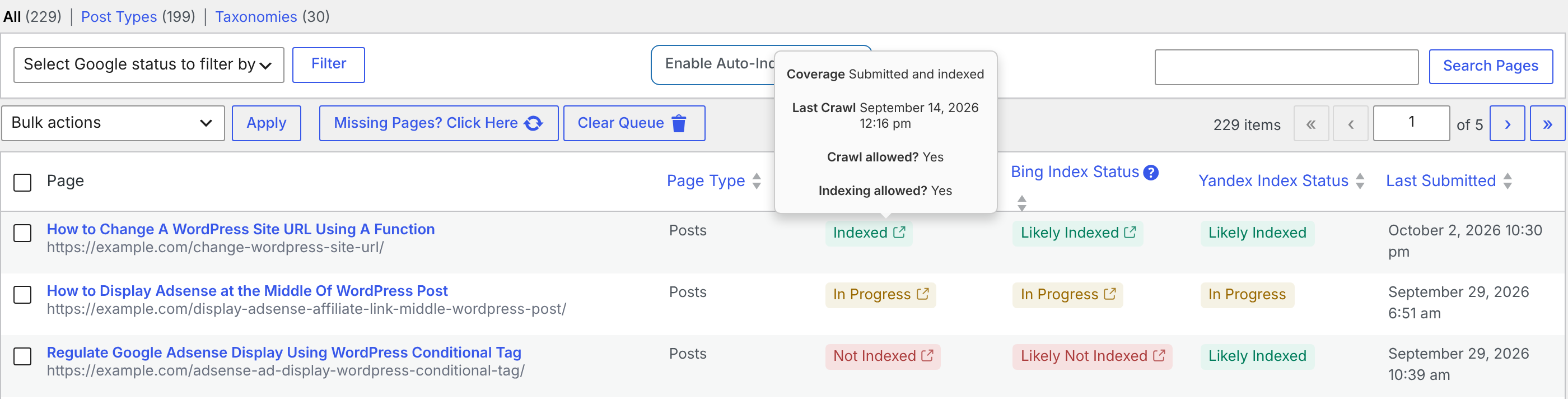
Each search engine needs its API connected under CrawlWP > Settings > API Settings. When an API is not connected, its column normally shows Not Checked. A page can also have a submission-related status after you use a bulk action such as Submit for Indexing. See Integrating WordPress with Google Search API, Bing, and Yandex.
The status names at a glance
| Status | What it means |
|---|---|
| Indexed | Google says the page is in its index. |
| Not Indexed | Google says the page is not in its index. |
| Likely Indexed | Bing or Yandex has information that suggests the page is indexed. |
| Likely Not Indexed | Bing or Yandex has no information suggesting the page is indexed, or the API returned an error. |
| In Progress | The page has been queued for submission and is waiting for its next index check. |
| Indexing Excluded | You used Exclude from indexing for the page, so CrawlWP does not check or submit it automatically. |
| Not Checked | CrawlWP has not checked the page yet, or the search engine API is not connected. |
Do not read all of these labels as if they were equally certain. Indexed and Not Indexed are Google’s direct results. Likely Indexed and Likely Not Indexed are estimates based on the information available from Bing or Yandex.
Google gives CrawlWP a direct result
For Google, CrawlWP uses the Google Search Console URL Inspection API to check the page. This is the same kind of index check you can perform with the URL Inspection tool in Search Console.
CrawlWP reduces Google’s response to two main statuses:
- If Google’s verdict is Pass or Partial, CrawlWP displays Indexed.
- For other verdicts, CrawlWP displays Not Indexed.
That makes the Google column the most useful place to start when you need a definitive answer about whether Google currently reports a page as indexed.
Read the details behind a Google status
Hover over a Google status to see more information from the inspection result. These details can explain why a page has the status it does.
| Detail | What it tells you |
|---|---|
| Coverage | Google’s description of the page, such as “Submitted and indexed” or “Crawled – currently not indexed”. |
| Last Crawl | The date and time Google last crawled the page. |
| Crawl allowed? | Whether robots.txt allows Google to crawl the page. No means the page is blocked by robots.txt. |
| Indexing allowed? | Yes when nothing blocks indexing. N/A when a noindex directive, HTTP header, or robots.txt prevents indexing. |
Click the Google status to open the page’s inspection result in Search Console. This is useful when the summary in CrawlWP tells you that a page is not indexed but you need Google’s underlying reason.
Why Bing and Yandex use “Likely”
Bing and Yandex do not give CrawlWP the same direct single-URL index verdict that Google provides. CrawlWP therefore looks at the data available from each service and uses it to make a best-effort estimate.
Bing’s status is based on search activity
For Bing, CrawlWP marks a page Likely Indexed when the page appears in your Bing top pages or has received impressions in Bing search. Otherwise, it is marked Likely Not Indexed.
This creates an important edge case: a page can actually be indexed by Bing but still appear as Likely Not Indexed when it has never appeared in search results and therefore has no qualifying activity for CrawlWP to use. Hover over the question mark next to Bing Index Status to see the short version of the rule.
When you need to investigate a Bing result further, click the status to check the page in Bing Webmaster Tools.
Yandex’s status comes from its reported search pages
For Yandex, a page is Likely Indexed when it appears in the list of pages Yandex reports as being in search. If it does not appear there, CrawlWP uses Likely Not Indexed.
Yandex returns up to 5,000 addresses in this data. On a larger site, that means some pages that are actually indexed can still appear as Likely Not Indexed simply because they are outside the addresses returned to CrawlWP.
For that reason, treat a Yandex Likely Not Indexed result as a signal to investigate, not as proof that the page is absent from the Yandex index.
In Progress, Not Checked, and Indexing Excluded are different
These three statuses describe CrawlWP’s workflow rather than a simple yes-or-no index result.
In Progress means the page has been queued for submission and is waiting for its next check. It can appear after you submit pages for indexing and does not by itself mean that Google has rejected the page.
Not Checked means CrawlWP does not currently have a usable index result for that search engine. This can happen because the page hasn’t been checked yet or because the required API isn’t connected.
Indexing Excluded is an intentional exclusion. When you use Exclude from indexing for a page, CrawlWP does not check or submit that page automatically.
When CrawlWP checks index status
Index checks run as background jobs whether or not automatic indexing is enabled. Turning off auto-indexing stops the automatic submission jobs, but it does not stop the index status checks.
- Google pages with Not Checked, In Progress, or Not Indexed are checked every 72 hours again.
- Bing and Yandex use the same 72-hour recheck period for pages with Not Checked, In Progress, or Likely Not Indexed.
- Google pages reported as Indexed are checked again about once a month so CrawlWP can detect pages that later drop out of the index.
- Bing and Yandex pages marked Likely Indexed are not checked again automatically.
- Pages marked Indexing Excluded are not checked.
When you need a fresh result rather than waiting for the next scheduled check, select the relevant pages and choose Check Google Index Status, Check Bing Index Status, or Check Yandex Index Status from Bulk actions, then click Apply.
Google allows 2,000 URL Inspection checks per site per day. If CrawlWP reaches that limit, Google checks are paused for 3 hours.
Use the status to decide what to do next
| If you see | A sensible next step |
|---|---|
| Google: Indexed | Google currently reports the page as indexed. No resubmission is needed simply because the status is Indexed. |
| Google: Not Indexed | Review the Google inspection details and decide whether the page needs another submission or another SEO change. |
| Bing/Yandex: Likely Indexed | Treat it as a positive signal based on the available search-engine data. |
| Bing/Yandex: Likely Not Indexed | Investigate further before assuming the page is definitely absent from the index. |
| In Progress | Allow the next index check to run if the page was recently submitted. |
| Not Checked | Check the API connection and allow CrawlWP’s background check to run. |
| Indexing Excluded | Remove the exclusion only when you want the page back in CrawlWP’s indexing workflow. |
Understand the cards above the table
The summary cards at the top of SEO Indexing give you a quick picture of Google’s current and historical indexing activity.
| Card | What it counts |
|---|---|
| Indexed Pages by Google | Pages whose Google status is Indexed. |
| Indexed by CrawlWP | Pages that moved from In Progress or Not Indexed to Indexed since CrawlWP started tracking them. A page remains counted even if it later drops out of the index. The filter with the same name shows only pages that are still indexed. |
| In Progress | Pages whose Google status is In Progress. |
| Not Indexed by Google | Pages whose Google status is Not Indexed. |
The Google Index History chart records indexed and not-indexed totals for each of the last 30 days and is updated every hour. This lets you spot changes in your site’s Google index coverage over time, rather than looking at one page at a time.
See pages that changed status
Open the Recent Movements tab to see pages whose Google status has changed.
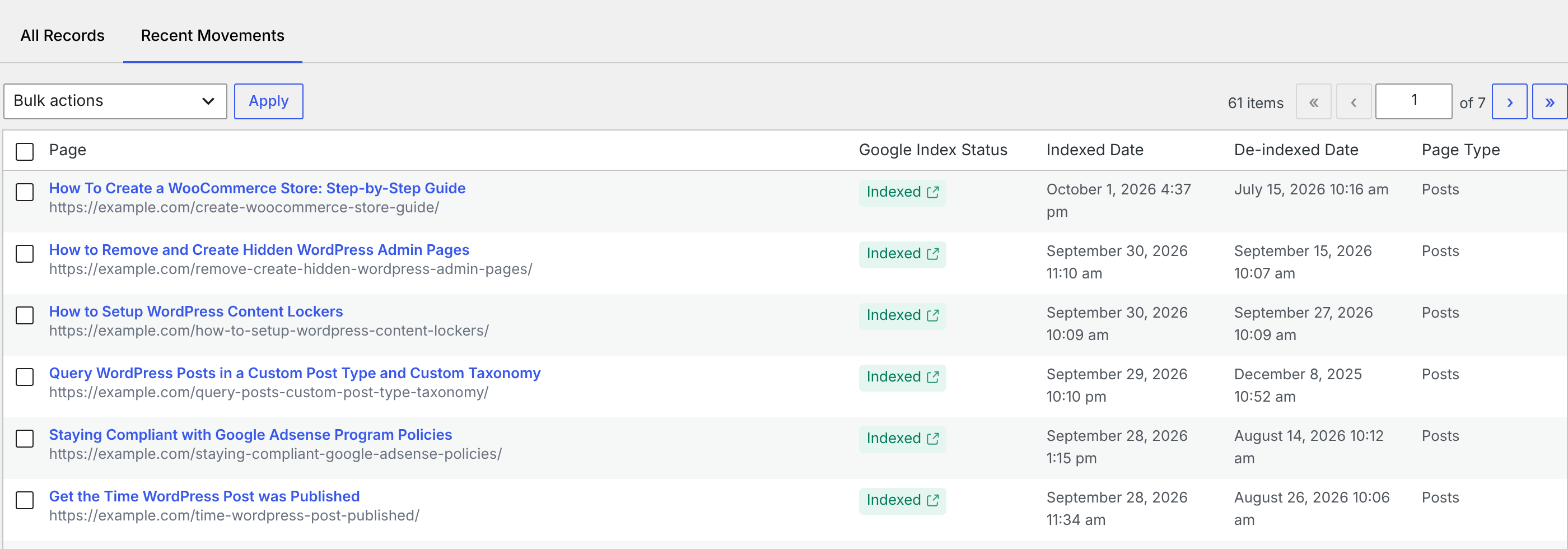
- Indexed Date records when CrawlWP last saw the page become indexed.
- De-indexed Date records when CrawlWP last saw the page drop out of Google’s index.
The most recent change appears at the top. Recent Movements tracks Google changes only, so it is not a combined history for Bing and Yandex.
Filter the table when you need a specific group of pages
Use Select Google status to filter by and click Filter. The available filters are Indexed, Indexed by CrawlWP, Not indexed, Index in progress, Indexing Excluded, and Not checked.
This is especially useful on larger sites. Instead of scanning the entire table, you can narrow it to pages that need attention, such as those currently marked Not indexed or Index in progress.
Troubleshooting status problems
Every Google status says Not Checked. Check that the Google API is connected under API Settings and that the same Google account has the site in Search Console. If CrawlWP cannot find the site in Search Console, it displays a notice at the top of the admin screens. The first background checks can take a few hours to appear.
The statuses are not updating. CrawlWP relies on WordPress scheduled tasks for its background checks. If those tasks are delayed or not running, status information can become stale. See how to fix cron events missing their schedules.
Search Console says something different from CrawlWP. CrawlWP is showing the result of its last index check. Run Check Google Index Status for the page from Bulk actions to request a fresh result.
Bing says Likely Not Indexed even though you believe the page is indexed. Remember that Bing’s status is based on the data CrawlWP can retrieve, including top-page and impression information. A page with no qualifying search activity can still receive Likely Not Indexed. Click the status to investigate the page in Bing Webmaster Tools.
Yandex says Likely Not Indexed on a large site. Yandex returns up to 5,000 addresses for the data CrawlWP uses. A page may therefore be indexed but absent from the returned list. Treat the status as an estimate rather than a definitive index verdict.
The easiest way to read CrawlWP’s index data
Use the Google column when you need Google’s reported index verdict, and use the Bing and Yandex columns as indicators based on the data those services make available. Keep In Progress, Not Checked, and Indexing Excluded separate in your mind because they describe CrawlWP’s workflow rather than the same thing as an index verdict.
Once you understand that distinction, the SEO Indexing page becomes much easier to use: find pages that need checking, inspect Google’s details when necessary, investigate likelihood-based statuses further, and use the summary cards and Recent Movements view to watch how your Google indexing changes over time.