
Every time someone searches Google and your page appears, Google records it.
- The keyword they used.
- Where your page ranked.
- Whether they clicked.
- How many people saw your result without clicking.
That data doesn’t live in a spreadsheet somewhere on Google’s servers, inaccessible to you. Google makes it available through an official API.
The Google Search Console API returns impressions, clicks, click-through rate, and average position for every keyword your verified property ranks for, going back up to 16 months.
Most WordPress site owners never touch that API directly.
They either log into Google Search Console to check rankings manually, use a third-party rank tracking tool that estimates positions independently, or open four different dashboards and try to connect the dots themselves.
There is a more sensible approach.
CrawlWP connects to the Google Search Console API on your behalf and surfaces your keyword ranking data, including position, impressions, clicks, and CTR, directly inside your WordPress dashboard. No API credentials to manage. No separate login. No estimation.
This guide explains how the Google ranking API works, what CrawlWP does with it in WordPress, and which third-party API providers to use when you need data that the official Google API cannot provide, primarily competitor rankings.
Table of Contents
What the Google Search Console API Provides
Before looking at tools, understanding what the API returns and what it cannot return matters for setting accurate expectations.
What the API gives you (for your own verified properties)
The Google Search Console API provides access to the same data you see in the Search Console dashboard: impressions, clicks, click-through rate, and average position for queries associated with your verified properties.
You can query it by page, keyword, device, country, and date range. It is free, authoritative, and integrates into reporting workflows.
The core endpoint is searchAnalytics.query, which returns performance data organized by whatever dimensions you specify. Query by keyword to see which search terms drive traffic to your site.
Query by page to see which URLs generate the most clicks. Filter by device to compare mobile versus desktop performance. Filter by country to understand geographic traffic distribution.
The Search Console API gives you something better than third-party rank tracking tools: actual impression-weighted position data directly from Google, tied to your verified properties.
There is no estimation involved. This is the most accurate source of keyword position data available to any SEO practitioner.
How Google defines the metrics
Clicks: How often someone clicked a link from Google to your site. Each click counts once regardless of how many pages the user visited afterward.
Impressions: How many times a link to your site appeared in Google search results. In Search Console, the metric is shown as average position, which averages the position value for all impressions because a link’s position differs each time it appears.
CTR: The calculation of clicks divided by impressions. A page appearing 10,000 times and receiving 200 clicks has a 2% CTR.
Average Position: A relative ranking of the position of your link on Google, where 1 is the topmost position, 2 is the next position, and so on. Google defines it as the topmost position occupied by a link to your property in search results, averaged across all impressions for that query.
Update worth knowing
Google now counts AI surfaces in Search Console data. Clicks, impressions, and position for AI Mode follow standard methodology. AI Overviews occupy a single position, and all links within that overview are assigned the same position.
This means your Search Console data reflects not just traditional organic rankings but also appearances in AI Overviews and AI Mode results. A keyword where your page consistently appears in an AI Overview will show impressions and potentially clicks from that surface.
What the API cannot do
The Search Console API only works for properties you own and have verified. You cannot use it to check your position in Google search for competitor domains.
This is the hard boundary of the official API.
If you need to track competitor keyword positions or check rankings for domains you do not own, you need a third-party SERP API, which we cover in the second half of this article.
The data also arrives with a two-to three-day lag, and Google anonymizes low-volume queries to protect user privacy. Very low-volume keywords may not appear at all.
CrawlWP: The Google Search Console API Inside WordPress
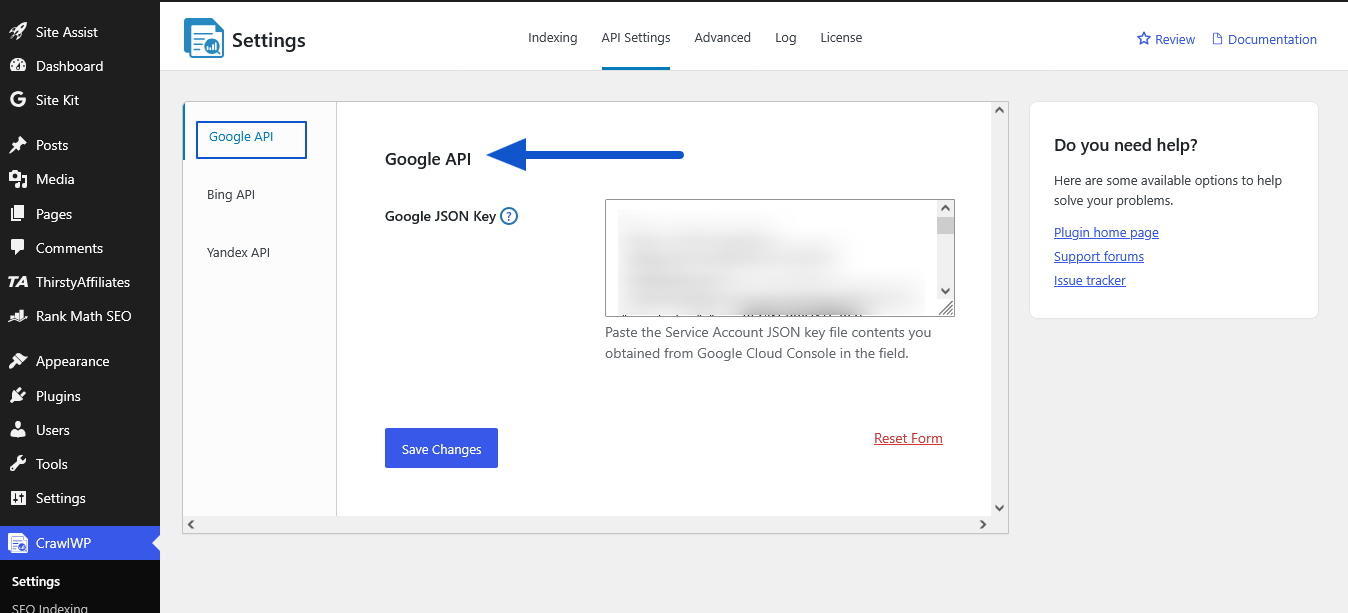
For WordPress site owners, CrawlWP is the most practical way to access Google Search Console ranking data without touching the API directly or logging into a separate platform.
What CrawlWP does
CrawlWP connects to Google Search Console, Bing Webmaster Tools, and Yandex via their official APIs and surfaces the ranking data inside your WordPress dashboard. Every number you see comes directly from the search engine’s own data. Nothing is estimated or approximated.
Over 40,000 WordPress site owners use CrawlWP to monitor and improve their search rankings.
The SEO Stats dashboard: what you actually see
Key Metrics at a Glance
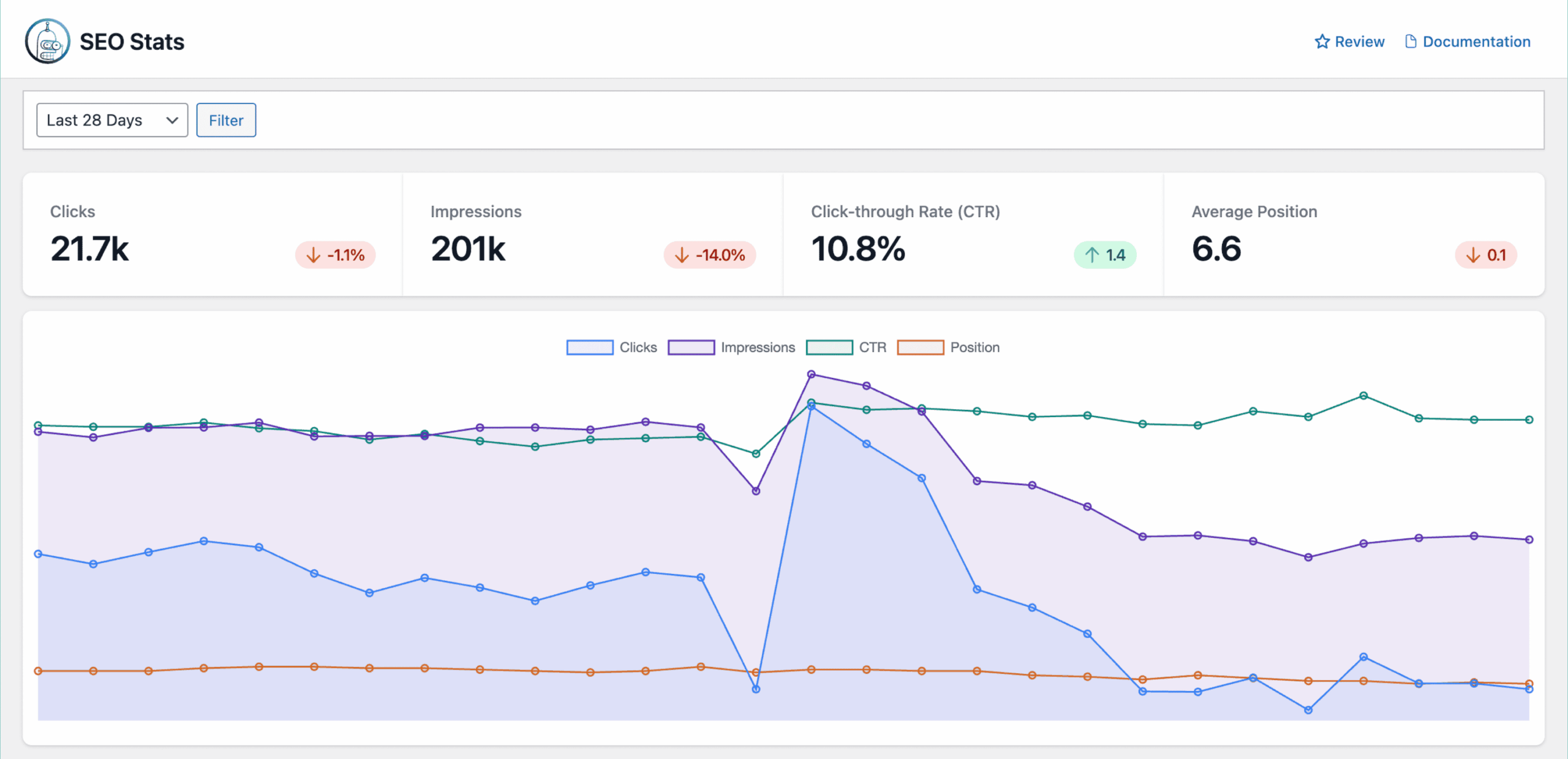
At the top of the SEO Stats dashboard, four headline metrics give you an immediate snapshot of your site’s search performance over the selected period:
Clicks: The total number of times users clicked on your WordPress site in Google search engine results. A growing number of clicks indicates that your pages are performing well and engaging users.
Impressions: The number of times your WordPress site pages appeared in search results. High impressions but low clicks could signal the need for better meta descriptions or titles.
Click-Through Rate (CTR): The ratio of clicks to impressions, expressed as a percentage. A higher CTR means your pages are compelling users to click.
Average Position: The average ranking of your WordPress site in Google search results. A lower number (closer to 1) reflects better rankings for your pages.
Performance Graph
The performance graph in the dashboard visualizes trends in clicks, impressions, CTR, and average position over time. The graph helps you identify patterns and assess the impact of recent SEO efforts, such as content updates or backlink improvements.
The graph plots each metric on its own line: clicks in blue, impressions in green, CTR in orange, and position in purple. Watching the position line trend downward (meaning rankings improve) while the clicks line trends upward is exactly what good SEO looks like, made visible.
Top Keywords Report
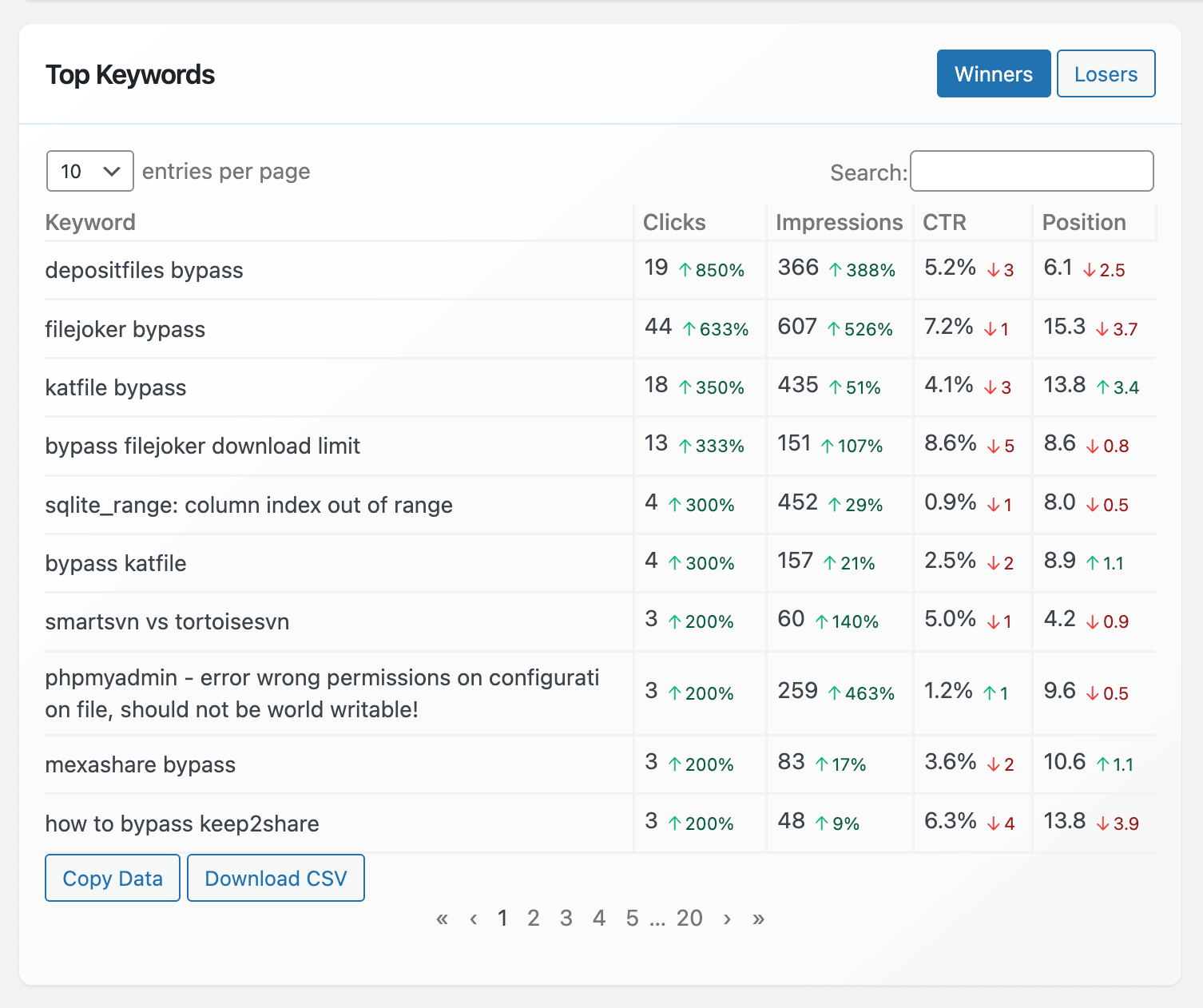
The Top Keywords section provides detailed performance data for the keywords your WordPress site ranks for. For each keyword, the table includes clicks, impressions, CTR, and position.
Two sorting filters make this section particularly actionable:
Winners sorts the top keywords by their Clicks trend in descending order. Losers sorts the top keywords by their Clicks trend in ascending order.
The Winners filter shows which keywords are gaining momentum. The Losers filter surfaces keywords that are declining before the drop becomes significant. Both views give you a prioritized work list without manually reviewing hundreds of keyword rows.
Practical uses of the Top Keywords data:
Identify keywords ranking positions 4 to 10 with high impressions. These are pages appearing in search results frequently but not breaking into the top three, where most clicks go. An optimized title tag or stronger meta description can move them up without writing new content.
Find keywords with high impressions but low CTR. A page appearing 8,000 times per month at position 6 with a 0.5% CTR has a title or description problem.
According to Backlinko data, position 1 captures 27.6% of clicks, position 2 captures 15.8%, position 3 captures 11.0%, and results beyond page one remain below 1%. The traffic available at positions 4 to 10 is real, but only if your result earns the click.
Top Pages Report
The Top Pages section lists your site’s highest-performing pages with metrics showing clicks, impressions, CTR, and position. This section helps you understand which pages attract the most traffic and why, enabling you to replicate their success across your site.
The same Winners and Losers filter applies here: sort by pages gaining clicks, or sort by pages losing clicks. Both views answer different questions. Winners shows you what to study and replicate. Losers shows you what needs attention before rankings slide further.
Top Countries Report
The Top Countries section breaks down your site’s performance by geographic region. For each country, you will see clicks, impressions, CTR, and position specific to users from that country.
If your analytics show a growing audience in a country you haven’t specifically targeted, this report makes that visible in search performance terms. You might find keywords performing differently by country, or geographic markets worth investing in based on existing organic visibility.
Device Breakdown
The Devices section shows how users access your site, including clicks, impressions, CTR, and position for mobile, tablet, and desktop. With the shift toward mobile-first indexing, this data helps you optimize for mobile users, who often make up the majority of traffic.
A page ranking position 3 on desktop but position 8 on mobile has a mobile-specific optimization problem. The device breakdown surfaces this discrepancy directly.
Bing and Yandex Stats
CrawlWP goes beyond the Google Search Console API to include Bing and Yandex ranking data in the same dashboard.
In the Bing Stats section, you can see the daily performance of your pages and ranking keywords on the Bing search engine.
Bing matters more in 2026 than most WordPress SEOs acknowledge: it powers Microsoft Copilot, DuckDuckGo, and Yahoo. Organic visibility on Bing reaches all three discovery surfaces.
In the Yandex Stats section, you can see the top keywords your website is ranking for in Yandex Search as well as pages indexed and visible in Yandex search results.
Data Filtering and Export
You can click on keywords, page URLs, countries, or devices to filter and deeply analyze your WordPress site’s performance on Google Search, Microsoft Bing, and Yandex.
Each section includes Copy Data and Download CSV buttons, allowing you to export your stats for further analysis or reporting.
For agencies preparing client reports or teams needing to share performance data, the CSV export eliminates the manual step of pulling data from multiple platforms.
SEO Email Reports
CrawlWP includes an SEO email reports feature that sends daily, weekly, or monthly roundups of your website’s search engine performance.
It includes data such as pages on your WordPress site that were recently indexed and de-indexed, search performance data including clicks, impressions, and ranking position, and top-ranking keywords and pages.
The email reports create a regular rhythm of reviewing search performance without requiring manual log-ins. Set a weekly report, review it on Monday, and know immediately whether anything needs attention that week.
The indexing advantage
CrawlWP does not just report on your rankings. It actively influences them by submitting new and updated content to Google, Bing, and Yandex the moment you publish. New pages get indexed in 24 to 48 hours rather than the typical 5 to 14-day wait.
The two functions work together: faster indexing means your keyword ranking data appears in the SEO Stats dashboard sooner, shortening the feedback loop between publishing content and seeing how it performs in search.
Pricing
- Free: Full SEO Stats dashboard including Google, Bing, and Yandex data inside WordPress
- Pro: $59/year (bulk submissions, SEO email reports, advanced analytics, priority support)
Check your keyword rankings with CrawlWP inside WordPress →
Understanding What “Google Rank Tracking API” Means
The phrase “Google rank tracking API” gets used to describe two fundamentally different things. Knowing the difference prevents wasted time and money.
Option 1: The Google Search Console API (for your own sites)
This is Google’s official API. It returns your actual search performance data for verified properties. Free to use. Authoritative. No estimation.
Limitations: your own sites only, 2 to 3 day data lag, anonymized low-volume queries, no real-time SERP snapshots.
CrawlWP uses this API and surfaces the data inside WordPress. If your goal is to check your own keyword rankings, this is the right tool and the right Google API.
Option 2: Third-Party SERP APIs (for any domain, including competitors)
If you want a general Google rankings API for any domain on the public SERP, Google doesn’t offer one.
To check keyword positions for domains you do not own, developers and SEO teams use third-party API providers that query Google’s search results pages directly and parse the ranking data.
The Google Custom Search JSON API, which some developers previously used as a workaround, is closed to new customers, and existing customers must transition off it by January 1, 2027.
For competitor rank tracking, live SERP snapshots, and building SEO software products, third-party SERP APIs are the practical path. The providers below are the leading options in 2026 with verified pricing.
Third-Party Google Keyword Ranking API Providers (2026)
DataForSEO
Best for: High-volume SEO data pipelines, agencies building SEO software products, developers wanting pay-as-you-go pricing at scale
Pricing model: Pay-as-you-go with no monthly minimum
DataForSEO provides raw SEO and SERP data via API at $0.0006 per query for Standard Queue (normal priority), the same underlying data powering tools like Ahrefs and Semrush, without the dashboard subscription.
Three latency tiers exist at different price points:
- Standard Queue (normal priority): approximately $0.60 per 1,000 requests (5-minute queue delay)
- Priority Queue: approximately $1.20 per 1,000 requests (faster processing)
- Live: approximately $2.00 per 1,000 requests (near real-time response)
At 1 million searches per month, DataForSEO costs approximately $600, compared to SerpApi’s approximately $3,750 at equivalent volume.
DataForSEO covers organic SERP results, local pack, featured snippets, People Also Ask boxes, shopping results, and 60-plus additional endpoint types. The API supports location and device targeting for local rank tracking across thousands of locations globally.
One important pricing note: DataForSEO doubles the first-page price from approximately $2 to $4 per 1,000 requests when AI Overview parsing is enabled. If you need AI Overview data alongside organic positions, factor this into your cost calculation.
DataForSEO requires a minimum $50 deposit to activate an account. Funds do not expire and are consumed as queries are made.
Best use case for agencies: Building custom white-label rank tracking tools, feeding SEO data into internal dashboards, large-scale keyword monitoring where per-query cost determines profitability.
SerpApi
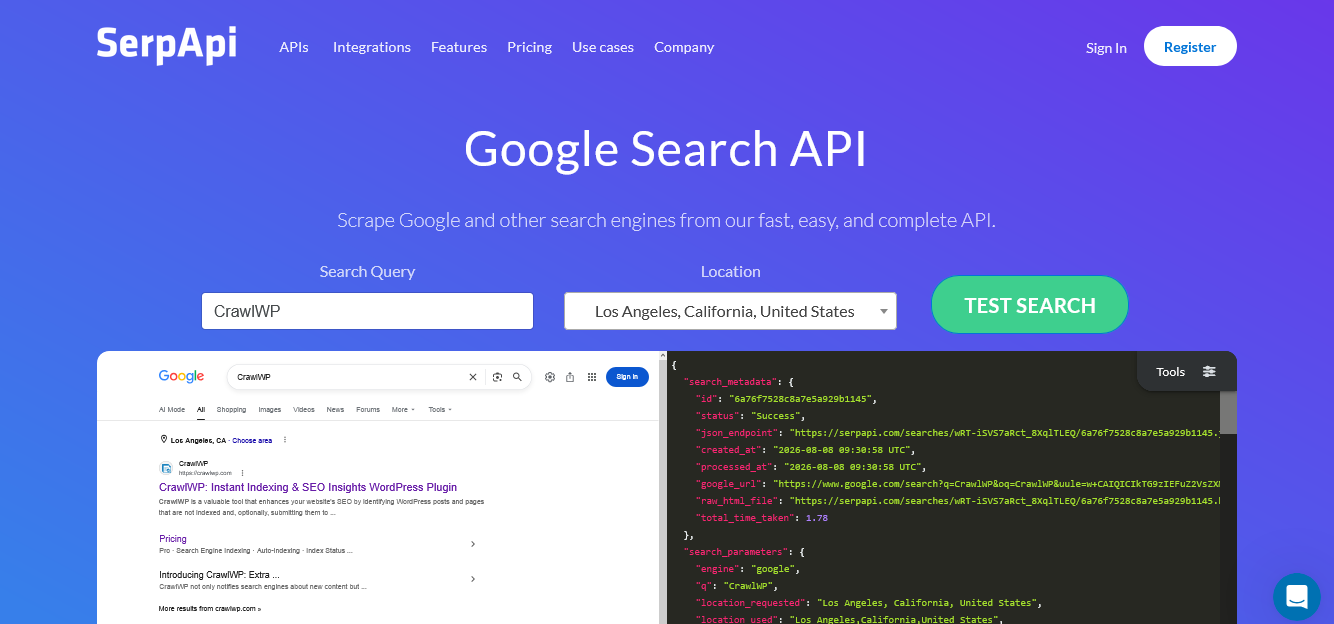
Best for: Real-time SERP data, rapid prototyping, teams prioritizing developer experience and documentation quality
Pricing model: Monthly subscription plans with fixed search allocations
SerpApi’s Starter plan costs $25/month and includes 1,000 searches. DataForSEO’s Standard Queue delivers the same 1,000 SERPs for approximately $0.60.
At entry volume, SerpApi is the most expensive per-query option on this list.
What justifies that premium: SerpApi returns results in under a second. DataForSEO’s Standard Queue takes approximately five minutes. For real-time applications, that latency difference is the entire decision.
SerpApi covers 80-plus search engines including Google, Bing, YouTube, Amazon, and Walmart. The documentation is the clearest of any provider on this list, and the G2 rating reflects this: SerpApi’s G2 rating of 4.8/5 beats DataForSEO’s 3.8/5, reflecting easier UX and cleaner documentation.
One significant development to monitor: Google filed a federal lawsuit against SerpApi in December 2025 for DMCA violations. A court hearing was set for May 2026. If the court grants an injunction, SerpApi’s core scraping product could be affected.
Teams building production systems on SerpApi should maintain awareness of this legal situation and consider contingency options.
Unused monthly searches do not roll over. At partial utilization, effective cost per query rises significantly from the headline rate.
Best use case: Consumer-facing applications where response speed matters, real-time keyword monitoring, teams new to SERP APIs who need strong documentation and straightforward integration.
ValueSERP (by TrajectData)
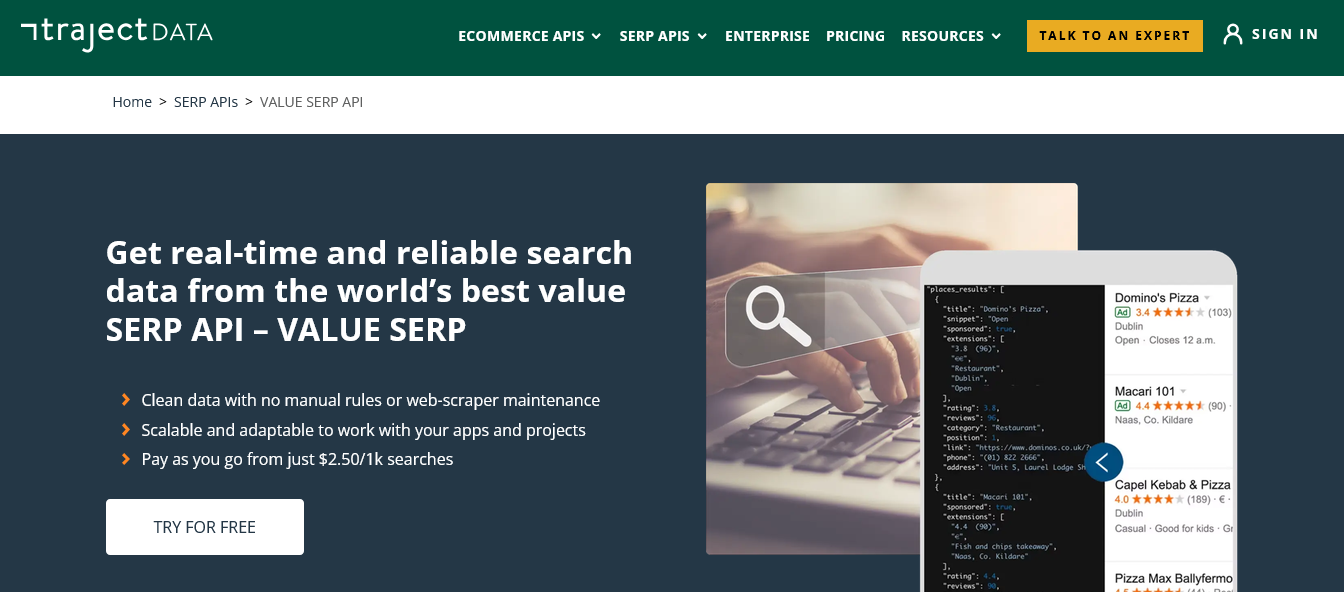
Best for: Rank tracking at scale with built-in scheduling, location-specific keyword position monitoring
Pricing model: Pay-as-you-go credits (never expire) and batch processing plans
ValueSERP is the most purpose-built option for rank tracking among the major SERP API providers, offering a free city-level Locations API and a scheduled Batches API specifically designed for automated daily keyword position monitoring.
The Batches API lets you define a list of keywords and a schedule; ValueSERP then queries those keywords at the set interval and returns the results. For rank tracking use cases, this eliminates the need to build your own scheduling infrastructure.
The free Locations API returns geographic location codes for over 100,000 cities worldwide at no additional cost. This is particularly valuable for local SEO rank tracking, where checking positions for a keyword in a specific city requires accurate location targeting.
Pricing is transparent and pay-as-you-go: credits do not expire, which makes it practical for teams with variable query volumes.
Best use case for SEO software projects: Building rank tracking features into existing SEO tools, agency dashboards with daily automated keyword position reporting, local SEO platforms requiring city-level location targeting.
Serper.dev

Best for: Teams wanting simple, affordable access to Google SERP data with a straightforward JSON API
Pricing model: Pay-as-you-go credits
Serper offers 2,500 free searches per month for new accounts, with paid credits available at competitive per-query rates. At 10,000 searches per month, Serper costs approximately $10.
At higher volumes, Serper’s pricing drops further, making it one of the more cost-effective options for moderate-volume use cases.
The API is notably simple to integrate.
A single POST request to api.serper.dev/search returns organic results, knowledge graph data, People Also Ask boxes, related searches, and featured snippets in a clean JSON format.
The response structure is more approachable for developers new to SERP APIs than DataForSEO’s more complex endpoint architecture.
At 1 million searches per month, Serper drops to about $0.30 per 1,000 requests at its top-volume tier. For teams that can commit to volume, Serper’s high-volume pricing is competitive with DataForSEO’s async queue pricing.
Best use case: Moderate-volume SEO research workflows, startups building SEO tools on a budget, developers who prioritize API simplicity over maximum feature depth.
Google Search Console API vs Third-Party SERP APIs: Which Do You Need?
The answer depends entirely on what data you truly need:
You want to check keyword rankings for your own WordPress site: Use CrawlWP. It connects to the Google Search Console API, displays your rankings inside WordPress, and covers Google, Bing, and Yandex in one dashboard. Free tier available. No API credentials to manage.
You want to check keyword rankings for competitor sites: The Google Search Console API cannot help here. Use DataForSEO (lowest cost at high volume, pay-as-you-go), SerpApi (fastest response times, best documentation), ValueSERP (built-in scheduling for rank tracking), or Serper (simplest integration, generous free tier).
You are building a rank tracking product or SEO software: Competitive intelligence requires third-party SERP APIs. These let you monitor competitor domain rankings for the same keyword sets you track for yourself, creating an ongoing feed of competitive position data. DataForSEO and ValueSERP are the most commonly used providers for this use case.
You want both your own rankings and competitor data: Combine CrawlWP (authoritative first-party data from Google, Bing, and Yandex for your own site) with a third-party SERP API for competitor monitoring. The two data sources complement each other: CrawlWP gives you exact data for your own properties; third-party APIs give you estimated position data for any domain.
Interpreting Keyword Position Data Correctly
Position data from any source, whether the Google Search Console API or a third-party SERP API, requires careful interpretation.
Average position is not a live snapshot:
When someone says “we rank number 6 for that keyword,” they are describing one data point from a much messier reality. Google does not assign a single fixed position to a page. What shows up and where it appears varies constantly depending on the searcher’s device, location, search history, and the exact query used.
Search Console position is an aggregate across thousands of real searches over time. A SERP API position check is a single live snapshot from one location at one moment. Neither is definitively “correct.” Both are useful for different purposes.
High impressions with low CTR is an opportunity:
A keyword where your page appears thousands of times but earns a few clicks is not a failure. It is an optimization opportunity. The ranking is there. The title or meta description is not compelling enough to earn the click. This is where Search Console data, surfaced through CrawlWP, is most actionable.
Position 4 to 10 with high impressions is priority territory:
Position 1 captures 27.6% of clicks, position 2 captures 15.8%, and position 3 captures 11.0%. Results beyond page one remain below 1%.
Keywords where you rank positions 4 to 10 with significant impression volume represent the most efficient optimization targets: you are already visible, you are already relevant, you just need to move up a few positions to capture more traffic.
FAQs
Can I use the Google API to check keyword rankings for any website?
No. The Google Search Console API only works for properties you own and have verified. You cannot use it to check position in Google search for competitor domains.
For competitor rank checking, you need a third-party SERP API such as DataForSEO, SerpApi, or Serper.
What is the difference between Google Search Console position and live SERP position?
Search Console gives you position, impressions, clicks, and CTR averaged across thousands of real searches over time. A SERP API gives you a live snapshot from one device, one location, and one point in time, which isn’t representative of anything broader.
Both are useful but measure different things. Search Console shows aggregate performance. SERP APIs show live results at a specific moment.
Is the Google Search Console API free to use?
Yes. The Google Search Console API is free for verified site owners. There are no per-query charges and no usage tiers. The limitation is that it only returns data for properties you own, and it provides aggregated historical data rather than live ranking snapshots.
How does CrawlWP use the Google Search Console API?
CrawlWP connects to the Google Search Console API on your behalf and displays the ranking data inside your WordPress dashboard. You see keyword-level data including position, impressions, clicks, and CTR without needing to access the API directly or log into Google Search Console separately.
How accurate is Google Search Console position data?
It is the most accurate source of keyword position data available for your own sites. The Search Console API gives you actual impression-weighted position data directly from Google. There is no estimation involved.
Third-party rank tracking tools that crawl Google’s SERPs provide estimates that may differ from Search Console data because they capture single snapshots rather than aggregated performance across all searches.
What happened to Google’s Custom Search JSON API?
Google’s Custom Search JSON API is closed to new customers, and existing customers must transition off it by January 1, 2027.
It was never a true organic rankings API: it capped at 10 results per request and returned a curated subset of Google’s index that did not accurately reflect real organic rankings.
Which third-party Google ranking API is the cheapest?
DataForSEO offers the lowest per-query cost in the market at approximately $0.0006 per standard queue request, with no monthly minimum. SerpApi is the most expensive at every volume tier.
At 1 million monthly requests, DataForSEO costs approximately $600 compared to SerpApi’s approximately $3,750. For the lowest entry cost with the simplest integration, Serper offers 2,500 free searches per month for new accounts.
Does CrawlWP show Bing and Yandex keyword rankings as well?
Yes.
In the Bing Stats section, you can see daily performance of your pages and ranking keywords on the Bing search engine. In the Yandex Stats section, you can see the top keywords your website ranks for in Yandex Search as well as pages indexed and visible in Yandex search results.
Both are displayed in the same WordPress dashboard as your Google ranking data.
What does CrawlWP cost?
The free version includes the full SEO Stats dashboard covering Google, Bing, and Yandex keyword ranking data inside WordPress. The Pro plan costs $49/year and adds bulk URL submissions, SEO email reports, advanced analytics, and priority support.