
Every important post and page on your WordPress website should have a clear SEO title and a useful meta description.
CrawlWP lets you customize these details for individual content while still giving you templates for everything you leave blank.
Your SEO title helps search engines understand the page and is commonly used for the title link in search results. The meta description gives searchers a short summary of the page. Together, they can make your pages easier to understand and more appealing to click.
Add an SEO title and meta description
- Open the post or page you want to edit in the WordPress editor.
- Scroll below the main content until you find the CrawlWP SEO box. In the block editor, the SEO metabox appears in the panel at the bottom of the screen. When you only see a bar labeled Meta Boxes, click it to expand the panel.
- Stay on the General tab and enter your SEO title.
- Add a Meta description that briefly explains what the page offers.
CrawlWP shows a length indicator below each field. The title is measured by pixel width rather than simply counting characters, which gives you a better idea of when a search engine may shorten it. The Search preview also lets you switch between Desktop and Mobile views.
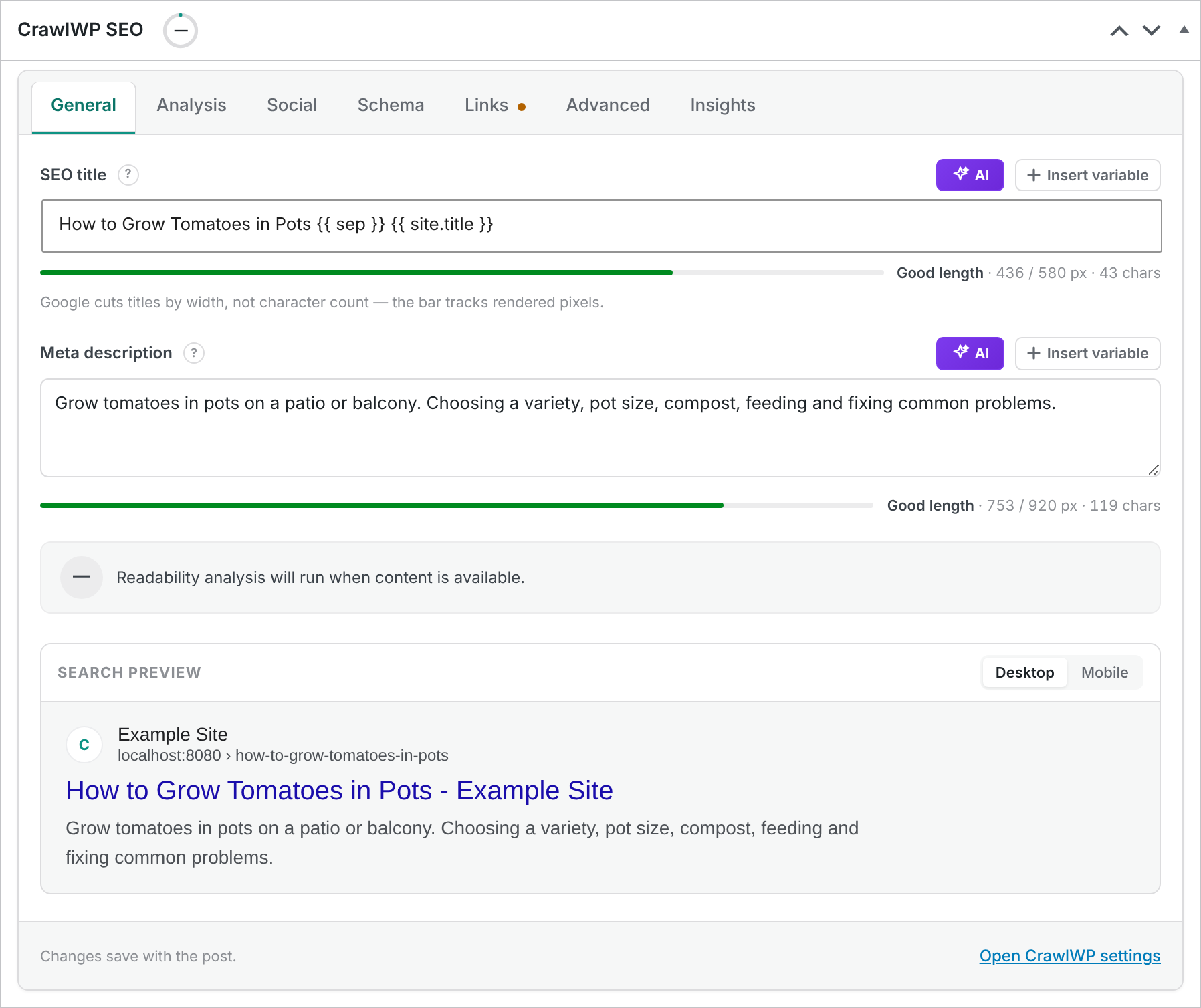
- Save your changes by clicking Save or Update.
Write a better SEO title
The best SEO titles describe the page naturally and make its main topic obvious. Start with the information that matters most to the person searching, then include your brand name when it adds useful context.
- Make the topic of the page clear.
- Use the main keyword naturally when it accurately describes the page.
- Keep the wording specific instead of using vague titles.
- Avoid repeating the same keyword or adding unrelated search terms.
- Use the pixel meter and preview to spot titles that are likely to be shortened.
Do not try to make every title follow an identical format. Important pages may deserve a custom title that targets a specific search intent, while less important pages can safely use the post type template.
Write a useful meta description
A meta description should tell someone what they will find after clicking the result on a search engine results page.
Focus on the page itself rather than writing a generic description that could apply to every page on your website.
- Summarize the main benefit or information on the page.
- Include the primary topic naturally where it makes sense.
- Make the description specific to the page.
- Write for humans rather than filling the description with keywords.
Search engines can choose different text for the snippet they display. A carefully written description improves the information you provide to search engines, but it does not force them to use that exact wording for every query.
Write them with AI
If an AI provider is connected to WordPress, click the AI button next to SEO title or Meta description to have it written for you. See Generating SEO titles and descriptions with AI.
Use variables in your SEO title and description
Variables let you combine fixed text with information that CrawlWP can generate automatically. When the page is displayed, CrawlWP replaces each variable with its current value.
For example, {{ site.title }} inserts your WordPress site title, while {{ sep }} uses the title separator configured in CrawlWP. You can also use variables for information such as the post title, category, author, and date.
Click Insert variable beside the field to see the available options and insert one without typing it manually.
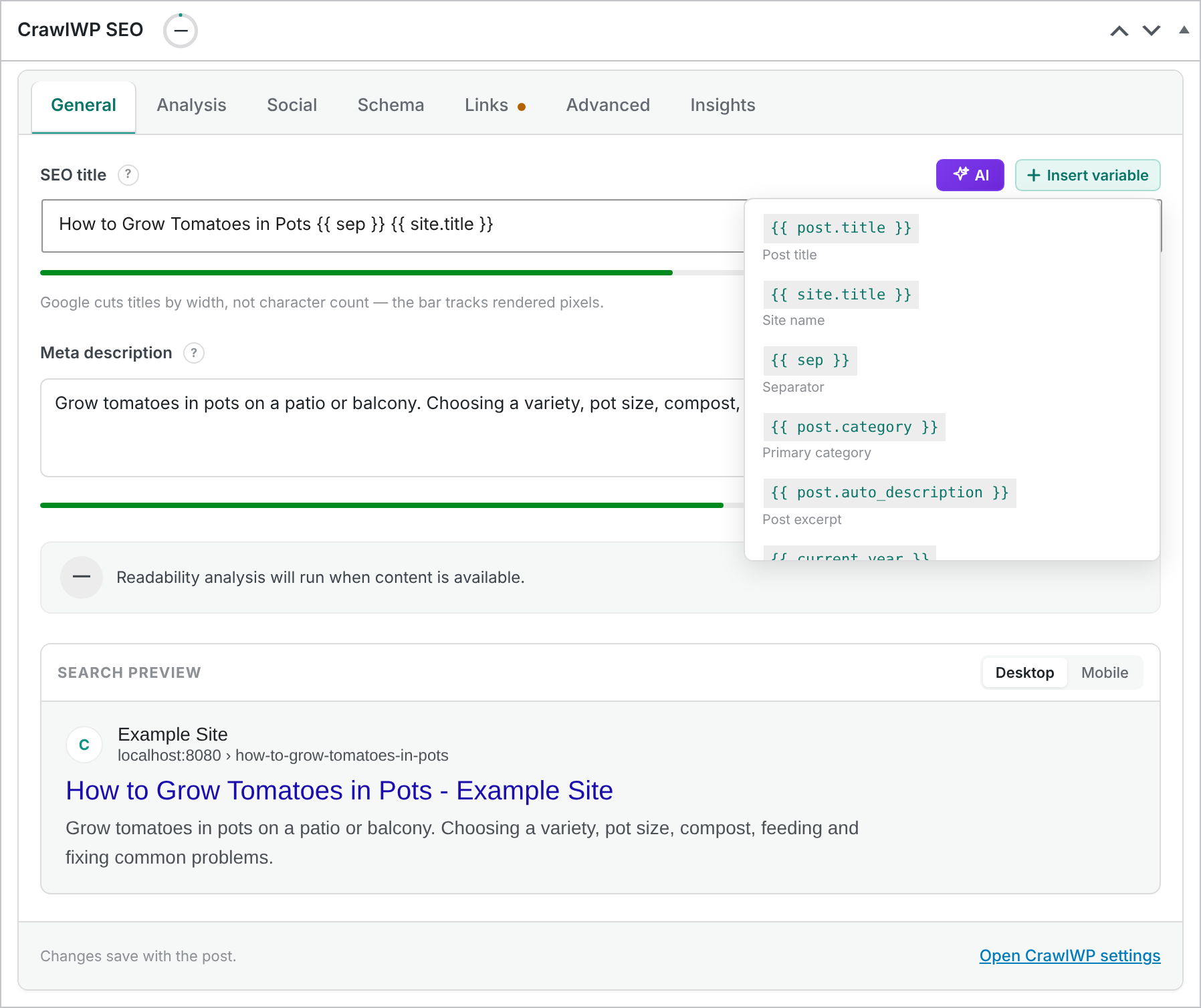
You can also type a supported variable directly into the field. For the complete list of variables available in CrawlWP, see Title and meta description template variables (reference).
What happens when you leave a field blank?
You do not have to write a custom title and description for every piece of content. When either field is empty, CrawlWP falls back to the template configured for that post type.
These templates are managed under CrawlWP > Settings > Title & Meta. This allows you to establish a sensible default for posts, pages, products, and other public custom post types.
The default templates for a post or page are:
- SEO title:
{{ post.title }} {{ sep }} {{ page }} {{ sep }} {{ site.title }} - Meta description:
{{ post.auto_description }}
For the automatic description, CrawlWP uses the post excerpt when one exists. If there is no excerpt, it uses the first 30 words of the content.
An SEO title or meta description entered directly on the post always takes precedence over the post type template.
See Search appearance settings for posts, pages, and custom post types to learn how these defaults work.
When should you customize an individual page?
Templates are useful for scale, but some pages deserve individual attention. Consider writing a custom title and description when:
- The page targets an important search query.
- The default template produces a vague or repetitive title.
- The page covers a very specific topic that needs different wording.
- You want the title to emphasize a different benefit, product, service, or audience.
- The automatically generated description does not explain the page well enough.
A good approach is to let templates handle most of the website and spend your manual optimization time on pages that are important for traffic, conversions, or revenue.
Optimize titles around search intent
Do not choose an SEO title simply because it contains a keyword. Make sure it matches what someone searching for that phrase actually wants.
- A how-to article should make it clear that the page teaches a process.
- A product page should identify the product and its main value or distinguishing feature.
- A comparison page should clearly communicate that multiple options are being compared.
- A service page should identify the service and, when relevant, its location or target audience.
Matching the title to the actual purpose of the page helps create a better experience for both searchers and search engines. Google recommends creating descriptive, useful page titles and content for people rather than trying to manipulate search rankings with keyword repetition.
Use the SEO preview before publishing
CrawlWP’s preview lets you check how your title and description fit together before you publish the page. Check both desktop and mobile views, and make sure the important information is easy to understand.
The preview helps you spot problems such as a title that is too long, an incomplete description, or wording that doesn’t clearly communicate the page topic.
Edit SEO titles and descriptions in bulk
You do not have to open every post individually when you need to update several SEO titles or descriptions. CrawlWP includes a Bulk Editor that lets you manage these fields from one table.
- Go to CrawlWP > Settings.
- Open Bulk Editor.
- Find the posts, pages, or custom post types you want to update.
- Edit the SEO titles and descriptions directly in the table.
- Click Save Table Changes.
The Bulk Editor is especially useful after a site migration, a template change, or an SEO audit where you need to fix a large number of pages.
Your SEO title is not always the title Google displays
Even when your HTML contains the title you entered, Google may generate a different title link or search snippet. Search engines can use other information from the page when they believe it better represents the content or the search query.
This is why it is better to write titles that are accurate, descriptive, and closely aligned with the visible page content rather than trying to force a particular search result.
Do not duplicate your H1 just for SEO
Your SEO title does not have to be an exact copy of the visible H1. It can be slightly shorter, clearer, or structured differently for search users, provided that both accurately describe the same page.
For example, you can shorten a long article heading in the SEO title when that makes the search result clearer. Avoid creating a title that promises something different from what the page actually contains.
Review the page’s social metadata too
The SEO title and meta description are intended primarily for search. CrawlWP also provides social settings for controlling what people see when a link is shared on social networks.
When you want the shared version to use different wording or imagery, open the Social tab in the CrawlWP SEO box and customize the Open Graph and X settings.
Check the final HTML
After publishing or updating the page, check what is actually being sent to visitors and search engines rather than relying only on the editor.
- Open the live post or page.
- View the page source.
- Find the
<title>element and the<meta name="description">tag. - Confirm that the values match your CrawlWP settings.
If the source contains the correct values but Google still displays something different, the search engine is choosing its own title or snippet rather than CrawlWP failing to generate the metadata.
SEO title and meta description best practices
- Give every important page a clear title. Don’t leave valuable pages dependent on a generic fallback when a custom title better matches their search intent.
- Make each important description useful. Avoid copying the same description across many pages.
- Keep the wording natural. Include relevant keywords where they belong, but do not repeat them unnaturally.
- Put important information first. Search results can truncate titles and descriptions depending on the available space.
- Match the page. Your title and description should accurately describe the content users will see after clicking.
- Use templates for scale. Let CrawlWP generate sensible defaults and manually optimize your highest-value pages.
Troubleshooting
The title in Google has not changed. First check the live page source. If the new title is present there, CrawlWP has generated it correctly. Google may need to crawl the page again before it updates its search results.
The old title or description is still in the page source. Clear your WordPress page cache and any cache provided by your hosting company or CDN. Then reload the live page and inspect the source again.
There are two title tags or two meta descriptions. Another SEO plugin, theme, or custom code may also be generating metadata. Inspect the source to find the second output and disable the duplicate source where appropriate.
The SEO title is unexpectedly long. Check for variables that expand to long values and look at the pixel meter. Remember that the final rendered value matters more than the number of characters typed into the field.
The meta description looks correct, but Google shows different text. This does not necessarily indicate an error. Search engines can generate snippets from other content on the page when they believe it better matches the search.
The CrawlWP SEO box is not visible. In the block editor, open the three-dot Options menu, select Preferences, open General, scroll to Advanced, and make sure CrawlWP SEO is enabled.
The CrawlWP SEO box is missing from a custom post type. CrawlWP provides the SEO metabox for public post types. Check that the custom post type is registered as public and review whether another plugin is restricting the editor interface.
The template is being used instead of my custom value. Make sure the custom SEO field was saved on the individual post or page. When you want the template to take over again, clear the custom field and update the content.
My variable is showing as text instead of being replaced. Check that you are using a supported CrawlWP variable and that its syntax is correct. Use the Insert variable menu or the template variable reference to verify the name.