
CrawlWP lets you control how your WordPress content appears in search engines without editing every post or page individually. You can create default SEO titles, meta descriptions, social images, robots directives, and schema settings for an entire post type.
These settings are especially useful for websites with a lot of content. For example, you can create one SEO title template for all blog posts, another for WooCommerce products, and a different set of settings for pages or a custom post type. Individual content can then override these defaults whenever needed.
Open the search appearance settings
- In your WordPress dashboard, go to CrawlWP > Settings.
- Open the Title & Meta tab.
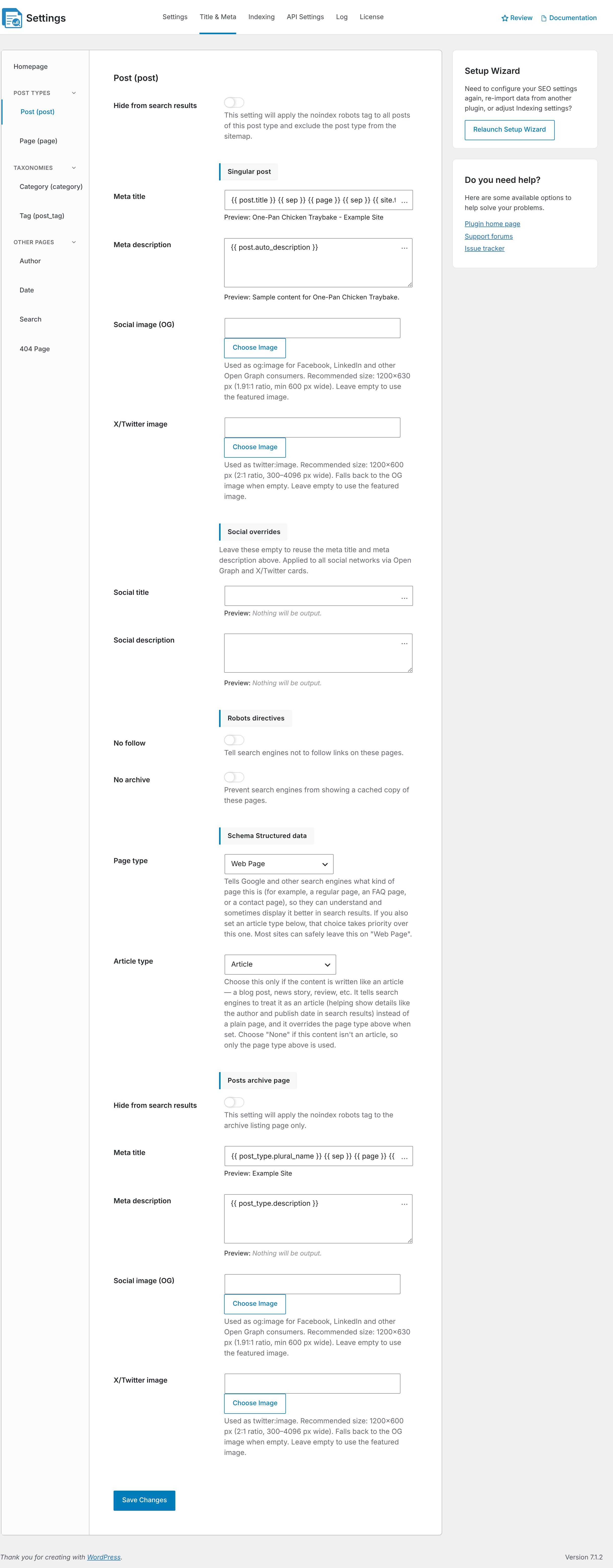
- Under Post Types, select the content type you want to configure, such as Post (post), Page (page), or a custom post type.
CrawlWP lists public post types registered on your WordPress installation. This can include post types created by plugins, such as WooCommerce’s Products.
How post type defaults work
The settings on this screen act as defaults for the selected post type. When a post has its own SEO title or meta description, that custom value takes priority over the template.
This gives you two levels of control. Set a template once for an entire post type, then customize individual posts only when they need a different title, description, image, or SEO setting.
Hide from search results
Turn on Hide from search results when the entire post type should be excluded from search results. CrawlWP adds a noindex robots directive to the items and removes the post type from its XML sitemap.
This can be useful for content types meant only for internal use, administrative purposes, or other situations where their individual URLs should not appear in organic search.
You can still make an exception for an individual post. The post’s Allow indexing setting can override the post type default. See Noindex, nofollow and other robots directives per post.
Singular post
The Singular post section controls the SEO settings used on individual items belonging to the selected post type.
- Meta title: creates the default title shown to search engines. It is used when an individual post does not have its own SEO title.
- Meta description: provides the default description for content that does not have a custom description.
- Social image (OG): controls the image used when the content is shared on networks that use Open Graph data, such as Facebook and LinkedIn. Leave it empty to fall back to the item’s featured image.
- X/Twitter image: controls the image used when the content is shared on X. When empty, CrawlWP can fall back to the featured image or the Open Graph image when there is no featured image.
You can insert dynamic information into the title and description templates by clicking … beside a field and selecting a variable. This lets one template automatically use information such as the post title, site name, or category.
CrawlWP starts with these templates:
| Field | Default template |
|---|---|
| Meta title | {{ post.title }} {{ sep }} {{ page }} {{ sep }} {{ site.title }} |
| Meta description | {{ post.auto_description }} |
For a complete reference of the variables available in CrawlWP, see Title and meta description template variables (reference).
Creating better SEO title templates
Your title template should identify the content clearly while keeping the most important information near the beginning. A simple blog title might use the post title followed by the site name, while an online store could include the product name and store name.
Avoid filling every title with unnecessary keywords. The title should describe the page naturally and make sense to someone deciding which search result to click.
Creating useful meta descriptions
A good default meta description should briefly explain what visitors will find on the page. You can use CrawlWP variables to generate descriptions automatically when manually writing one for every post is not practical.
Remember that search engines may rewrite a meta description when they believe another part of the page better matches the search query. A template therefore provides a useful default rather than a guarantee of the exact text that will appear in search results.
Social overrides
Social title and Social description let you use different text for social sharing. When you add values here, they are used instead of the normal SEO title and description when items from the post type are shared.
Leave these fields empty when you want social networks to use the same title and description as the page’s regular SEO metadata.
Robots directives
- No follow: adds
nofollowto items of this post type. - No archive: adds
noarchiveto the items.
These settings apply to the post type by default. An individual post can override No follow with its own Follow links setting.
Use robots directives deliberately. For example, setting an entire valuable content type to noindex can remove many useful pages from search results.
Schema Structured Data
The Page type and Article type options define the default structured data for this post type.
- Posts use Article as the default article type.
- Pages and custom post types use Web Page with no article type by default.
For most websites, the default schema types are suitable. You can also choose a more specific type where it accurately describes the content, then override the setting for an individual item from its Schema tab.
Archive page
Post types that have an archive get an additional section for configuring that archive page. For the standard Post post type, this is the Posts archive page, which is normally the page used to display your blog posts.
The archive section has its own Hide from search results setting, along with separate Meta title, Meta description, Social image (OG), and X/Twitter image settings.
The default archive templates are:
| Field | Default template |
|---|---|
| Meta title | {{ post_type.plural_name }} {{ sep }} {{ page }} {{ sep }} {{ site.title }} |
| Meta description | {{ post_type.description }} |
If your blog posts page is a static WordPress page rather than the automatically generated archive, the SEO title and meta description assigned directly to that page take precedence over these archive templates. See Setting up your homepage title and meta description.
Use search appearance settings strategically
Post type settings are most useful when you treat them as a consistent SEO foundation for your website rather than trying to optimize every URL from the same template.
- Blog posts: Use a title template that keeps the article title prominent and adds your site name. A generated meta description can be useful as a fallback.
- Pages: Let important pages use their own SEO titles and descriptions where you need more control over search intent.
- Products: Build templates around product names and your store or brand, then customize important products individually.
- Custom post types: Create a template around the information that makes each item unique instead of reusing a generic blog template.
- Low-value or internal content: Consider whether the post type should be indexed at all before creating titles and descriptions for it.
Save your settings
Once you are happy with the configuration, click Save Changes at the bottom of the page. Your new settings become the defaults for the selected post type.
How CrawlWP chooses the SEO title and description
For individual posts and pages, CrawlWP checks for a custom value before falling back to the post type template.
- If the item has a custom SEO title or meta description in its CrawlWP SEO box, CrawlWP uses that value.
- If no custom value exists, CrawlWP generates the value from the template configured for the post type.
This means changing a post type template can affect many pages at once, but posts with their own custom values will keep those values.
To update one item, edit the post or page directly. To review or change many SEO titles and descriptions without opening each item, use CrawlWP > Settings > Bulk Editor.
How social settings work
Social metadata has its own rules. A Social title or Social description configured for a post type is used when its content is shared on supported social networks, even when an individual item has a different SEO title.
When you need unique social copy for one post, open that item’s Social tab, turn off Use the SEO title and description, and enter the desired Open Graph title and Open Graph description.
The social defaults also apply to the post type’s archive page.
Check your search appearance after making changes
After changing a template, review a few real URLs from that post type. Open the pages on your website and check the generated title, meta description, social metadata, robots directives, and schema where relevant.
- Check an item with no custom SEO values to confirm the template is working.
- Check an item with its own SEO title or description to confirm the custom value still takes priority.
- Check the relevant archive page separately.
- View the page source when you need to confirm the exact HTML output.
Common SEO mistakes with post type templates
- Using the same template for every content type: Products, blog posts, pages, and custom post types often have different search intent and should not always share the same format.
- Making every title overly long: Keep the important part of the title clear and natural rather than filling it with repeated keywords.
- Writing keyword-heavy descriptions: A meta description should explain the page and encourage a click rather than repeat keywords unnaturally.
- Hiding an entire post type without checking it first: Enabling Hide from search results affects every item in that type unless individual settings override it.
- Forgetting archive pages: The SEO settings for individual posts do not automatically replace the settings for the post type archive.
- Adding schema that does not describe the content: Choose structured data types based on what the content actually represents.
Troubleshooting
A post type does not appear in the list. CrawlWP displays public post types. A private or internal post type may not appear, and media attachments are not treated as normal post types here.
My template is not being used. The individual post probably has its own SEO title or meta description. Open the item’s CrawlWP SEO box and clear the custom field when you want the post type template to take over.
Posts still appear in Google after enabling Hide from search results. Search engines must crawl the URLs again before they can process the noindex directive. Also check the individual post’s Advanced settings, because its own indexing setting can override the post type default.
The archive title is not changing. Check whether the archive is actually being generated by the post type or whether you are using a static WordPress page. A static page can have its own SEO title and description that take precedence.
The preview does not look like the final result. The preview uses an existing item as an example. Open a real page and inspect its source to confirm the actual title, description, robots directives, and schema.
Search results do not show the exact meta description I entered. A meta description is a recommendation to search engines, not a guarantee of the exact snippet shown for every query. Google may choose a different section of the page when it believes that text better matches the search.
Changes are not visible on the live site. Clear your WordPress cache, hosting cache, or CDN cache and reload the page. Cached HTML can continue showing the previous SEO output until the cache is refreshed.