
Have you ever published a new WordPress post only to wonder why it isn’t showing up in Google search results?
You’re not alone. Many website owners expect their content to start ranking as soon as they hit the Publish button. In reality, getting a new page to rank takes time and the right SEO strategy.
Search Engines (Google, Bing, Yandex, etc) first need to discover your content, crawl it, understand what it’s about, and determine whether it deserves to appear for relevant search queries. That process depends on several factors, including the quality of your content, your site’s structure, internal linking, keyword optimization, and how easily search engines can access your pages.
The good news is that you can improve your chances of ranking by following a few proven SEO practices, which include choosing the right keywords, optimizing your content for SEO, and helping Google discover new pages faster through index submission.
In this guide, we’ll show you how to rank new WordPress content in search engines using actionable techniques. You’ll also learn how CrawlWP can help you notify search engines about newly published and updated content.
Table of Contents
What It Takes to Rank New WordPress Content in Search Engines
To rank new WordPress content in Google and other search engines, you need to focus on three broad areas:
- Help Google discover and index your content.
- Create content that satisfies what searchers are looking for.
- Build the relevance and authority needed to compete in search results.
These areas work together.
For example, you could publish an excellent article targeting a valuable keyword, but it may struggle to generate traffic if Google cannot discover or index the page. Similarly, getting a page indexed does not guarantee a high ranking if the content does not satisfy search intent or your website lacks authority in the topic.
A practical SEO process looks like this:
Research → Create → Optimize → Publish → Get discovered → Get indexed → Build authority → Monitor → Improve
Let’s look at each step in detail.
1. Keyword Research
Before you start writing a new WordPress post, you need to understand what your audience is searching for. This is where keyword research comes in.
Keyword research helps you discover the words and phrases people type into Google, Bing, Yandex, and other search engines when looking for information, products, services, or solutions. By understanding what your target audience is searching for, you can create content that answers their questions and is more likely to appear in relevant search results.
For example, if you want to write about WordPress SEO, you might find keywords such as “how to improve WordPress SEO,” “WordPress SEO tips,” or “how to get WordPress posts indexed by Google.” Each of these keywords can give you an idea for content that addresses a specific need.
Choose Keywords That Match Your Audience
Start by thinking about the questions your target audience is asking and the problems they are trying to solve. What information are they looking for? What would they type into Google, Bing, and search engines to find an answer?
You can use keyword research platforms like Google Keyword Planner, Ahrefs, Semrush, Ubersuggest, and Moz Keyword Explorer to find relevant keyword ideas.
Google itself can also be useful. When you search for a topic, pay attention to the autocomplete suggestions, the “People also ask” section, and related searches at the bottom of the results page. These can reveal the questions and phrases people commonly search for around your topic.
If your website is new or has limited authority, consider targeting lower-competition keywords rather than immediately trying to rank for broad terms that attract many competing websites.
For example, instead of targeting a broad keyword like “WordPress SEO,” you could focus on a more specific phrase such as “how to improve WordPress SEO for a new website.” Although the longer phrase may receive fewer searches, it can attract visitors who are looking for exactly the information your content provides.
Understand Search Intent
Once you have a list of potential keywords, look at the intent behind each search.
Search intent is the reason someone types a particular query into Google. Understanding it helps you create the type of content people actually expect to find.
Common types of search intent include:
- Informational intent: The user wants to learn something, such as “how to rank new WordPress content in Google.”
- Navigational intent: The user is looking for a specific website or brand, such as “CrawlWP.”
- Commercial intent: The user is researching products or services before making a decision, such as “best WordPress SEO plugins.”
- Transactional intent: The user is ready to take action, such as “buy WordPress SEO plugin.”
Before choosing a keyword, search for it on Google, Bing, Yandex, and study the results that appear on the first page. Look at the type of content showing. Are the results detailed guides, tutorials, product pages, comparison articles, or list posts?
This can give you a better idea of what searchers expect to see. Your content should aim to satisfy that intent while providing useful information that genuinely helps the reader.
Focus on Relevance, Not Just Search Volume
Another common mistake is choosing keywords based only on their monthly search volume. While keywords with high search volumes may seem appealing, they can also be highly competitive and difficult to rank for.
A keyword with fewer monthly searches can still bring valuable traffic if it is highly relevant to your audience.
For example, a website focused on WordPress SEO may benefit more from ranking for a specific WordPress indexing topic than from trying to rank for the broad term “SEO.” A more specific search may attract fewer visitors, but those visitors are more likely to be interested in the website’s content and services.
The goal is to find keywords that are closely related to your topic, align with your audience’s needs, and offer a realistic opportunity to rank in search results.
When you choose your keywords with these factors in mind, you have a stronger foundation for creating content that attracts the right visitors to your WordPress website.
2. Create High-Quality Content That Satisfies Search Intent
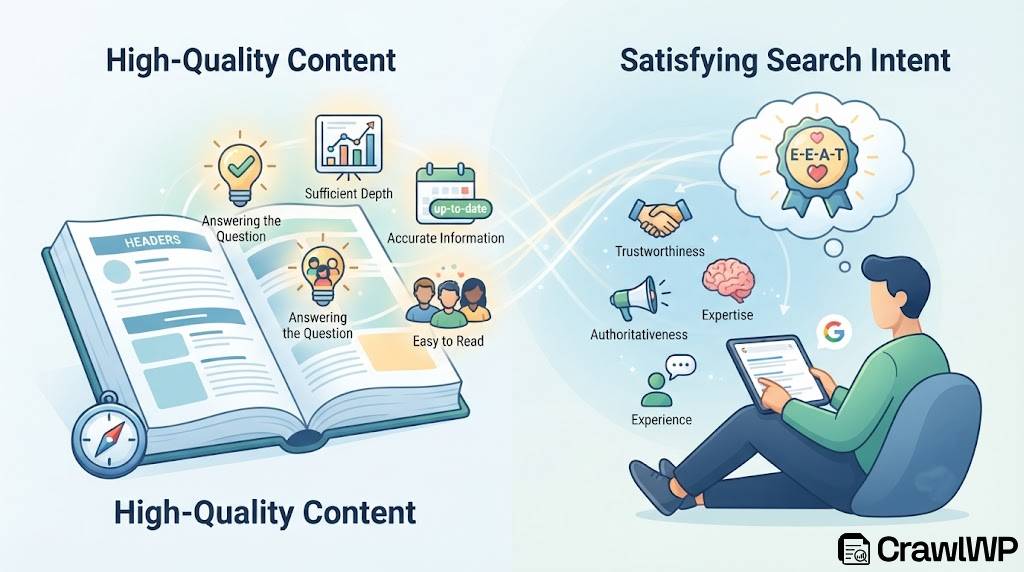
Once you have selected a target keyword, create content that genuinely answers the searcher’s question.
Google and search engines want to provide users with useful and relevant results. If your article only targets keywords without providing meaningful information, it is unlikely to perform well over time.
A good article should:
- Answer the main question early.
- Cover the topic in sufficient depth.
- Use clear headings and subheadings.
- Provide practical examples where appropriate.
- Address related questions users may have.
- Use accurate and up-to-date information.
- Avoid unnecessary repetition.
- Be easy to read on desktop and mobile devices.
Demonstrate Experience, Expertise, and Trust
When creating content, think beyond keywords and search rankings. Your article should also demonstrate that the information is trustworthy and that the person or website publishing it has a genuine understanding of the topic.
This is where Google’s concept of E-E-A-T, which stands for Experience, Expertise, Authoritativeness, and Trustworthiness, becomes relevant. While E-E-A-T is not a single ranking factor that guarantees higher positions in Google, these qualities are important characteristics of content that Google’s quality guidelines consider valuable.
Where appropriate, demonstrate first-hand experience by sharing practical examples, lessons learned, original insights, or real-world observations. Support factual claims with accurate information and reliable sources, especially when discussing topics where accuracy matters.
You should also make it clear who is responsible for creating the content. Adding an author bio, providing information about your business, and maintaining a transparent website can help readers understand who is behind the information they are reading.
Most importantly, focus on building trust. Avoid misleading claims, outdated information, exaggerated promises, and content created solely to attract search traffic. Your goal should be to create a resource that readers can confidently use to answer their questions or solve their problems.
Use AI Responsibly When Creating Content
AI can be useful when creating WordPress content. You can use it to brainstorm topics, organize ideas, create outlines, identify questions to answer, or help improve an early draft. However, relying entirely on AI to produce large amounts of generic content without human review is unlikely to produce the kind of useful resource readers are looking for.
If you use AI in your content creation process, review and improve the final result before publishing. Fact-check important information, remove repetitive sections, add your own insights, and include relevant examples or first-hand experience where possible.
Your content should also reflect your website’s knowledge and perspective rather than reading like a generic article that could have been published anywhere.
The goal is not to avoid AI completely. Instead, use it as an assistant while ensuring that the final content is accurate, original, useful, and genuinely written to help your audience.
3. Optimize Your WordPress Content for Your Target Keyword
Once you know what keyword you want to target, optimize your content naturally around that topic.
Your primary keyword can appear in important areas such as:
- The page title
- The URL slug
- The introduction
- Relevant headings
- The body content
- Image alt text where appropriate
- The meta description
However, avoid forcing the same keyword into every paragraph.
Google has become increasingly capable of understanding topics and context. Your article should naturally include related terms and concepts that help explain the subject.
4. Write a Compelling SEO Title and Meta Description
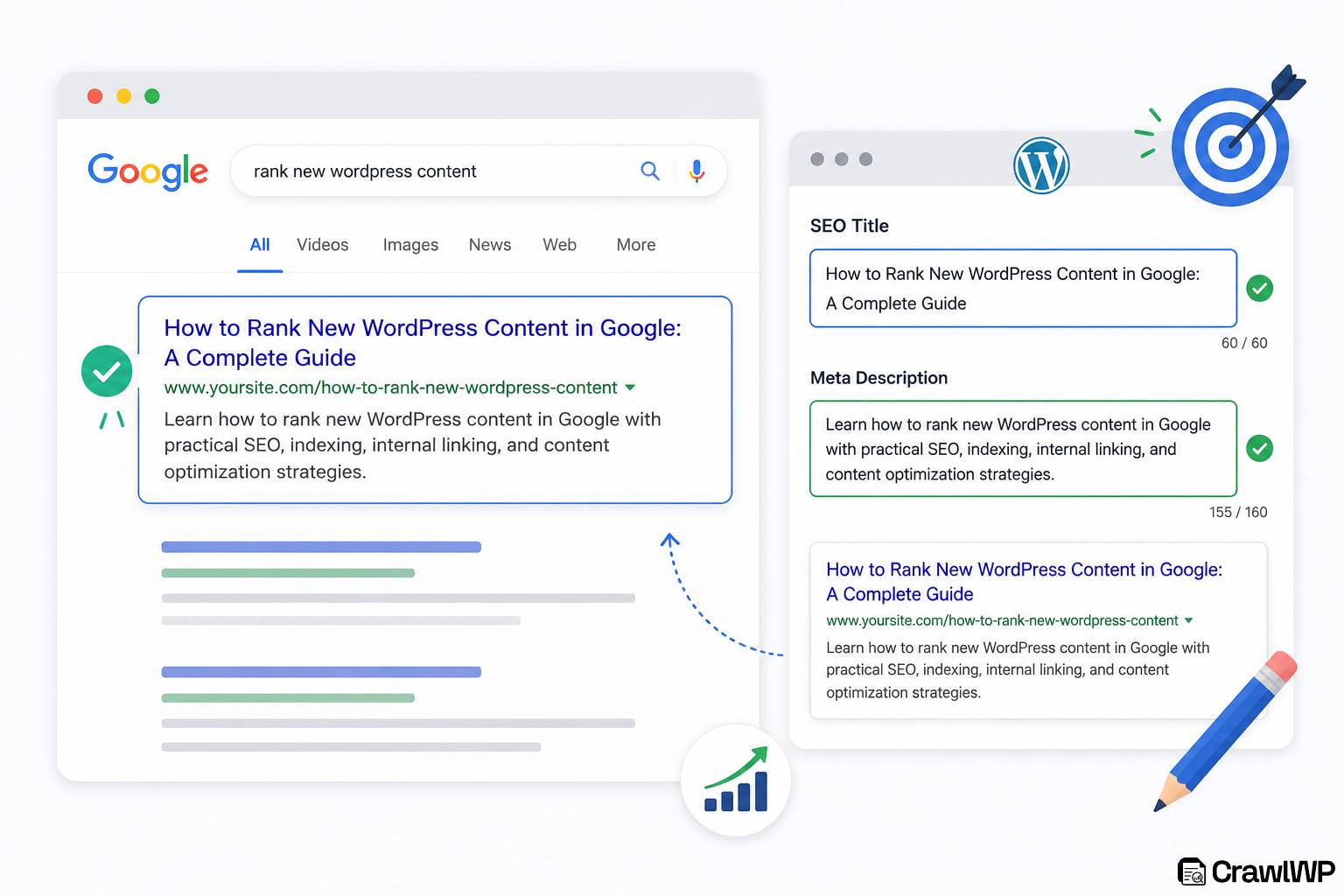
Your title is among the first things users see in Google search results.
A good title should clearly communicate what the page is about and give users a reason to click.
For example:
How to Rank New WordPress Content in Google
You can make your title more specific by including the expected outcome or the main benefit.
Your meta description should also summarize the page accurately and encourage users to visit your website.
For example:
Learn how to rank new WordPress content in Google with practical SEO, indexing, internal linking, and content optimization strategies.
Keep your title and description relevant to the actual page. Avoid making promises that the article does not deliver.
5. Build an Excellent Internal Linking Structure
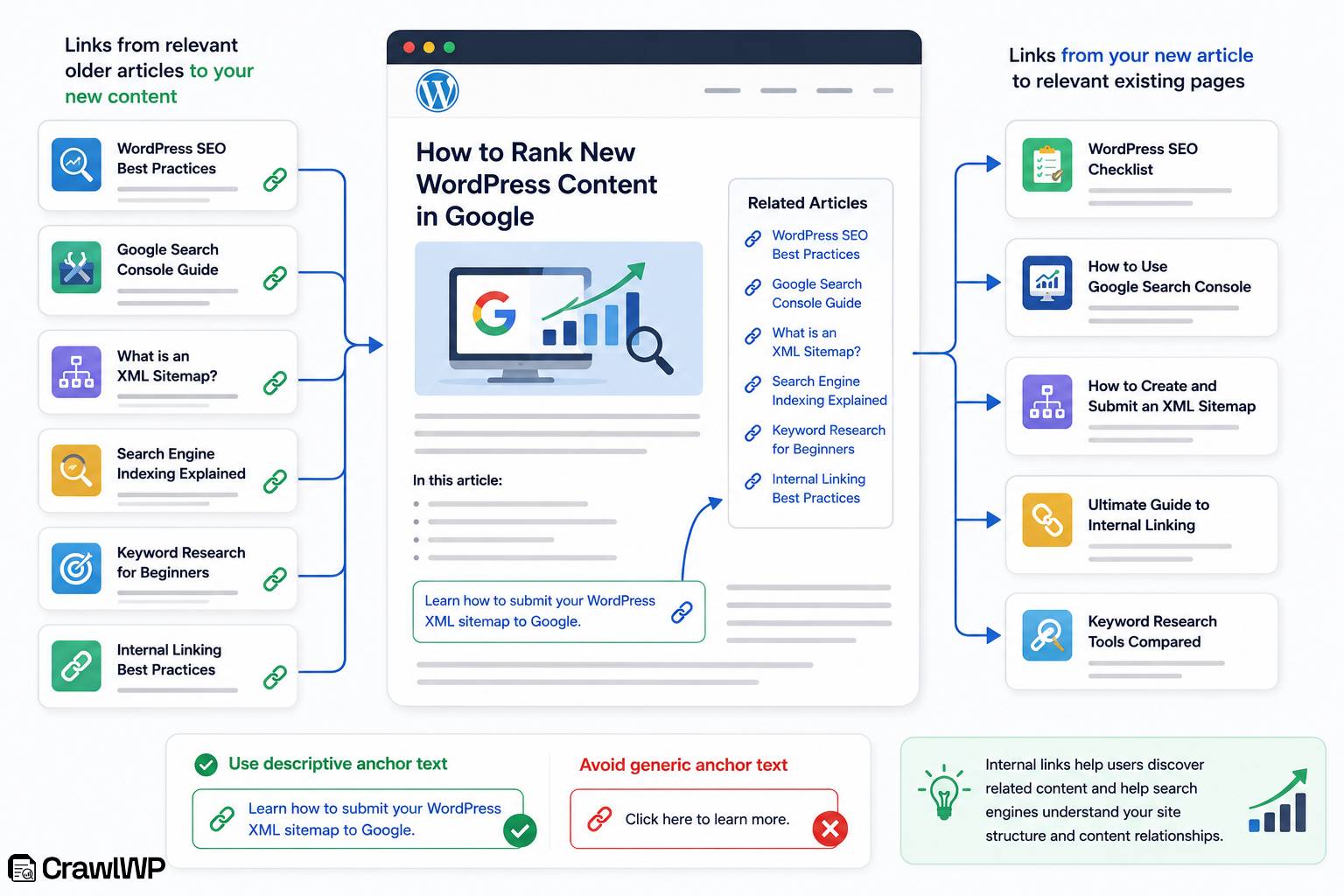
Internal links connect pages on your website.
They help users navigate between related content and give search engines additional ways to discover your pages.
When publishing a new article, look for relevant older articles to link to.
For example, if you publish an article about ranking new WordPress content, you could link to it from related articles about:
- WordPress SEO
- Google Search Console
- XML sitemaps
- Search engine indexing
- Keyword research
- Internal linking
You should also add links from your new article to relevant existing pages.
Use descriptive anchor text that tells readers what they will find after clicking.
Instead of:
> Click here to learn more.
You could write:
> Learn how to submit your WordPress XML sitemap to Google.
This gives readers and search engines more context about the linked page.
6. Improve Your Website’s Site Structure
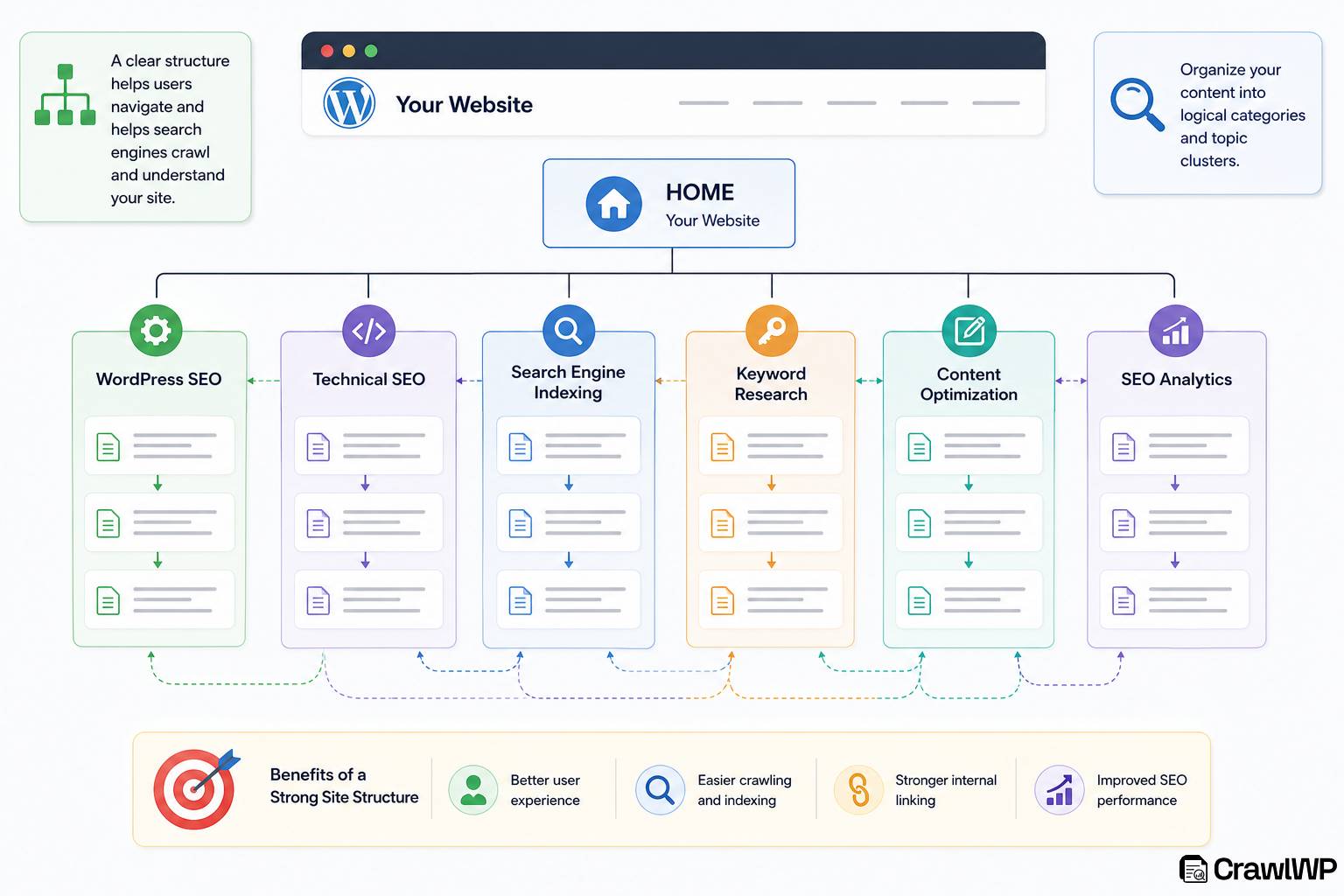
Your website structure affects how users and search engines navigate your content.
Organize your WordPress website into logical categories and topic clusters.
For example, a WordPress SEO website might have categories such as:
- WordPress SEO
- Technical SEO
- Search Engine Indexing
- Keyword Research
- Content Optimization
- SEO Analytics
Within each topic, create related articles that link to each other naturally.
A well-organized structure makes it easier for users to find related information and helps search engines understand the relationships between your pages.
7. Build Relevant Backlinks
Backlinks are links from other websites to your content. They help Google discover pages and contribute to your website’s authority and ranking potential. However, the quality and relevance of backlinks matter.
Instead of trying to acquire as many links as possible, focus on earning links from relevant websites that have a genuine reason to reference your content.
You can promote your new WordPress content through:
- Industry publications
- Relevant blogs
- Expert roundups
- Digital PR
- Guest contributions
- Original research
- Useful resources
- Partnerships
- Community discussions
Create content that people have a reason to reference. Original statistics, detailed guides, research, case studies, and practical resources can naturally attract links.
Avoid participating in link schemes or buying low-quality links solely to manipulate rankings.
8. Make Sure Google Can Crawl Your WordPress Website
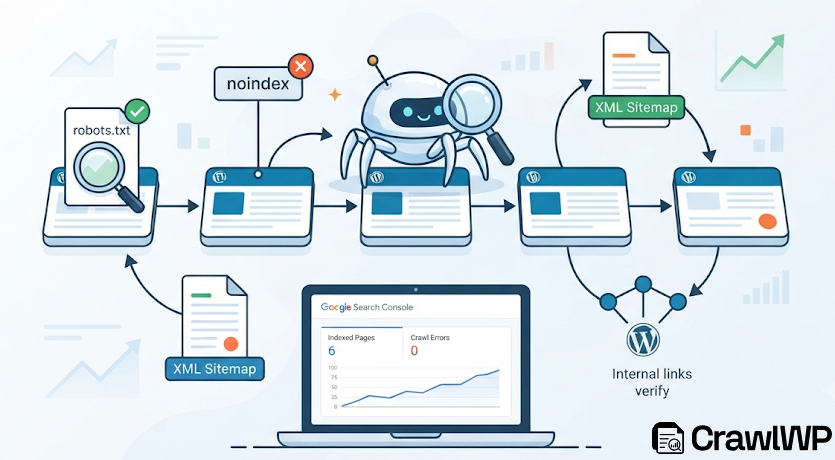
Even the best content won’t rank if Google can’t find or access it. Before your pages can appear in search results, Google must be able to crawl your website and understand your content.
Start by checking that your site is publicly accessible and isn’t blocking search engines. Review your robots.txt file to ensure important pages aren’t being disallowed, and verify that pages you want to rank don’t have a noindex meta tag or HTTP header.
Next, make sure your XML sitemap is up to date and submitted through Google Search Console. A sitemap helps Google discover new and updated pages more efficiently, especially on larger websites.
You should also review your website’s internal linking structure. Important pages should be easy to reach through your navigation, categories, and links from related articles. At the same time, fix broken internal links and redirect pages that return errors, as these can waste crawl budget and create a poor user experience.
Finally, monitor the Pages report in Google Search Console for crawl errors, blocked URLs, or indexing issues.
Addressing these problems early helps Google crawl your content more effectively and increases the chances that your new WordPress pages will be indexed and ranked.
9. Help Search Engines Discover and Index Your New Content Faster
Publishing a new WordPress post does not mean Google, Bing, Yandex, and other search engines will discover or index it immediately.
Google can find new content through internal links, XML sitemaps, links from other websites, and its regular crawling process. However, if you regularly publish or update content, you may want a more proactive way to notify search engines about these changes.
This is where CrawlWP can help.
CrawlWP is a WordPress SEO and indexing plugin that helps website owners manage content indexing and monitor their site’s search visibility. When you publish, update, or delete WordPress content, CrawlWP can automatically notify supported search engines about the changes.
For Google, CrawlWP integrates with the Google Indexing API to submit WordPress content for indexing. CrawlWP also supports integrations with Bing and Yandex, while IndexNow extends notification support across participating search engines, including Bing, Naver, and Seznam.cz, Yandex, and Yep
The process works like this:
Publish or update content → CrawlWP detects the change → Supported search engines receive a notification → Search engines discover the URL → The page is crawled and evaluated → The page is added to the search index
How to Set Up CrawlWP for Improved Google Indexing
To set up CrawlWP, visit our pricing page, choose a suitable plan, and download the plugin ZIP file.
Once you have downloaded the plugin, log in to your WordPress dashboard and go to Plugins > Add New, and click Upload Plugin.
Next, select the ZIP file you downloaded, then click Install Now to begin the installation.
After the installation is complete, click Activate to enable the plugin on your WordPress website.
Next, go to CrawlWP > Settings > Indexing > Google API
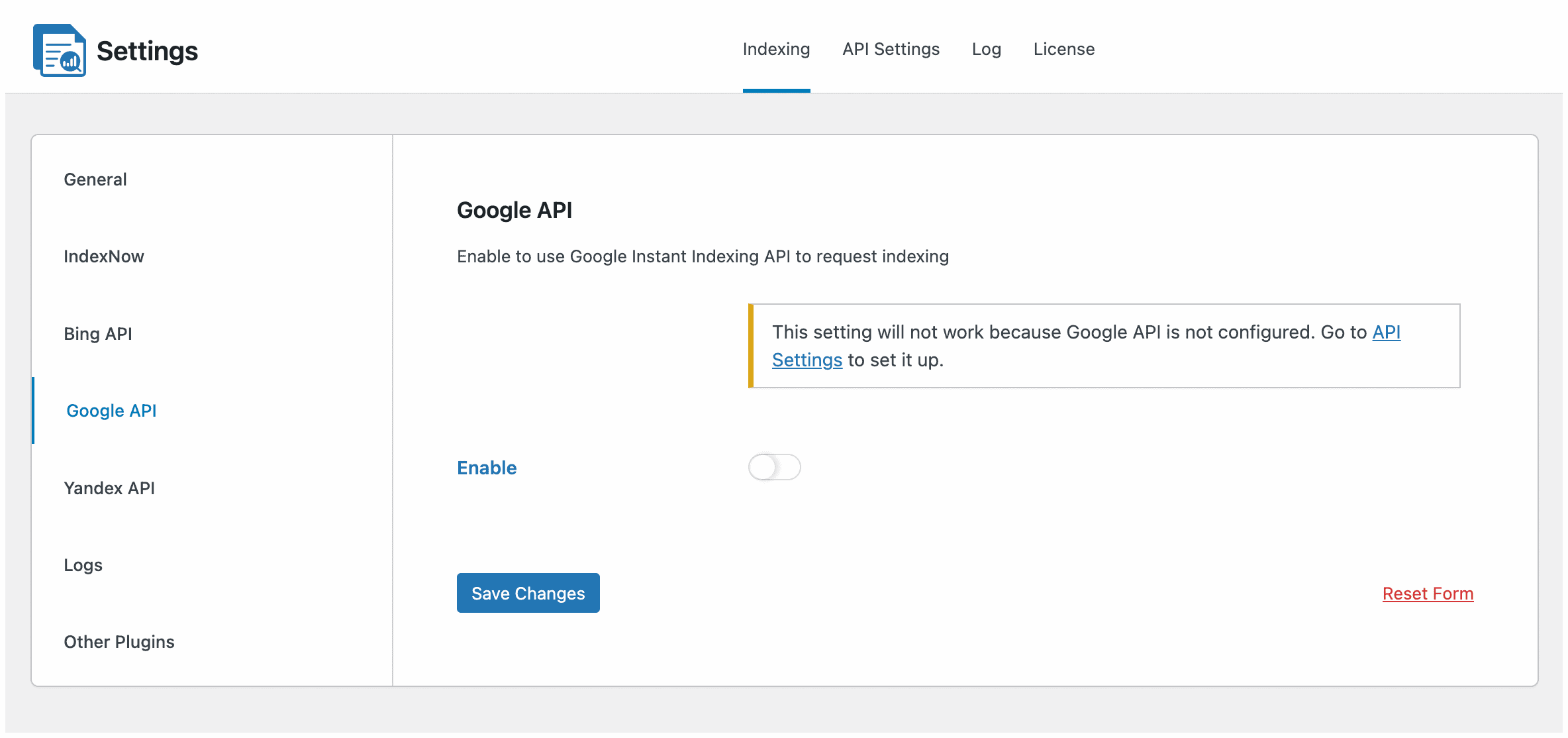
Enable the Google API option, then click Save Changes.
Next, you will then need to connect CrawlWP to the Google Indexing API. This requires setting up a project in Google Cloud, enabling the Indexing API, and creating the required service account credentials to authorize indexing requests.
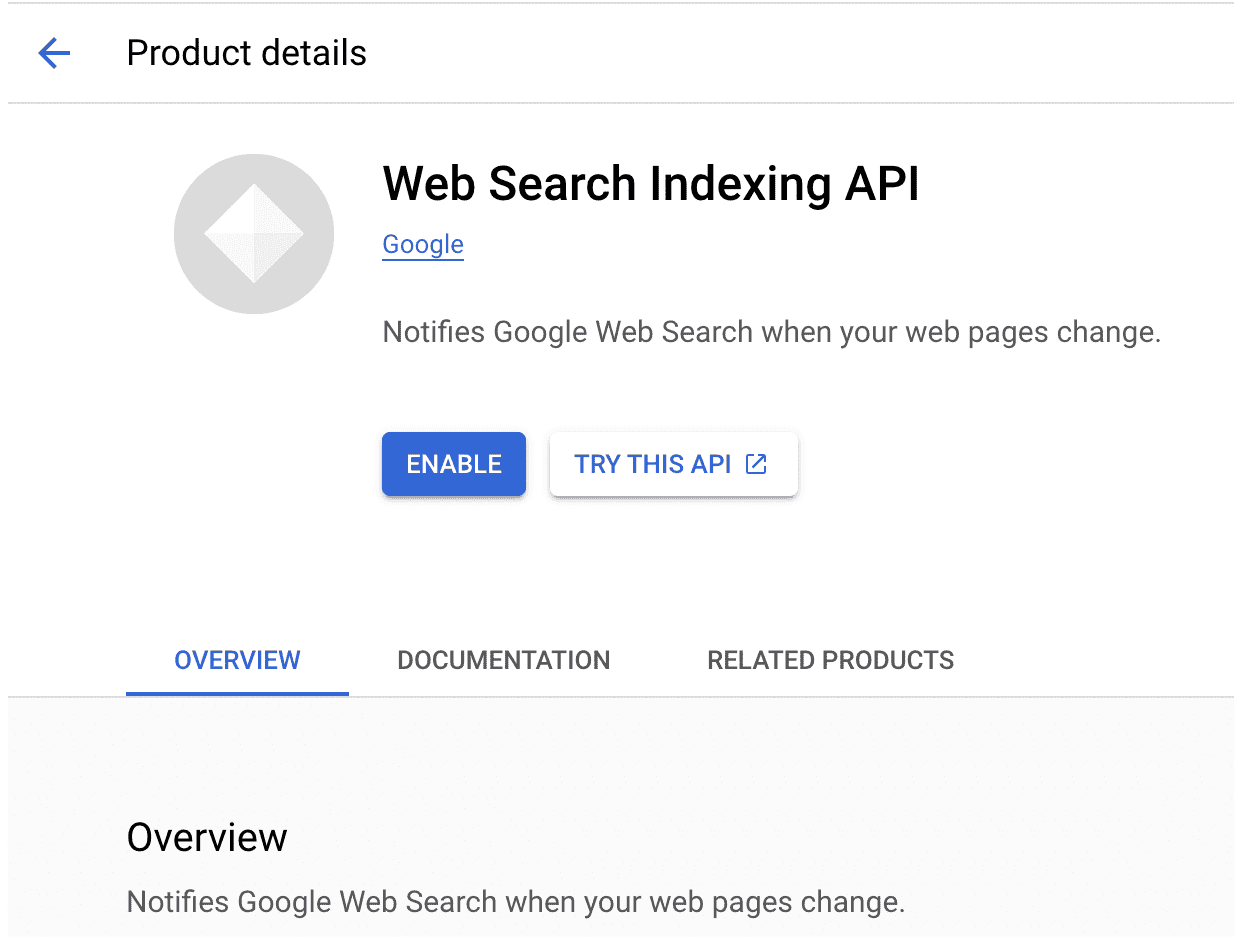
For detailed instructions, see our guide on integrating WordPress with the Google Indexing API.
After connecting the API, go to CrawlWP > Settings > Indexing > General
Here, you can choose which post types and taxonomies you want to submit for indexing.
You can also decide when CrawlWP should notify supported search engines. Depending on your settings, notifications can be triggered when posts are published, updated, or deleted, or when terms are added or changed.
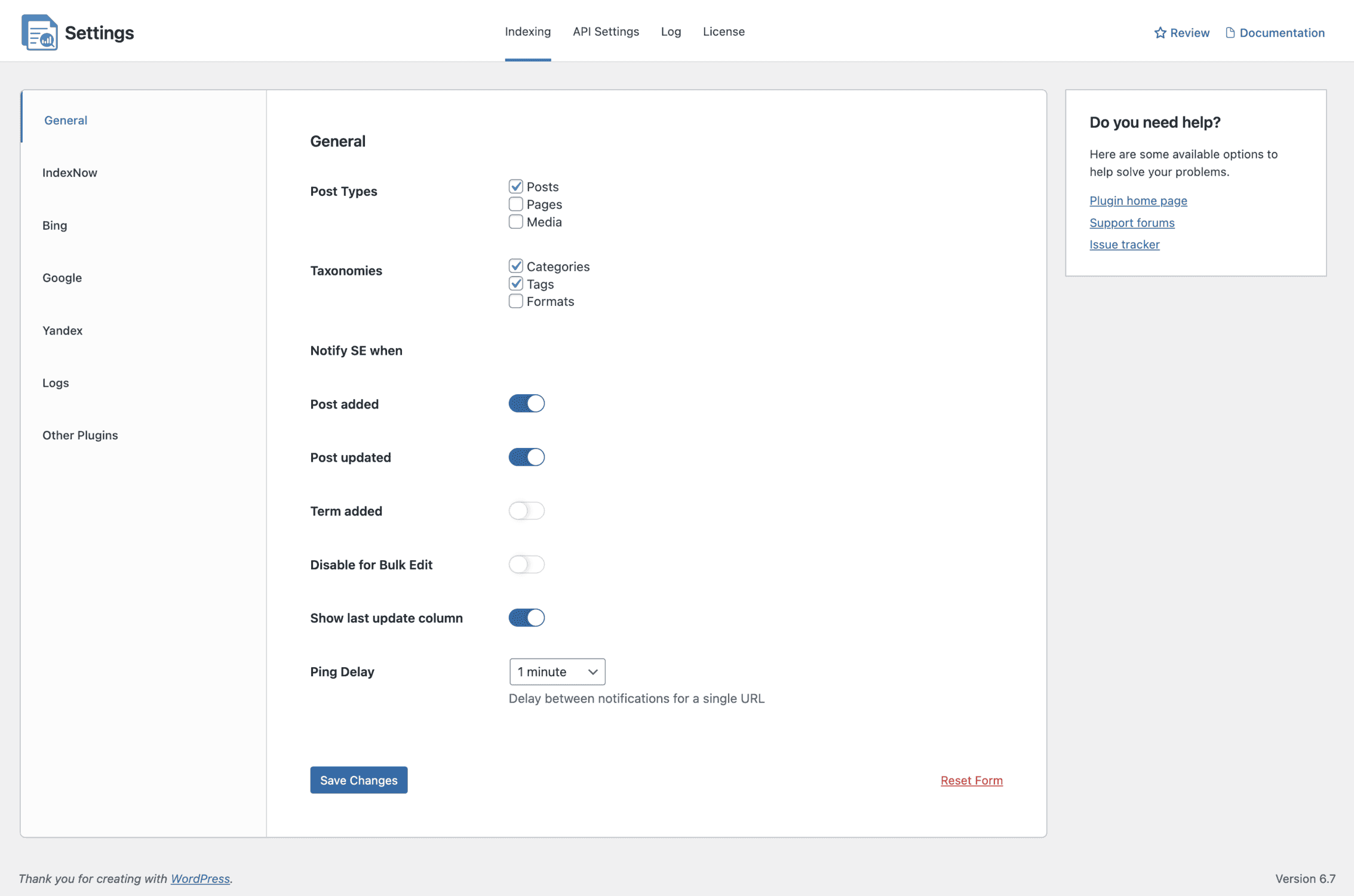
Once done, click on Save Changes.
With this done, CrawlWP can automatically submit your selected WordPress content to search engines for indexing when you publish new posts or make updates.
This means you do not have to manually submit every new URL whenever you publish or update your content. Instead, CrawlWP helps you manage the process automatically, giving search engines timely information about changes to your WordPress website.
10. Improve Your Page Experience
Google considers page experience signals when evaluating websites. Your WordPress website should provide a good experience across different devices.
Pay attention to:
- Mobile responsiveness
- Page loading performance
- Core Web Vitals
- HTTPS security
- Intrusive interstitials
- Layout stability
- Easy navigation
A slow website can frustrate visitors and increase the likelihood that they leave before reading your content.
To improve performance, optimize your images, reduce unnecessary plugins, use reliable hosting, implement caching, and minimize unnecessary scripts.
SEO is not only about search engines. A better experience can also help users stay longer and interact with your content.
11. Monitor Your Indexing Status
After publishing a new WordPress page, you should know whether Google has discovered and indexed it.
You can also use CrawlWP to monitor the Google, Bing, and Yandex index status of your content and WordPress posts.
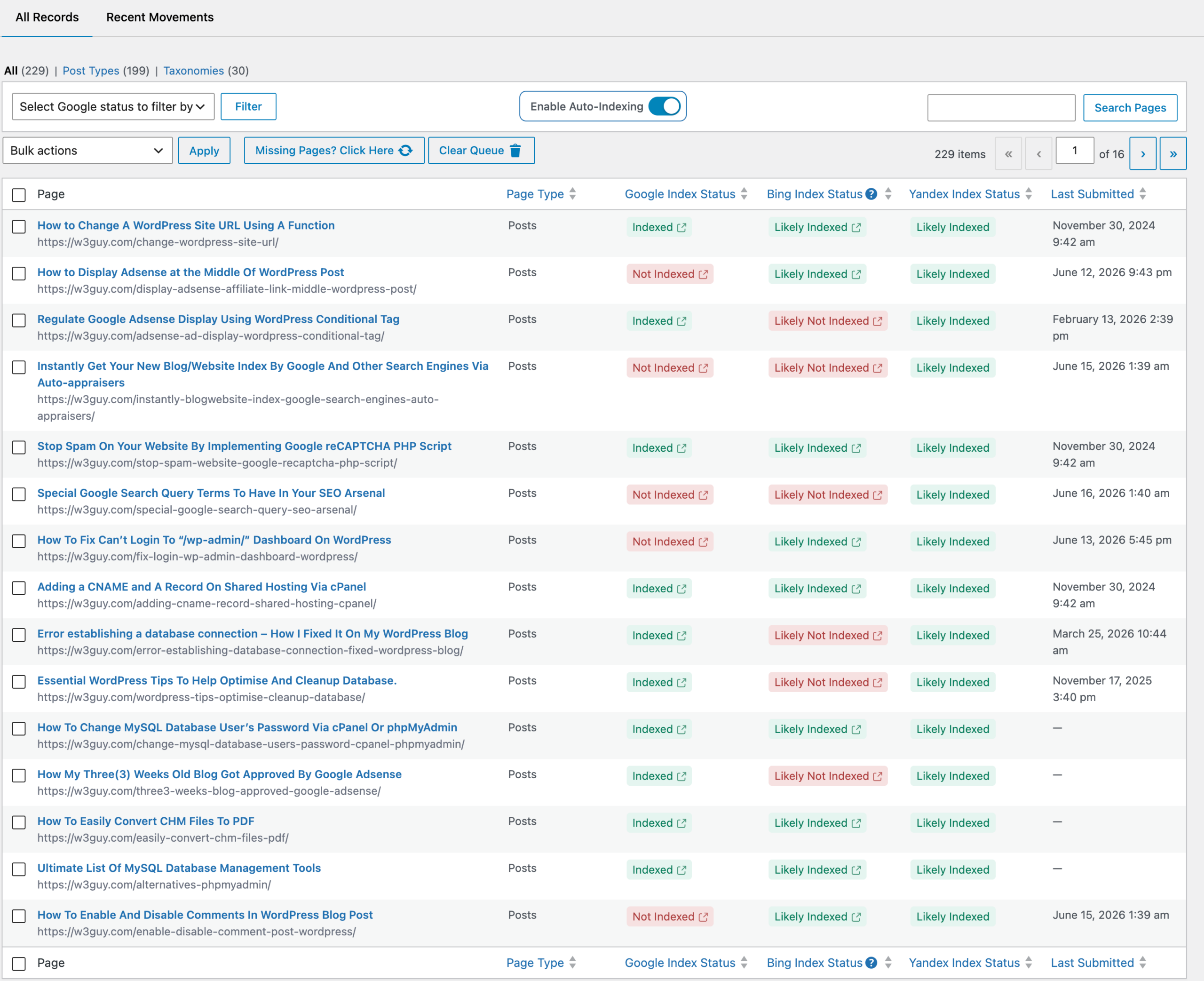
CrawlWP provides indexing-related features that can help you understand what happens after content is submitted. Depending on your setup and plan, you can access features such as:
- Manual URL submission
- Bulk-index submission of WordPress posts and pages
- Real-time indexing status tracking
- Indexing status reports
- Indexing history
- Tracking of submitted content
- Monitoring of indexed and deindexed pages in WordPress
This can be particularly useful for websites that publish frequently or manage a large number of WordPress pages.
Instead of guessing whether your content has been discovered, you can monitor your indexing activity and identify pages that may need further attention.
12. Use SEO Performance Data to Improve Your Content
Getting a page indexed is only the first step. Once your content starts appearing in Google, monitor its performance and look for opportunities to improve it.
Use CrawlWP to track how your content performs on Google, Bing, and Yandex.
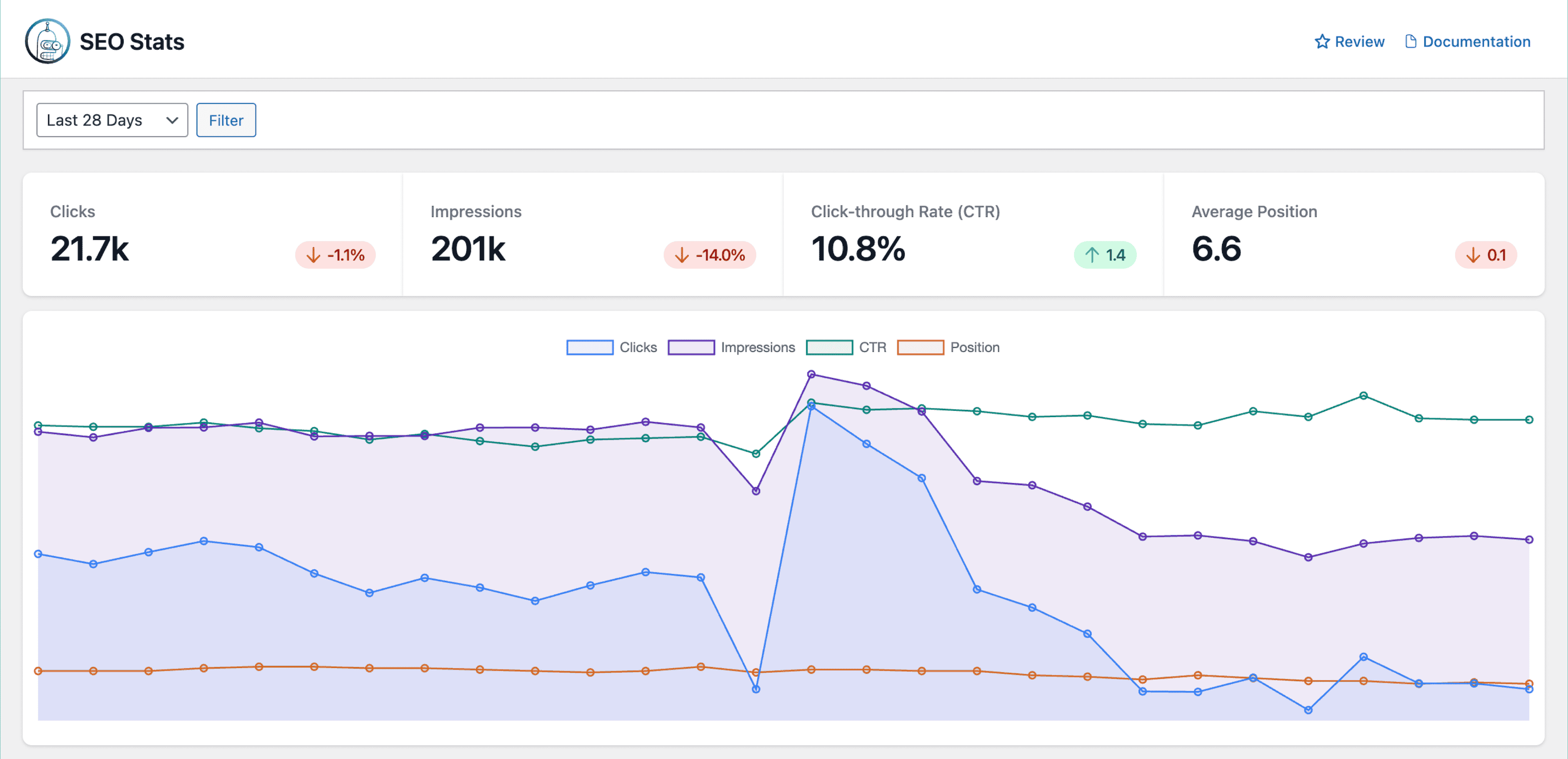
Review metrics such as impressions, clicks, average ranking position, and the keywords your pages rank for. If a page receives plenty of impressions but few clicks, consider improving its title and meta description.
If it’s ranking on the second or third page of search results, updating the content, adding useful information, and strengthening internal links may help improve its position.
By reviewing your SEO performance regularly and making continuous improvements based on real data, you can increase your content’s visibility and improve its chances of ranking higher in search results.
A Practical Checklist
Before and after publishing a new WordPress article, use this checklist:
Before Publishing
- Research your target keyword.
- Understand search intent.
- Analyze the current search results.
- Create useful, original content.
- Optimize the title.
- Write a relevant meta description.
- Create a clean URL slug.
- Add relevant headings.
- Optimize images.
- Add internal links.
- Check mobile usability.
- Review page speed.
- Proofread the article.
Immediately After Publishing
- Confirm the page is accessible.
- Check that the page is not blocked from indexing.
- Confirm the canonical URL is correct.
- Use CrawlWP to notify Google about the new content.
- Share the article with your audience.
- Add links to the new page from relevant existing content.
After Publishing
- Monitor indexing status.
- Track impressions and clicks.
- Monitor keyword rankings.
- Look for new search queries.
- Build relevant backlinks.
- Update the content when necessary.
- Use CrawlWP to resubmit or notify Google when meaningful changes are made.
Frequently Asked Questions About Ranking New WordPress Content in Google
Ranking new WordPress content in Google can take time, especially when your website is new or you’re targeting competitive keywords.
Below are answers to common questions about getting new content discovered, indexed, and ranked in Google.
Q1. How long does it take for new WordPress content to rank on Google?
There is no fixed timeframe for ranking new WordPress content in Google, Bing, and Yandex. A page may start appearing in search results within days or weeks, while competitive keywords can take months or longer to rank well.
The timeframe depends on several factors, including your website’s authority, the competitiveness of your target keyword, content quality, backlinks, internal linking, technical SEO, and how well your content satisfies search intent.
Instead of focusing only on how quickly a page ranks, monitor its progress over time. Look for increases in impressions, clicks, and average search position in Google Search Console. These signals can indicate that your content is gaining visibility in search engine results pages (SERPs), even if it has not yet reached your desired position.
Q2. Does getting a new WordPress post indexed guarantee that it will rank?
No. Indexing and ranking are two different things.
When Google indexes your page, it means the search engine has discovered and processed the URL and may consider it for relevant search queries. However, this does not guarantee that the page will appear at the top of the search results.
Your ranking depends on factors such as relevance, content quality, competition, website authority, backlinks, internal links, and overall page experience.
This is why getting your content indexed should be viewed as an important first step rather than the final goal.
Q3. How can I get Google to discover my new WordPress content faster?
You can help Google discover your new WordPress content by adding relevant internal links, maintaining an updated XML sitemap, and notifying Google when you publish or update important URLs. You can also use CrawlWP to automate the indexing notification process.
CrawlWP integrates with the Google Indexing API to submit WordPress content for indexing, helping Google become aware of new and updated content more efficiently.
Q4. How often should I update my WordPress content?
There is no universal schedule for updating content. The right frequency depends on the topic.
Some articles may remain accurate for years, while others need frequent updates because the information changes quickly. Review your important content periodically and update it when the information becomes outdated or when you discover opportunities to make it more useful.
Q5. Does AI-generated content rank on Google?
AI-assisted content can appear in Google search results, but using AI does not automatically make content rank or prevent it from ranking.
The important consideration is whether the final content is helpful, accurate, original, and created to serve the needs of your audience. If you use AI to assist with research, brainstorming, or drafting, review the output carefully before publishing.
Fact-check claims, remove generic or repetitive sections, add your own expertise and experience, and make sure the content provides genuine value.
The focus should be on creating useful content for people rather than producing large amounts of content solely to attract search traffic.
Q6. How can I track whether my new WordPress content is improving?
Google Search Console is a useful starting point for monitoring your content’s performance. Pay attention to impressions, clicks, click-through rate, average position, and the search queries generating traffic.
You can also use CrawlWP’s SEO performance features to gain additional insights into your site’s search visibility and indexing status. Monitoring these metrics over time can help you identify which WordPress pages are performing well and which may need further optimization.
Q7. Does CrawlWP guarantee that my content will rank on Google?
No. CrawlWP does not guarantee search rankings.
Its purpose is to help WordPress websites communicate content changes to search engines, improve the chances of your WordPress posts, pages, and content getting indexed by search engines, manage indexing submissions, monitor the indexing status of your pages, and see how your website is performing across the big three search engines (Google, Bing, and Yandex).
That’s how to rank new WordPress content in Google
This guide has covered the important information you need to take to give your new WordPress content a better chance of ranking in Google.
From researching relevant keywords and understanding search intent to creating valuable content, optimizing your pages, building internal links, and earning relevant backlinks, every part of your SEO strategy plays a role.
You also need to make sure Google can crawl, discover, and index your content. With CrawlWP, you can notify Google when you publish or update WordPress content, monitor search indexing activity, and gain insights into your WordPress site SEO performance.
Remember, ranking in Google does not happen overnight. Keep creating useful content, monitor how your pages perform, and make improvements when needed.