
Do you want to optimize your website for search engines so it ranks higher, attracts more organic traffic, and reaches more people online?
Millions of website owners, marketers, and entrepreneurs ask the same question every day. With search engines constantly updating their algorithms, endless SEO advice online, and growing competition, optimizing your website can feel overwhelming.
The good news? SEO isn’t magic, and you don’t need to be a tech wizard to get it right. At its core, search engine optimization is about understanding what your audience is searching for, creating content that genuinely answers their questions, and making your website easy for both visitors and search engine crawlers to navigate.
In this guide, we’ll break down how to optimize your website for search engines with strategies covering keyword research, helpful content, on-page SEO, technical optimization, link building, and SEO performance tracking.
Whether you run a small blog, an e-commerce store, or a corporate website, you’ll learn what you can do to improve your search visibility and attract more relevant organic traffic.
Table of Contents
What Is SEO?
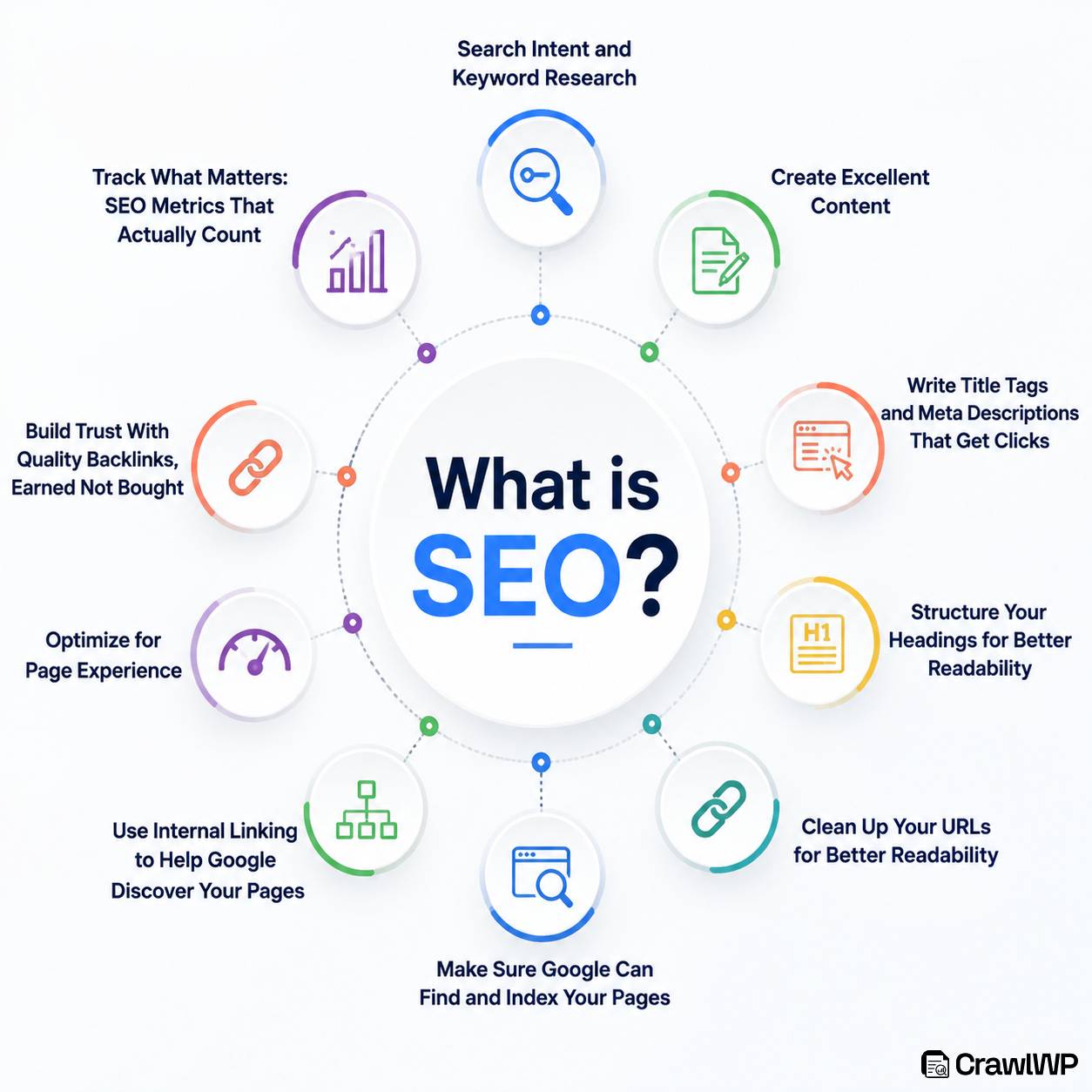
Before we dive into tactics, let’s get one thing straight: SEO is not a mystery, and it’s definitely not a one-time task you check off a list.
So, what exactly is it?
SEO (Search Engine Optimization) is the process of improving your website so search engines can better understand, crawl, index, and rank its pages.
In simple terms, SEO helps your website appear in search results when someone searches for something related to what you offer.
For example, if you run a WordPress website about healthy recipes, good SEO can increase your chances of appearing when someone searches for phrases such as “easy healthy dinner recipes” or “healthy meals for beginners.”
Why Does SEO Actually Matter?
1. SEO Increases Your Website’s Visibility: A great website is not very useful if no one can find it. SEO improves your chances of appearing when people search for topics, products, or services related to your business. The more visible your pages are in search results, the more opportunities you have to attract potential visitors.
2. SEO Brings Relevant Organic Traffic: SEO does not just help you attract more visitors; it helps you attract people who are already interested in what you offer. When someone searches for a specific question, service, or product and finds your page, that visitor is more likely to engage with your content because it matches what they were looking for.
3. SEO Reduces Dependence on Paid Advertising: Paid advertising can generate traffic quickly, but the traffic often stops once you stop paying for ads. SEO can provide more sustainable results. A well-optimized page may continue attracting organic visitors for months or even years, especially when the content remains accurate, useful, and relevant.
4. SEO Helps Build Trust and Credibility: Websites that consistently provide useful information and appear prominently in relevant search results can gradually build trust with their audience. Good SEO also encourages you to improve content quality, website structure, page experience, and accessibility, all of which can make your website appear more professional and reliable.
5. SEO Improves the Overall User Experience: SEO is closely connected to user experience. Search engines want to direct users to pages that are helpful, easy to navigate, mobile-friendly, and fast. Improving these areas for SEO also creates a better experience for your visitors, making it easier for them to find information and interact with your website.
6. SEO Helps Search Engines Understand Your Content: Search engines need to crawl, interpret, and index your pages before they can show them in relevant search results. Proper SEO gives search engines clearer signals about what each page is about through good site structure, headings, internal links, metadata, and useful content.
7. SEO Creates Long-Term Growth Opportunities: SEO is not usually an overnight strategy. However, the work you do today can continue producing results over time. An informative article or well-optimized landing page can keep generating impressions, clicks, leads, or sales long after it was originally published.
8. SEO Helps You Understand Your Audience: Keyword research, search queries, and SEO performance data can reveal what your audience is interested in, the questions they are asking, and the problems they want solved. You can use these insights to create better content and make good marketing decisions.
Now that you know what SEO is and why it matters, let’s look at ways you can optimize your website for search engines.
1. Start With Search Intent and Keyword Research
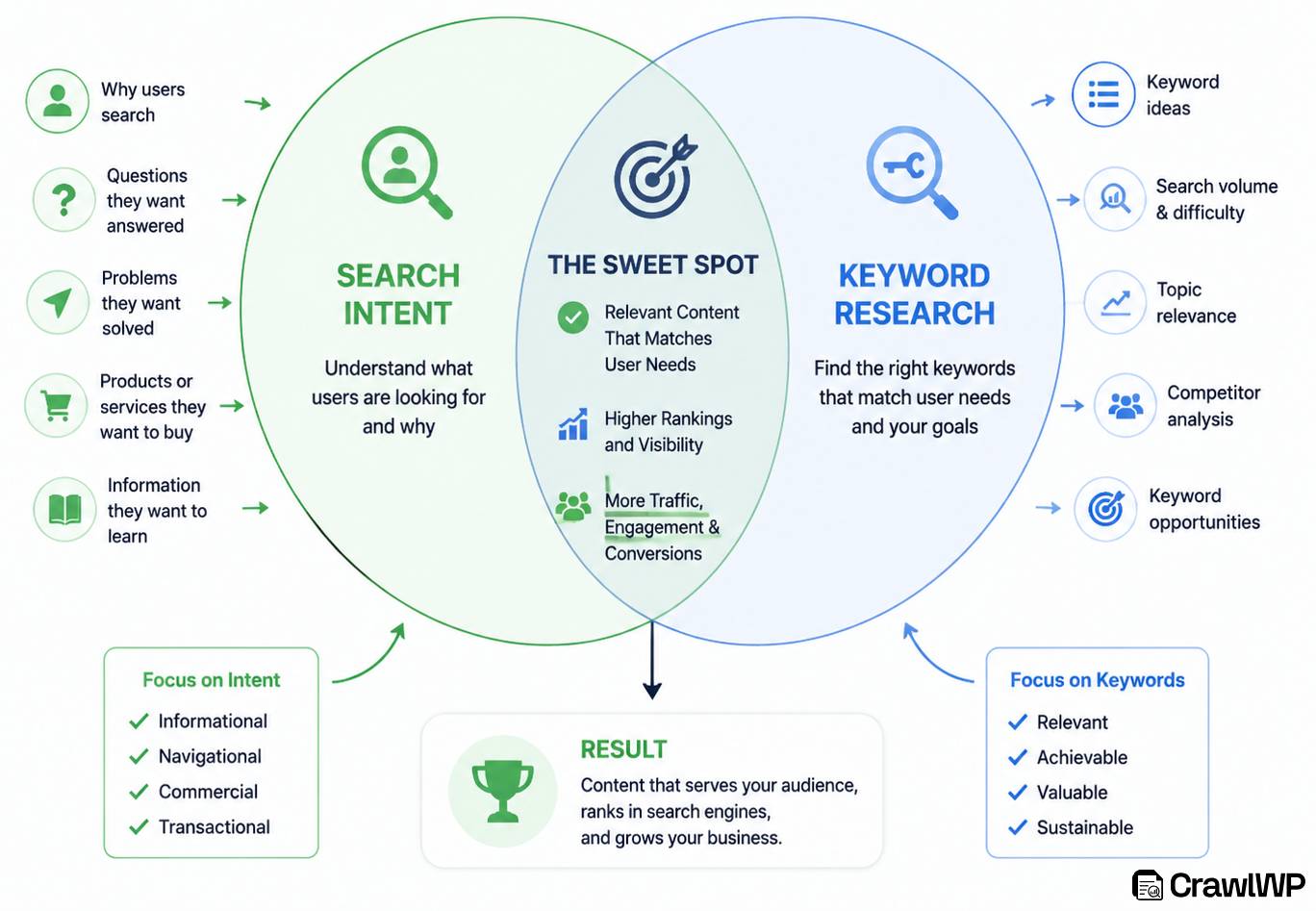
Before you write a single word of content, before you tweak a single meta tag, and before you even think about backlinks, you need to stop and ask yourself one crucial question:
“What are people actually searching for?”
Too many website owners skip straight to guessing what keywords “sound good” or what their competitors are ranking for. That’s a recipe for wasted time and traffic that never converts.
Keyword research isn’t about finding random words with high search volume. It’s about understanding your audience’s mindset; their problems, their questions, and the exact language they use when they’re ready to take action.
Let’s break this down into a simple, repeatable process.
Step 1: Understand Search Intent (The Golden Rule)
Search intent is the reason behind a search query. If you ignore intent, your content will miss the mark every single time.
Search engines categorize most searches into four types of intent:
| Intent Type | What the User Wants | Example Query | Your Content Should Be… |
| Informational | To learn something | “How to optimize images for SEO” | A tutorial or guide |
| Navigational | To find a specific site or page | “CrawlWP login” | A direct link or shortcut page |
| Commercial | To compare options before buying | “Best SEO tools for beginners” | A comparison, review, or “best of” list |
| Transactional | To make a purchase or take action | “Buy CrawlWP subscription” | A product page or pricing page |
The golden rule: Align your content perfectly with the intent. If someone is looking for information, don’t sell to them yet. If they’re ready to buy, don’t give them a 5,000-word history lesson. Match the intent, and you match the expectation.
Step 2: Find Your Seed Keywords
Seed keywords are broad, foundational terms that describe your topic and give you a starting point for keyword research. They are usually short phrases that you can later expand into more specific keywords and search queries.
For example, if you are creating content about CrawlWP, your seed keywords might include:
- WordPress SEO
- Google indexing
- IndexNow
- WordPress indexing
- search engine indexing
- SEO indexing tools
How to find your seed keywords:
- Think about the main topics your target audience searches for.
- Review your existing content and identify topics that already attract visitors.
- Look at questions users commonly ask about.
- Explore forums, communities, and search results to discover how people describe their problems.
- Check what related topics competitors are covering to find potential keyword opportunities.
Step 3: Expand Into Long-Tail Keywords
Once you have your seed keywords, the next step is to turn them into more specific long-tail keywords. These are usually longer search phrases that reveal a clearer intent behind the search.
For example, instead of targeting a broad term like “WordPress indexing,” you could target phrases such as “how to get Google to index a WordPress website,” “how to submit WordPress URLs to IndexNow,” or “best WordPress indexing plugin.”
Long-tail keywords can be easier to target because they are more specific and often face less competition. More importantly, they can help you create content that directly answers what someone is looking for.
Step 4: Use the Right Keyword Research Tools
Once you have your seed keywords and expanded them into long-tail variations, the next step is to find the right tools to validate your ideas and uncover additional opportunities.
Below is a list of excellent keyword research tools:
| Tool | Best For | Price |
| Google Keyword Planner | Basic search volume and ideas | Free (with Google Ads account) |
| Google Trends | Spotting rising topics and seasonality | Free |
| Ubersuggest | Keyword suggestions + difficulty scores | Free limited version; paid plans start at $12/month. |
| AnswerThePublic | Question-based keywords (great for blog ideas) | Free limited searches; paid plans start at $10/month. |
| SEMrush | Advanced keyword research, keyword gaps, and competitor analysis. | Starts at $139/month |
| Moz Keyword Explorer | Priority score and organic CTR | Free limited version; paid plans start at $99/month. |
| Ahrefs Free Keyword Generator | Finding hundreds of keyword ideas | Free |
| CrawlWP | Monitoring keyword rankings and performance directly in WordPress | Starts at $59/year |
Tip: Start with Google’s autocomplete feature. Just type your seed keyword into the search bar and see what Google suggests; those are real, popular queries straight from the source.
Step 5: Analyze the Competition
Once you have a shortlist of keywords, type them into Google and look at the top 3–5 results. Ask yourself:
- What type of content are they producing? (Blog post, video, product page?)
- How detailed is their content? (Short vs. long-form?)
- What headings, subheadings, and topics do they cover?
- Is there anything missing that you could do better?
This is called the content gap analysis, and it’s pure gold. If you can find a gap in what the top results are providing, you can create something more complete and leapfrog them in the rankings.
2. Create Content That Actually Helps (Not Just Fills Space)
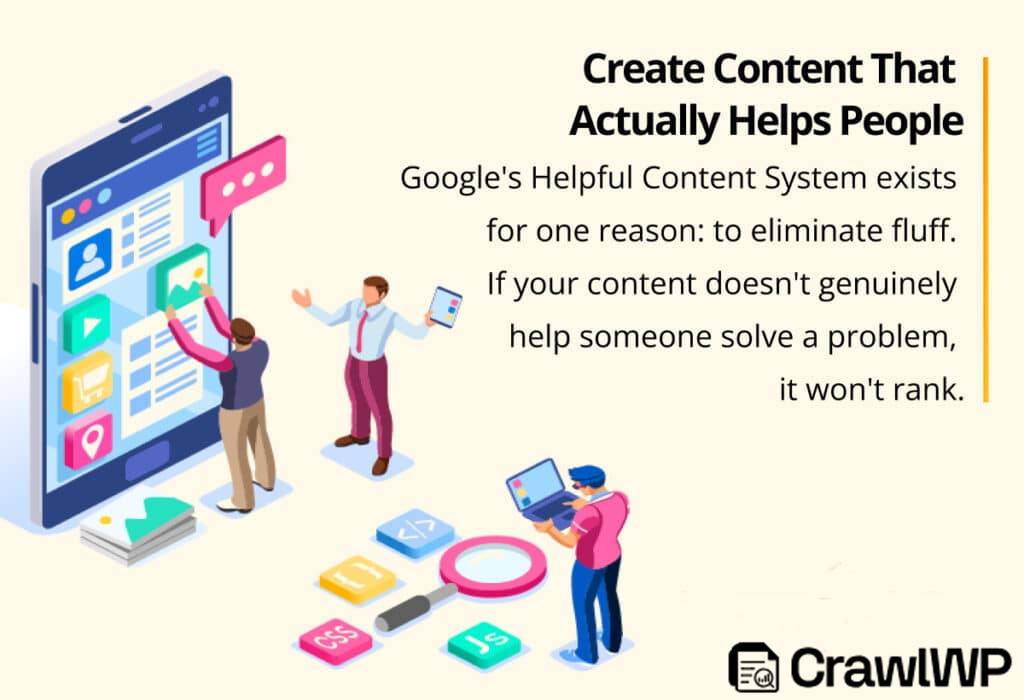
Now that you know what people are searching for and why, it’s time to create content that actually delivers.
Here’s how to do it.
1. Start With the User, Not the Keyword: Before you open a blank document, ask yourself:
- What problem is the searcher trying to solve?
- What question are they asking?
- What would a “perfect” answer look like to them?
This is called user-first content creation. The keyword is your compass, but the user’s need is your destination.
2. Cover the Topic Thoroughly (But Don’t Ramble): There is a sweet spot between too short and too long. A short article may leave important questions unanswered, while an overly long piece can lose readers through repetition and unnecessary details.
The goal is simple: write enough to satisfy the searcher’s intent, and nothing more. If the topic needs 800 words, write 800. If it needs 3,000, write 3,000. Let the topic determine the length, not an arbitrary word count.
3. Answer Related Questions (Satisfy the Full Intent): Google doesn’t just look at whether you answered the primary query. It looks at whether you satisfied the entire search journey.
That means covering:
- Primary question (the main keyword)
- Secondary questions (what else might they wonder?)
- Objections (what might hold them back?)
- Next steps (what should they do after reading?)
Example: If your topic is “How to start a podcast,” don’t just explain the equipment. Also cover:
- How to choose a niche
- How to record and edit
- How to publish and distribute
- How to grow an audience
- How to monetize
When you cover the full ecosystem of a topic, you become the go-to resource, and Google notices.
4. Add Original Research, Data, or Unique Insights: Originality beats repetition. If your content says the same thing as the other 50 articles on page one, why should Google rank you higher? It won’t.
Be unique by adding:
- Original case studies (your own results, experiments, or failures)
- Unique data (surveys, polls, or internal analytics)
- Expert quotes (interviews or testimonials from industry pros)
- Personal experience (what you learned the hard way)
- Fresh analogies or frameworks (explain old concepts in new ways)
This is what turns “good” content into “link-worthy” content, and links are the currency of SEO.
5. Optimize for Readability: Even excellent content can lose readers if it is difficult to read. Keep your sentences reasonably short, use active voice, break up long sections with clear headings, and use transition words to guide readers from one idea to the next. Avoid unnecessary jargon and explain technical terms or acronyms the first time you use them.
You can also use tools such as Hemingway Editor or Grammarly to review your content before publishing. The goal is not to chase a perfect readability score, but to make your writing clear, natural, and easy to follow. If readers can quickly understand your message without having to reread each paragraph, you are on the right track.
6. Refresh and Update Regularly: Content decay is real. A post that ranks #1 today might drop to #5 in six months if you don’t maintain it.
So set a schedule to review each major post every 6–12 months and:
- Update outdated stats and facts
- Add new insights or examples
- Improve internal links to newer content
- Refresh images or screenshots
- Expand thin sections based on new search data
Google loves fresh content, and so do your readers.
3. Write Title Tags and Meta Descriptions That Get Clicks
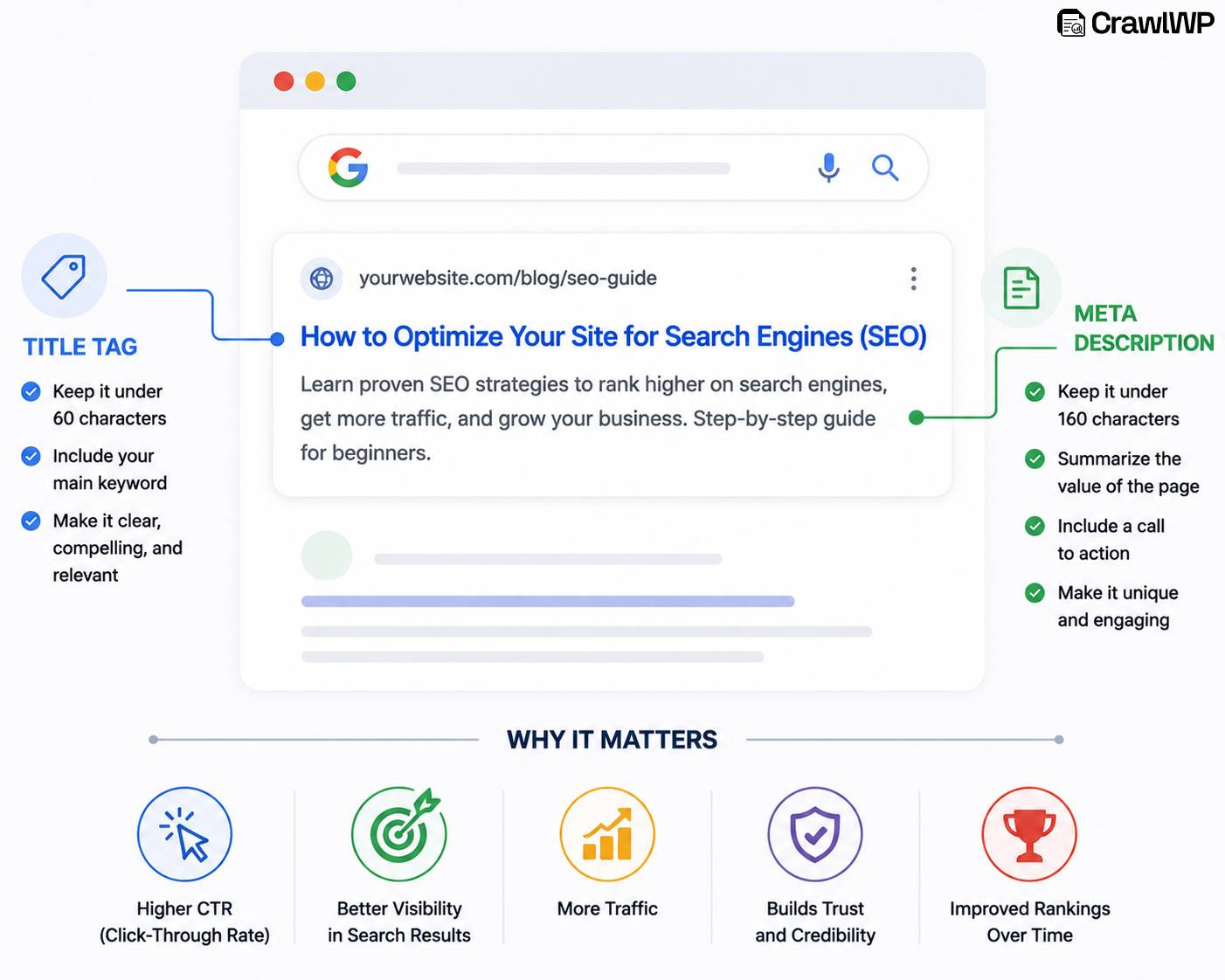
You’ve done the hard work of creating great content. But here’s the brutal truth: If nobody clicks on your result in the search results, all that effort is wasted.
Your title tag and meta description are your first (and sometimes only) impression on a searcher. They’re the digital equivalent of a storefront window, and if they’re boring, vague, or confusing, people will scroll right past you to your competitors.
Below, we will show you how to fix that.
What Are Title Tags and Meta Descriptions?
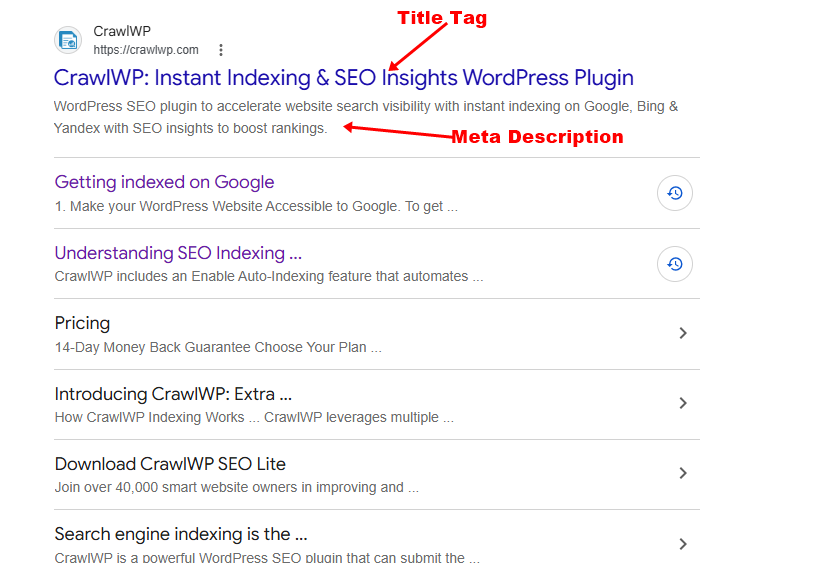
A title tag is the clickable headline that typically appears for your page in search engine results and browser tabs. It tells both search engines and users what the page is about, so it should be clear, relevant, and closely aligned with the page content.
A meta description is the short summary that can appear below the title in search results. It gives searchers a quick idea of what they can expect from the page.
How to Write Title Tags That Get Clicks
1. Keep it concise: Aim for a title that displays well in search results without being cut off.
2. Place your primary keyword naturally: Including the main keyword near the beginning can make the topic clear to both search engines and users.
3. Make it compelling: Words such as “Proven,” “Step-by-Step,” “Updated,” or “Free” can make a title more appealing when they accurately describe the content.
4. Match search intent: Your title should reflect what the searcher wants. For example, an informational query could use “How to Get Google to Index Your WordPress Website,” while a commercial query could use “Best WordPress SEO Indexing Plugins Compared in 2026.”
5. Give every page a unique title: Avoid using the same title across multiple pages. Each title should accurately describe the specific content visitors will find on that page.
How to Write Meta Descriptions That Drive Clicks
1. Keep it concise: Aim for around 150–160 characters, while focusing on clarity rather than hitting an exact character count.
2. Use relevant keywords naturally: Include your primary keyword and related terms where they fit.
3. Focus on the benefit: Tell readers what they will gain from visiting the page.
4. Add a natural call to action: Phrases such as “Learn how,” “Discover,” or “Read the full guide” can encourage clicks without sounding overly promotional.
5. Stay accurate: Make sure your description matches the page content. Avoid promising results or information the page doesn’t actually provide.
4. Structure Your Headings for Better Readability
You’ve written a great title and meta description; the searcher clicked through. Now they’re on your page.
Here’s the question: Will they stay?
If your content looks like a giant wall of text, they’ll bounce within seconds. But if it’s structured with clear, logical headings, they’ll stay, scroll, and engage.
That’s where heading structure comes in.
How to Structure Your Headings
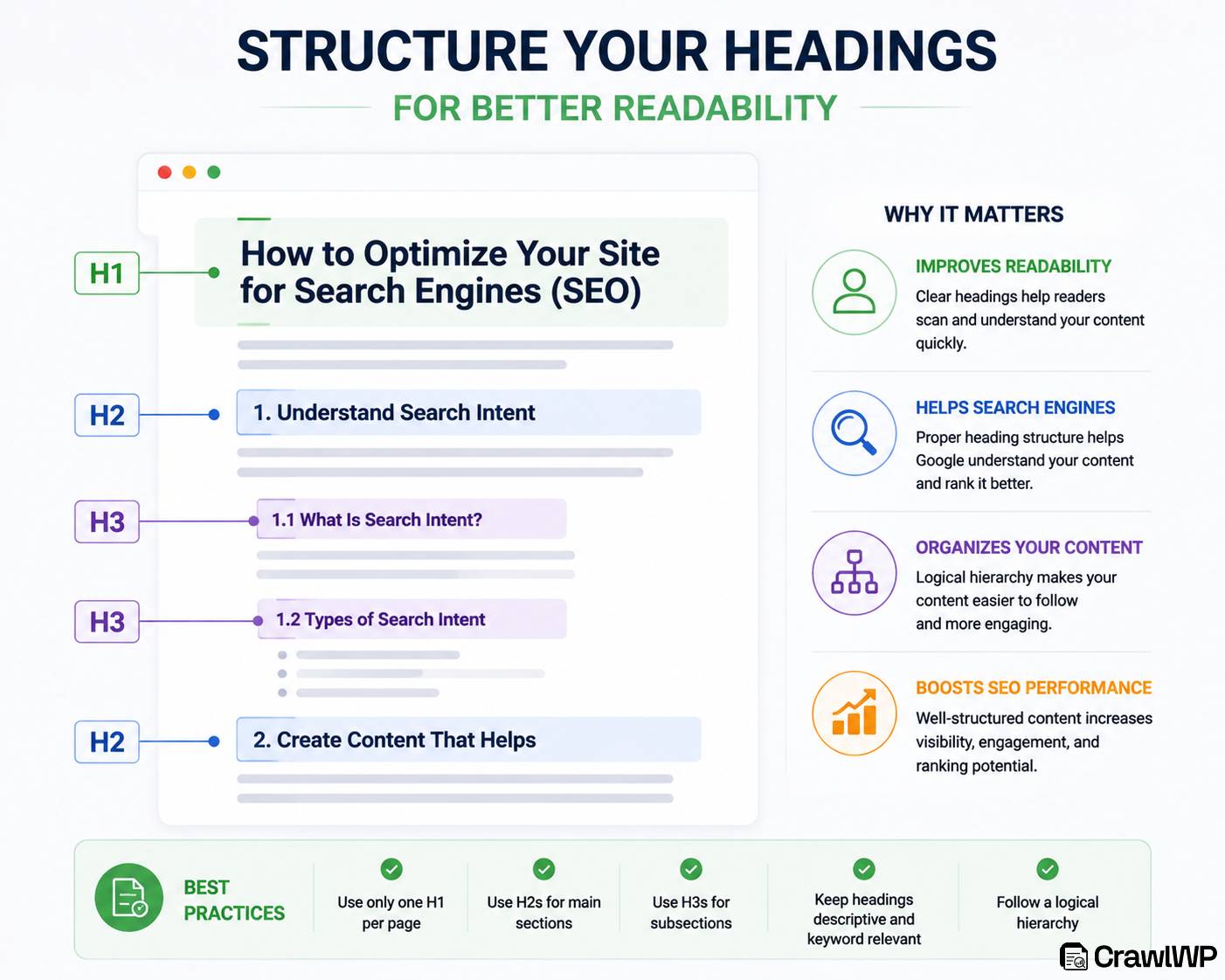
1. Use one clear H1: Your H1 should describe the main topic of the page and naturally include the primary keyword where appropriate.
2. Use H2s for major sections: Break your content into clear sections that cover the main points.
3. Use H3s for supporting points: When an H2 covers several related ideas, use H3 headings to organize those subtopics. This creates a logical hierarchy and makes longer articles easier to navigate.
4. Make headings descriptive: Readers should understand what a section covers just by reading its heading. Avoid vague headings.
5. Use keywords naturally: Include relevant keywords in your headings when they fit naturally, but don’t force them into every heading. Clarity should always come first.
5. Clean Up Your URLs for Better Readability
Your URL might seem like a small detail, but it matters more than you think.
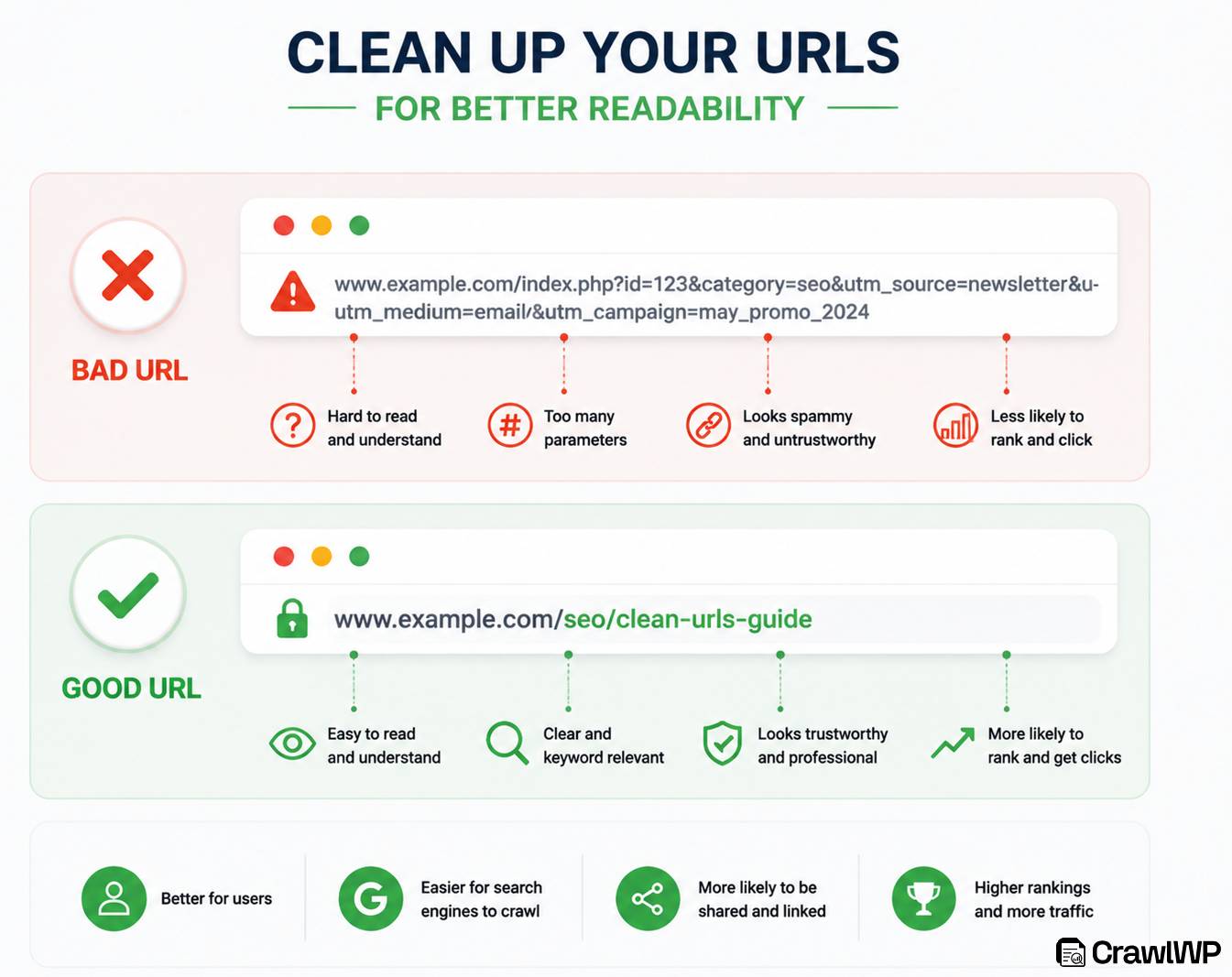
A clean, readable URL:
- Helps users understand what the page is about before they click
- Gives search engines a clear signal about your page’s topic
- Is more likely to be shared and clicked on social media
- Looks professional and trustworthy
What Makes a “Good” URL?
| Good URL | Bad URL |
| yourdomain.com/seo-guide-2026 | yourdomain.com/p=1234?category=5&id=892 |
| yourdomain.com/start-podcast-equipment | yourdomain.com/2022/11/24/blog-post-version-3 |
| yourdomain.com/best-coffee-makers | yourdomain.com/products/item.php?id=45&ref=affiliate |
Best Practices for SEO-Friendly URLs
1. Keep it short and descriptive: Aim for 3–5 words that capture the page’s main topic.
- Too long: /how-to-optimize-your-website-for-search-engines-in-2026-complete-guide
- Just right: /seo-optimization-guide-2026
2. Use hyphens (-) to separate words: Google recommends hyphens over underscores. Hyphens are treated as word separators; underscores are not.
- Good: /best-seo-tools
- Bad: /best_seo_tools
3. Include your primary keyword: Your URL is another place to reinforce your topic. But don’t stuff it.
- Good: /keyword-research-guide
- Bad: /keyword-research-guide-best-keyword-research-tools-2026
4. Use lowercase letters: URLs are case-sensitive on some servers. To avoid broken links, always use lowercase.
- Good: /seo-tips
- Bad: /SEO-Tips
5. Remove stop words when possible: Words like “and,” “or,” “but,” and “for” can often be removed without hurting clarity.
- Longer: /how-to-start-a-podcast-for-beginners
- Tighter: /start-podcast-beginners
6. Avoid special characters: Stick to letters, numbers, and hyphens. Avoid symbols like &, %, $, @, and #.
7. Keep it static (not dynamic): Dynamic URLs with question marks and parameters (“?id=123”) look messy and are harder for Google to interpret.
How to Change an Existing URL (The Right Way)
If you already have a bad URL, don’t just change it and break existing links. Follow this process:
- Create the new, clean URL
- Set up a 301 redirect from the old URL to the new one
- Update internal links that point to the old URL
- Update any external backlinks if you can (though you can’t control them all)
- Submit your new sitemap to the various search engines
Important: Changing URLs too often can hurt your rankings. Only do it when necessary.
6. Make Sure Search Engines Can Find and Index Your Pages
You’ve created amazing content. Your titles are click-worthy, your headings are perfectly structured, and your URLs are clean.
But here’s the problem: If search engines can’t find your pages, they can’t rank them.
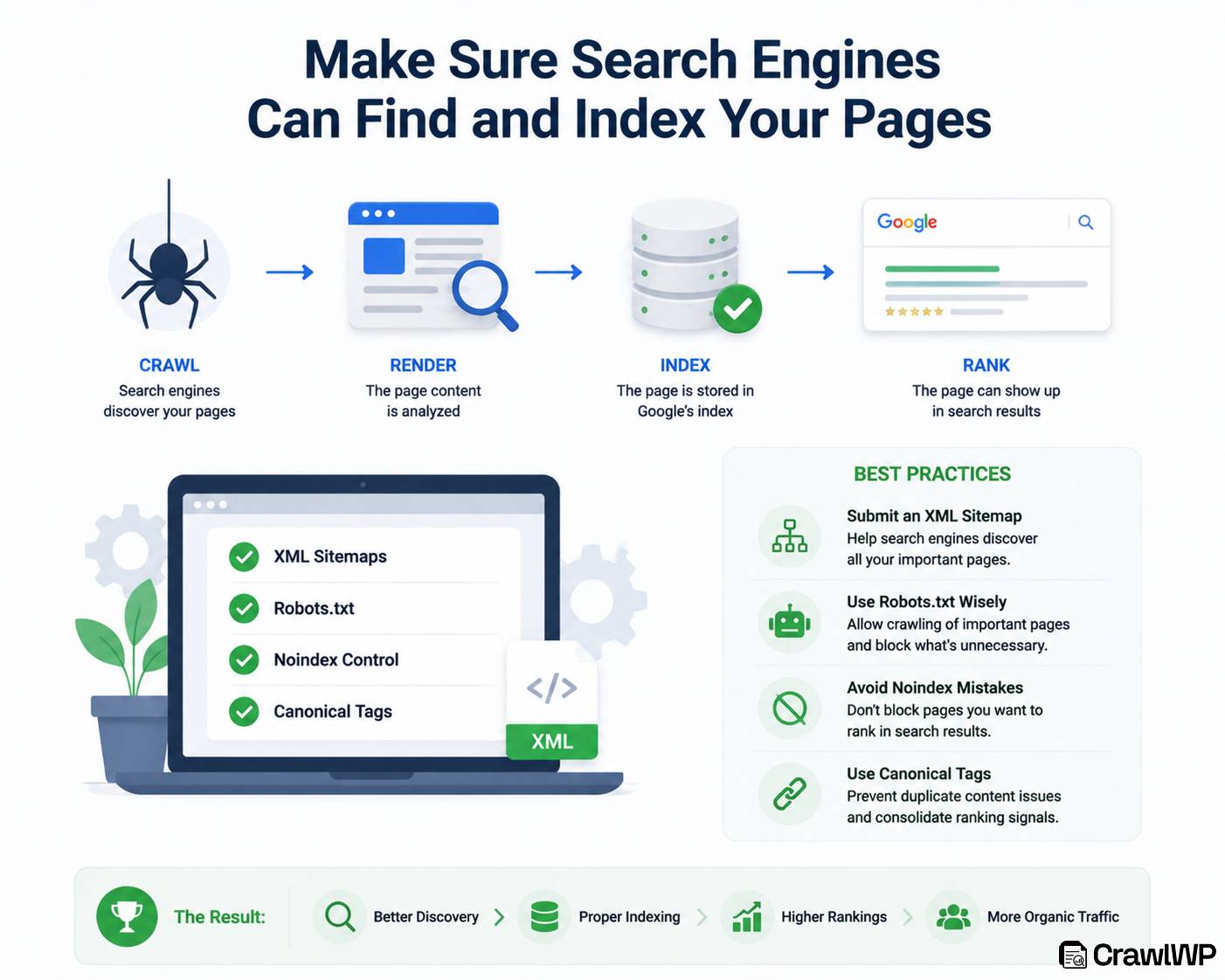
Think of search engines as a librarian. It sends out “spiders” (crawlers) to explore the web, follow links, and catalog every page it finds. This process is called crawling and indexing.
How to Help Search Engines Find and Index Your Pages
1. Submit your XML sitemap: Your sitemap provides search engines with a list of important URLs on your website. Most WordPress SEO plugins can generate one automatically. Keep it updated and submit it through the webmaster tools provided by the search engines you want to target.
2. Check your robots.txt file: Make sure your robots.txt file does not accidentally block important pages. Review your crawl directives whenever you make major changes to your website.
3. Use internal links: Link relevant pages together so search engine crawlers have clear paths to discover your content. Internal links also help visitors move naturally between related pages.
4. Keep your website structure clear: Organize your pages logically and avoid leaving important content isolated. A simple structure makes it easier for both visitors and search engines to understand how your website fits together.
5. Use CrawlWP: For WordPress users, CrawlWP is an SEO and indexing plugin that helps automate content submissions and monitor how search engines discover and index your pages. It can notify supported search engines when you create, update, or delete content.
CrawlWP uses the IndexNow protocol for Bing, Naver, Seznamcz, Yandex, and Yep, and integrates with the Google Indexing API. It also supports Bing URL Submission and Yandex APIs, giving WordPress site owners multiple ways to notify search engines about content changes.
7. Use Internal Linking to Spread Link Juice
Now that search engines can find your pages, let’s make sure they understand how those pages relate to each other.
Internal linking is the practice of linking from one page on your website to another page on the same website. It’s one of the most overlooked SEO practices, yet it can help search engines discover content, understand your site’s structure, and identify important pages.
Think of internal links as roads connecting different parts of your website. When you create relevant links between related pages, you make it easier for visitors to explore your content and give search engines more context about how your pages connect.
How to Use Internal Links Effectively
1. Link to your most important pages (cornerstone content): Your cornerstone content is your best, most in-depth content. These pages should receive the most internal links.
Pro tip: Every new piece of content you publish should link back to your cornerstone pages.
2. Use descriptive anchor text: Anchor text is the clickable text in a link. It tells Google what the linked page is about.
- Good: Learn more about [keyword research best practices]
- Bad: Click here
- Worse: [Learn more] with no context
3. Link naturally (don’t force it): Your links should make sense in context. If you’re writing about baking bread, link to your sourdough starter guide — not your podcasting tips.
4. Link from high-authority pages to low-authority pages: Identify your pages with the most backlinks and page authority. Link from those to your newer or weaker pages to lift them up.
5. Use a reasonable number of internal links: There’s no hard limit, but 3–5 internal links per 1,000 words is a good benchmark. Don’t overdo it; too many links can look spammy and distract readers.
Pro tip: When publishing a new article, look for older relevant pages where you can add a link to it. This creates a more connected content network and gives readers more useful resources to explore.
Tools to Find Internal Linking Opportunities
These tools can help identify internal linking problems and uncover opportunities to strengthen your website structure:
Ahrefs Site Audit: Ahrefs can identify internal linking issues such as orphan pages, pages with too few internal links, and pages that are not receiving enough internal authority. It helps website owners understand where additional internal links could improve crawling and search engine results.
Semrush Internal Linking Tool: Semrush analyzes your website content and suggests relevant internal linking opportunities. It identifies pages that could benefit from additional links based on keyword relevance, content relationships, and SEO value.
Yoast SEO: For WordPress websites, Yoast SEO provides internal linking suggestions while you create or edit content. It analyzes your articles and recommends related pages you can link to naturally within your content.
Link Whisper: Link Whisper is a WordPress plugin that automatically suggests relevant internal links, helps identify pages that need more links, and makes it easier to manage internal linking at scale.
Screaming Frog SEO Spider: Screaming Frog crawls your website and provides a detailed view of your existing internal link structure. It helps identify broken internal links, pages with too few internal links, excessive linking, and other structural issues that may affect SEO.
Using these tools regularly can help ensure that important pages are easy for users and search engines to discover, while also improving the flow of authority throughout the website.
8. Optimize for Page Experience (Search Engines’ Non-Negotiable)
You’ve done everything right so far:
- Excellent keyword research
- Great content that actually helps
- Click-worthy titles and meta descriptions
- Perfect heading structure
- Clean URLs
- Google can find and index your pages
- Great internal linking
But here’s the catch: If your website is slow, clunky, or frustrating to use, none of that matters.
Every major search engine Google, Bing, Yahoo, DuckDuckGo, and others prioritizes user experience in their ranking algorithms. They want to send users to sites that are fast, stable, and easy to use. If users have a bad experience on your site, search engines will rank you lower even if your content is brilliant.
Note that page experience isn’t one thing. It’s a combination of:
- How fast your pages load
- How stable they are while loading
- How responsive they are to user interaction
- How mobile-friendly they are
- Whether they use intrusive pop-ups or annoying ads
- Whether they’re served over a secure connection (HTTPS)
Below, we’ll break down the practical steps you can take to improve your site’s page experience.
Practical Ways to Improve Your Site’s Page Experience
1. Improve Page Loading Speed: Page speed affects both user satisfaction and search visibility. Visitors expect websites to load quickly, and when a page takes too long to appear, many users leave before reading the content or completing an action.
To improve loading speed:
- Compress large images before uploading them.
- Use modern image formats such as WebP where possible.
- Remove unnecessary plugins, scripts, and website features that slow down loading.
- Enable browser caching so returning visitors can load pages faster.
- Use a reliable hosting provider with good server performance.
- Reduce the number of external scripts running on each page.
You can measure your website speed using platforms such as Google PageSpeed Insights, Lighthouse, and GTmetrix. These reports highlight performance issues and offer recommendations for improvement.
2. Make Your Website Mobile-Friendly: More people browse the web on smartphones, so your website should work well on smaller screens. Text should be easy to read, buttons should be simple to tap, and visitors should not have to zoom or scroll horizontally to use your pages.
To improve mobile usability:
- Use a responsive website design.
- Make buttons and links easy to tap.
- Keep text readable without zooming.
- Avoid layouts that require horizontal scrolling.
- Test your pages across different screen sizes.
3. Optimize Core Web Vitals: Core Web Vitals measure important aspects of page experience, including loading performance, responsiveness, and visual stability. The three current metrics are Largest Contentful Paint (LCP), Interaction to Next Paint (INP), and Cumulative Layout Shift (CLS).
To improve these metrics:
- Optimize large images and other heavy resources.
- Reduce unnecessary JavaScript.
- Reserve space for images, videos, and dynamic elements.
- Improve server response times.
- Remove scripts that delay page interaction.
4. Keep Your Pages Visually Stable: Nothing is more frustrating than trying to click a button only for the page to move suddenly. Layout shifts can happen when images, advertisements, fonts, or other elements load without reserved space.
To reduce unexpected movement:
- Set dimensions for images and videos.
- Reserve space for advertisements where necessary.
- Avoid inserting content above existing content while the page loads.
- Load fonts in a way that minimizes visual changes.
A stable layout makes your website easier and more comfortable to use.
5. Use HTTPS: HTTPS protects the connection between your website and its visitors while helping establish trust. Make sure your SSL certificate is valid and that all important pages use HTTPS rather than unsecured HTTP.
After enabling HTTPS, check your website for mixed-content issues, update internal links where necessary, and make sure HTTP versions redirect correctly to their HTTPS counterparts.
6. Avoid Intrusive Pop-Ups: Pop-ups can help grow an email list or promote an offer, but they can also frustrate visitors when they block the main content. This is especially important on mobile devices, where large overlays can make pages difficult to use.
Keep pop-ups relevant and easy to close. Avoid covering the main content as soon as someone arrives, and make sure visitors can still access the information they came to find.
7. Make Navigation Easy: A good website should help visitors move from one page to another without confusion. Use clear menus, descriptive links, breadcrumbs, and logical categories so users can easily discover related content.
Review your navigation regularly, and make sure important pages aren’t buried several clicks deep. Good navigation helps visitors find information faster while giving search engine crawlers clearer paths through your website.
9. Build Trust With Quality Backlinks (Earned, Not Bought)
Backlinks are links from other websites to your site, and they can help search engines understand that your content is useful and worth referencing. When a reputable website links to one of your pages, it can act as a signal of trust and potentially help improve your site’s authority and visibility in search results.
However, not all backlinks carry the same value. A few relevant links from reputable websites can be far more valuable than hundreds of low-quality or unrelated links.
Buying links, participating in link schemes, or trying to manipulate rankings can also put your website at risk. Instead, focus on earning links naturally by publishing useful content, sharing original insights, creating resources people want to reference, and building genuine relationships within your industry.
So, how can you attract backlinks that actually benefit your website while avoiding risky link-building tactics? Let’s look at practical strategies that can help you earn them.
Strategies for Building Quality Backlinks
1. Create Original, Link-Worthy Content: The easiest way to earn backlinks is to publish content that other websites genuinely want to reference. This could include detailed guides, original research, statistics, case studies, industry reports, free resources, or useful templates. For example, if you publish an in-depth study about WordPress SEO or search engine indexing, other bloggers and publications may naturally link to it when discussing the topic.
2. Publish Original Research and Statistics: Original data can attract links because writers are always looking for credible sources to support their claims. You could conduct a survey, analyze industry data, publish a benchmark report, or present findings from your own website. Make the findings easy to understand and provide a page that others can reference when using your statistics.
3. Write Guest Posts for Relevant Websites: Guest posting can help you reach a new audience and earn relevant links when done properly. Look for reputable websites in your industry that accept useful contributions, then pitch a topic that genuinely fits their audience. Focus on providing valuable information rather than using the article as an excuse to place as many links as possible.
4. Find Unlinked Brand Mentions: Sometimes websites mention your company, product, or content without linking to your website. Search for these mentions and contact the website owner with a polite request to add a link where appropriate. Since the website already references your brand, this can be a natural opportunity to turn an existing mention into a useful backlink.
5. Reclaim Broken or Lost Links: Websites regularly remove pages, change URLs, or update old articles, which can result in broken backlinks. Use SEO tools to identify links that once pointed to your website but no longer work. If you have a suitable replacement page, contact the website owner and suggest updating the old link.
6. Create Useful Resources: Resources such as checklists, calculators, templates, glossaries, original graphics, and practical guides can naturally attract links. The more useful and unique the resource is, the more likely other websites are to reference it when creating their own content.
7. Build Relationships in Your Industry: Quality backlinks often come from genuine relationships rather than cold link requests. Connect with bloggers, publishers, businesses, journalists, and other professionals in your niche. Share their useful work, contribute valuable insights, and participate in relevant communities. Over time, these relationships can lead to legitimate collaboration and link opportunities.
8. Avoid Buying or Manipulating Links: Do not focus on buying large numbers of backlinks or using link schemes designed solely to manipulate rankings. A backlink from an irrelevant or low-quality website is not automatically valuable just because it exists. Prioritize relevance, usefulness, and editorial value rather than chasing a high backlink count.
The best backlink strategy is to create something worth linking to and put it in front of the right people. A handful of relevant, editorially earned links can be far more meaningful than hundreds of artificial or unrelated links.
10. Track Your Website SEO Performance
You’ve put in the work: creating helpful content, optimizing your pages, making sure search engines can discover and index them, improving website performance, and earning quality backlinks. But one important question remains: Is your SEO strategy actually working?
Tracking your SEO performance helps you understand what is driving results and where your website needs improvement. You can see which pages attract visitors, which keywords are gaining visibility, and whether your organic traffic is moving in the right direction.
The challenge is that SEO produces a lot of data, and not every metric deserves your attention. Instead of getting distracted by every number in your SEO dashboard, focus on metrics that help you make better decisions.
Below are the SEO metrics that actually matter and how you can use them to measure and improve your performance.
SEO Metrics You Should Track
1. Organic Traffic: Organic traffic shows how many visitors reach your website through unpaid search results. It is a useful way to measure whether your SEO efforts are increasing your visibility and attracting people to your site. Look at both your overall organic traffic and the traffic going to individual pages to identify which content is performing well and which pages may need improvement.
Do not focus only on whether traffic is going up or down. Look at the quality and relevance of that traffic too. A page that attracts fewer visitors but brings people genuinely interested in your product or service can be more valuable than a page with thousands of visits that rarely leads to meaningful action.
2. Keyword Rankings: Your keyword rankings show where your pages appear for specific search queries. Tracking your rankings helps you identify keywords that are improving, declining, or ranking just outside the top positions. Pay particular attention to keywords appearing on the first or second page, as small improvements can potentially lead to significant increases in visibility and clicks.
For WordPress users, CrawlWP can help monitor keyword performance and provide insights into your website’s search visibility. Its keyword tracking features help you identify the terms generating clicks and impressions, as well as keywords that are gaining or losing performance. These insights can help you decide which pages need further optimization to improve their rankings.
3. Impressions: Impressions measure how often your website appears in search results. A page can receive many impressions but relatively few clicks, which may indicate that people are seeing your result but choosing other options. Tracking impressions alongside clicks gives you a better understanding of how much search visibility your content is receiving.
A steady increase in impressions can also be an early sign that your content is gaining visibility for more searches. If impressions are growing but clicks remain low, review your title and meta description to make sure they accurately communicate the page’s value.
4. Click-Through Rate (CTR): CTR measures the percentage of people who click your search result after seeing it. A low CTR doesn’t always mean your content is poor, but it can indicate that your title or search snippet isn’t compelling enough for the query.
For example, if a page receives thousands of impressions but very few clicks, experiment with a clearer title, stronger value proposition, or more relevant meta description. Make sure any changes accurately represent what visitors will find on the page.
5. Search Position: Your average search position gives you an idea of where your pages appear for the queries they rank for. Watching position changes over time can reveal whether your optimization efforts are producing progress or whether a page is losing visibility.
However, do not obsess over a single ranking position. Search results can vary by query, location, device, personalization, and other factors. Look for broader trends and combine ranking data with clicks, impressions, and conversions to understand the bigger picture.
6. Conversions: Traffic and rankings are useful, but conversions tell you whether that traffic is contributing to your actual business goals. Depending on your website, a conversion could be a purchase, newsletter signup, contact form submission, demo request, account registration, or another meaningful action.
This is where SEO becomes connected to business results. A page ranking first for a high-volume keyword is not necessarily successful if it attracts visitors who never take action. Track which organic landing pages and search queries contribute to conversions so you can invest more time in the content that produces meaningful results.
7. Indexed and Non-Indexed Pages: Monitor how many of your important pages are indexed and ensure that search engines can properly discover and display your content in search results. Pages that are not indexed cannot generate organic traffic, so regularly check for indexing issues such as blocked pages, crawl errors, incorrect robots.txt rules, or pages marked with “noindex” tags.
For WordPress websites, CrawlWP can help monitor indexing status and provide information about indexed pages. Its indexing history and status reports can make it easier to identify changes and investigate potential problems.
Frequently Asked Questions About Optimizing Your Site for Search Engines
Below, we answer some common questions people ask about optimizing their sites for search engines.
Q1. What’s the single most important thing I can do to optimize my site?
Create genuinely helpful, high-quality content that answers real user questions. Everything else- technical SEO, backlinks, page speed- supports your content. If you focus on helping users, search engines will reward you. Content is the foundation of all SEO success.
Q2. How many keywords should I target per page?
Focus on one primary keyword and 2–5 secondary keywords per page. Include related terms and question-based keywords naturally throughout your content. Never keyword stuff; write for humans first. Quality and relevance matter more than quantity.
Q3. How long does it take to see results from SEO?
SEO is a long-term strategy, and results usually do not happen overnight. Depending on your website’s age, competition, content quality, technical health, and backlink profile, it may take several months to see significant improvements. Consistently publishing valuable content, fixing technical issues, and monitoring performance can help accelerate growth over time.
Q4. How do search engines find and index my website?
Search engines use automated programs called crawlers or bots to discover and analyze website pages. After crawling a page, search engines store and organize the information in their index.
With CrawlWP, you can submit your WordPress content for faster indexing by notifying search engines when new content is published, updated, or removed. It integrates with IndexNow, Google Indexing API, Bing URL Submission, and Yandex APIs.
Q5. Is SEO better than paid advertising?
SEO and paid advertising serve different purposes. Paid ads can provide immediate visibility, while SEO builds long-term organic traffic and authority. Many successful businesses use both strategies together to increase visibility, attract customers, and maximize online growth.
Conclusion
You now have a clear roadmap for optimizing your website for search engines, from understanding search intent and creating helpful content to improving technical performance, earning quality backlinks, and tracking the metrics that actually matter.
The tactics are clear. The question is: will you take action?
Start small but start today. Pick one area, whether it’s fixing your title tags, compressing your images, submitting your sitemap, or publishing a new piece of content, and implement it immediately.
Then move to the next. Consistency beats perfection every time. Small improvements compound into significant results over weeks and months.
As you publish and update content, don’t leave indexing to guesswork. Use CrawlWP to automate indexing submissions of content and pages to major search engines, monitor your indexing status, and gain valuable SEO insights directly from your WordPress dashboard.
Your audience is already searching for what you offer. Make sure your website is ready to be found. Start optimizing today, stay consistent, and keep improving.